Capacities.io Review: Is Object-Based Note-Taking Worth Switching For?
A hands-on review of Capacities.io, the object-based PKM app that replaces folders and pages with typed objects and backlinks. We break down its free tier, Pro and Believer pricing, the metered AI assistant, and who should actually switch.
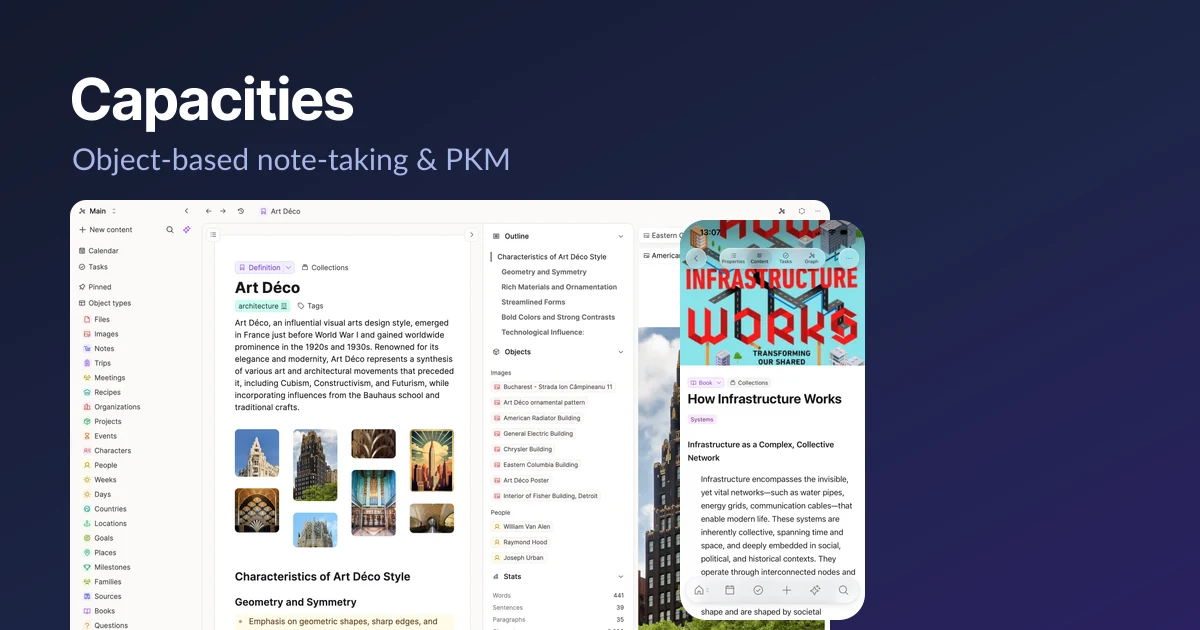
Most note apps still think in folders and pages. Capacities.io throws that model out. Instead of filing a note under a folder, you create an object — a person, a book, a meeting, a project, an idea — and every object can link to every other object. The result is less like a filing cabinet and more like a small database of your own thinking, which is exactly what the company means when it calls itself "a studio for your mind."
That premise is not new — Notion, Obsidian, Tana and others circle the same territory — but Capacities commits to it harder than most, and its pricing has finally settled into a shape worth judging: a genuinely usable free tier, two paid plans, and a metered AI assistant that lives behind a separate budget. This review covers what the object model actually feels like to use, where the free plan stops, what Pro and Believer cost, and who should switch — and who should not.
What Capacities actually is
Capacities is an object-based personal knowledge management (PKM) app. The core idea is simple to state and takes a while to internalise: everything you capture is an object with a type. A book is a Book object; the author is a Person object; the note you took while reading is linked to both. Types are not just labels — each carries its own fields, its own default layout, and its own place in the graph of everything else you have stored.
This is the opposite of the file-and-folder metaphor. There is no "where do I put this" decision, because you are not putting it anywhere — you are describing what it is and letting the links do the organising. Open a Person object and you see every meeting, note and project that references them, gathered automatically. Capacities calls the loose capture surface Daily Notes: a lightweight inbox where you dump thoughts during the day and connect them to objects later.
The one-sentence version
Capacities replaces folders and pages with typed objects that link to each other, so your notes organise themselves through relationships instead of hierarchy.
You can create unlimited custom object types even on the free plan, which is where the app gets interesting. Track films, recipes, clients, workouts, research papers — whatever your work or life actually contains — and each type behaves like its own little collection while staying woven into the same graph.
Core features: links, backlinks and search
The connective tissue of Capacities is bi-directional linking. Reference one object inside another and both ends of the link know about it: open either object and you find the relationship listed as a backlink. Over time this builds a web of related content that surfaces on its own, so you rediscover old notes you would never have thought to search for.
- Bi-directional links and backlinks between every object, with automatic related-content surfacing.
- Daily Notes as a fast capture inbox that you connect to objects afterwards.
- Full-text search across everything, plus tags for lighter, ad-hoc grouping.
- Content saving from WhatsApp, Telegram, Twitter/X and email straight into your space.
- Full import and export, offline support, and sync across all your devices.
Search deserves a specific mention because reviewers consistently single it out: combined with the tag and backlink system, it makes finding things fast even in a large space. The free tier gives you unlimited spaces, objects and blocks, so the graph can grow without hitting a wall on the structure itself — the limits, as we'll see, are on media and AI, not on how much you can think.
Pricing: free, Pro and Believer
Capacities has two pricing axes that are easy to confuse, so it's worth stating them separately. The first is your base plan — Basic, Pro or Believer. The second is an optional AI budget add-on that stacks on top of a paid plan. Don't collapse them into a single number.
Basic (free)
The free plan is unusually generous. You get unlimited spaces, objects and blocks, unlimited custom object types, sync across devices, full-text search, offline support, content saving from messaging apps and email, view-only sharing, and full import/export. Media uploads are capped at 5 GB total, then 100 MB per month after that. There are no AI features on Basic.
Pro
Pro is $9.99/month billed annually ($119.88/year), or $11.99/month if you pay monthly. It adds task management, the AI assistant, calendar integrations, smart queries and task actions, related-content and weblink analysis, image analysis, version history, smart search, table formulas, an extra icon set, the Raycast and Webhighlights extensions, API access, and — importantly — unlimited media uploads. AI usage on Pro is capped by a monthly budget the company describes as "sized for light daily use and occasional media."
Believer
Believer starts at $12.49/month (billed annually), or more if paid monthly. It includes everything in Pro, plus beta access to new features and early-supporter status. The AI budget is the same as Pro — you are paying the premium to support the company and get features early, not for more AI.
The AI add-on
Separately, a Pro+/Believer+ AI add-on costs $8.33/month (billed annually, marketed as "2 months free"). It raises the AI budget substantially and unlocks unlimited pay-as-you-go AI top-ups. If you plan to lean on the assistant heavily, this is the line item that matters, and it roughly doubles your monthly outlay on top of Pro.
What the free tier really costs you
The free plan is complete as a note system — the paid upgrade mostly buys tasks, calendar, AI, unlimited media and integrations, not the ability to organise your knowledge. Try Basic first; you'll know within a fortnight whether the object model clicks.
The AI assistant and its budget
Capacities' AI is deliberately not the headline. This is a PKM app with an assistant bolted on, not an AI-first product, and the pricing reflects that: AI is Pro-only and every account runs against a monthly budget rather than an unlimited allowance. The base Pro budget is meant for light daily use and the occasional media analysis — summarising a note, analysing a linked webpage or an image, running a smart query.
For occasional use that budget is fine. If your workflow is AI-heavy — constant summarisation, bulk media analysis — you will hit the ceiling, and the Pro+/Believer+ add-on with unlimited pay-as-you-go top-ups becomes close to mandatory. That is a reasonable design (it stops one heavy user subsidising everyone else) but it does mean the true cost of "Capacities with AI" is higher than the headline Pro price.
- Start on Pro and use the included AI budget as-is for a month.
- Watch how often you brush against the limit.
- Only add the Pro+ AI top-up if you consistently run out — don't pre-buy it.
Platforms, privacy and company
Capacities runs on Mac, Windows, Linux, iOS, Android and the web, so whatever mix of devices you carry is covered. The one consistent caveat from users is that the mobile apps lag noticeably behind desktop in polish and capability — fine for capture, less comfortable as your main workspace.
On the company side, Capacities is user-funded with no VC backing, which shapes decisions like the Believer tier and the metered AI model — the users pay the bills, so the roadmap answers to them rather than to growth targets. Data is hosted in an EU data centre and the company states GDPR compliance. It reports 50,000+ knowledge workers, a 4.8/5 rating on Product Hunt across 198 reviews, and press mentions in Fast Company and The Verge.
Strengths and weaknesses
What Capacities does well
- A backlink and tag system that genuinely makes old notes resurface, paired with fast full-text search.
- Works offline and syncs cleanly across every major platform.
- A free tier that is complete as a note system — unlimited spaces, objects, blocks and custom types.
- A coherent, opinionated object model that rewards the effort of learning it.
Where it falls short
- The object-based system has a real learning curve; it is not a drop-in replacement for a page-and-folder app.
- The mobile app lags noticeably behind the desktop experience.
- AI is Pro-only and budget-limited, so heavy AI users pay meaningfully more.
- There is no mass-import tool — moving from Notion or Obsidian is largely a manual job.
That last point is the practical dealbreaker for many people. If you already have hundreds of pages in Notion or a large Obsidian vault, there is no button that turns them into Capacities objects. You import the raw content, but re-typing it into the object model is manual work — which is precisely the migration most likely to stall.
Who should switch — and who shouldn't
Switch if you think in relationships rather than hierarchies: researchers, writers, students and knowledge workers who track people, sources and ideas that constantly cross-reference each other. The object model turns that mental overhead into structure, and the free tier lets you prove it costs you nothing to try.
Hold off if you need a polished mobile-first app, if you rely heavily on AI and don't want a second subscription line, or if you have a large existing vault you can't face re-typing by hand. And if the folder-and-page model already works for you, Capacities' main selling point is a solution to a problem you may not have.
Frequently asked questions
Is Capacities free?
Yes. The Basic plan is free forever and includes unlimited spaces, objects, blocks and custom object types, sync, offline support, full-text search and full import/export. The main limits are 5 GB of total media (100 MB/month after that) and no AI features.
How much does Capacities Pro cost?
Pro is $9.99/month billed annually ($119.88/year) or $11.99/month billed monthly. It adds tasks, the AI assistant, calendar integrations, version history, API access, integrations and unlimited media uploads. Believer starts at $12.49/month annually and adds beta access and early-supporter status on top of Pro.
Does the AI cost extra?
AI is included with Pro and Believer but capped by a monthly budget sized for light use. If you need more, a Pro+/Believer+ AI add-on at $8.33/month (billed annually) raises the budget substantially and enables unlimited pay-as-you-go top-ups. Heavy AI users should budget for this on top of their base plan.
Can I import my notes from Notion or Obsidian?
You can import your content, but there is no mass-import tool that recreates it as Capacities objects. Re-typing existing pages into the object model is largely manual, which makes migrating a large vault a real time investment rather than a one-click job.
What platforms does Capacities run on?
Mac, Windows, Linux, iOS, Android and the web, with sync across all of them and offline support. Note that the mobile apps are widely reported to lag behind the desktop version in features and polish.
Where is my data stored and is it private?
Capacities hosts data in an EU data centre and states that it is GDPR compliant. The company is user-funded with no VC backing, which it presents as an alignment of its incentives with paying users rather than investors.
Key takeaways
- Capacities replaces folders and pages with typed, interlinked objects — powerful once it clicks, but it carries a real learning curve.
- The free Basic plan is complete as a note system: unlimited spaces, objects, blocks and custom types, limited mainly by 5 GB of media and no AI.
- Pro is $9.99/month annually (or $11.99 monthly); Believer starts at $12.49/month and adds beta access, not more AI.
- AI is Pro-only and metered; heavy users need the $8.33/month AI add-on, so factor that into the true cost.
- Best for relationship-driven thinkers; weakest for mobile-first users and anyone migrating a large existing vault by hand.
More in Services & Software
Browse Services & Software