ClickUp Review 2026: Prices, AI Add-Ons and Real Limits
ClickUp costs $7 to $12 per user a month on annual billing, but Brain AI is a separate $9 add-on charged for every member. The plan limits, guest seats and refund rules, checked line by line.
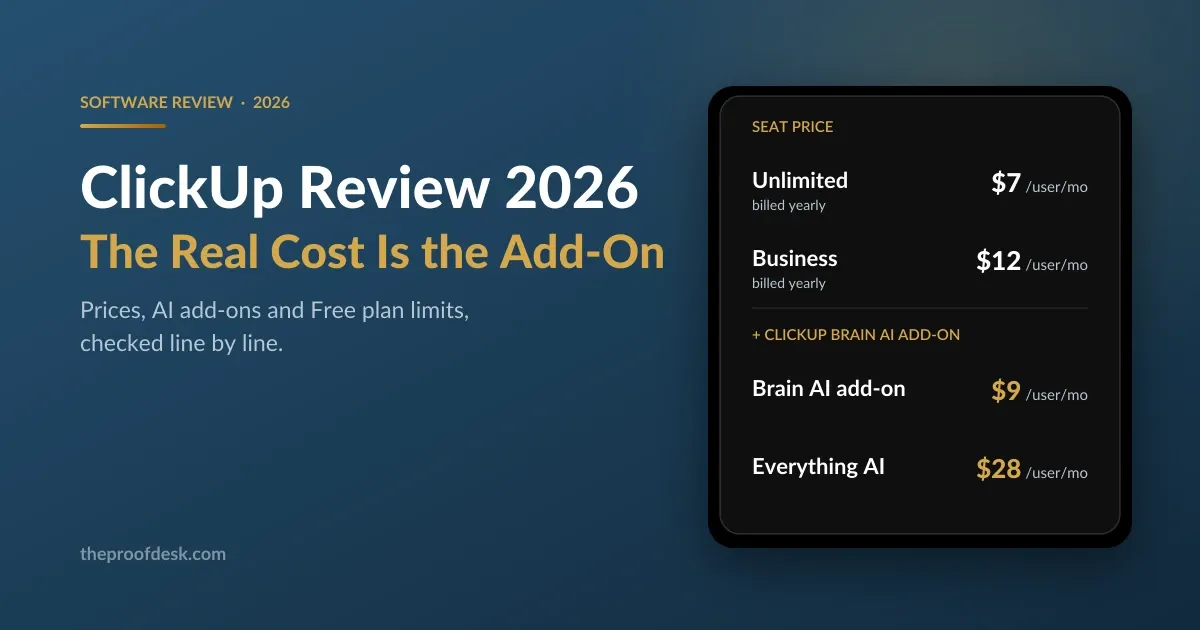
ClickUp sells itself as the app that replaces the other apps, and the seat price supports that story: $7 per user a month on Unlimited, $12 on Business, both billed yearly. The number that decides your real bill is somewhere else. ClickUp Brain, the AI layer the product is now built around, is a separate add-on at $9 per user a month, and you cannot buy it for just the people who want it.
This review works through what each plan actually includes in 2026, where the free plan stops, how the 'uses' limits behave, what guests cost you, and what ClickUp's own terms say about refunds. Every figure below comes from ClickUp's pricing page, help centre or terms of service.
How ClickUp is put together
A ClickUp workspace nests: Spaces hold Folders, Folders hold Lists, and Lists hold tasks. Every List can be shown as a Board, a List, a Calendar, a Gantt chart, a Timeline or a Workload view, and the view you pick does not change the underlying data. That is the whole pitch — one set of tasks, rendered whichever way a given team wants to look at them.
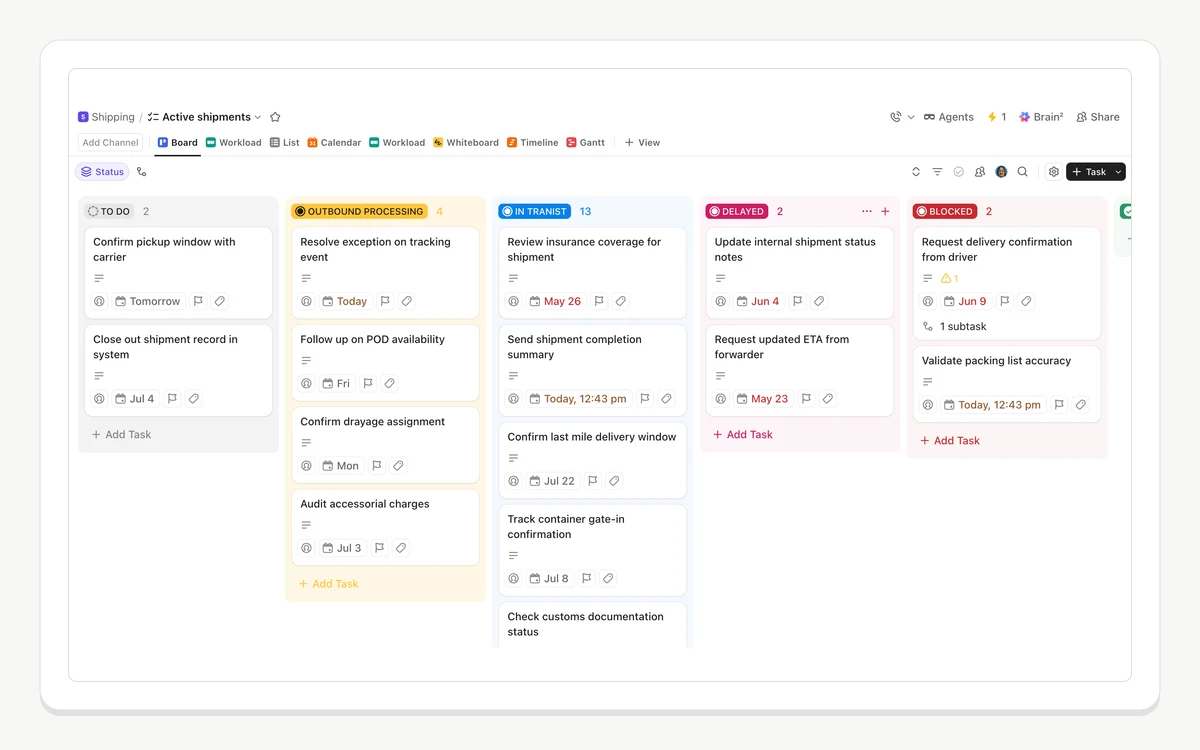
The structure is more flexible than most competitors and that cuts both ways. A workspace nobody has designed turns into a maze quickly, because ClickUp will happily let you build five levels of hierarchy before anyone asks whether you needed them. Teams that succeed with it usually agree on a Space layout in the first week and stick to it.
- Views: Board, List, Calendar, Gantt, Timeline, Workload, Whiteboard and Table, switchable per List.
- Docs and Chat live inside the workspace, so a spec or a conversation can be attached to the task it belongs to.
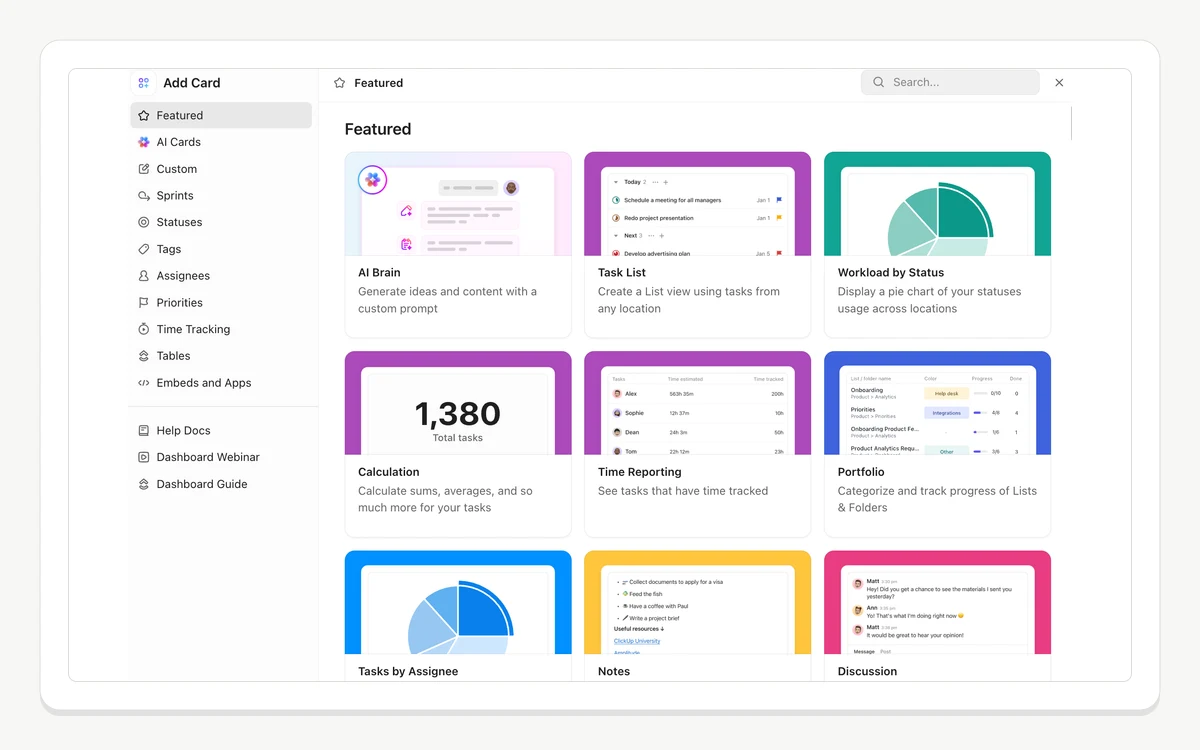
- Dashboards assemble cards — time reporting, portfolio progress, workload by status — into a reporting page.
- Automations run rule-based triggers and actions without leaving the platform.
- ClickUp Brain adds AI answers, AI fields and agents across all of the above, and is billed separately.
What ClickUp costs in 2026
ClickUp publishes four tiers. Free Forever costs nothing. Unlimited is "$7" per "user/month, billed yearly" and "$10" per "user/month, billed monthly". Business, the plan ClickUp marks as popular, is "$12" billed yearly and "$19" billed monthly. Enterprise has no listed price and is sold as "Contact Sales".
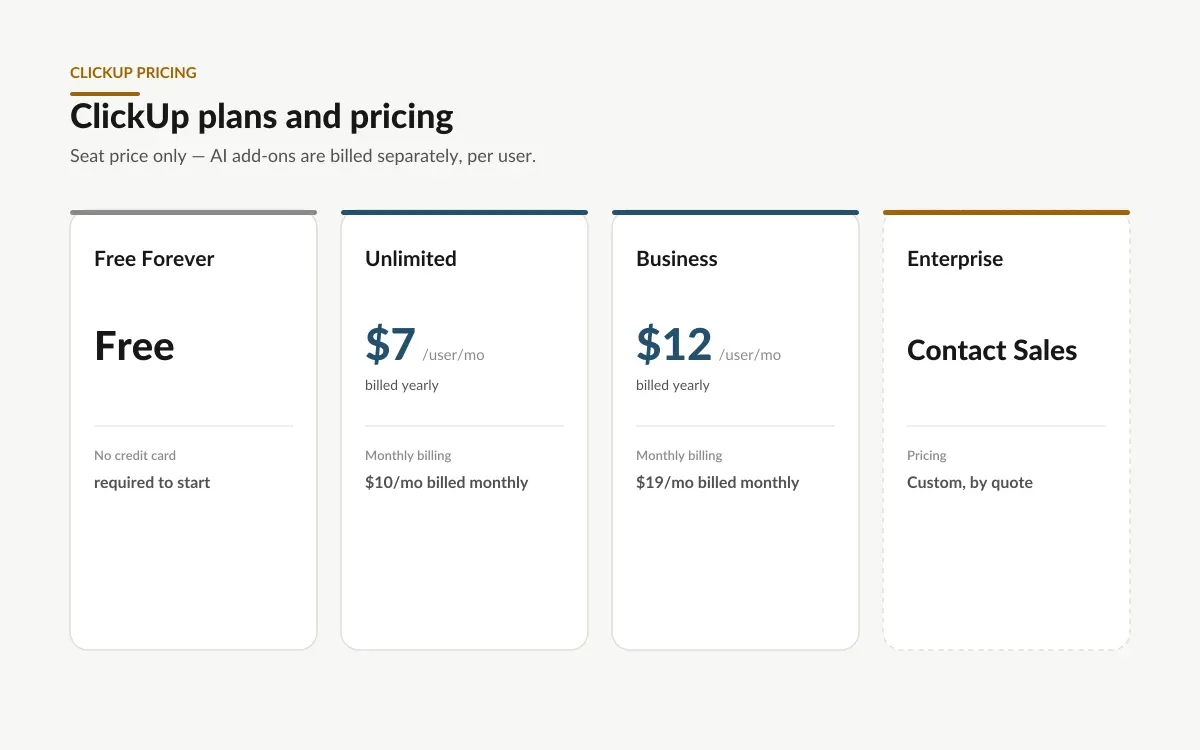
Paying monthly is expensive here. The gap between $7 and $10 on Unlimited is 43 percent, and the gap between $12 and $19 on Business is 58 percent — a steeper annual discount than most tools in this category ask for. If you are going to commit for a year anyway, the annual price is the only sensible one; if you are not sure yet, budget for the monthly figure rather than the one on the marketing page.
There is a fifth plan you cannot see
ClickUp's help centre lists five plans, including Business Plus — "Best for multiple teams. Includes custom role permissions and priority support." It is absent from the public pricing page by design: "Business Plus is not included on our pricing page, but you can see plan details when following the upgrade instructions in your Workspace." Its price is not published anywhere, so you cannot compare it until you are already inside a workspace and clicking upgrade.
Two billing rules catch teams out. Plans are bought for the whole workspace, not per person — "To upgrade ClickUp, you'll need to upgrade your entire Workspace, which means all members in your Workspace" — and "It is not possible for users to be on different plans in one Workspace." You also "cannot mix yearly and monthly licenses within the same Workspace." Adding someone mid-cycle is prorated automatically.
Brain is a second bill, charged for everybody
ClickUp Brain is not included in the seat price. It is an add-on: $9 per user a month for Brain AI, or $28 per user a month for the Everything AI bundle that adds the Notetaker, AI Fields, AI automations and Super Agents. The marketing site describes the cheaper tier as including "unlimited access to Brain², premium models (ChatGPT, Claude, Gemini), and 1,500 AI Super Credits."
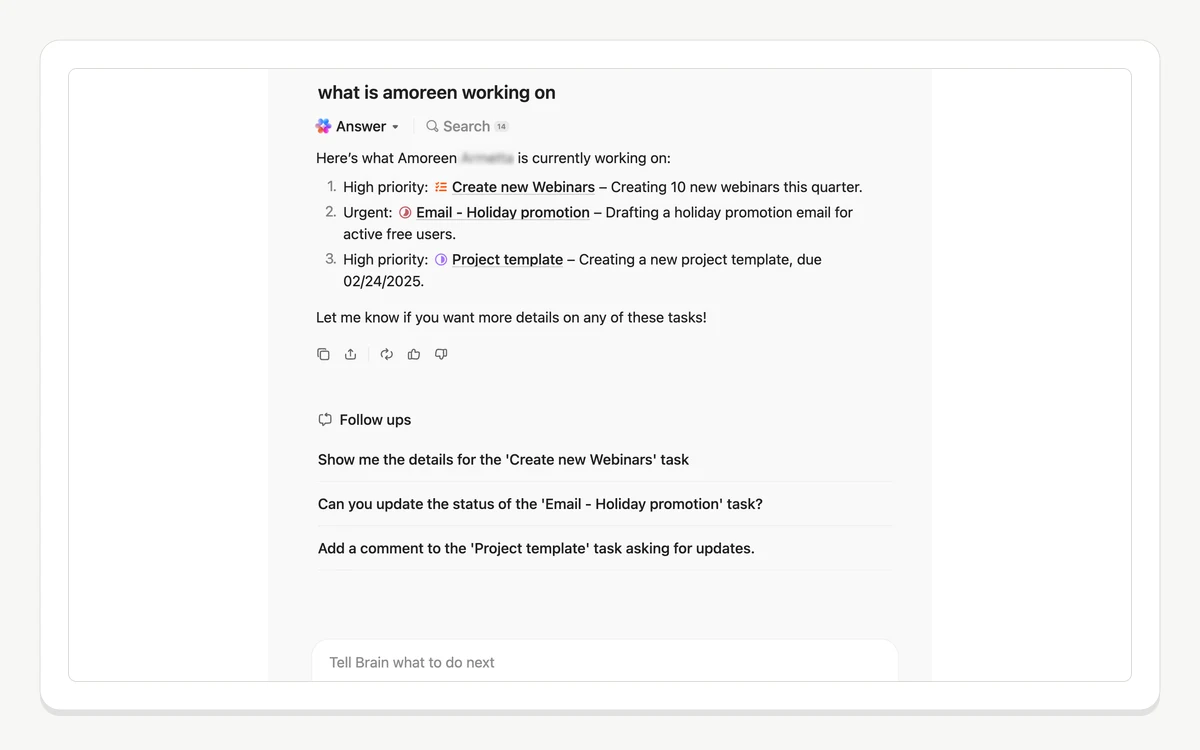
The part worth reading twice is who pays. ClickUp's help centre is unambiguous: "Brain AI is purchased per Workspace. If you have multiple Workspaces, you'll need to purchase Brain AI for each one. The fee applies to all members of your Workspace." You cannot buy five Brain seats for the five people who will use it. On a 20-person Business workspace, adding Brain AI takes the per-seat cost from $12 to $21 a month, and Everything AI takes it to $40.
- Brain AI add-on: 1,500 AI Super Credits per user per month, and 25,000 Talk to Text words per workspace.
- Everything AI add-on: 5,000 credits per user per month and unlimited Talk to Text.
- Extra credits cost "$0.001 per credit" and are sold in "$10 per 10,000 credits" increments, monthly.
- Before you buy anything, paid plans with no add-on get 1,000 trial credits per user; Free Forever gets 500 total for the whole workspace.
- Brain MAX — the desktop app for macOS 13+ and Windows, plus mobile and a Chrome extension — is not priced separately. It is the client for the add-on you already bought.
The Brain trial does not reset
Before you buy an add-on, Brain runs on a fixed count of uses that never refills: "Free Forever: 25 uses per Workspace (up to 10 people) or 50 uses per Workspace (more than 10 people). This limit does not reset." Unlimited and Business get 50 or 75; Business Plus and Enterprise get 100 or 175. "Any option that generates an AI response counts as a use." It is enough to see whether Brain understands your workspace, and not enough to rely on it for a week.
The free plan and where it stops
Free Forever gives you unlimited tasks and, unusually, unlimited people: "Free Forever Workspaces can have an unlimited number of members and guests at no charge. On the Free Forever Plan, guests have full create and edit permissions, which cannot be modified." That last clause matters — on the free plan there is no such thing as a read-only outsider.
- 5 Spaces, 40 Lists per Space, 100 Folders per Space and 2 Teams.
- 60MB of file storage for the whole workspace — the cap most free workspaces hit first.
- 5 active automation rules and 100 automation executions.
- 50+ native integrations, and an API rate limit of 100 calls a minute.
- Two-factor authentication is available, but enforcing it across the org is not.
The features people actually evaluate ClickUp for — Gantt, Timeline, Workload, Dashboards, Custom Fields, Custom Task Types — are not on the free plan in any usable sense. They appear as limited "uses", and ClickUp explains the model plainly: "'Uses' are intended as a demonstration of paid plan features... Uses are cumulative throughout a Workspace and they do not reset or count down. When you reach a use limit, you won't lose any data, but you won't be able to edit or create new items with that feature."
ClickUp's own pages disagree about free storage
The pricing table and the dedicated storage-limits help article both say Free Forever gets 60MB. A separate help article about upgrading — updated the same week — says "If your Workspace has more than 100 MB of data, you'll need to upgrade or free up some storage." Two sources say 60MB against one that says 100MB, so plan for 60MB. Either way it is a few dozen attachments, not a document library.
Automations, guests and the limits that pick your plan
Automations are the clearest ladder in the whole price list, and for most teams they are what decides the tier. Free gets "5 Active Rules, 100 Automation executions". Unlimited gets "500 Active Rules, 1,000 Automation executions". Business gets unlimited rules and 5,000 executions a month. Enterprise gets 250,000.
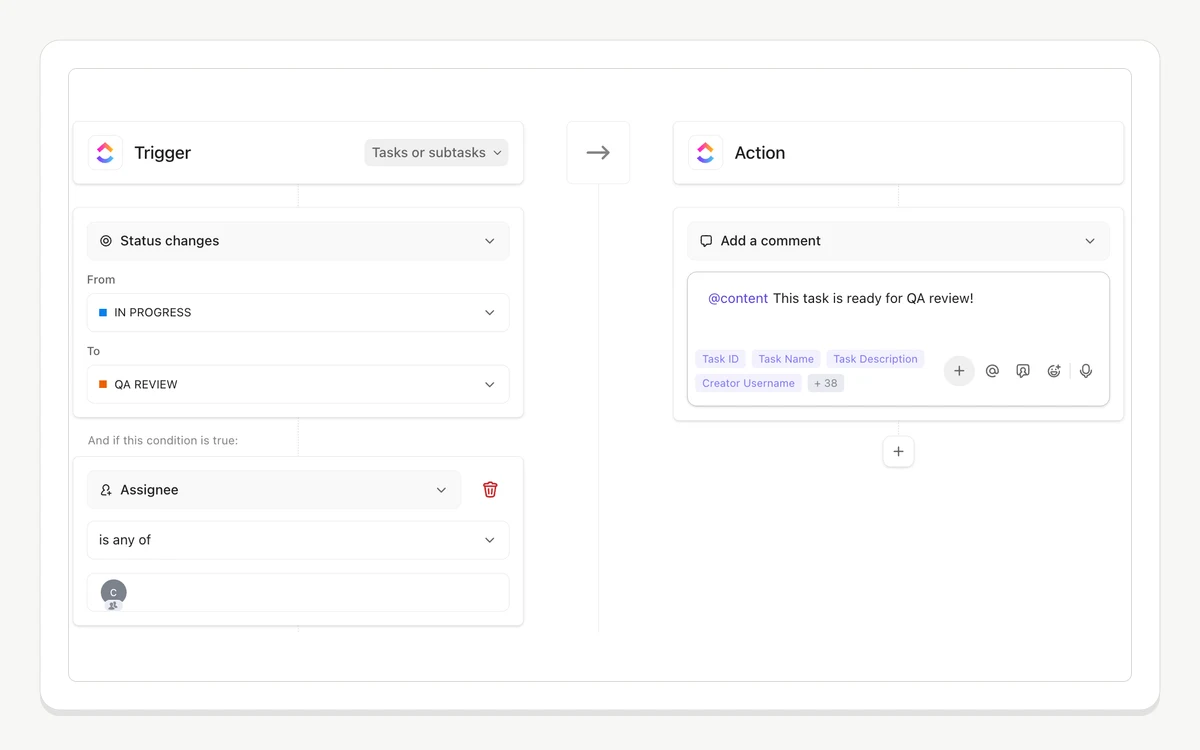
The 1,000 executions on Unlimited sound generous until you count them. One rule that posts a comment on every status change, across a team closing fifty tasks a week with four status steps each, is 800 executions a month on its own. Advanced Automations — webhooks, email, SMS and integration actions — are not on Unlimited at all, so any rule that has to talk to another system is a Business rule.
Guests are the other place the bill moves. Paid plans include a pool of permission-controlled guest seats that scales with headcount: Unlimited gives "5 guest seats for a 1 paid user Workspace and 2 guest seats for each additional paid user", while Business and Enterprise give 10 plus 5 per additional member. Run out and ClickUp does not warn and stop — "You'll be automatically charged for a new member seat" when you invite a permission-controlled guest with no seats left.
- Timeline and Workload views are limited "uses" on Unlimited too, not just Free — they only open up fully on Business.
- Google SSO arrives on Business; Microsoft, Okta and custom SAML SSO, session management, custom roles and custom permissions are Enterprise only.
- White labeling and the Salesforce integration are Enterprise only, and HIPAA compliance is quoted, not listed.
- The API stays at 100 calls a minute all the way through Business, and jumps to 10,000 a minute only on Enterprise.
- Advanced reporting and custom exporting start at Business.
Dashboards are what the paid tiers are really for
Reporting is the honest reason to leave the free plan. Dashboards are built from cards — time reporting, portfolio progress, workload by status, calculations, task lists — and on Free and Unlimited they are capped as demonstration uses rather than a feature you can run a business on. On Business they are unlimited, with the advanced card types included.
If your team is five people who need shared task lists, ClickUp's free plan genuinely works and Unlimited is a reasonable $7. If anyone above them needs to see progress across projects without asking for it, you are on Business at $12 — and that is before Brain. Pricing ClickUp honestly means starting from $21 per user a month for a team that wants the AI it is currently marketed on.
Trials, refunds and cancelling
ClickUp offers a satisfaction guarantee rather than a conventional refund window, and it is written for first purchases only. Section 1.14 of the terms: "if you are not satisfied with your initial purchase of ClickUp Services for any reason, simply contact us within thirty (30) days, and we will be happy to issue a full refund." Upgrade to a higher plan and the guarantee runs for thirty days from that upgrade, refunding "the cost difference between the prior plan and the Upgraded Plan."
The exclusions are where it gets narrow. The guarantee "does not apply to (a) Services initially purchased through or with the assistance of a ClickUp sales representative or reseller...; (b) renewals or expansions of previously purchased Services or Upgraded Plans, or; (c) instances where you have completed a pilot or trial period of the Services prior to initial purchase." Outside those thirty days, "All fees are non-refundable except as required by law". Note the third exclusion in particular: doing the responsible thing and trialling the product first can cost you the refund window.
Nobody at ClickUp will tell you how long the trial is
ClickUp confirms trials exist and what happens when they end — "When your trial expires, you won't lose access to your data. You won't be able to edit or add data using paid plan features associated with your trial" — but no ClickUp-owned page we could find states a number of days. Third-party sites repeat "14 days", which ClickUp does not confirm. The AI page does say "No card required", and the terms refer to "trial accounts without a payment method", so a card is at least not universally required.
Cancelling is straightforward: "You're free to cancel at anytime! When you do, your current plan will last until the end of your billing cycle, unless you choose to downgrade immediately." Downgrades take effect at the end of the cycle and your data stays put — "All your data will remain in the Workspace and can be accessed if you upgrade again." Subscriptions, including add-ons, renew automatically unless you act.
Frequently asked questions
Is ClickUp actually free?
Yes, and the free plan has no user limit — unlimited members and guests at no charge, with unlimited tasks. The ceilings are elsewhere: 60MB of storage, 5 Spaces, 5 automation rules, and demonstration-only access to Gantt, Timeline, Workload, Dashboards and Custom Fields. Free guests also have full create and edit permissions that cannot be restricted.
How much is ClickUp per user in 2026?
Unlimited is $7 per user a month billed yearly, or $10 billed monthly. Business is $12 billed yearly or $19 billed monthly. Enterprise is quoted by sales. A fifth plan, Business Plus, exists but its price is only shown inside the upgrade flow of a live workspace.
Do I have to buy ClickUp Brain for everyone?
Yes. Brain AI is purchased per workspace and "the fee applies to all members of your Workspace", so a 20-person team pays 20 × $9 whether or not all 20 use it. There is no per-person opt-in, and multi-workspace organisations buy it separately for each workspace.
How many automations does each plan get?
Free gets 5 active rules and 100 executions a month, Unlimited 500 rules and 1,000 executions, Business unlimited rules and 5,000 executions, Enterprise 250,000. Advanced actions — webhooks, email, SMS and integrations — require Business or above regardless of how few rules you run.
Does ClickUp charge extra for guests?
It can. Paid plans include permission-controlled guest seats — 5 plus 2 per extra member on Unlimited, 10 plus 5 per extra member on Business and Enterprise — plus unlimited read-only guests. Invite a permission-controlled guest after that pool runs out and ClickUp automatically adds and charges a full member seat.
Can I get a refund from ClickUp?
Only on a first purchase, within 30 days. The satisfaction guarantee excludes renewals, expansions, anything bought through a sales rep or reseller, and — importantly — cases where you completed a trial before buying. After 30 days all fees are non-refundable except where the law requires otherwise.
Is there a free trial of the paid plans?
Yes, but ClickUp does not publish its length anywhere on its own site or help centre. What it does document is the ending: your data stays, and you simply lose the ability to edit or create using the paid features you were trialling. The AI page states "No card required", so at least some trials start without payment details.
Key takeaways
- The seat price is $7 on Unlimited and $12 on Business when billed yearly; monthly billing costs 43 to 58 percent more.
- ClickUp Brain is a separate $9 per user add-on charged for every member of the workspace, which is what pushes a Business team to a real $21 per user a month.
- The free plan's binding limits are 60MB of storage and the cumulative 'uses' model, which turns Dashboards, Gantt and Custom Fields into a demo rather than a feature.
- Automation executions and Advanced Automations, not headcount, are what usually force the move from Unlimited to Business.
- Guest seats are pooled and finite on paid plans; exceeding the pool silently converts a guest into a billed member seat.
- The 30-day refund guarantee covers first purchases only and is void if you completed a trial beforehand.
More in Services & Software
Browse Services & Software