Eraser Review 2026: Pricing, AI Credits, Free Plan Limits and the New Business Plus Tier
Eraser review for October 2026: what Free, Business ($45/$60), Business Plus ($42, 10-seat minimum) and Enterprise include, how AI credits and overage work, and the fine print.
Eraser (eraser.io) is a diagramming and technical design doc tool built for engineering teams. You describe a system in plain English or in its own diagram-as-code language, and it draws architecture diagrams, sequence diagrams, ERDs and flowcharts next to a Markdown design doc in the same file.
The product has moved fast in 2026, and so has the price list. Between September and late October 2026 Eraser retired its Starter plan for new teams, cut the AI allowance on Business from 250 to 100 per month, moved SAML SSO out of Business and into a new Business Plus tier, open-sourced its AI-native diagram format and shipped an MCP server for coding agents. Eraser published no changelog entry for the plan changes, so this review compares the archived September pricing page with the live page on 2026-10-28.
Below is what each plan really costs, where the paywalls sit, how AI credits and overage are billed, and the places where Eraser's own pages disagree with each other.
What Eraser is and who it is for
Eraser describes itself as a place to create architecture, sequence, flow chart, ERD or BPMN diagrams, and to write the technical design doc around them. A file combines a canvas for diagrams with a Markdown document, so the diagram and the reasoning behind it live in one place instead of a whiteboard link pasted into Confluence.
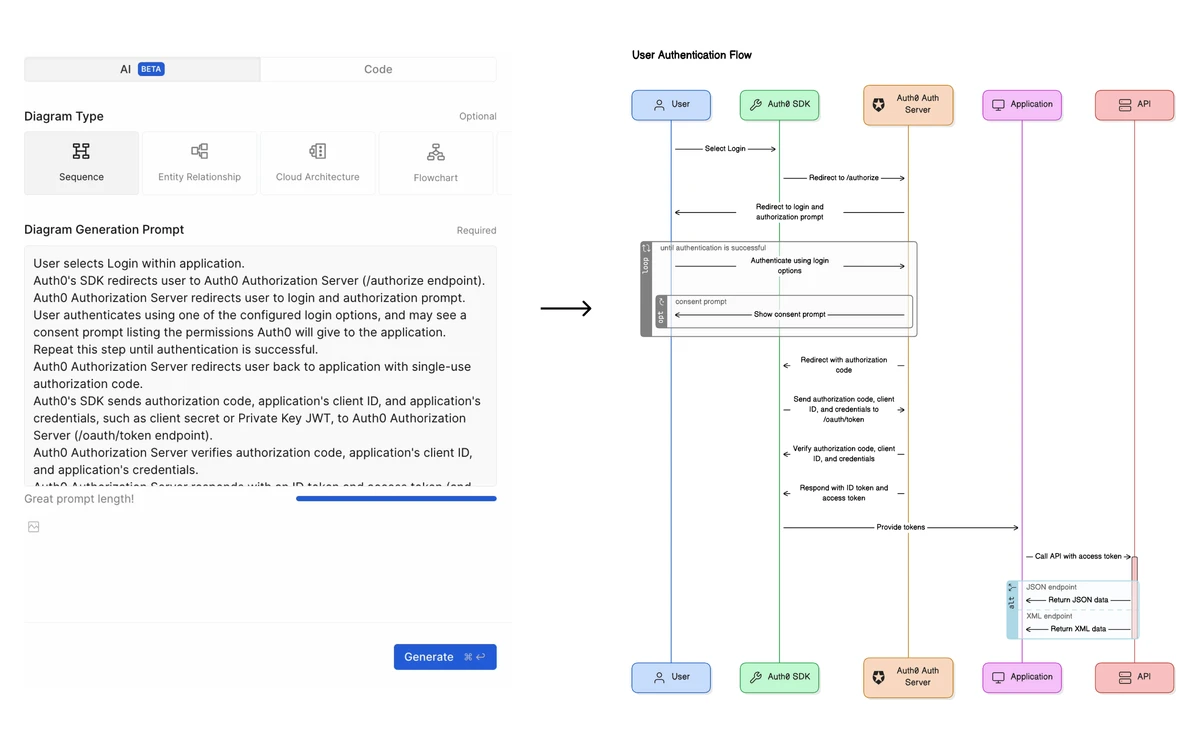
There are two ways to draw. Freeform drawing works like a normal whiteboard. Diagram-as-code uses Eraser's own DSL: you write entities and connections as text and Eraser handles the layout. Eraser AI sits on top of both and turns a prompt, a pasted spec or a connected code repository into a diagram you can then edit.
The audience is narrow on purpose. Eraser is aimed at software engineers, solution architects and platform teams who document systems. It is not trying to be a general brainstorming board like Miro or Mural, and third-party reviewers count that technical focus, the smaller template library and the learning curve of the DSL among its main drawbacks.
Diagram-as-code and AI diagrams
Diagram-as-code is the strongest reason to pick Eraser. Eraser's docs make the case directly: you skip arranging boxes and arrows by hand, and an update is often just a one-liner change to the DSL. Because the source is text, a diagram can be reviewed, diffed and regenerated instead of redrawn.
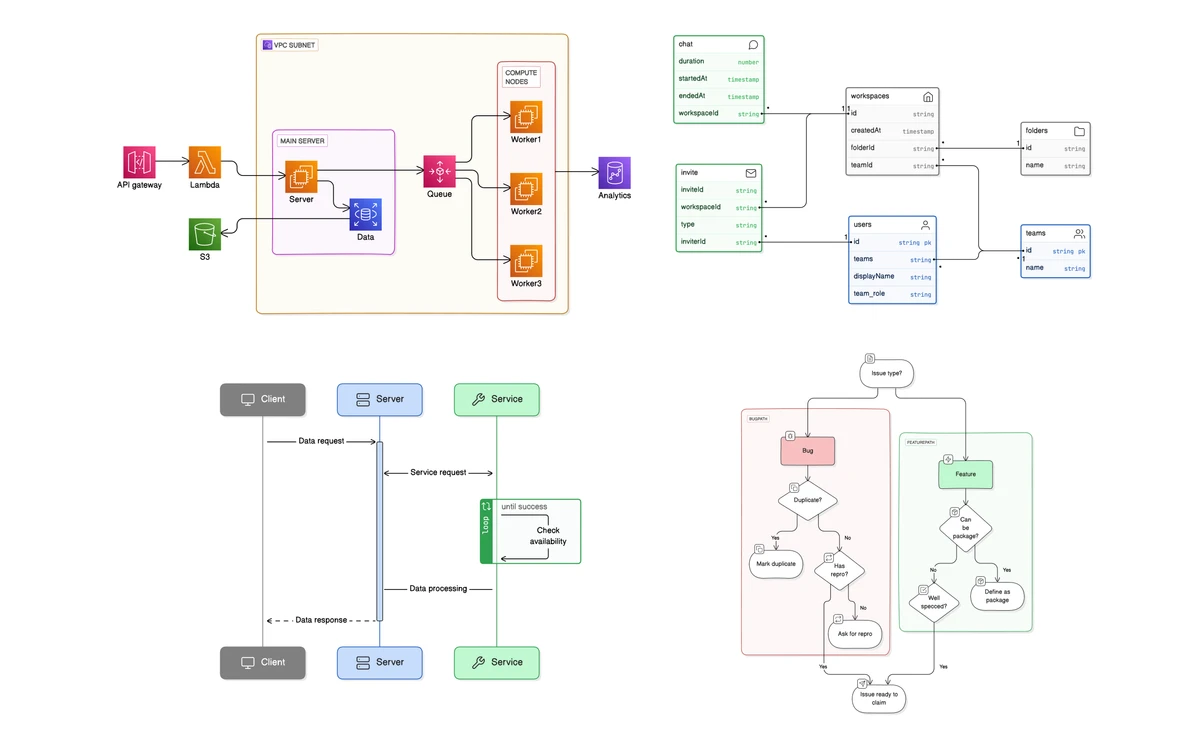
The AI diagram picker offers four types: sequence, entity relationship, cloud architecture and flowchart. Generation uses AI credits, and so do AI outlines for documents. Eraser says it picks a model per task, naming Anthropic's Claude Opus 5.5, Sonnet 5.5 and Haiku 5.5 and OpenAI's GPT-6.1 Sol and GPT-6 Luna.
What the AI is good at
AI generation works best as a first draft from a spec, a ticket or a codebase. Expect to fix labels and grouping afterwards, which is quick because the result is editable DSL rather than a flat image.
Eraser pricing in October 2026
Eraser now sells four plans: Free, Business, Business Plus and Enterprise. All prices are per member per month, and every plan allows unlimited free guests. Guests can edit and comment only on the specific files they are invited to.
- Free - $0. 3 files, 3 AI credits, 7-day version history, unlimited team members and guests. No Git repositories or data sources.
- Business - $45 per member per month billed annually, or $60 billed monthly. 100 AI credits a month, unlimited files, 1 Git repo plus 1 data source, models up to 1,000 rows, private files, 100 custom icons.
- Business Plus - $42 per member per month, annual billing by card only, minimum 10 seats. 250 AI credits a month, 3 Git repos plus 3 data sources, tenant-level data sources, models up to 5,000 rows, SAML SSO, unlimited custom icons.
- Enterprise - custom pricing. Unlimited AI credits, unlimited Git repos and data sources, custom hosting, SCIM provisioning, SIEM logging, usage reporting, security questionnaires, POs, invoicing, ACH and wire, and a customer success manager.
What changed since September
In the September 2026 snapshot of the pricing page, Business cost the same $45 annual or $60 monthly but came with 250 AI diagrams a month and SAML SSO, and a Starter plan sat below it at $15 annual or $20 monthly. On the live page in late October, Starter is gone for new teams, Business lists 100 AI credits and no SSO, and both the 250 allowance and SSO have moved to Business Plus. The unit was also renamed from AI diagrams to AI credits, so the two numbers are not strictly like-for-like, but the headline allowance on the same price fell by 60 percent.
Teams already on Starter keep their plan and can still switch between monthly and annual billing. Older aggregator listings that quote a $10 Professional or Starter plan, or Business at $20 to $25, are out of date.
What a year actually costs
- Business, annual: $45 x 12 = $540 per member per year.
- Business, monthly: $60 x 12 = $720 per member per year, so annual billing saves 25 percent.
- Business Plus: $42 x 10 seats x 12 = $5,040 a year at minimum, paid up front by card.
- A 5-person team on annual Business pays $2,700 a year.
The odd one out
Business Plus is listed at $42 per seat, which is less than annual Business at $45. That is how Eraser's pricing page shows it. The catch is the 10-seat minimum and annual-only billing: a team of 1 to 9 people cannot buy it, so the only way such a team gets SAML SSO is Enterprise. A team with 10 or more members should price Business Plus first.
AI credits, usage-based pricing and API costs
AI credits pay for AI diagrams and outlines. The pricing card shows 100 AI credits a month on Business and 250 on Business Plus, while Eraser's plans documentation phrases the same numbers as monthly AI credits per member. If the distinction matters for your team size, confirm it with Eraser before buying.
Whether the 3 credits on Free reset each month is not documented on Eraser's current pages. An older in-app screenshot called them one-time use, so treat Free as a trial of the AI rather than a working allowance.
Overage rates
- AI credits: $60 per 100 credits, or $0.60 each.
- API calls to /render/prompt (AI generation through the API): $80 per 100 calls.
- API calls to /render/elements (rendering DSL you already have): $20 per 100 calls.
Usage-based pricing is available only on paid plans and must be switched on before you can make API calls at all. Charges are billed per calendar month against a spend limit you set. When you hit 100 percent of that limit, AI beyond the plan allowance and API calls stop working until the next month or until you raise the limit.
Budget tip
Set a spend limit the day you enable usage-based pricing. Eraserbot monitors and agent integrations consume credits and API calls in the background, so overage can build up without anyone opening the app.
Git repositories, Eraserbot and live data sources
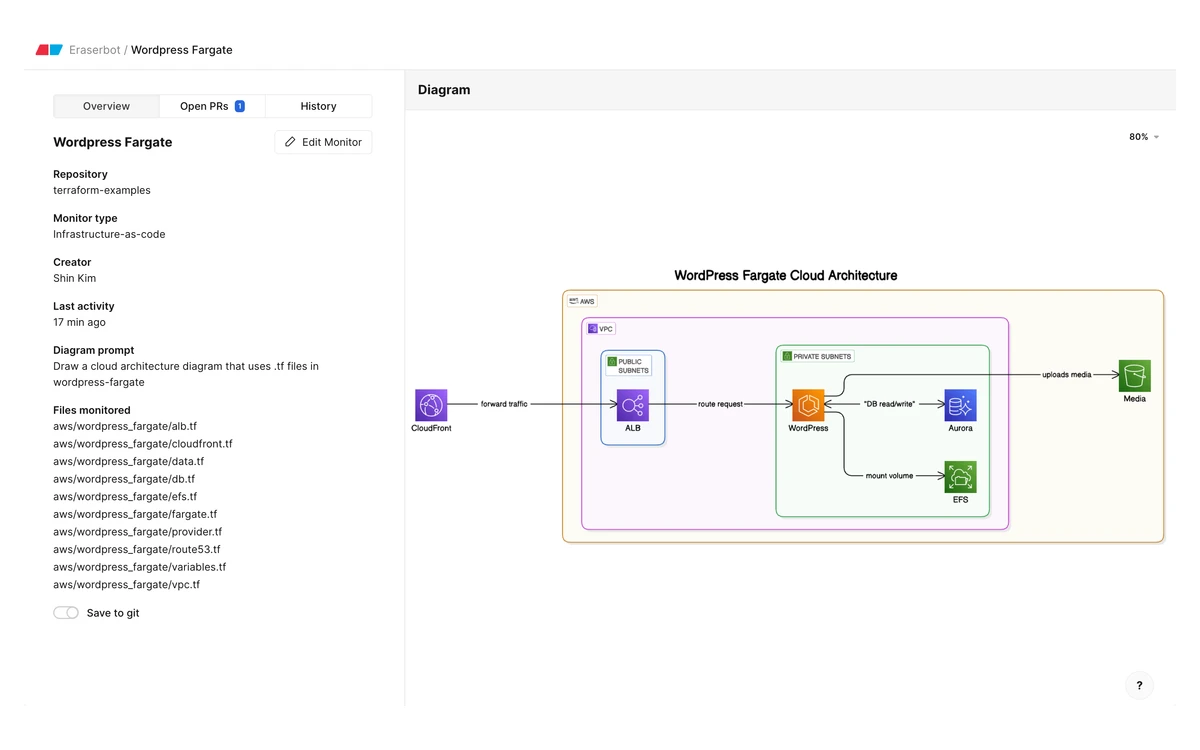
Paid plans can connect code repositories from GitHub, GitLab and Azure DevOps, with Bitbucket listed as coming soon. A connected repo can be used as context in a prompt, for example asking Eraser to draw a cloud architecture diagram from the Terraform files in one folder. Business allows one repo, Business Plus three and Enterprise unlimited. Free plan teams cannot connect repositories or data sources at all.
Eraserbot goes further. A monitor watches files in a repo, such as .tf infrastructure files, keeps the diagram in step with the code and opens pull requests. Monitors run on GitHub and GitLab, and committing files back to the repo (Git sync) is GitHub only. Creating a monitor uses AI credits for each generation attempt, and once it runs it consumes API credits, so usage-based pricing must be turned on.
Data sources import from live systems instead of code. Eraser's docs list AWS, Azure, GCP, ServiceNow, VMware, Cisco, Ardoq and OrbusInfinity. Business Plus adds tenant-level data sources, meaning sources that span several accounts such as an AWS organization.
Eraser Diagrams: the open-source format
On 2026-09-07 Eraser published Eraser Diagrams, which it calls an AI-native, coordinate-aware diagram format, under the MIT license. The release includes a spec, a reference renderer and an example gallery. Diagrams are JSON, every entity carries explicit x and y coordinates, and a file can be validated against the schema before it is rendered.
The argument behind it is that language models have outgrown Mermaid, because Mermaid hands placement to a layout engine and cannot say where things go. With coordinates in the format, the model decides the layout. Eraser's own example is a map of the top 10 US metro areas: the engine-based layout ignores geography, while the model-placed version comes out roughly map-accurate.
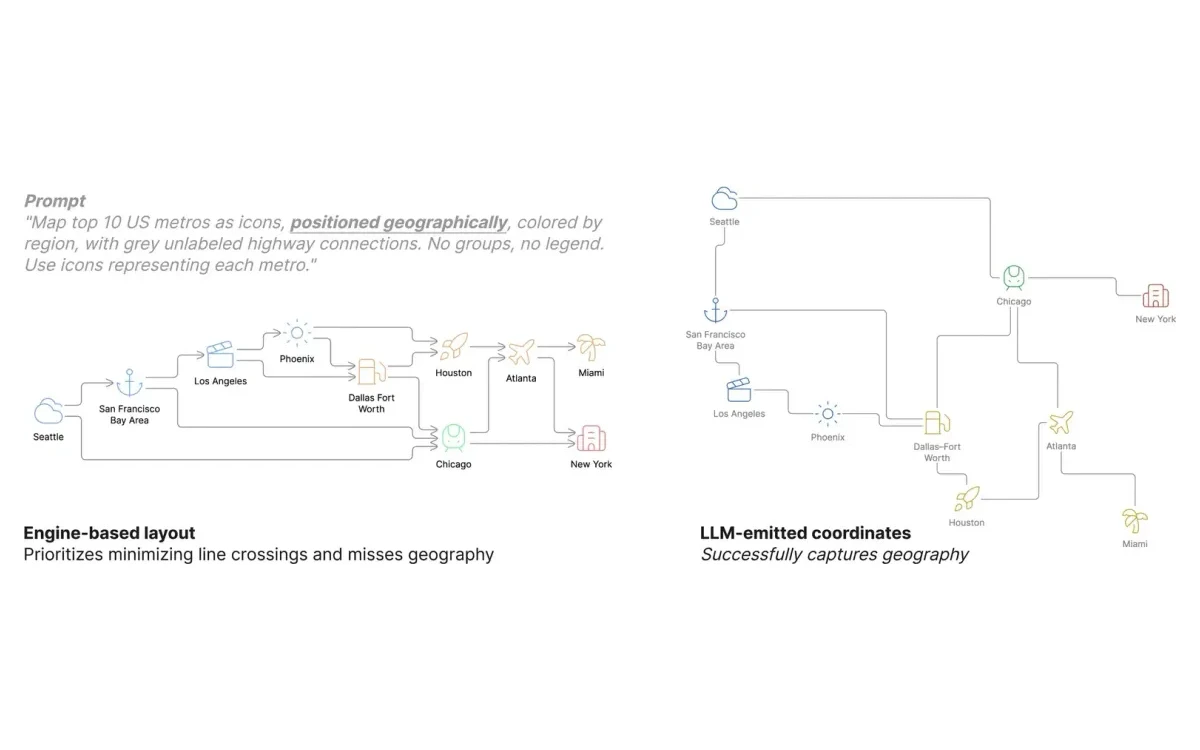
Two caveats. The repository (eraserlabs/eraser-diagrams) is MIT licensed and free for commercial use but closed to contribution, so it is an open spec from one company rather than a community project. And it is young: the repo was created in July 2026 and had 294 GitHub stars when checked on 2026-10-28.
MCP server, Agent Skills and the API
Eraser now plugs into coding agents. A hosted MCP server lives at app.eraser.io/api/mcp, with OAuth as the recommended sign-in, and Agent Skills install with one npx command for Claude Code, Cursor and other agents that support the skills framework. An agent can then write Eraser DSL, have Eraser render it and return an image URL plus an Open in Eraser link.
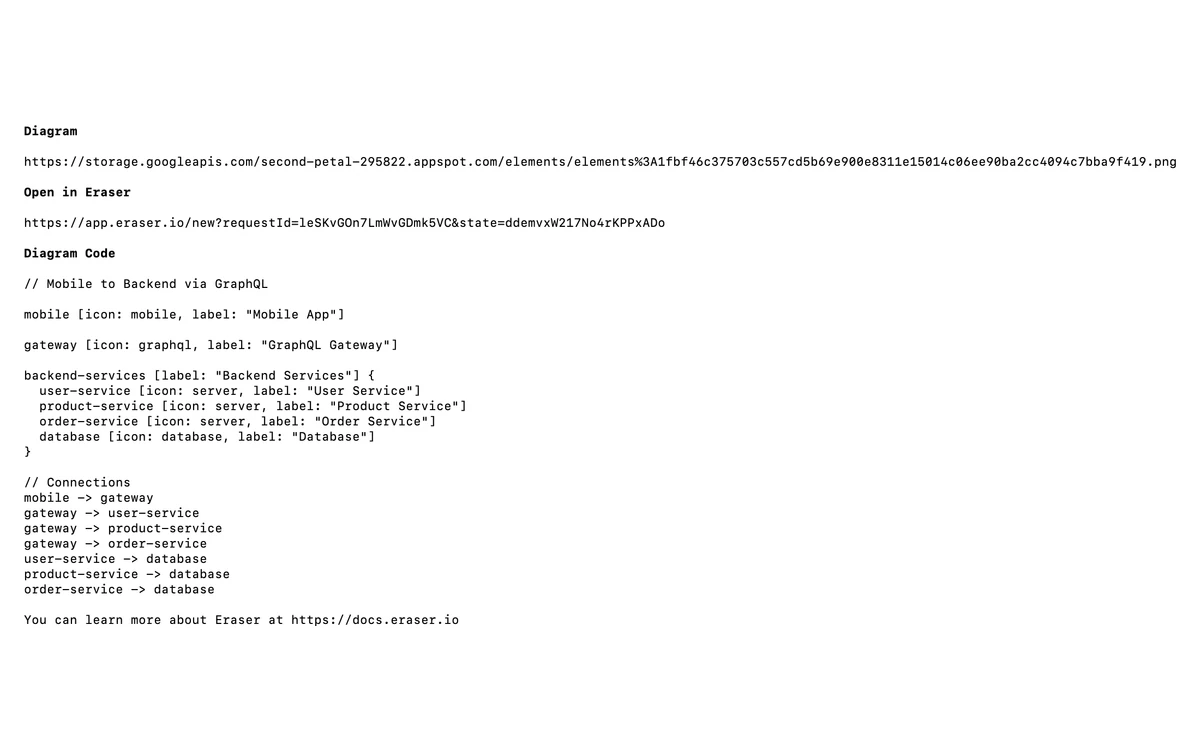
The MCP server itself is free but subject to the same limits as in-app use, so on the Free plan it runs into the 3-credit ceiling quickly. OAuth requests draw on the signed-in user's AI credits, while API key requests draw on team-level credits. API tokens cannot be created on the Free plan, and without an API key rendered diagrams carry a watermark and come out at lower resolution.
The fine print: exports, history, SSO, security and refunds
Where Eraser contradicts itself
- Exports: the pricing table lists Export to file (PDF, PNG, SVG, MD) as included on Free, but the export docs say PDF, Visio, draw.io, PowerPoint and Google Slides export, 2x and 3x image quality, and watermark removal all need a paid plan.
- Version history: Free keeps 7 days. The pricing page promises unlimited history on paid plans, while the version history docs say paid teams get 90 days.
- Public editing: the pricing table shows publicly editable files on Free, while the team docs say public editing and link access need a paid plan.
- AI credits: 100 a month on the pricing card, 100 per member in the docs.
None of these is a deal-breaker, but if one of them decides your purchase, get the answer in writing from Eraser.
Security and SSO
SAML SSO is available only on Business Plus and Enterprise. SCIM provisioning is Enterprise only and requires SAML SSO to be set up first. Eraser offers a SOC 2 Type 2 report and a penetration test report through its Trust Portal under NDA. Single-tenant and self-hosted deployment are Enterprise only. No data residency choice or retention period is documented.
AI and your data
Eraser says neither it nor Anthropic nor OpenAI will use your data to train AI models. The same FAQ says Eraser may analyze your usage to improve its AI feature, and that OpenAI retains API requests and responses for up to 30 days.
Billing, refunds and cancellation
Monthly plans are charged for every member, admins included. Added members are pro-rated and removed members earn a pro-rated credit. Annual plans are billed for the number of members at the time of purchase. Under Eraser's terms, paid fees are non-refundable except where the law requires otherwise, with case-by-case exceptions, and cancelling does not refund the current period. You cannot delete your account while a paid subscription is active. Discounts exist for education and non-profit users. No startup discount and no trial length are published.
Who should buy Eraser, and the alternatives
- Good fit: engineering teams that want diagrams versioned as code, generated from Terraform or a repo, and kept next to the design doc.
- Good fit: teams of 10 or more that need SSO, where Business Plus is the cheapest per-seat option on the list.
- Poor fit: small teams that need SSO, because Business no longer includes it and Business Plus needs 10 seats.
- Poor fit: anyone who wants a free tool for regular use. Three files and three AI credits are a demo, not a plan.
- Poor fit: non-technical workshops, brainstorming and retros.
If Eraser does not fit, the usual alternatives are Excalidraw for free hand-drawn sketches, Lucidchart for formal diagrams and wide template coverage, Whimsical for quick flowcharts and wireframes, and Miro or Mural for collaborative whiteboarding. The Proof Desk has full reviews of each.
Verdict
Eraser is one of the better tools for the specific job of documenting software systems. Diagram-as-code, repo-aware AI, Eraserbot monitors and the new MCP server form a workflow that general whiteboards do not match, and the open-source format is an interesting bet on letting models handle layout.
The October 2026 plan change makes it a harder buy for small teams. Business costs the same as before but includes 100 AI credits instead of 250 and drops SSO, and overage at $0.60 a credit adds up. Start on Free to test the DSL, budget for annual Business if you are under 10 people, and price Business Plus first if you are over it.
Frequently asked questions
How much does Eraser cost?
Business costs $45 per member per month billed annually or $60 billed monthly. Business Plus is $42 per member per month, annual only, with a 10-seat minimum. Free costs nothing, and Enterprise is quoted on request.
What are the limits of the Eraser Free plan?
Free allows 3 files, 3 AI credits and 7 days of version history. It includes unlimited members and guests, but it cannot connect Git repositories or data sources and cannot create API tokens.
What happens when I run out of AI credits?
On a paid plan you can turn on usage-based pricing and pay $60 per 100 extra credits. Without it, or once your monthly spend limit is reached, AI beyond your plan allowance stops until the next month.
Does Eraser Business include SAML SSO?
No, not any more. SAML SSO moved to Business Plus and Enterprise between September and October 2026. Business Plus needs at least 10 seats, so a smaller team needs Enterprise for SSO.
Does Eraser train AI models on my diagrams?
Eraser says no: neither Eraser, Anthropic nor OpenAI trains on your data. Eraser may still analyze usage to improve its AI, and OpenAI keeps API requests and responses for up to 30 days.
Can I connect GitHub on the free plan?
No. Git repositories from GitHub, GitLab and Azure DevOps need a paid plan. Notion, Confluence and VS Code integrations are included on Free.
Does Eraser offer refunds?
Generally no. Eraser's terms say paid fees are non-refundable unless the law requires otherwise, with case-by-case exceptions, and cancelling does not refund the current billing period.
Is there a free trial of the paid plans?
Eraser does not publish a trial length. Its terms only say a trial may be offered, so the Free plan is the dependable way to try the product.
Key takeaways
- Eraser is a diagram-as-code and AI diagramming tool aimed at engineering teams, with design docs in the same file.
- Business is $45 per member per month annually or $60 monthly, now with 100 AI credits and no SAML SSO.
- Business Plus is $42 per member per month, annual only, 10-seat minimum, with 250 credits and SSO.
- Free is limited to 3 files and 3 AI credits, with no Git, data sources or API tokens.
- Overage costs $60 per 100 AI credits; API calls cost $80 or $20 per 100 depending on the endpoint.
- Some of Eraser's own pages disagree on exports, version history and credits, so confirm what matters before paying.
More in Services & Software
Browse Services & Software