Fellow.app Review 2026: A Great AI Notetaker With a Free-Plan Catch
Fellow (fellow.app, now fellow.ai) is a polished AI meeting assistant, but its free plan caps you at 5 AI notes for the account's lifetime. Here's the full 2026 pricing breakdown and who it's really for.
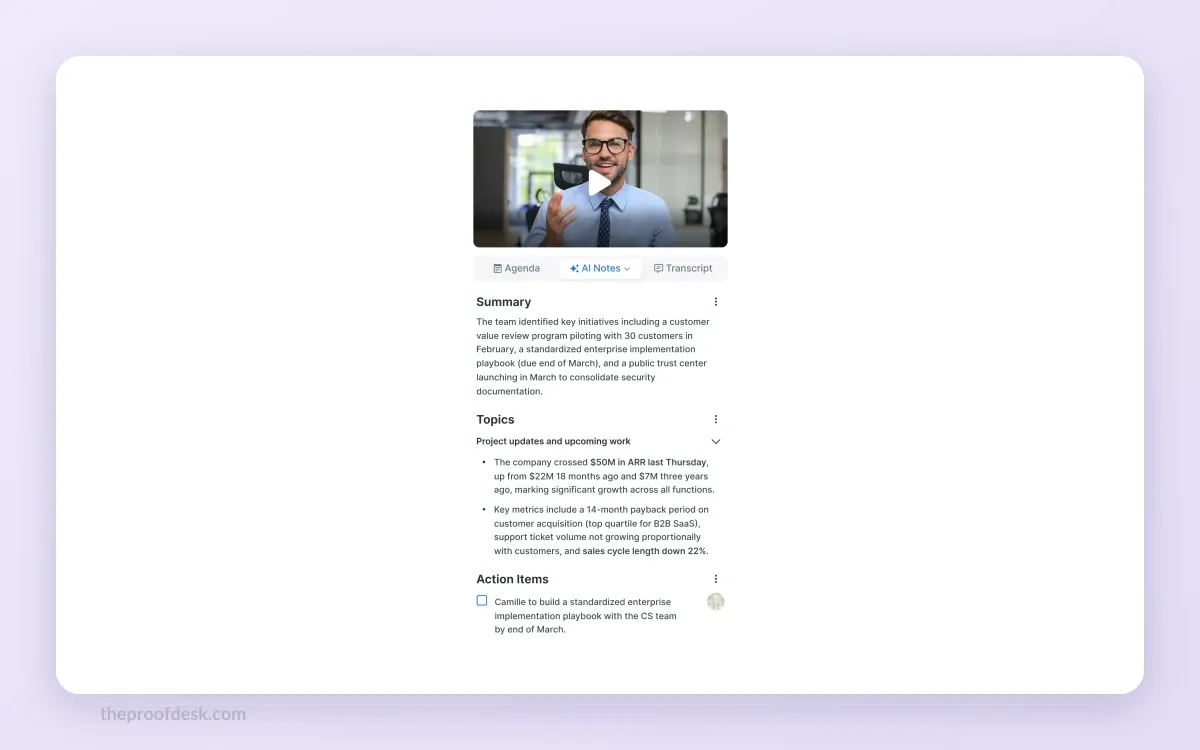
Fellow is one of the most polished AI meeting assistants you can try today. It joins your Google Meet, Microsoft Teams and Zoom calls, transcribes them, writes a summary, pulls out action items, and lets you search across every past meeting with a feature called "Ask Fellow." The New York Times' Wirecutter even named it the best service for transcribing and summarizing meetings in 2025.
But there's a catch that most reviews get wrong, and it lives in the free plan's fine print. Fellow's free tier caps you at 5 AI meeting notes for the entire lifetime of the account, not 5 per month. After a single busy week of calls, you're out. This review breaks down exactly what changes across Free, Team, Business and Enterprise, where the money actually goes, and where Fellow still beats rivals like Fireflies and Notta.
One naming note before we start: the product used to live at fellow.app, which now 301-redirects to fellow.ai. The company rebranded to Fellow.ai, though the mobile app and Chrome extension are still listed under the old "Fellow.app" name. It's the same product throughout, and we'll just call it Fellow.
What Fellow actually does
Fellow is an AI notetaker built around the whole meeting lifecycle, not just the recording. Before a call, you build a shared agenda that everyone can edit. During the call, Fellow's AI captures a transcript and, afterward, produces a clean summary with decisions and assigned action items. Those action items then carry forward into your next meeting so nothing quietly falls off the list.
It connects directly to Google Meet, Microsoft Teams and Zoom to do this automatically, so there's no separate app to babysit during a call. The transcript, summary and action items land in your workspace once the meeting ends.
The feature people actually stay for
"Ask Fellow" is the standout. Instead of re-reading old transcripts, you ask a plain-language question across all of your past meetings, and Fellow surfaces the relevant decisions, action items and context. For anyone who sits in a dozen recurring meetings a week, this is the difference between a searchable memory and a folder of files no one opens.
- Shared, collaborative agendas you build before the call
- Automatic transcription, summaries and action items after it
- "Ask Fellow" search across every past meeting
- A choice between a visible meeting bot or botless recording
- Integrations with Google Meet, Microsoft Teams and Zoom
Fellow pricing in 2026: every plan compared
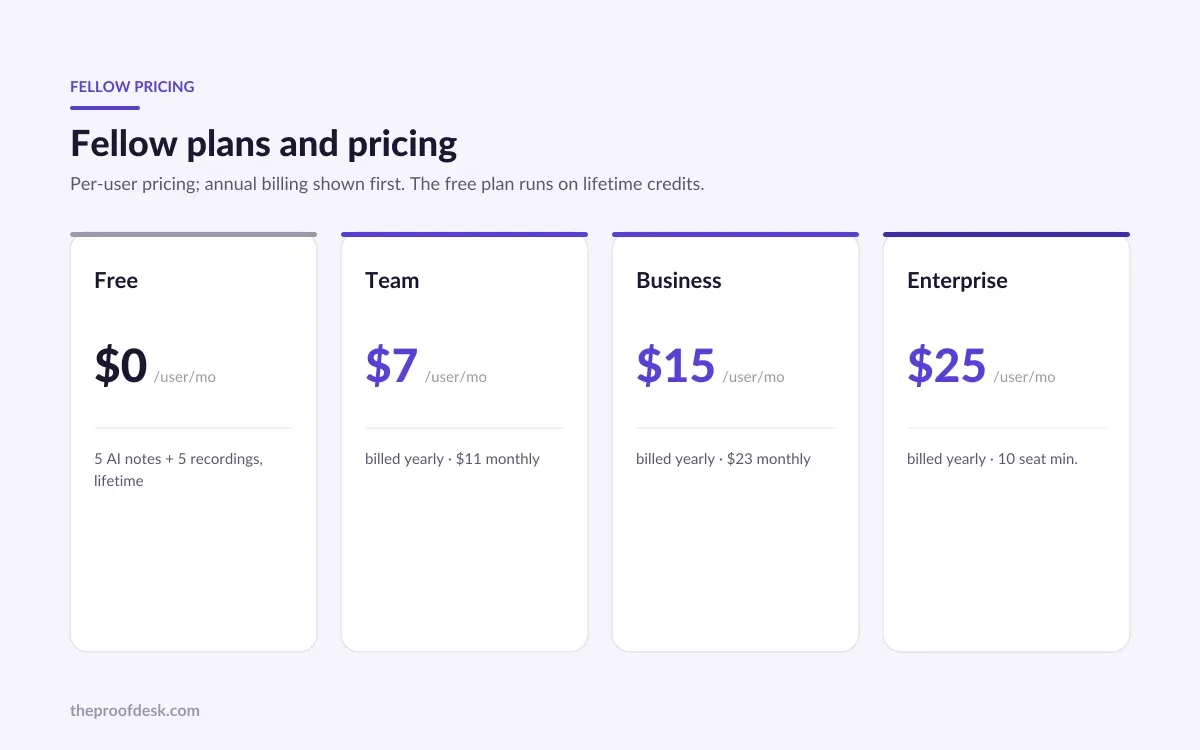
Fellow sells five tiers: Free, Solo, Team, Business and Enterprise. Every paid price below is per user, per month. Fellow quotes the discounted annual rate first, so we've paired each one with its higher month-to-month figure so you can see the real range.
Free — $0/user/month
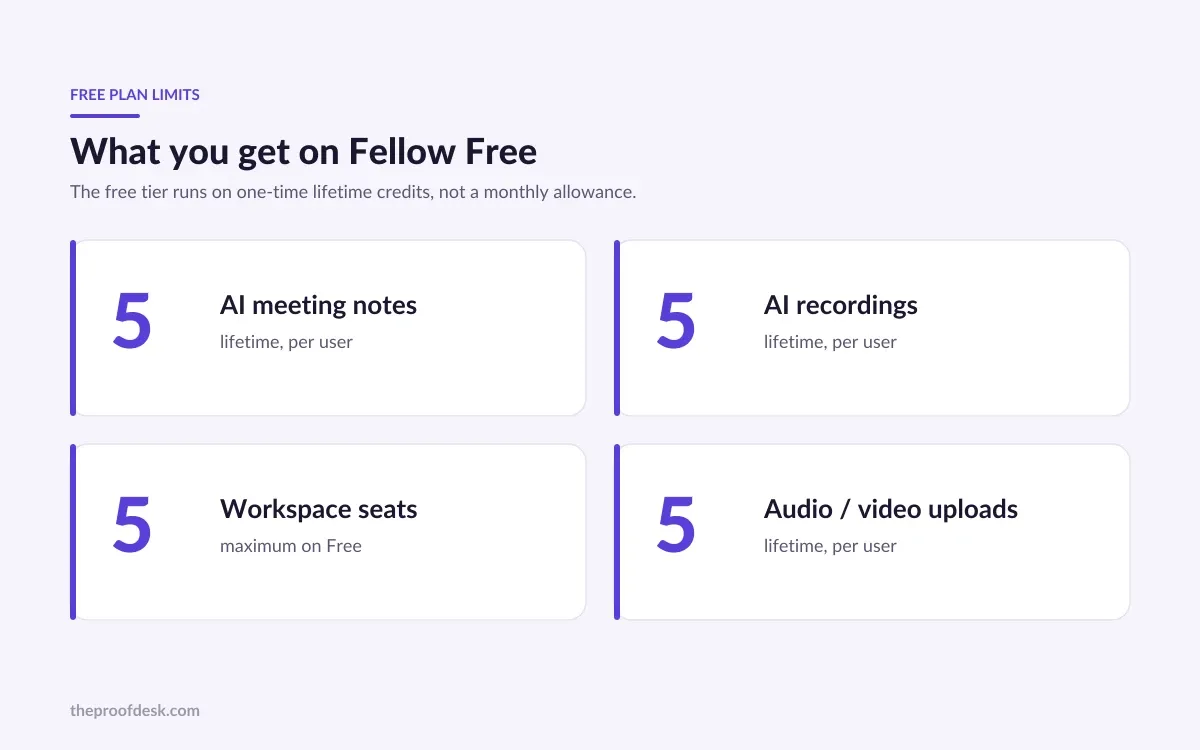
Core meeting notes, AI transcription, summaries, action items and basic integrations. Capped at 5 AI notes for the lifetime of the account (not monthly) and a maximum of 5 seats. There is no monthly billing option because there's nothing to bill.
Team — $7/user/month annually ($11 billed monthly)
10 AI notes per user per month and up to 20 seats. Adds meeting automations and project-management integrations on top of everything in Free.
Business — $15/user/month annually ($23 billed monthly)
Unlimited AI notes and recordings and up to 50 seats. Adds CRM integrations, Sales AI recap templates and organization-wide meeting templates.
Enterprise — from $25/user/month annually
Starts at a 10-user minimum with unlimited seats and unlimited AI notes. Adds SSO, HRIS syncing, workspace analytics, delegated access and advanced admin and security controls.
There's also a Solo plan aimed at individuals, with unlimited AI meeting notes, recordings and summaries. Fellow doesn't publish the Solo price on its public pricing page, so you'll see the number only when you select it on-site.
Where the jump makes sense
The meaningful line isn't Free-to-Team, it's Team-to-Business. Team's 10 AI notes per user per month is fine for someone with a handful of key calls, but if your role is meetings, you'll hit that ceiling. Business is the first plan with genuinely unlimited notes and recordings, and it's the one most heavy users should budget for.
The free-plan catch, spelled out
Read this twice: Fellow's free plan gives you 5 AI meeting notes for the entire lifetime of the account. It does not reset every month. This is the single detail competitor round-ups most often get wrong, and it changes who the free tier is actually for.
In practice, the free plan is a trial in disguise. Five notes is enough to see whether Fellow's summaries and action items are accurate for your kind of meetings, and not much more. If you attend even a few calls a week, you'll exhaust it in your first week and then be running Fellow with its headline feature switched off.
Who the free plan really suits
Someone evaluating Fellow before buying, or a very light user who records only a handful of important meetings ever. If AI notes are part of your weekly routine, treat Free as a demo and price out Team or Business from the start.
Privacy and recording: where Fellow leads
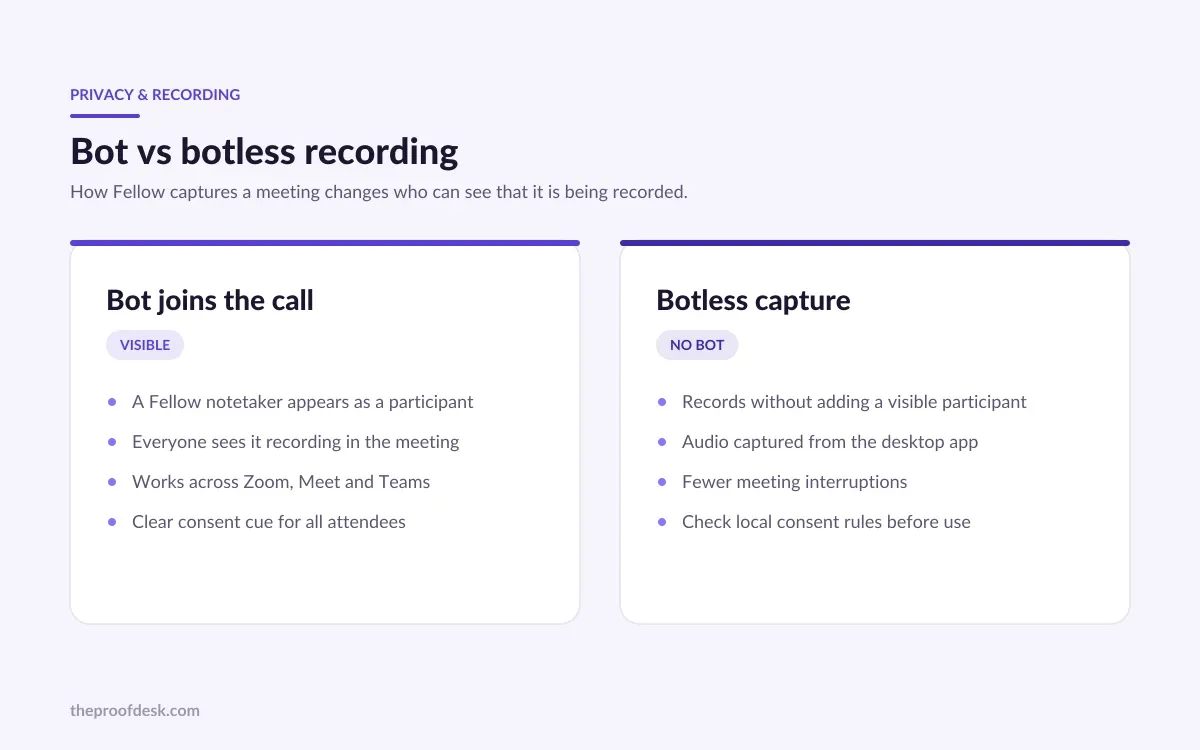
Two things set Fellow apart on the parts buyers increasingly care about. First, it's one of the only AI notetakers to offer both a bot join and a botless recording option, so you can decide whether a visible bot appears in the participant list. On sensitive external calls, a silent capture avoids the awkward "why is there a notetaker bot here?" moment; on internal calls, the visible bot keeps everyone honest that the meeting is being recorded.
Second, Fellow is SOC 2 compliant and states that it does not train any AI models on customer data. For teams handling client conversations or regulated information, "your meetings don't become someone's training set" is a line that matters, and not every rival can say it as plainly.
- Bot join or botless recording, your choice per meeting
- SOC 2 compliant
- Does not train AI models on your data
Where Fellow falls short
Fellow is strong, but it isn't the deepest tool in every dimension. Reviewers put it around 8 out of 10 on core features, praising the AI notes, Ask Fellow search and shared agendas, while flagging two consistent weaknesses.
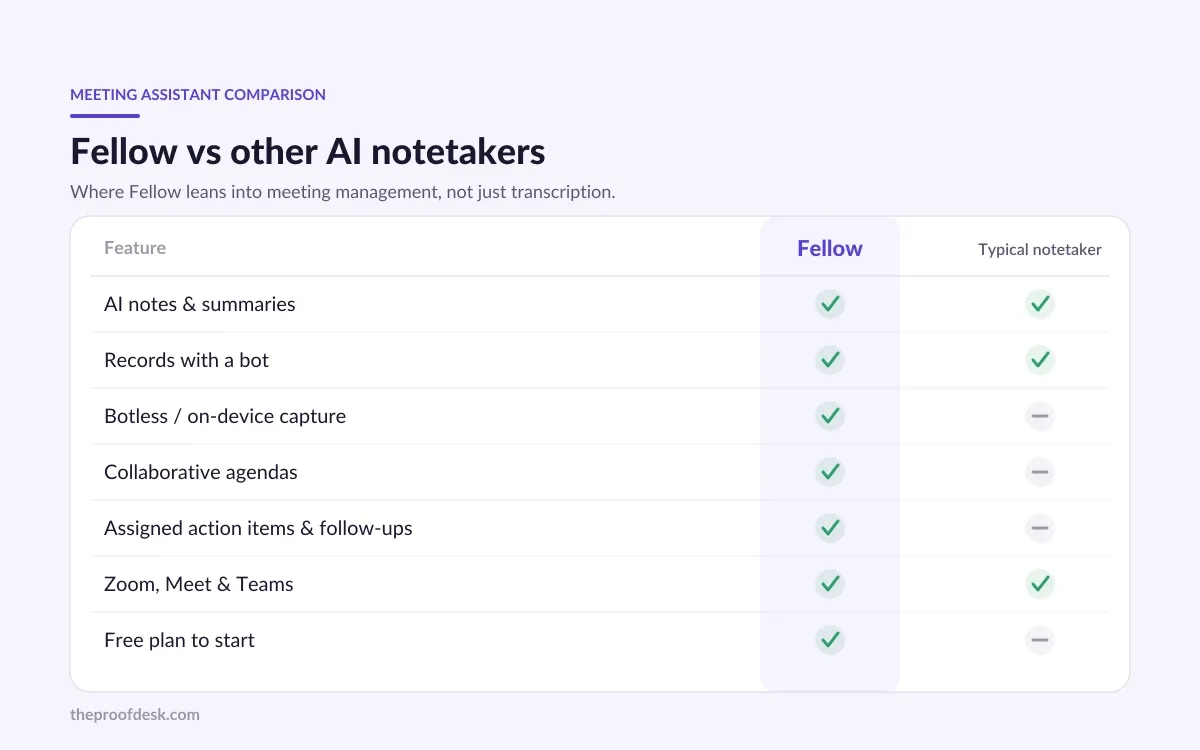
The first is precision on AI action items. Fellow captures them, but they're not always as cleanly scoped or correctly assigned as you'd want, so you'll still edit them. The second is breadth of integrations: rivals like Fireflies and Notta connect to more tools out of the box. If your workflow depends on a long tail of niche integrations, check Fellow's list against them before committing.
Consider a rival if...
You need the widest possible integration catalog, or your priority is raw transcription volume at the lowest price. Fellow's edge is the agenda-to-action-item workflow and privacy, not being the cheapest transcriber on the market.
Who should buy Fellow
Fellow is the right pick for teams that treat meetings as a workflow, not just events to record. If you run recurring meetings, care about carrying action items forward, and want the reassurance of botless recording and no AI training on your data, it's one of the best options in 2026.
Start on Free only to test accuracy, then move to Team if your meeting load is modest, or Business if AI notes are a daily habit and you want them uncapped. Solo is worth a look for independent professionals who want unlimited notes without paying for seats they won't use.
Frequently asked questions
Is Fellow really free, and what's the limit?
Yes, there's a genuinely free plan at $0 per user per month, but it caps you at 5 AI meeting notes for the lifetime of the account, not 5 per month. It also maxes out at 5 seats. It's best treated as an extended trial rather than a long-term free tool.
How much does Fellow cost per month?
Team is $7 per user per month billed annually, or $11 billed monthly, with 10 AI notes per user per month. Business is $15 per user per month annually, or $23 monthly, with unlimited notes. Enterprise starts at $25 per user per month annually with a 10-user minimum.
What's the difference between the Team and Business plans?
The core difference is AI note volume. Team gives each user 10 AI notes per month and up to 20 seats; Business makes AI notes and recordings unlimited, raises the cap to 50 seats, and adds CRM integrations, Sales AI recap templates and org-wide templates. Heavy meeting users should plan for Business.
Does Fellow work with Zoom, Google Meet and Microsoft Teams?
Yes. Fellow integrates with all three to automatically transcribe calls and generate summaries and action items. You can also choose between a visible meeting bot joining the call or a botless recording, depending on the meeting.
Is Fellow safe with my meeting data?
Fellow is SOC 2 compliant and states that it does not train any AI models on customer data. Combined with the option to record without a visible bot, that makes it a reasonable choice for teams handling sensitive or client conversations.
Is there a plan for a single user?
Yes. Fellow offers a Solo plan for individuals with unlimited AI meeting notes, recordings and summaries. Its exact price isn't published on the public pricing page, so you'll see the figure only when you select the plan on Fellow's site.
Key takeaways
- Fellow's free plan gives you only 5 AI notes for the lifetime of the account, not per month, so treat it as a trial.
- Paid tiers run $7/user/mo (Team, annual) to $25+/user/mo (Enterprise); Business at $15/user/mo annually is the first with unlimited notes.
- Fellow leads on privacy: botless recording, SOC 2 compliance, and no AI training on your data.
- Its weak spots are less precise AI action items and fewer integrations than Fireflies or Notta.
- Best for teams that run recurring meetings and want agendas, carried-forward action items and cross-meeting search.
More in Services & Software
Browse Services & Software