Filmora Review 2026: Filmora 16 Is Cheap Until You Use the AI
Filmora 16 review: what the new version adds, what the US$49.99 Basic, US$59.99 Advanced and US$79.99 Perpetual plans really include, how AI credits work, and who should buy.
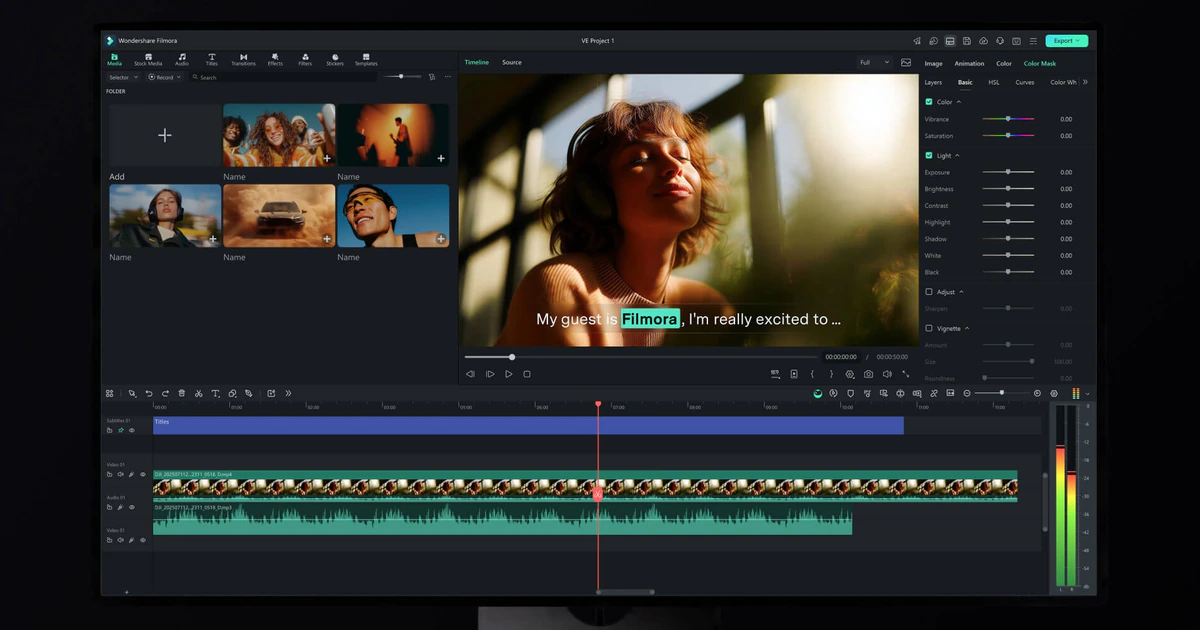
Wondershare Filmora has long been the video editor people recommend when Premiere Pro is too much and a phone app is too little. Filmora 16, released in September 2026, adds Camera Tracking, AI Media Analysis, Smart Text Correction and AI Night View, and the pricing page still leads with a US$49.99 yearly plan and a US$79.99 one-time licence.
Those headline prices are real, but they buy the editor, not the AI. Almost every generative feature is metered in AI credits, the cheapest plan gets none, subscription credits vanish every 30 days, and one Veo 3.1 text-to-video run costs 450 credits. This review walks through what each plan actually includes, what the AI costs in practice, and who should pick which option.
What Filmora 16 is and what changed
Filmora is Wondershare's consumer video editor for Windows and macOS, with a separate mobile app for iPhone, iPad and Android. It sits between phone-first editors like CapCut and professional suites like Premiere Pro: a multi-track timeline, keyframes, color tools and a large library of templates, effects and stock media, with a growing layer of AI tools on top.
Version 16.0 is listed on the vendor's What's New page under September 2026. The headline additions are:
- Camera Tracking, Color Mask and 360° Video Reframing for more precise compositing and reframing.
- AI Media Analysis, which the vendor says will "label and score your clips by content, so you can find the right shots quickly".
- Smart Text Correction, which "checks captions for errors and fixes them in one click".
- AI Night View, described as a way to "brighten low light and night footage with sharper detail and less noise".
- Dynamic Caption, Track Matte, Auto Color, Multi-Source Recording and an all-new Shortcut Key Manager.
The months before 16.0 were mostly about generative AI. Version 15.0.1 (November 2025) added AI Extend, 15.1.0 (December 2025) added AI Mate, a conversational assistant, and 15.4.2 (April 2026) brought GPT Image 2 into the app. Google's Veo 3.1 now powers the Text to Video and Image to Video tools. That matters for this review, because nearly all of those features are paid for separately from the plan price, in AI credits.
The editing experience
The core editor is the part of Filmora that costs nothing extra once you have a plan. The layout is the familiar four-panel one: media and asset library top left, preview top right, a property panel for the selected clip, and a multi-track timeline across the bottom. For someone moving up from a phone editor it is approachable, and for someone coming down from Premiere or DaVinci Resolve it will feel simplified but not crippled.
Export is straightforward. You can render locally or publish directly to YouTube, TikTok and Vimeo, choose presets by device, and paid plans export in 4K without a watermark. There is also a "Backup to the Cloud" toggle in the export dialog, which uses the cloud storage that comes with each plan.
The free version is a genuine trial of the editor rather than a crippled demo: Wondershare says you "can access all of Filmora's basic editing features for free, and easily export your videos. However, watermarks will be added to the exported files." The free asset library is much smaller, for example 1,500+ effects and filters versus 18K+ on paid plans, and 600+ stock media items versus 1.1M+.
Pricing: four plans, one catch
These are the default US-dollar prices shown on Filmora's pricing page when we checked on 26 September 2026. The page renders prices per region, so what you see may differ.
- Basic - US$49.99 per year (shown struck through from US$59.99). Windows and Mac, 1 GB cloud storage, continuous version upgrades, 4K export without watermark, 500 free AI Mate conversations. No monthly AI credits.
- Advanced - US$59.99 per year (struck through from US$69.99). Everything in Basic plus 1,000 Filmora AI credits per month and 10 GB cloud storage.
- Perpetual - US$79.99 one-time payment. One operating system only, 1,000 AI credits once, 1 GB cloud storage, updates within Filmora 16 only.
- Premium - US$99.99 per year, shown on the member-plan page rather than the main pricing page. 2,000 AI credits per month, 100 GB cloud storage, and the full Creative Assets library.
Wondershare describes Premium as bundling "Advanced US$59.99/yr + AI Credits US$9.99/mo + Creative Assets US$99.99/yr". Creative Assets is also sold on its own with a free 7-day trial, renewing at US$19.99 per month, and the software is not included in that add-on.
The catch
The Basic plan's comparison table marks the AI features as "Paid by AI Credits", and Basic comes with zero monthly credits. The US$49.99 plan is a solid conventional editor; it is not an AI video editor unless you buy credits on top.
At the time of checking, the pricing page also carried a "Limited Time: +1500 Bonus AI Credits" banner. Treat that as a promotion that may not be running when you buy.
AI credits: where the real cost sits
Filmora's credit rules page lists what each AI tool costs. A selection of the figures:
- Text to Video with Google Veo 3.1: 450 credits per run. With Sora 2: 150 to 450 credits per run.
- Image to Video with Veo 3.1: 250 to 450 credits per run.
- AI Extend: 300 credits for 5 seconds or 500 credits for 8 seconds at 1080p.
- AI Idea to Video: roughly 300 to 800 credits per session.
- AI Object Remover: 100 credits per use. AI Voice Cloning: 100 credits per use.
- AI Video Enhancer: 20 credits per use.
- Speech to text: 4 credits per minute. Smart Short Clips: 6 credits per minute. Text to Speech: 1 credit per 10 characters.
- AI Mate: 10 credits per use beyond the free allowance.
Put against the plans, the numbers are tight. Advanced's 1,000 monthly credits cover two Veo 3.1 text-to-video runs with 100 credits left over, or ten AI Object Remover passes, or about 250 minutes of speech to text. Premium doubles that. For captioning, cleanup and enhancement the allowance is workable; for generative video it runs out fast.
Credits also expire. Subscription credits are "valid for 30 days from the date of issuance", and the pricing FAQ is explicit: "Any unused credits from the previous 30-day period are reclaimed when the new credits are issued." There is no rollover. Perpetual-plan credits have permanent validity, but there are only 1,000 of them, once. Credits are shared across Windows and Mac.
Buying more credits
One-off credit packs run from 1,500 credits for US$9.99 to 100,000 credits for US$399, and those credits are valid for one year. There are also monthly packs of 2,000 credits for US$9.99 and 8,000 credits for US$37.99, which reset every 30 days.
The comparison worth doing: Basic plus a single 1,500-credit pack costs US$59.99, the same as Advanced. Advanced hands out 12,000 credits across the year but takes back whatever you do not spend each month; the pack gives you 1,500 credits to spend at your own pace over a year. If you use AI tools every week, Advanced wins easily. If you use them a few times a year, Basic plus a pack is the calmer choice.
AI features that cost no credits
On paid plans, Smart Search, Auto Reframe, AI Face Mosaic, AI Portrait and AI Color Palette do not consume credits. AI Mate gets 500 free uses per month on paid plans and 15 per day on the free plan.
The perpetual licence fine print
US$79.99 once looks like the best deal on the page, and for the right person it is. But read the conditions:
- "Perpetual plans include all updates to the current major version but don't include upgrades to future major versions." You own Filmora 16; Filmora 17 will cost extra.
- The licence is tied to one operating system: "a Windows license ... will only work on Windows devices". Basic and Advanced cover both Windows and Mac.
- The 1,000 AI credits are one-time. After that, every AI feature that uses credits needs a credit pack.
- "Projects made in Filmora 16 cannot be opened in previous versions", so collaborators on older versions cannot open your files.
Wondershare's upgrade page says Filmora 15 perpetual licences bought after 24 June 2026 get Filmora 16 for free, while owners of Filmora 10 to 15 bought before that date are offered an unspecified discount. Buyers of the "unlimited AI features" rights sold with version 13 were also converted: "The unlimited AI features rights have become normal AI features rights." That history is worth remembering before paying for any open-ended AI promise.
System requirements and platforms
- Windows: Windows 11, 10, 8.1 or 7 on x64, or Windows 11 or 10 on ARM. 8 GB RAM minimum, Intel 6th Gen or AMD Ryzen 3 1300X or higher, at least 10 GB free space.
- Windows GPU: GeForce GTX 1050 Ti or later, MX550 or later, Radeon RX 500 or later (excluding RX Vega), or Intel UHD 630 or later with 2 GB VRAM; 4 GB VRAM recommended. 8K editing needs an RTX 3000 series or Radeon RX 6000 series card with at least 8 GB VRAM.
- macOS: 10.15 Catalina through macOS 26 Tahoe, iMac 2017 or later, MacBook 2018 or later, Apple silicon supported. 4 GB VRAM is required for HD and 4K video.
- iOS and iPadOS: 13.0 or later. The Mac licence does not cover iOS or iPadOS; the mobile app is sold separately through the app stores.
Those are modest requirements. Most laptops bought in the last five years will run the editor comfortably, and the heavier generative tools run in the cloud rather than on your machine.
Privacy and security
Because the generative and enhancement tools run in the cloud, using them means uploading footage. The AI Video Enhancer is described as running "using cloud-based AI", and Wondershare's privacy policy (last updated 11 August 2026) says photos, videos and audio you provide are "sent to Google's AI models (Gemini 3.0 Flash/Pro, Veo 3.0/3.1, NanoBanana/NanoBanana Pro) and third-party AI models (Sora 2, Kling 2.5) for processing."
The same policy says "We do not use this data to train our own general AI models" and that biometric data will never be shared with third parties for their own model training or marketing. Biometric data may be retained for up to three years after your last interaction. If you edit client footage under an NDA, keep the AI tools off that project; the timeline editor itself works locally.
Company context
In September 2025 Trend Micro reported that Wondershare RepairIt, a different Wondershare product, exposed user data through insecure cloud storage and hardcoded credentials, tracked as CVE-2025-10643 and CVE-2025-10644. Filmora was not named in that research. It is still a reasonable prompt to think about what you upload to any vendor's cloud.
Trial, cancellation and refunds
The free version is the trial: full editor, watermarked exports. The pricing page promises a "30-day money-back guarantee" subject to the refund policy, and that policy has real exclusions:
- Direct purchases generally have a refund window of up to 30 days from the initial payment. EU customers have a 14-day right of withdrawal.
- Used credits are "generally non-refundable once consumed".
- A refund request "based solely on dissatisfaction with AI-generated output" is not eligible.
- Renewal charges are excluded if you did not cancel first: "Our 30-day policy does not apply to auto-renewal charges."
- App Store and Google Play purchases are refunded through those stores, not by Wondershare.
Subscriptions renew automatically until cancelled. Wondershare asks you to cancel at least 24 hours before the billing period ends, promises at least 14 days' notice of any price change, and keeps service running until the end of the paid term after you cancel. If you only want one year, cancel the renewal soon after buying.
Verdict: who should buy which plan
- Buy Basic (US$49.99/yr) if you want a friendly timeline editor with watermark-free 4K export on both Windows and Mac, and you rarely touch AI tools.
- Buy Advanced (US$59.99/yr) if you caption, clean up or enhance footage every month. The 1,000 credits cover that kind of work well; they do not cover much generative video.
- Consider Premium (US$99.99/yr) only if you also want the full Creative Assets library and 2,000 credits a month.
- Buy Perpetual (US$79.99) if you edit on one computer, do not care about Filmora 17 and want to stop paying. Treat the 1,000 credits as a bonus, not a supply.
- Skip Filmora if generative video is the main reason you are buying. At 450 credits per Veo 3.1 run, a dedicated generator or a pay-as-you-go credit budget is easier to reason about.
Filmora 16 is a good editor with a fair base price. The honest way to judge it is to price the editor and the AI separately: the editor is cheap, the AI is metered, and the plan names do not always make that clear.
Frequently asked questions
How much does Filmora cost in 2026?
Basic is US$49.99 per year, Advanced US$59.99 per year, Perpetual US$79.99 once and Premium US$99.99 per year, at default US prices checked on 26 September 2026. Regional prices and promotions vary.
Does the Filmora Basic plan include AI features?
Only a few. Basic has no monthly AI credits, so credit-based tools such as Text to Video, AI Object Remover and AI Video Enhancer need a credit pack. Smart Search, Auto Reframe, AI Portrait, AI Face Mosaic, AI Color Palette and 500 AI Mate uses a month are included.
Do unused Filmora AI credits roll over?
No, not on subscriptions. Unused subscription credits are reclaimed when the next 30-day batch is issued. Credit packs last one year and Perpetual-plan credits never expire.
Is the Filmora perpetual licence really lifetime?
It is lifetime for Filmora 16 only. You get updates within version 16, but future major versions cost extra, and the licence works on one operating system.
Can I use one Filmora subscription on Windows and Mac?
Yes, Basic and Advanced cover both, and AI credits are shared across them. The perpetual licence is tied to either Windows or Mac, and the Mac licence does not cover iPhone or iPad.
Does Filmora upload my videos?
Only when you use cloud AI tools or cloud backup. Footage sent to AI features is processed by Google and other third-party models, and Wondershare says it does not use it to train its own general AI models.
Can I get a refund on Filmora?
Usually within 30 days of the first payment on direct purchases. Consumed credits, renewals you did not cancel in time and complaints about AI output quality are excluded, and app store purchases go through Apple or Google.
Is the free version of Filmora usable?
Yes, for learning the editor. Every export carries a watermark and the asset library is much smaller, so it works as a trial rather than a long-term free editor.
Key takeaways
- Filmora 16 (September 2026) adds Camera Tracking, AI Media Analysis, Smart Text Correction and AI Night View to an approachable timeline editor.
- Basic at US$49.99/yr is a good-value editor with no monthly AI credits; Advanced at US$59.99/yr adds 1,000 credits a month.
- Subscription credits are reclaimed every 30 days, and one Veo 3.1 text-to-video run costs 450 credits.
- Perpetual at US$79.99 covers Filmora 16 on one operating system only, with 1,000 one-time credits.
- Refunds are available within 30 days of the first payment, but not for consumed credits, un-cancelled renewals or disappointing AI output.
More in Services & Software
Browse Services & Software