Netmaker Review 2026: Free Self-Hosted Core, $3 Cloud Connections and Telemetry On by Default
Netmaker review: what per-connection pricing really costs, what the free self-hosted edition lacks, six 2026 CVEs and how to turn off default telemetry.
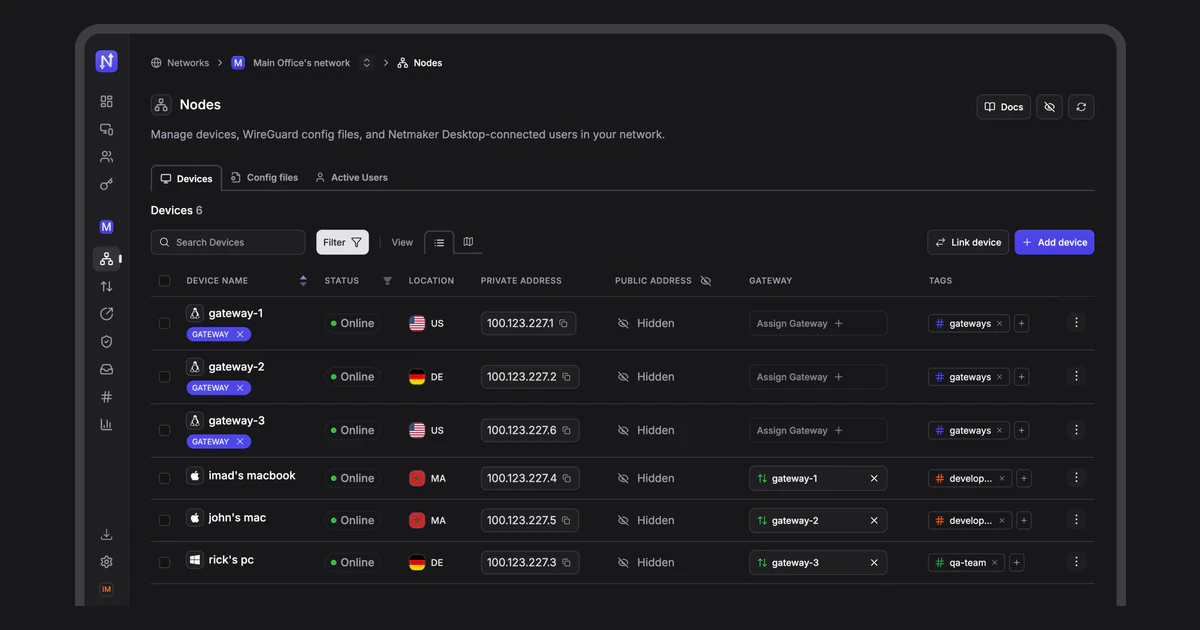
Netmaker is a WireGuard-based mesh networking platform. A coordination server hands out keys, addresses and access rules, and every device builds direct encrypted tunnels to the others. The core is open source and free to self-host, and the paid plans run either on Netmaker's cloud or on your own server.
The pricing has changed shape. The old $99 a month Professional plan and per-device billing are gone, replaced by billing per active connection, with Team "starting $2" and Business "starting $4" a month. Those headlines are the self-hosted rates, though. On Netmaker's cloud, Team starts at $3 a connection plus a $10 platform fee. This review works out what a team actually pays, what the free edition leaves out, and two things the pricing page does not mention: six security advisories published in 2026 and telemetry that is on by default.
What Netmaker is and how it works
Netmaker was founded in 2021 and went through Y Combinator's Winter 2022 batch. It announced a $2.3 million seed round in October 2022, led by Lytical Ventures, Uncorrelated Ventures and SaxeCap, and Y Combinator lists a team of 7. Its open-source repository, gravitl/netmaker, had about 11,800 GitHub stars and 661 forks in October 2026.
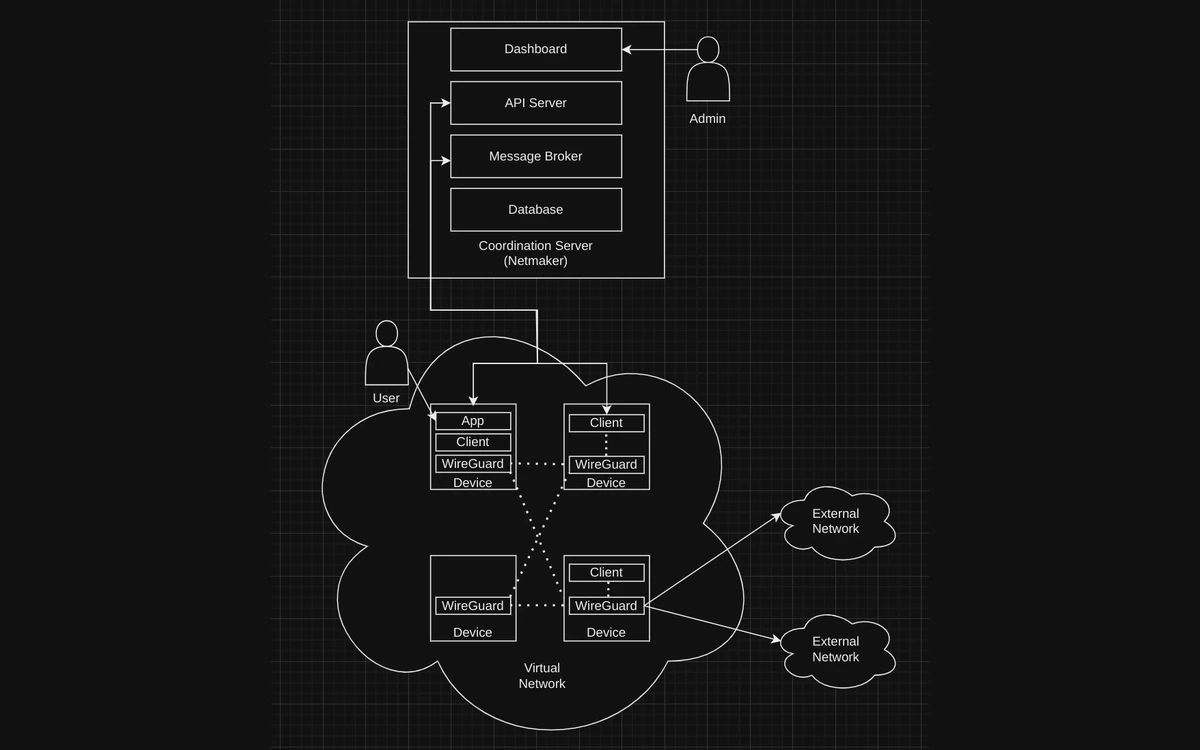
A Netmaker deployment has two parts. The coordination server bundles the web dashboard, the API, an MQTT message broker (Mosquitto by default) and a database (embedded SQLite by default, with PostgreSQL or rqlite as options). Every device runs the netclient agent alongside WireGuard. The server hands out addresses, keys and access rules, and the devices build encrypted tunnels to each other. The README leans on kernel WireGuard as the selling point: "Kernel WireGuard offers maximum speed, performance, and security."
The licence is open core. Code outside the repository's pro/ directory is Apache 2.0, while the pro/ directory has its own Pro licence, which is why GitHub reports the licence as NOASSERTION. "Open source" therefore describes the Community Edition, not every feature in the codebase.
Netmaker pricing in 2026: billed per active connection
There are four plans: Community (free, self-hosted, Apache 2.0), Team, Business and Enterprise (custom quote). Every paid plan can run either on Netmaker's cloud or on your own server. The pricing page pitch is "Stop paying for idle seats. Netmaker charges only for daily active connections."
The real rates behind "starting $2"
The pricing calculator pulls its rates from Netmaker's billing API. Each plan has a platform fee and three connection tiers:
- Team Cloud: $10 per month platform fee, then $3.00 per connection for connections 1-50, $2.50 for 51-100 and $2.00 for 101-150.
- Team Self-hosted: no platform fee, then $2.00, $1.50 and $1.00 per connection.
- Business Cloud: $30 per month platform fee, then $5.00, $4.50 and $4.00 per connection.
- Business Self-hosted: no platform fee, then $4.00, $3.50 and $3.00 per connection.
- Networks: the first is free on every plan, then $10 per extra network per month.
- Above 150 connections the calculator switches to "Custom" and a contact form.
So the "Starting $2" and "Starting $4" headlines are the self-hosted rates for your first 50 connections. On the cloud version, Team only gets down to $2 a connection, and Business to $4, for connections 101 to 150, with the platform fee charged on top.
What a real network costs
The tiers are graduated, not volume-based: the first 50 connections are always billed at the tier-1 rate, the next 50 at the tier-2 rate, and so on. Monthly totals with one network:
- 10 connections: $40 on Team Cloud ($10 + 10 x $3), $20 on Team Self-hosted.
- 25 connections: $85 on Team Cloud.
- 100 connections: $285 on Team Cloud, $175 on Team Self-hosted, $505 on Business Cloud and $375 on Business Self-hosted.
- 150 connections: $385 on Team Cloud.
- Each additional network adds $10.
Self-hosting a paid plan removes the platform fee and lowers every per-connection rate, but you take on running and patching the server, which matters given the 2026 security record covered below.
What counts as a connection
Netmaker's help center defines a connection as a Netclient device, a WireGuard config file (a "static node") or a Netmaker Desktop or mobile app user. A phone or router joined with a plain WireGuard config therefore counts the same as a server running netclient. The two official descriptions of the billing basis do not quite match: the pricing page says "daily active connections", while the help article says billing is "solely on the average active connections throughout the month". Ask which one applies before you commit.
What the free Community Edition includes and what it leaves out
The free self-hosted edition is generous on scale. It has no device or network caps and the pricing page lists these features:
- Unlimited networks and unlimited devices
- Basic access controls with device policies
- Bring-your-own WireGuard and egress to external networks
- Private DNS
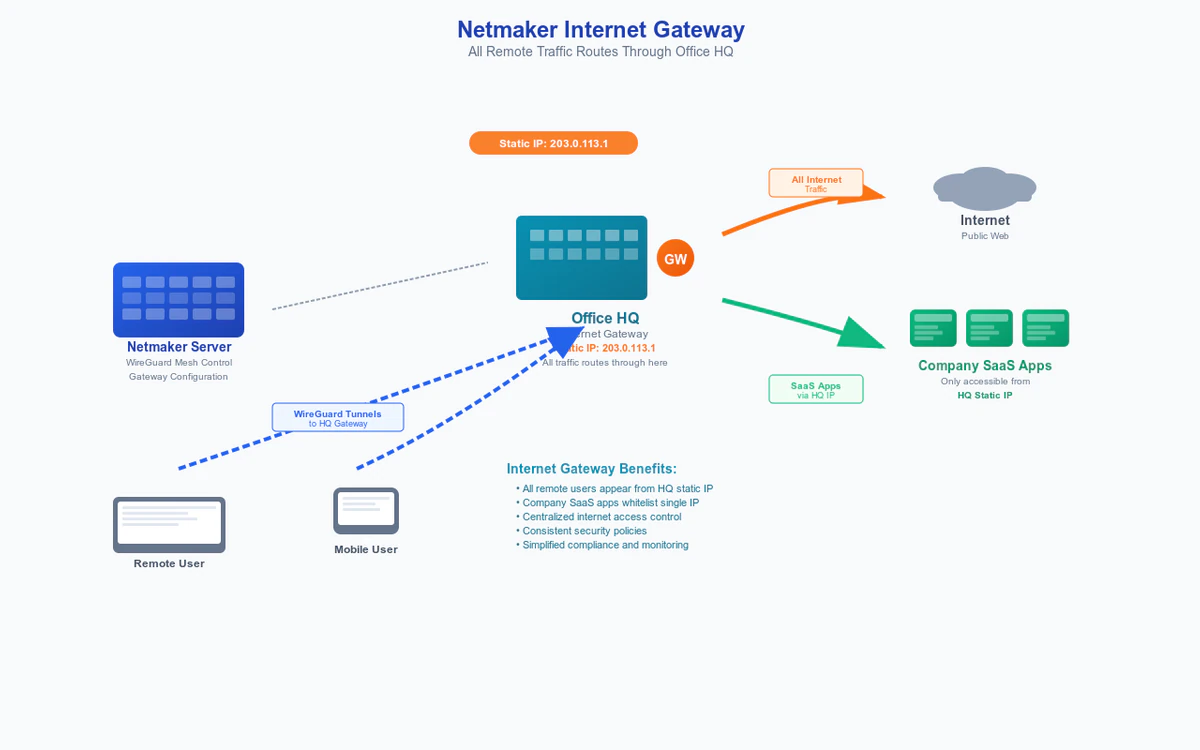
- Full-tunnel internet gateways and network relays
- Basic user management and MFA
- Kubernetes operator
- TCP transport
Paid-only features
- Team adds SSO login (Google, GitHub, Microsoft, custom OIDC), advanced access controls with user policies, dedicated traffic relays, zero-touch NAT traversal, a Prometheus and Grafana metrics exporter, network analytics, application-aware routing, the desktop and mobile apps and standard support.
- Business adds audit logging, high-availability traffic routing, posture checks, device approvals, MDM and EDR integration and priority support.
- Enterprise adds SCIM provisioning (Entra ID, Google Workspace, Okta), traffic logs, just-in-time access, SIEM integration, custom MSA and SLAs, invoicing, a choice of data residency and dedicated support.
The help center's edition comparison is blunter about the gap. It lists non-admin user management, identity-provider login, the desktop and mobile apps, auto-relays, gateway high availability, posture checks, traffic metrics and logging, white labelling and tag management as Pro-only. On the free edition, plan on admins enrolling devices themselves rather than end users signing in through your identity provider.
Setup, clients and platform support
On the cloud plans Netmaker runs the coordination server for you. Self-hosters deploy the server stack themselves, then create a network in the dashboard and add hosts to it. The Kubernetes operator is included in the free edition for cluster workloads.
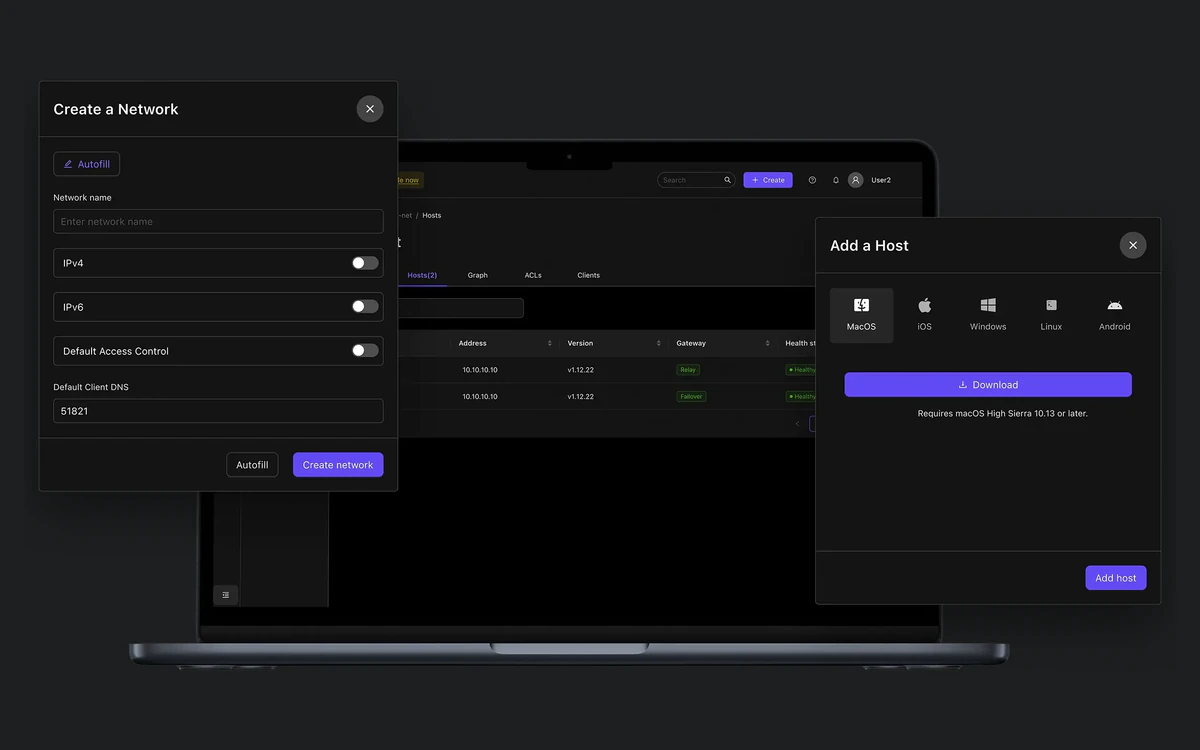
Netclient supports Linux (most distributions), Windows, macOS and FreeBSD. Every other device joins with what Netmaker calls a Remote Access Client config, which is a standard WireGuard configuration file. Netmaker Desktop is available for Windows, Mac and Linux, with Android and iOS apps alongside, but those apps are paid features.
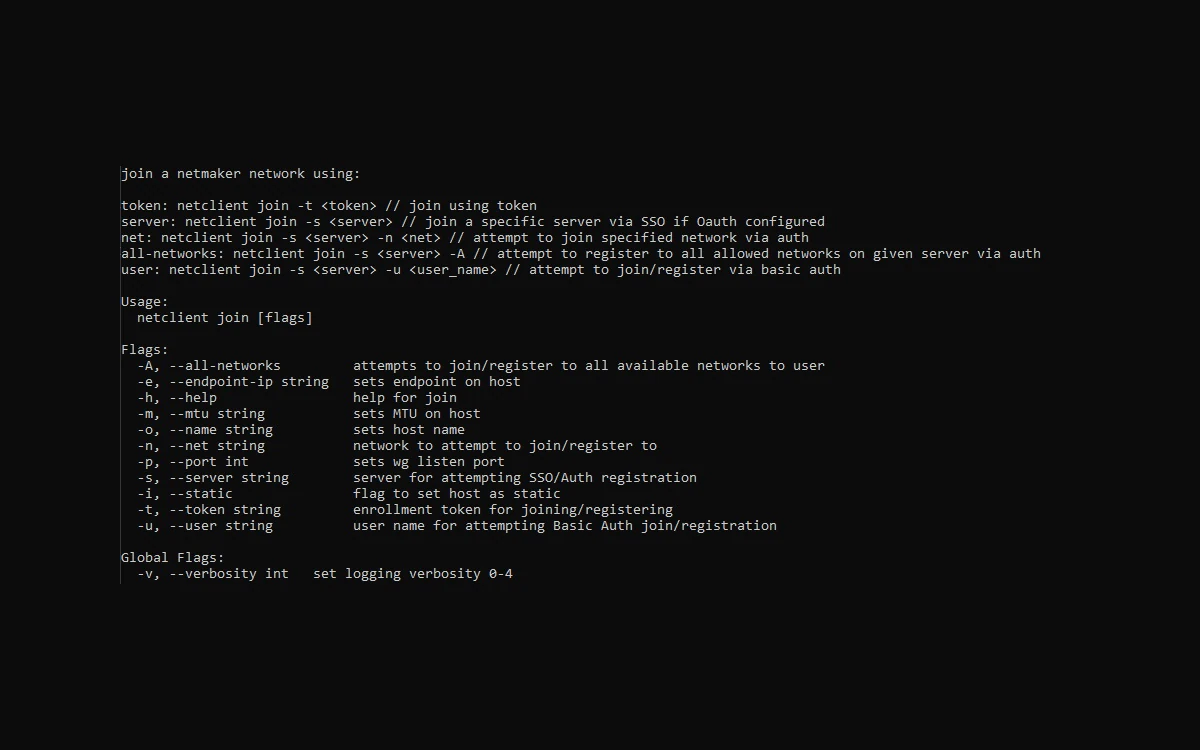
The OAuth documentation lists Google, Okta, Microsoft Entra ID, generic OpenID Connect and GitHub. The Team pricing card leaves Okta out, although Okta is listed for Enterprise SCIM provisioning. If you choose Team Cloud, confirm during the trial that SSO is actually enabled on your tenant, since the billing configuration we read does not make it obvious.
Two limitations are worth knowing. The cloud service states that "IPv6-only machines are not yet supported." The documentation is also mid-migration: docs.netmaker.io pages are marked as deprecated in favour of learn.netmaker.io, so some guides and screenshots lag behind the current release.
What changed in v1.7.0
Netmaker v1.7.0 shipped on 31 August 2026. It adds multi-tenancy for managed service providers, a TCP proxy and WSS uplink option, EDR integration (Pro: Defender, CrowdStrike, SentinelOne, Wazuh) and MDM integration (Pro: Intune, Jamf, JumpCloud, Iru).
Releases have arrived every two to three months: v1.4.0 in December 2025, v1.5.0 in February 2026, v1.5.1 in March, v1.6.0 in June (site-to-site ACLs in beta, an egress applications catalogue and just-in-time group memberships) and v1.7.0 in August. Self-hosters cannot skip ahead: "You must run Netmaker v1.6.0 successfully before upgrading to v1.7.0."
Security record: six advisories in 2026
Netmaker's GitHub security page lists six advisories published in 2026:
- CVE-2026-29771 (high, March 4): denial of service via a server shutdown endpoint, fixed in 1.2.0.
- CVE-2026-29194 (high, March 7): insufficient authorization in host token verification, fixed in 1.5.0.
- CVE-2026-29195 (medium, March 7): privilege escalation from admin to super-admin via user update, fixed in 1.5.0.
- CVE-2026-29196 (high, March 7): users with network access could read config files containing WireGuard private keys, fixed in 1.5.0.
- CVE-2026-32599 (medium, September 15): boolean-based SQL injection, fixed in 1.5.0.
- CVE-2026-81034 (medium, October 13): SMTP TLS certificate verification bypass, fixed in 1.6.0.
Older advisories include CVE-2023-32079 (critical, non-admin to admin), CVE-2023-32077 (a hardcoded DNS secret key) and CVE-2022-23650 (a hard-coded cryptographic key). Everything listed is fixed in current releases.
On the cloud plans, Netmaker patches the server. A self-hosted server older than 1.6.0 is exposed to at least one of these issues. CVE-2026-29196 matters most in a mesh network, because WireGuard private keys are what identify each device. If you ran an affected version with users you do not fully trust, upgrading and rotating keys is the cautious move. Vulnerability reports go to [email protected], and the policy states "there is no official bug bounty program".
Privacy: telemetry is on by default
A self-hosted Netmaker server phones home by default. The default environment file sets TELEMETRY=on, and the server sends a daily check-in to PostHog with counts of nodes, hosts, users and networks, operating system counts, the version and Pro or trial status. It also sends the admin email and domain, which a code comment says is "needed for posthog integration with hubspot", HubSpot being a sales and marketing CRM.
To opt out, set this in the server environment (or Server.Telemetry=off in the config file):
TELEMETRY=offThe privacy policy only covers website visitors. It mentions name, company, email and payment history via Stripe, plus log data such as IP address, browser and ISP, but says nothing about the network and device data held in cloud tenants or where it is stored. Choosing a data residency region is an Enterprise feature. We could not confirm a SOC 2 or ISO 27001 certification, because Netmaker's trust portal refused access, so ask for any report your procurement process needs before signing.
Trial, billing terms and cancellation
- Trial: 7 days on Team and Business, with no annual plan to lock in a discount.
- Renewal: subscriptions renew automatically for the same term unless either side gives notice at least 30 days before the end.
- Late payment: a finance charge of 1.5% per month.
- Refunds: none on change of mind. The only refund is a pro-rated portion of prepaid fees when you terminate because Netmaker breached the agreement.
- Liability: capped at the greater of $1,000 or the fees paid, under New York law.
- Closing an account is irreversible and deletes all its tenants and subscriptions. It is done from the profile page at account.netmaker.io.
The subscription terms carry no effective date, so save a copy when you sign up.
Netmaker vs Tailscale and ZeroTier
All three build private overlay networks between your devices, but they bill and license in very different ways:
- Tailscale is free for 6 users, with paid seats at $8, and bills per user.
- ZeroTier gives 10 devices free, its Essential plan is $18, and its self-hostable controller is licensed for non-commercial use only.
- Netmaker's self-hosted Community Edition is free with unlimited devices and networks under Apache 2.0. Paid plans bill per active connection, from $2 self-hosted or $3 plus a $10 platform fee on cloud.
Netmaker wins on unrestricted self-hosting that is free for commercial use, kernel WireGuard and paid plans that can also run on your own hardware. It loses on convenience: the free tier means operating your own server, SSO and the desktop and mobile apps require a paid plan, the company is small, the 2026 advisory list is long and telemetry is on until you turn it off.
Verdict: who should use Netmaker
Netmaker suits infrastructure teams that are comfortable running a server and want a free, commercially usable WireGuard mesh with no device cap. It also suits Kubernetes users who want the operator, and MSPs now that v1.7.0 adds multi-tenancy. For them, the Community Edition is one of the few options with no device limit and no non-commercial clause.
It is a weaker fit for small teams that want a hands-off VPN with SSO and phone apps, since those cost money and the cloud rates are higher than the headline suggests: $40 a month for 10 connections on Team Cloud. It is also a weaker fit for compliance-driven buyers, who get no published certification and no data residency choice below Enterprise. Whichever edition you pick, set TELEMETRY=off if you do not want to share usage data, and keep self-hosted servers on v1.6.0 or later.
Frequently asked questions
How much does Netmaker cost in 2026?
The self-hosted Community Edition is free. Team starts at $2 per active connection per month self-hosted, or $3 per connection plus a $10 platform fee on Netmaker's cloud. Business starts at $4 self-hosted, or $5 plus a $30 platform fee on cloud. Rates drop for connections 51-100 and 101-150, each extra network costs $10 a month, and anything above 150 connections is custom pricing.
What counts as an active connection?
Every Netclient device, every static WireGuard config file and every Netmaker Desktop or mobile app user. The pricing page says it bills "daily active connections", while the help center says billing uses the "average active connections throughout the month", so ask which method applies to your account.
Is Netmaker free for commercial use?
Yes, the Community Edition is released under Apache 2.0 with unlimited networks and devices, and nothing in that licence restricts commercial use. Only the code in the repository's pro/ directory sits under a separate Pro licence, and that is the code behind the paid features.
Does a self-hosted Netmaker server send data to Netmaker?
Yes, by default. A daily check-in goes to PostHog with node, user and network counts, OS counts, version, licence status and the admin email and domain. Set TELEMETRY=off in the server environment to stop it.
Is there a free trial or a refund?
There is a 7-day free trial on Team and Business. There is no money-back window: the terms only provide a pro-rated refund of prepaid fees when you terminate because Netmaker breached the agreement.
Is Netmaker cheaper than Tailscale?
It depends on how many devices each person has. Tailscale is free for 6 users and charges $8 per paid seat, while Netmaker counts devices and app users. A 10-connection Team Cloud network costs $40 a month and the same network self-hosted costs $20. On the free tier, Netmaker has no user cap but you run the server yourself.
Is Netmaker secure?
Its tunnels use kernel WireGuard, but the server software had six security advisories published in 2026, including one that exposed WireGuard private keys to users with network access. All of them are fixed in v1.6.0 and later, so self-hosters must keep the server current.
Which devices does Netmaker support?
Netclient runs on Linux, Windows, macOS and FreeBSD. Phones, routers and anything else that speaks WireGuard can join with a standard WireGuard config file. The Netmaker Desktop and mobile apps are paid features, and the cloud service does not yet support IPv6-only machines.
Key takeaways
- The Community Edition is free to self-host under Apache 2.0, with unlimited devices and networks, including for commercial use.
- The paid "starting" prices are self-hosted rates. Team Cloud is $10 a month plus $3 per connection for the first 50, so 10 connections cost $40 a month.
- Tiers are graduated, extra networks cost $10 a month each, there is no annual plan and anything above 150 connections is custom pricing.
- SSO, the desktop and mobile apps, advanced ACLs and posture checks all require a paid plan.
- Six advisories were published in 2026, one of them exposing WireGuard private keys. Self-hosters should run v1.6.0 or later.
- Self-hosted servers send daily telemetry, including the admin email, until you set TELEMETRY=off.
More in Virtual Private Network
Browse Virtual Private Network