Technology reviews & practical guides
Our Twingate review covers 2026 pricing ($0, $5 and $10 per user), how its zero-trust routing works, what it logs by plan, no-refund terms and its May outage.
Twingate sells itself as the thing you replace your company VPN with. Instead of putting a laptop on the office network, it gives each user access to specific Resources, such as a database, a Git server or an internal dashboard, and nothing else. In October 2026 the free Starter plan still covers up to 5 users, and paid seats list at $5 per user per month on Teams and $10 on Business.
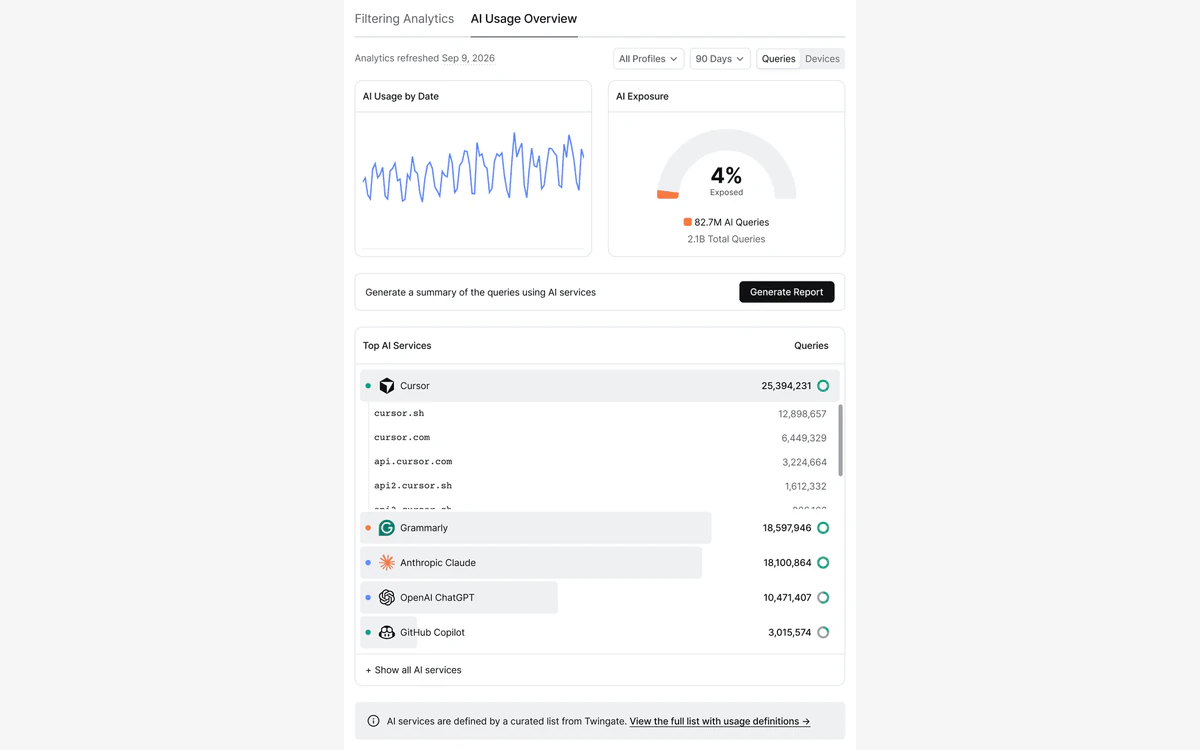
This year stretched the product well past remote access: Privileged Access for SSH in May, Privileged Access for web apps in August (with HTTPS from October 15), an AI Usage Overview in DNS filtering in September, and a flat $15 per month Home plan for homelabs. We went through Twingate's pricing page, docs, terms, privacy policy and status page to see what you get, what it logs and where the fine print bites.
The short version: it is one of the cheapest ways for a small technical team to retire a legacy VPN, on a sound architecture. The catches are short log retention on the cheaper plans, a no-refund billing policy, a pricing page that contradicts itself on yearly prices, and a May 2026 authorization outage.
Twingate is one of the cheapest and cleanest ways for a small team to replace a VPN with per-Resource access. Start on the free plan or a 14-day trial, and read the billing terms before you pay for a year.
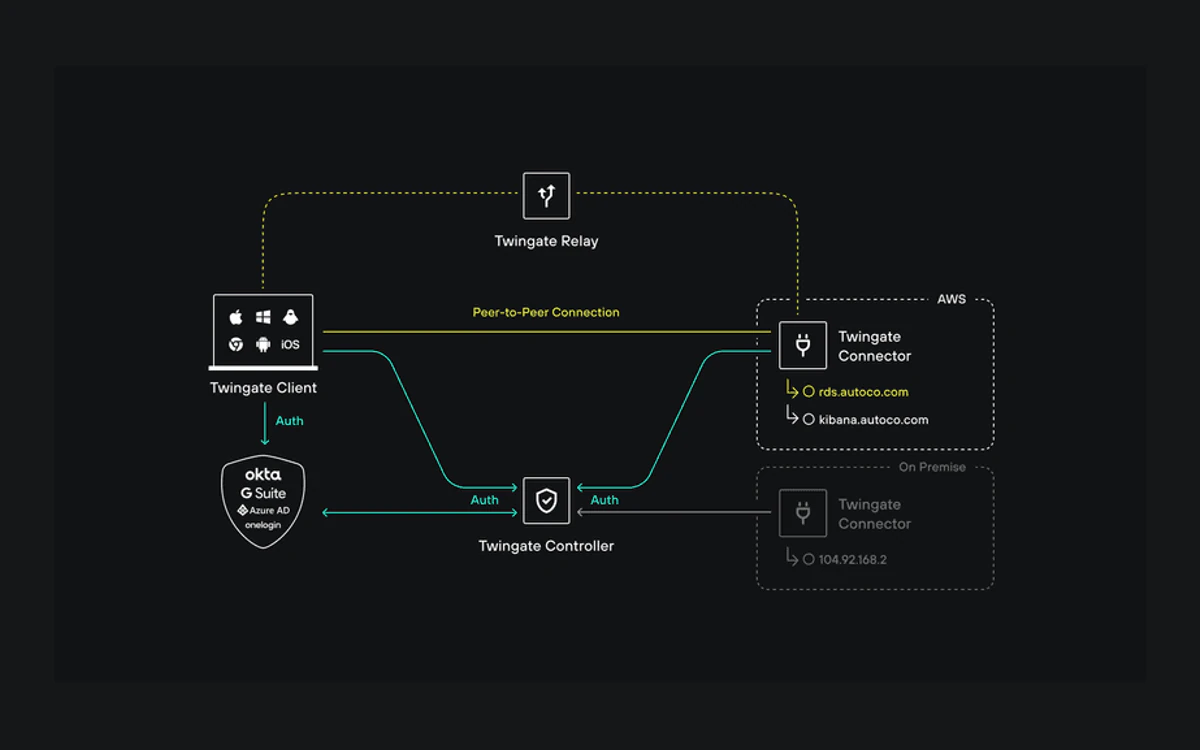
Twingate is built from four components: the Controller, Clients, Connectors and Relays. The Controller is a Twingate-hosted, multi-tenant service that holds your configuration and decides who may reach what. According to Twingate's own architecture docs, it is "the only component that does not interact with any data flow".
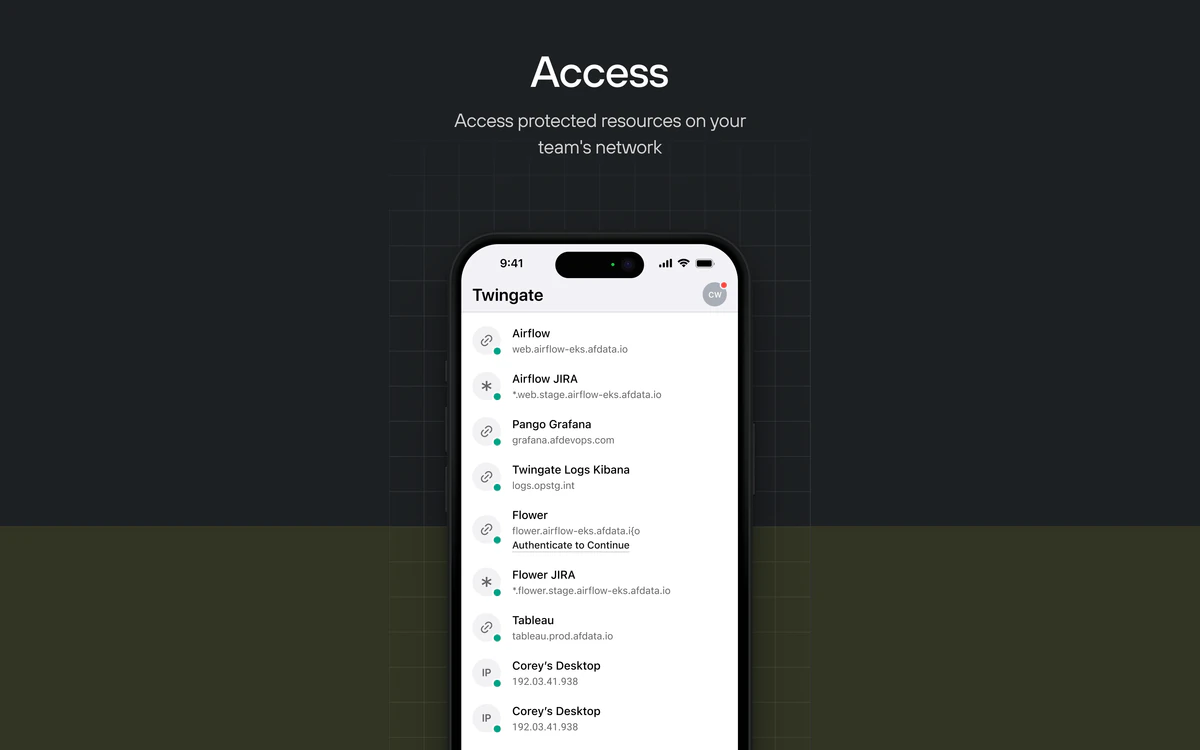
Connectors are the piece you run. You deploy them inside each private network you want to expose (on Linux, in Docker or in a cloud account), and they sit in front of the Resources you define: a database, an internal dashboard, a Git server, an SSH host. Clients run on your users' devices and only ever see the Resources their policies allow.
When a user opens a Resource, "Twingate always attempts to establish a peer-to-peer connection between the Client and Connector", and Relays are used as a backup when a direct path cannot be made. The peer-to-peer transport uses QUIC, which supports only TLS 1.3 and later. Twingate says Relays "do not store any traffic or network-identifiable information" and that no data-carrying connection is terminated at a Relay.
Encryption is end to end between the Client and the Connector. The docs state that nothing in between, Relays included, can decrypt packets, because they are encrypted with a session key generated by the Client and shared with the Connector.

Twingate brokers who can reach which Resource, but the contents of that traffic travel encrypted between your device and your own Connector. A compromised user account exposes only the Resources that account was granted, not a whole network.
By default Twingate is split-tunnel: in the docs' words, "only traffic destined for Resources goes through Twingate". Everything else, including normal web browsing, leaves through the device's regular internet connection. That is the right design for remote access, and it also means Twingate is not a privacy VPN out of the box.
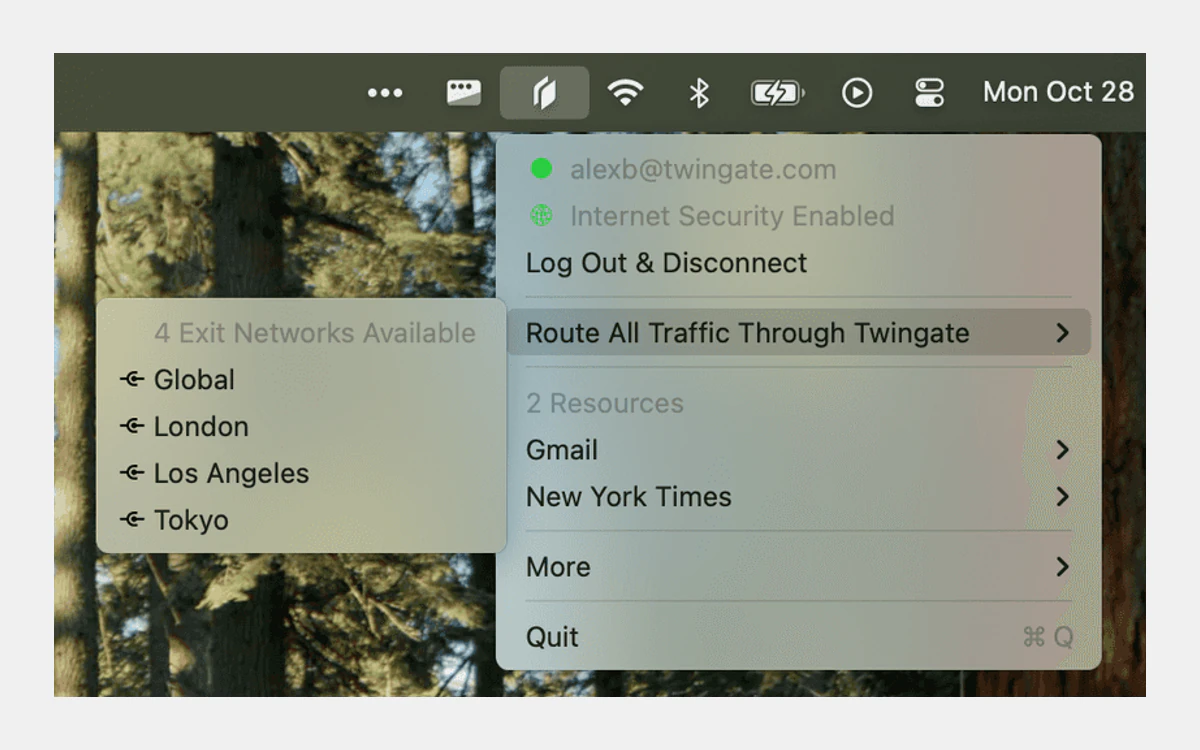
Exit Networks are the full-tunnel option. They route all of a device's internet traffic through an exit you choose, which is useful for a fixed egress IP, inspection or travel. They launched on October 30, 2024 as an Enterprise-only feature, and the docs now say they "are only available on certain plans (Home, Business, Enterprise)". Teams and Starter do not get them.
Relay coverage also depends on the plan. Starter, Home and Teams use 12 Global Relay Network locations at the Basic performance tier. Business gets 21 locations at Standard, and Enterprise gets 21 at Premium. Because Relays are only the fallback path, this matters most for users behind restrictive networks where peer-to-peer fails.

Twingate's pricing page lists five plans. Here is what each one includes, with limits taken from the page's comparison table.
Every plan except Enterprise allows 5 devices per user. Home, Teams and Business each offer a 14-day trial.
The Teams and Business cards carry a "Yearly -15%" badge, but the comparison table's yearly column shows "$12 user / mo" for both plans. That is higher than either card price and identical for two plans that differ by $5. We could not tell whether $5 and $10 are the monthly rates or the already-discounted yearly rates. Confirm the exact figure at checkout before you commit to an annual term, especially because annual fees are not refundable.
One more caution: several answers in the pricing-page FAQ look like placeholder text (a billing question is answered with a line about setup taking 15 minutes). For billing and refunds, rely on the Terms of Service, covered below.
Twingate shipped steadily this year, and most of it pushes the product from network access toward privileged and audited access. From the public changelog:
That builds on 2025, which brought Geoblocking (January 3), Privileged Access for Kubernetes and a generally available Kubernetes Operator (June 26), Multi-Account Support (September 1), JIT Access Requests (October 22) and Linux userspace networking (December 11).
AI-agent access is not shipped. The Identity Firewall docs mention "future support for database protocols and Model Context Protocol (MCP)", and database support is listed as early access on the pricing page. Treat MCP as roadmap, not a feature you can buy today.

Bookmarks, scripts and documentation that point at the old admin console address should be updated to the <network>.us1.twingate.com format.
Twingate has clients for macOS, Windows, Linux, iOS, Android and ChromeOS. The Windows and Linux clients can also run headless, which is how service accounts connect CI runners and servers without a logged-in user.
Two limits are worth planning around. Clients older than 12 months are not supported and will not connect, so managed fleets need a regular update cycle. And DNS filtering and DNS-over-HTTPS only work on the macOS, Windows and Linux clients, not on phones or Chromebooks.
On the connector side, there is still no native Windows Connector; it has been waitlist-only since June 17, 2026. Windows-only shops will need a small Linux VM or a Docker host to run one.
The iOS app was updated to version 2026.279 on October 15, 2026 and is rated 4.38 on the US App Store, though that average comes from only 34 ratings.

Twingate does not store the contents of your traffic. Its customer-data page says "content data is not stored by Twingate" and that, because of end-to-end encryption, it has no visibility into the unencrypted contents.
It does keep network and connection activity logs, and how long depends on the plan. The pricing page lists the minimum log storage period as:
Yes, the flat-rate Home plan keeps logs longer than the paid-per-seat Teams plan. That is what the page says. If you need a longer audit trail on Teams or Business, the comparison table also lists syncing logs to an S3 bucket and to a SIEM.
DNS filtering is the bigger data trade-off. When it is on, Twingate collects and logs the domain names users try to reach, along with the time, the user's identity and details about the device. That data is stored on US servers, some of them run by vendors such as Google Cloud. Separately, session recording in the Identity Firewall product, which runs on customer-deployed Gateways, lets a customer capture the contents of communications. That is a choice the admin makes, not a default.
Twingate's privacy policy (last updated September 28, 2026) covers its websites and service accounts. It lists device identifiers, browser and OS versions, IP address, ISP and carrier name and signal strength; usage data such as bandwidth and when and for how long you use the service; and location derived from IP address, GPS or other device sensors. It shares online identifiers, cookie and device identifiers and IP addresses with advertising partners for its websites and ads. Data is kept for as long as needed to provide the service or as long as you have an account.

Twingate is an access-control product, and logging who reached what is part of the job. If your goal is personal browsing privacy, a consumer VPN with an audited no-logs policy is the right tool, not Twingate.
Twingate has a SOC 2 Type 2 report. Existing customers request it through trust.twingate.com, and access to the report expires after 30 days. We could not confirm other certifications because the trust centre only renders in a browser, and the HIPAA, PCI, GDPR and DORA pages in the docs are compliance guides, not certifications.
Security issues are reported by email to security [at] twingate.com, and Twingate says it aims to resolve critical issues within 5 business days of disclosure. We found no paid bug bounty and no public penetration-test report. We also found no reported security breach, acquisition or new funding in 2025 or 2026.
On the business side, Twingate announced a $42 million Series B led by BOND. The post is undated on its own blog; the third-party database Tracxn dates the round to April 14, 2022 and puts total funding at $67 million.
Twingate's Terms of Service (version date April 22, 2024) are strict on money. The key clauses:
Run the 14-day trial with real users and real Resources first. Put the renewal date in a calendar with a reminder more than 30 days ahead, because a missed cancellation window means another non-refundable term.
Twingate's status page shows two notable incidents this year, both in May.
On May 28, 2026, an incident marked critical: "Twingate experienced a degradation of its Authorization service that affected approximately 15% of active connections at peak impact." The postmortem gives the window as 10:00-12:30 UTC, while the status history runs from 09:24 to 17:27 UTC, a span that includes the monitoring period.
Earlier in May, a configuration error broke Relays on port 443 for about 2 hours and 10 minutes. The postmortem dates it May 9, 2026; the status history lists May 8, 08:44-10:55 UTC. Separately, Linux package downloads were down on July 8-9 (rated minor). The status page lists no incidents in September or October 2026, only scheduled maintenance.
The May 28 incident shows the trade-off of a hosted Controller: authorization runs through Twingate's service, so a problem there can affect connections even when your own Connectors are healthy. Custom SLAs are only offered on Enterprise.
Tailscale is the obvious alternative for small technical teams, and we cover it in our separate Tailscale review. On headline pricing:
The tiers do not map one to one, so compare features, not just price. The bigger difference is the model. Tailscale builds a mesh between the devices you install it on. Twingate puts a Connector in front of each network and grants access per Resource, which suits teams that want to expose specific internal apps without installing an agent on every server. If you are also weighing a full SASE platform, our Perimeter 81 review covers that end of the market.
Twingate fits a startup or IT team that wants to replace a VPN with least-privilege access to internal tools, and a homelabber who is happy with the $15 Home plan's non-commercial limit. It is a poor fit if you need a consumer privacy VPN, long audit logs on a small budget, or a Windows-only infrastructure today.
Yes, the Starter plan is free for up to 5 users, 50 Resources and 10 Remote Networks with one admin. Logs are kept for only 24 hours, and Twingate's terms allow it to end free accounts, including for inactivity.
Teams costs $5 per user per month and Business costs $10 per user per month. Home is a flat $15 per month for up to 7 users and non-commercial use only, and Enterprise is quoted by sales. The page advertises 15% off for yearly billing but shows a conflicting $12 yearly figure, so confirm the price at checkout.
No, not by default. Twingate is split-tunnel, so only traffic to your Resources goes through it. Full-tunnel routing through Exit Networks is available on the Home, Business and Enterprise plans.
No, it cannot read the contents. Traffic is encrypted end to end between the Client and your Connector. Twingate does log connection activity for between 24 hours and 12 months depending on plan, and DNS filtering logs the domains users visit along with user and device details.
Generally no. The terms say fees are not refundable, including any unused part of a subscription term, except when you terminate for Twingate's material breach. Cancel at least 30 days before your renewal date to avoid another term.
The Windows client works, including in headless mode for service accounts. A native Windows Connector is not available yet and has had a waitlist since June 17, 2026, so Connectors run on Linux, Docker or cloud platforms.
No. The Home plan is limited to non-commercial use. A small business should start on Starter (up to 5 users) or Teams at $5 per user per month.
More in Virtual Private Network
Browse Virtual Private Network