RemNote Review: Pricing, Features and Whether the AI Tier Is Worth It
A hands-on look at RemNote's notes, PDF annotation and spaced repetition, plus a plain breakdown of its Free, $8/mo Pro and $18/mo Pro with AI plans.
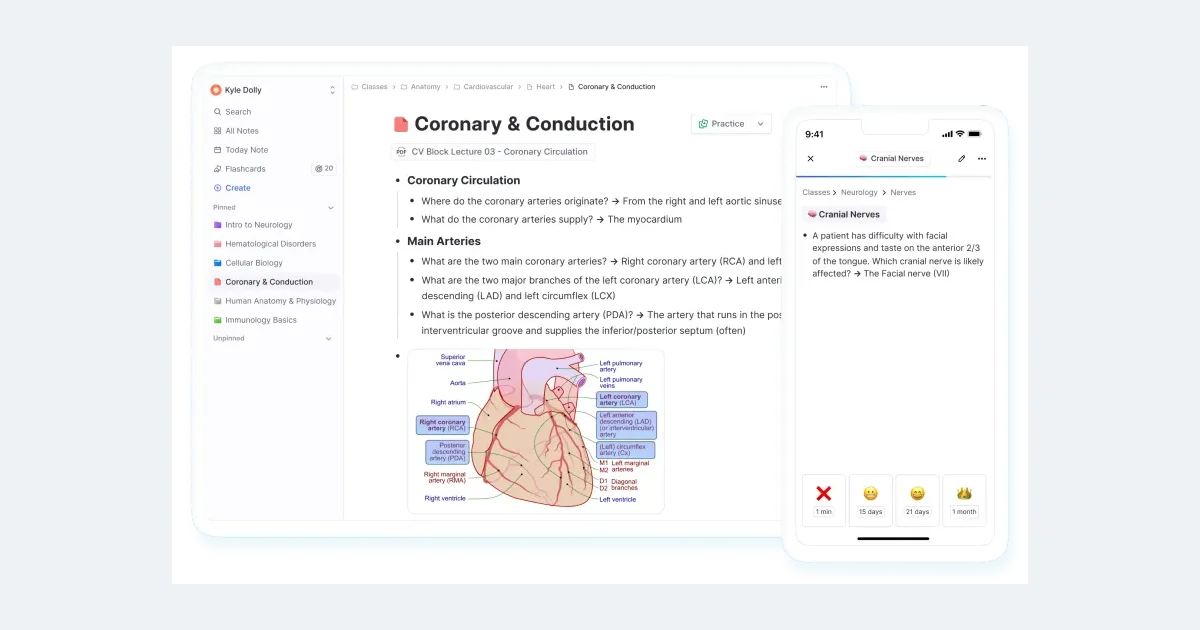
RemNote sells itself as one app for the entire study loop: write your notes, turn any line into a flashcard, and let spaced repetition bring it back for review right before you would have forgotten it. Instead of juggling a notes app, a PDF reader and Anki, you keep everything in a single outline where the review schedule is built in.
The catch is where the newer features sit. Auto-generated flashcards, quizzes, PDF summaries and a lecture recorder all live in a "Pro with AI" plan at $18/month, more than double the $8/month Pro tier. This review walks through what RemNote actually does, then breaks down what each plan buys so you can decide whether the free plan, plain Pro, or the AI tier fits how you study.
What RemNote is
RemNote is a note-taking app built around outlining, where the notes and the flashcards are the same document. You type in a nested outline, and any line can become a flashcard using a keyboard shortcut, so a card is never an isolated fact cut off from where you learned it. Each card keeps a link back to its source context in your notes.
It combines three tools that students usually keep separate: note-taking, flashcard creation and PDF annotation, all in one app. It supports both typed and handwritten notes, runs offline on desktop and mobile, and includes an AI tutor chat for explanations and quiz generation. If you already have material elsewhere, RemNote imports from Anki, Notion, Roam Research and plain Markdown files.
Spaced repetition, the core engine
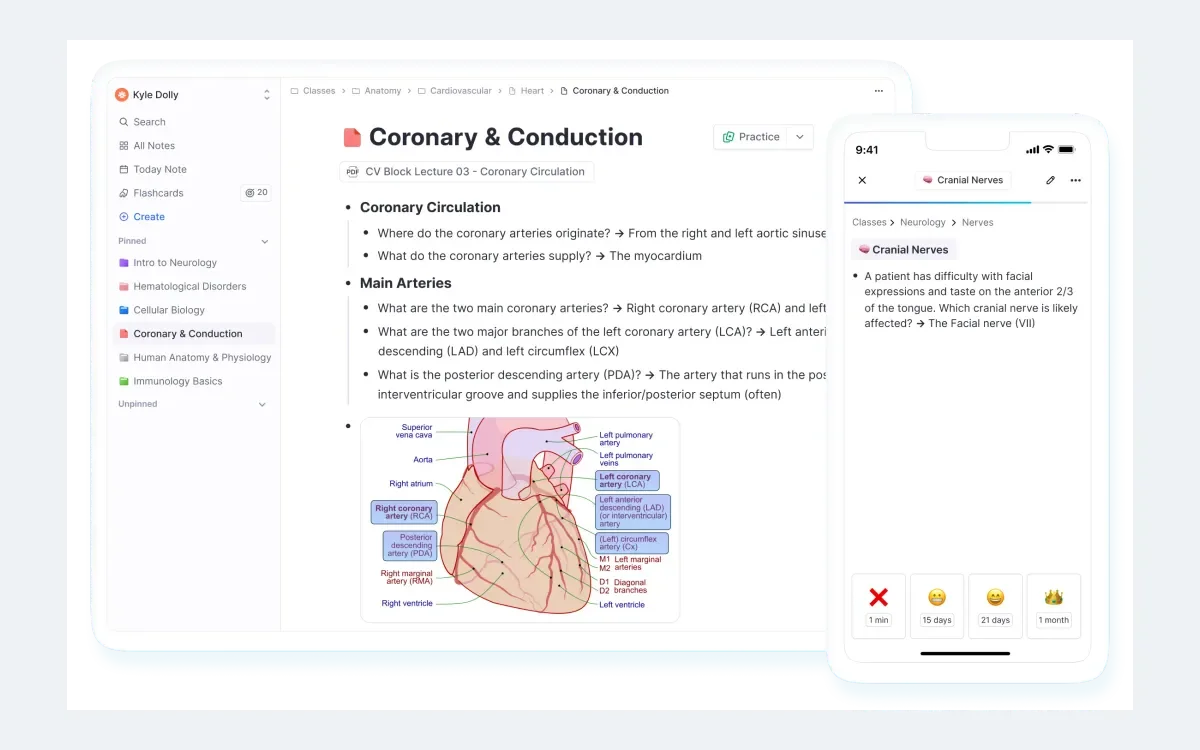
The reason to choose RemNote over a plain notes app is its spaced repetition. RemNote schedules a card for review at the moment it estimates a 10% chance you have forgotten it. New cards come back within days, while cards you know well stretch out to months or even years between reviews, so you spend your time on the material that is actually slipping.
Because flashcards are created inside your notes with keyboard shortcuts, building a deck is a side effect of writing good notes rather than a separate chore. That tight loop between writing and reviewing is RemNote's strongest argument.
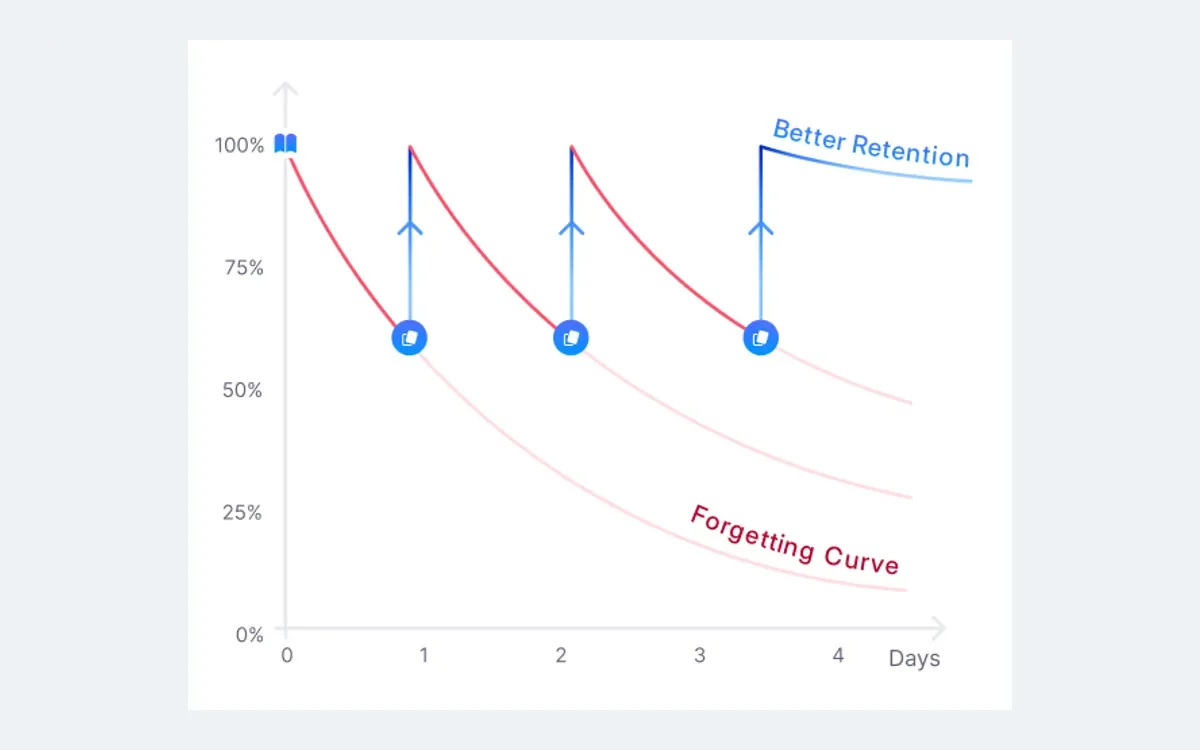
For anyone studying toward a fixed date, the Exam Scheduler adjusts spaced-repetition timing to a specific exam date and gives you a daily list of cards to practice ahead of it. That turns the general review queue into a countdown plan for a real deadline.
Notes, PDFs and annotation
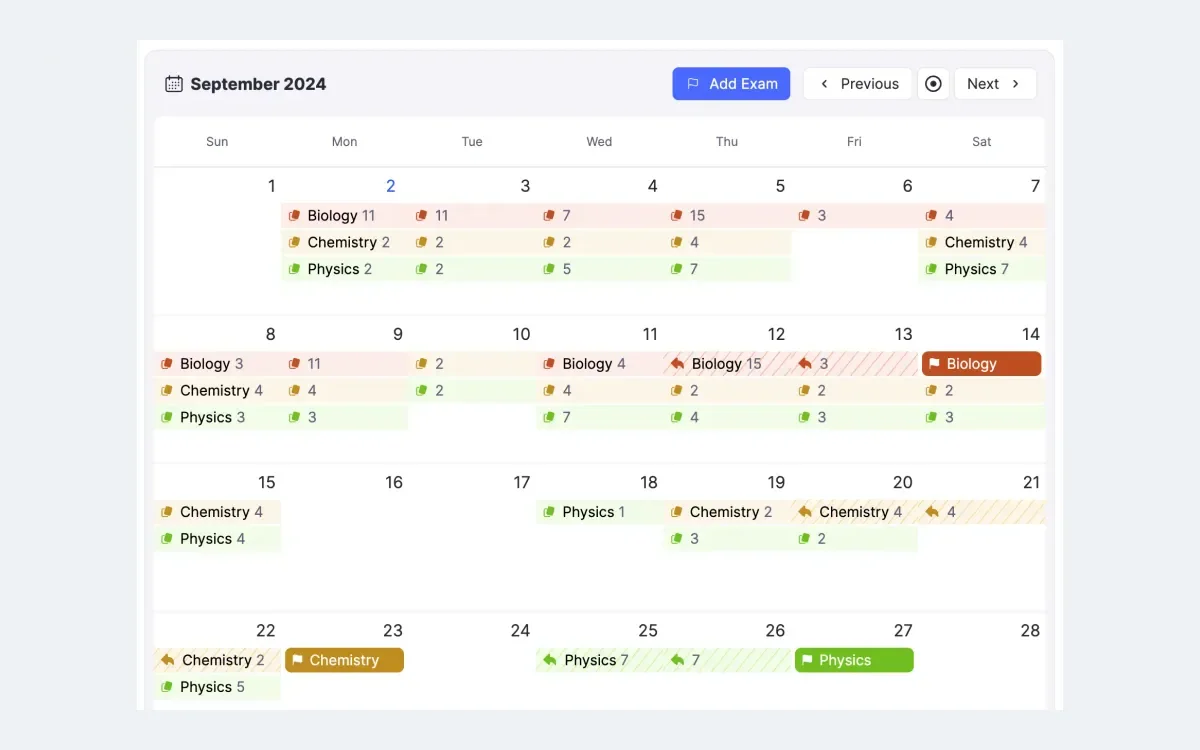
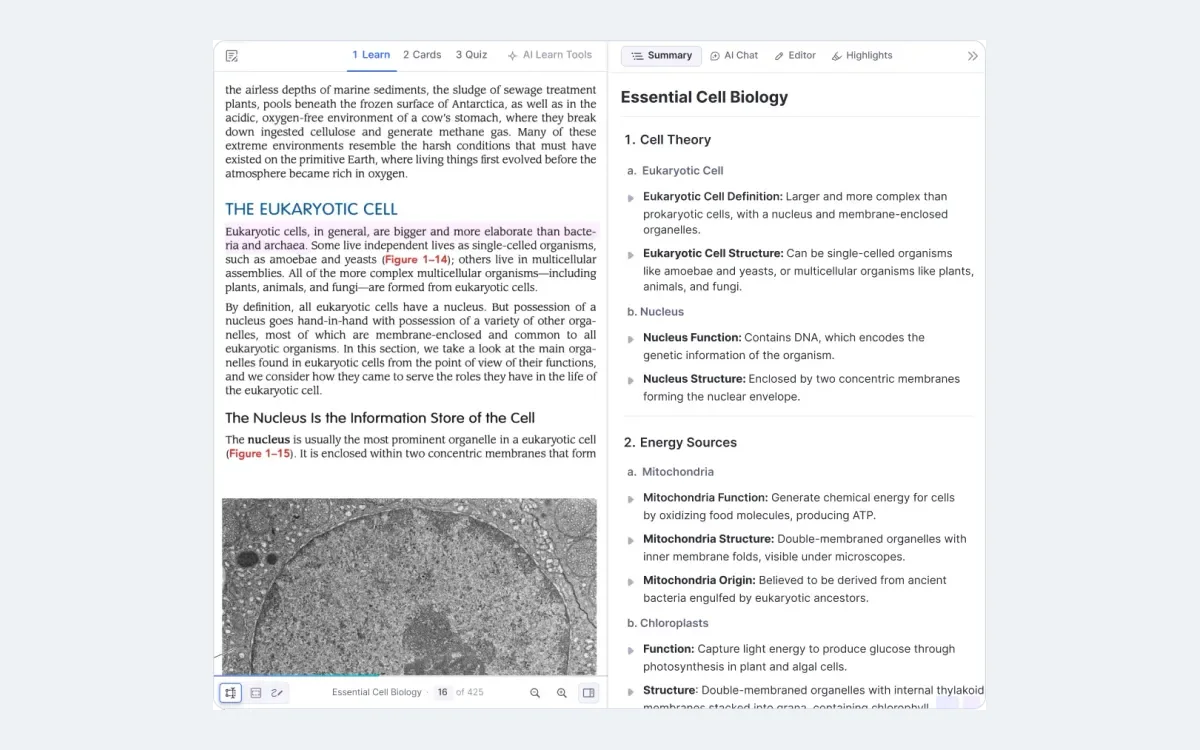
Beyond typed outlines, RemNote handles PDF annotation and handwritten notes, and it can make image occlusion cards, the kind that hide part of a diagram so you recall the labels. This is where the free plan's limits bite: it caps you at 3 annotated PDFs, 5 image occlusion cards and 1 handwritten document.
Pro removes those ceilings, giving you unlimited annotated PDFs, unlimited image occlusion, unlimited handwritten notes, plus tables and templates. If you annotate readings heavily or study from diagrams, this is the tier that actually unblocks daily use.
The AI layer
The AI features are what RemNote gates most tightly. Every plan gets a monthly allowance of RemNote AI credits: 250 on Free, 1,000 on Pro and 20,000 on Pro with AI. Those numbers are credit allowances, not prices, and they are what the AI tools spend as you use them.
Pro with AI is where the marquee tools live. It adds Learn PDF, which generates flashcards, quizzes and summaries from a document; unlimited flashcard explanations and AI tab creation; a lecture recorder; AI grading and chat; and image-to-text. In practice this is the difference between making cards by hand and having RemNote draft them from your source material.
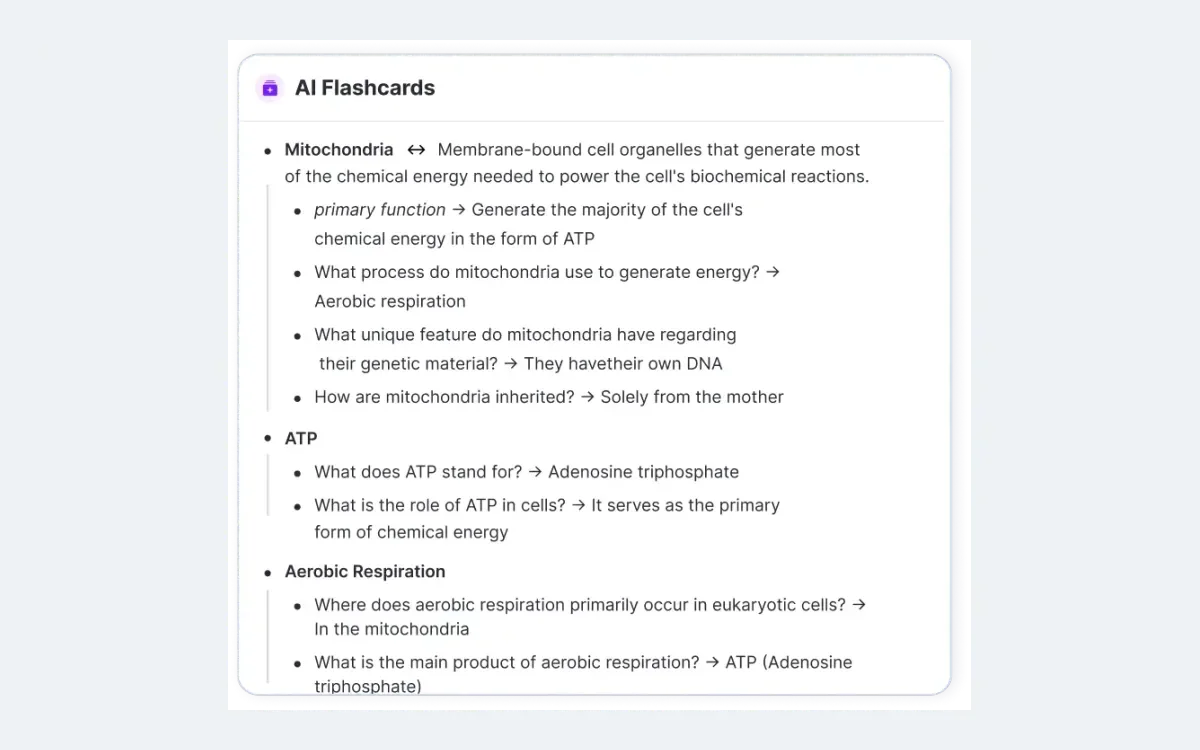
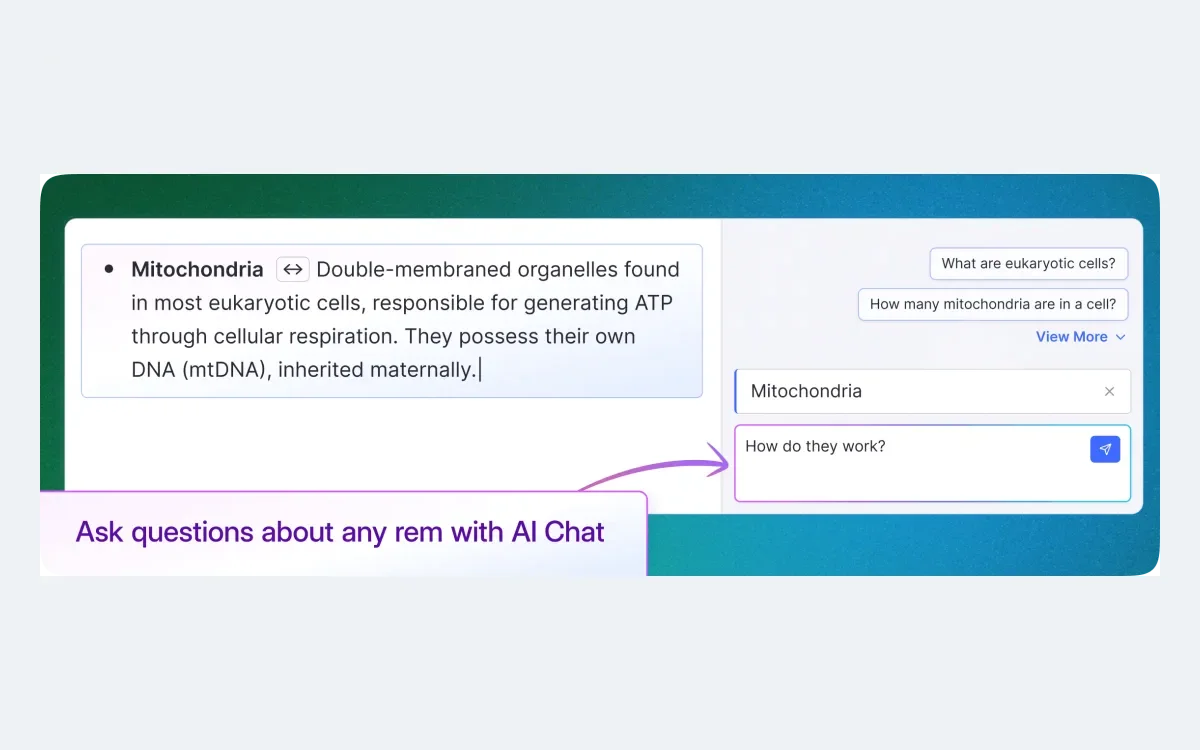
The AI tutor chat answers questions about your notes and can generate quizzes to test you. It is available for explanations across tiers, but the heavier automation and the large credit pool that keeps it usable all day belong to the AI plan.
Pricing: the three plans compared
RemNote sells three tiers. Here is what each one includes, taken from RemNote's own pricing page.
Free — $0/month
- Unlimited notes and flashcards
- Unlimited synced devices
- 3 annotated PDFs
- 5 image occlusion cards
- 1 handwritten document
- 250 RemNote AI credits per month
Pro — $8/month or $96/year
- Unlimited annotated PDFs
- Unlimited image occlusion
- Tables and templates
- Exam Scheduler
- Unlimited handwritten notes
- 1,000 RemNote AI credits per month
Pro with AI — $18/month or $216/year
- Everything in Pro
- Learn PDF: AI flashcards, quizzes and summaries
- Unlimited flashcard explanations and AI tab creation
- Lecture recorder
- AI grading and chat
- Image-to-text
- 20,000 RemNote AI credits per month
Credits are not dollars
The 250 / 1,000 / 20,000 figures are monthly RemNote AI credit allowances, not the price of the plan. The price is $0, $8 and $18 per month respectively.
One thing the pricing page makes plain: paying yearly does not save you money on the listed rates. Pro is $96 a year, which is exactly $8 times twelve, and Pro with AI is $216 a year, exactly $18 times twelve. Annual billing here is a convenience, not a discount.
Is the AI tier worth it?
Start with the free plan. Unlimited notes, unlimited flashcards and full spaced repetition on unlimited synced devices already cover the core of what makes RemNote good. Many students never need more than this, especially if they build cards by hand as they read.
Move to Pro at $8/month when the free caps get in the way, which usually means heavy PDF annotation, lots of image occlusion, or studying toward an exam with the Exam Scheduler. Pro is about removing limits on the manual workflow, not about AI.
Pro with AI at $18/month is a genuine step up in cost, so treat it as a bet on automation. If turning readings and lectures into draft cards, quizzes and summaries would save you real hours each week, the 20,000-credit pool and Learn PDF can pay for themselves. If you would still rather write your own cards, the AI tier is paying double for tools you will not lean on. The honest test is whether you will actually offload card-making to the AI, not whether the feature list looks impressive.
Frequently asked questions
Is RemNote free?
Yes. The free plan is $0/month and includes unlimited notes and flashcards, unlimited synced devices and full spaced repetition, plus 250 AI credits a month. It is limited to 3 annotated PDFs, 5 image occlusion cards and 1 handwritten document.
How much does RemNote Pro cost?
Pro is $8/month or $96/year. It removes the free plan's caps, adding unlimited annotated PDFs, unlimited image occlusion, unlimited handwritten notes, tables and templates, the Exam Scheduler, and 1,000 AI credits a month.
What is the difference between Pro and Pro with AI?
Pro with AI ($18/month or $216/year) adds the automation layer on top of Pro: Learn PDF for AI-generated flashcards, quizzes and summaries, unlimited flashcard explanations and AI tab creation, a lecture recorder, AI grading and chat, image-to-text, and 20,000 AI credits a month instead of 1,000.
What are RemNote AI credits?
They are a monthly allowance the AI tools spend as you use them, not a price. You get 250 credits on Free, 1,000 on Pro and 20,000 on Pro with AI. They reset each month.
Can I import my existing notes and decks?
Yes. RemNote imports from Anki, Notion, Roam Research and plain Markdown files, so you can bring an existing flashcard deck or note library into it.
Does RemNote work offline?
Yes. RemNote has offline desktop and mobile apps and syncs across an unlimited number of devices, so you can study without a connection and have changes sync when you are back online.
Does paying yearly save money?
Not on the listed rates. Pro's $96/year equals $8 times twelve, and Pro with AI's $216/year equals $18 times twelve, so annual billing is a single payment rather than a discount.
Key takeaways
- RemNote combines notes, PDF annotation and Anki-style spaced repetition in one app, with cards created inside your notes.
- Spaced repetition resurfaces a card when RemNote estimates a 10% chance you've forgotten it; the Exam Scheduler bends timing toward a test date.
- The free plan ($0) covers unlimited notes, flashcards and sync but caps PDFs, image occlusion and handwritten docs.
- Pro ($8/mo or $96/yr) removes those caps; Pro with AI ($18/mo or $216/yr) adds Learn PDF, a lecture recorder and 20,000 AI credits.
- Annual billing matches twelve monthly payments exactly, so there is no yearly discount. Buy the AI tier only if you'll truly offload card-making to it.
More in Services & Software
Browse Services & Software