Technology reviews & practical guides
Smartsheet lists $9 per Member a month on Pro and $19 on Business, annually. But the seat model, the 250-automation ceiling and quote-only add-ons decide the real bill. A 2026 review with the published numbers.

Smartsheet publishes exactly two prices: $12 per Member a month on Pro and $24 on Business, dropping to $9 and $19 when you pay annually. Everything above that — Enterprise and the Advanced Work Management bundle — is a sales call. For a product whose whole pitch is that it looks like a spreadsheet, the buying process is decidedly not spreadsheet-simple.
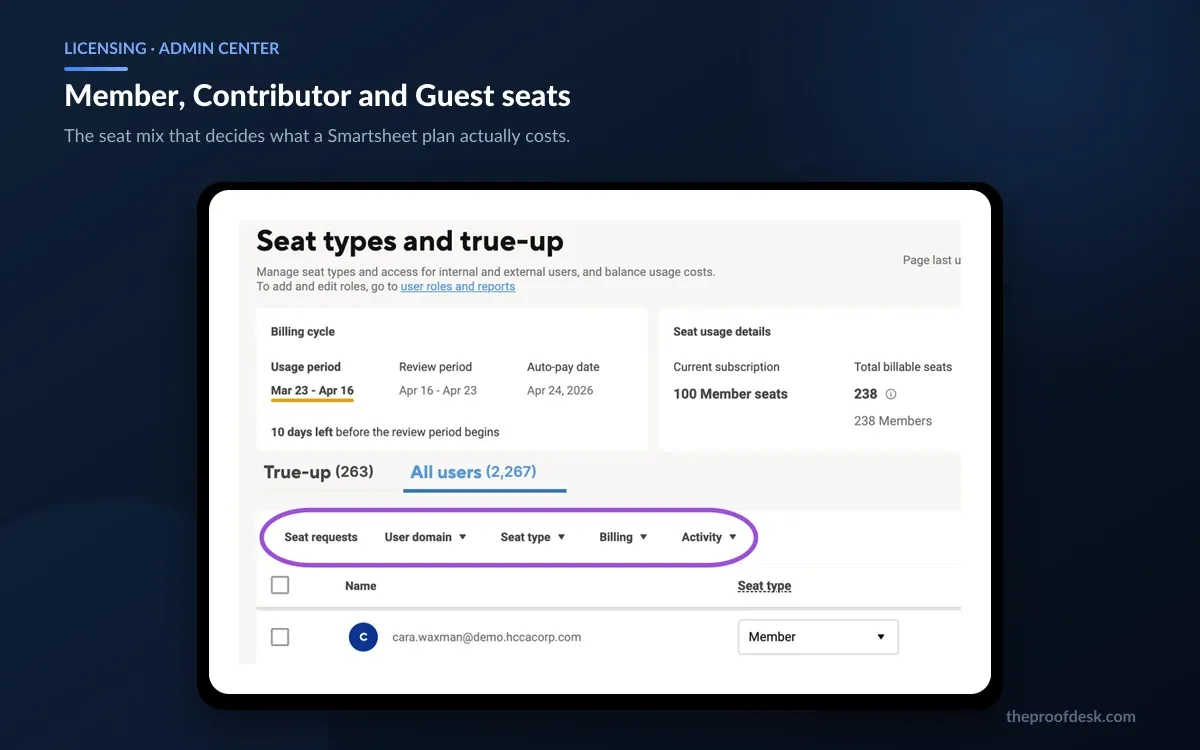
The list price is also not the number that lands on your invoice. Since the 2024-2025 rollout of what Smartsheet calls its user model, your bill is set by how many people count as Members rather than how many people use the tool. Contributors and Guests are free, and getting that split right is worth more than any discount you will negotiate.
This review works through the published 2026 figures — prices, seat types, sheet limits, the automation ceiling, AI inclusion, security gating and the refund policy — and flags the places where Smartsheet does not publish a number at all.
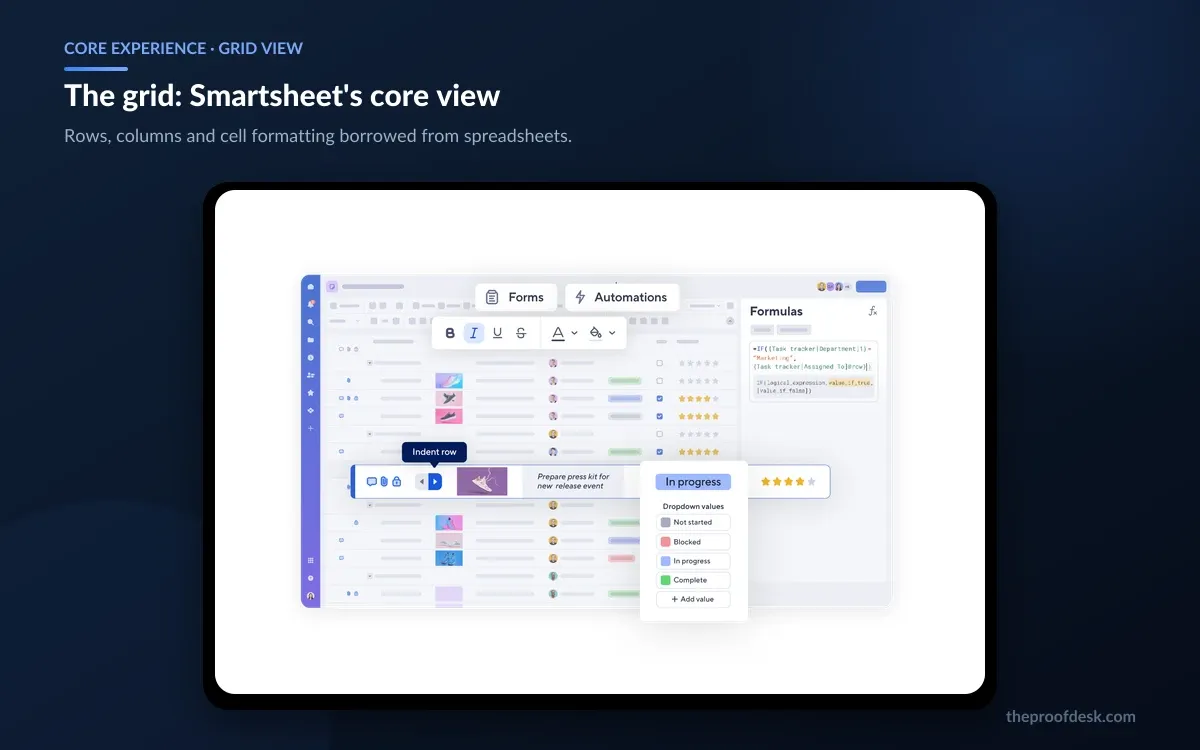
Smartsheet is a work management platform built on a spreadsheet metaphor. The atomic unit is a sheet: rows, columns, cell formatting and formulas that anyone who has used Excel can read on sight. On top of that sit the things a spreadsheet cannot do — timeline and board views of the same rows, intake forms, cross-sheet reports, rollup dashboards and rule-based automations.
That familiarity is the product's entire strategy. Teams that would stall on a purpose-built project tool adopt Smartsheet because the first screen is a grid they already understand, and the project management arrives later without a migration.
One structural change matters for anyone signing a multi-year term. Blackstone and Vista Equity Partners acquired Smartsheet in a deal valued at $8.4 billion, paying $56.50 a share; the transaction closed on 22 January 2025 and the company delisted from the NYSE. Smartsheet is now privately held, which means no quarterly filings, no public revenue disclosure and no external visibility into the roadmap. That is not a reason to avoid the product, but it does remove a source of information buyers used to have.
Every figure below comes from Smartsheet's own pricing page, help centre or user agreement, checked on 31 August 2026. Third-party aggregator sites currently quote higher monthly prices ($14 Pro, $25 Business) than Smartsheet's own page does. Where a number is not published anywhere first-party, this review says so rather than guessing.
Start here, because on Smartsheet the seat model matters more than the sticker price. There are four seat types, and only one of them is billed.

Two behaviours catch people out. Provisional Membership means a Contributor who edits one cell starts a clock toward becoming a billable Member, so plans grow their seat count quietly unless someone watches the Admin Center. And Guests automatically revert to a Contributor seat type within 90 days if they do not hold Editor permissions or above on any shared core Smartsheet item — fine in itself, but it means external access silently downgrades on dormant projects.
This model replaced an older licensed-user and collaborator scheme. Smartsheet's own migration notes state that customers have been on the updated model since 2024, annual plans transitioned at their first renewal after 1 January 2025 and monthly plans began transitioning on 1 February 2025, with licensed users automatically becoming Members. One carve-out survives: Smartsheet Gov customers who buy through an authorised sales representative remain on the legacy collaborator model, while those who purchase online move to the new one.
Smartsheet's current pricing page sells three named plans plus a bundle. Prices are per Member per month, in US dollars.
There is no free plan on the pricing grid. A Free account type still exists operationally — it is what an expired trial drops into — but Smartsheet no longer sells or markets it as a tier, which is a meaningful change if you were planning to run a small team on it indefinitely.
The Pro ceiling of 10 Members and the Business floor of 3 create a narrow band where the decision is easy. Below three paid editors, Pro. Above ten, you are on Business whether you wanted to be or not. Annual billing saves 25% on Pro and roughly 21% on Business, but read the cancellation section before committing to a year.
Smartsheet lists prices in eleven currencies beyond USD, including GBP at £10 monthly and £7 annually on Pro, and EUR at 11 and 8 respectively. Australian, Canadian, Swiss, Japanese, Norwegian, New Zealand, Swedish, Singaporean and South African pricing is published on the same page.
The grid is where most of the work happens and where Smartsheet is strongest. Columns are typed — dropdown, contact, date, checkbox, symbol sets like rating stars — so a sheet enforces structure that a raw spreadsheet does not, while still behaving like one. Conditional formatting, cell-level comments, attachments per row and a formula language close enough to Excel's to be guessable all sit in the same surface.

Cross-sheet formulas and cell links are the feature that turns a collection of sheets into a system, and they are generous: the platform allows up to 500,000 inbound and outbound cell links or references. Smartsheet Gov is tighter, with an inbound cell link limit of 100,000.
The honest limitation is that everything remains sheet-shaped. Relationships between records are expressed as links and lookups rather than as real relations, so a genuinely relational data model gets awkward at scale. Teams that outgrow this usually reach for DataTable or Bridge, both of which are quote-priced add-ons.
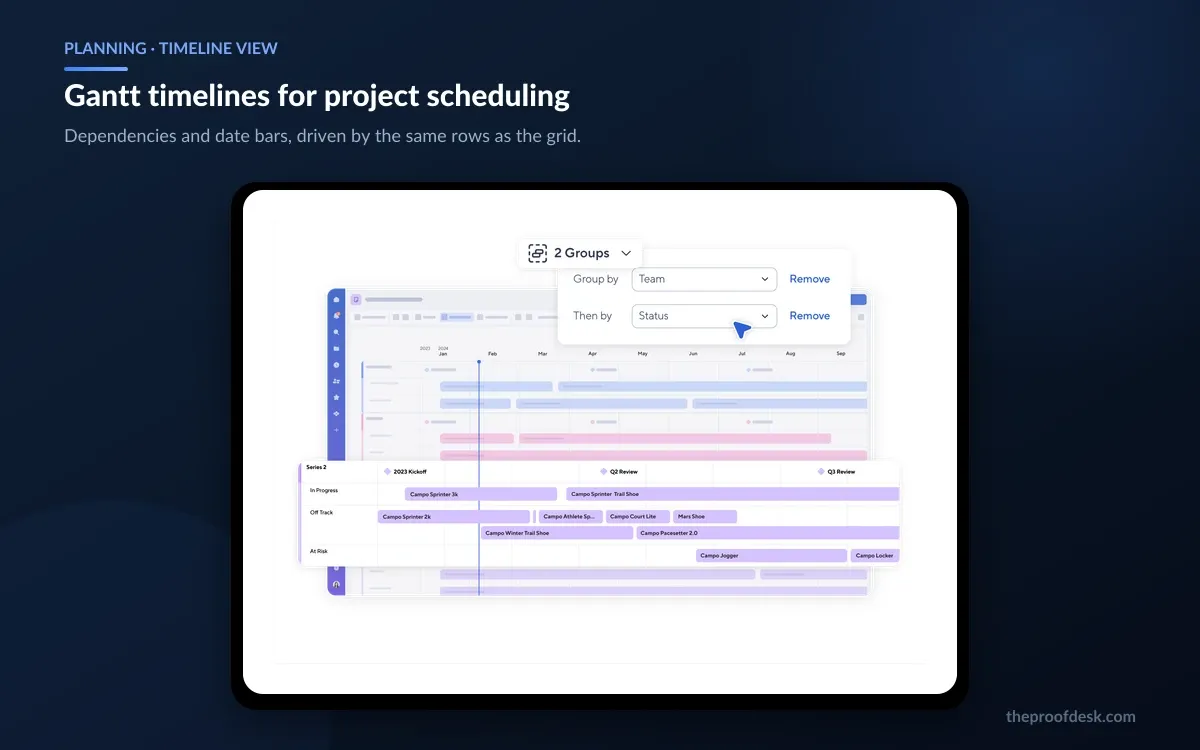
The same rows render as a timeline, a card board or a calendar without duplicating data. For project work the timeline view is the one that earns the licence: dependencies, predecessors, duration-driven dates and a critical path filter behave the way a project manager expects, and the underlying grid columns stay editable alongside the bars.

Smartsheet has also been rolling out a table view aimed at much larger sheets, and the capacity difference is tier-gated. All customers can open table view, but large-scale sheets — anything above 500,000 cells or 20,000 rows — are available on Enterprise plans only, where they extend to 1,000,000 cells across up to 50,000 rows or 400 columns.
Forms round out intake. They write directly into a sheet, support conditional logic and are unlimited on every paid tier, which makes Smartsheet a reasonable request-intake tool without buying anything extra.
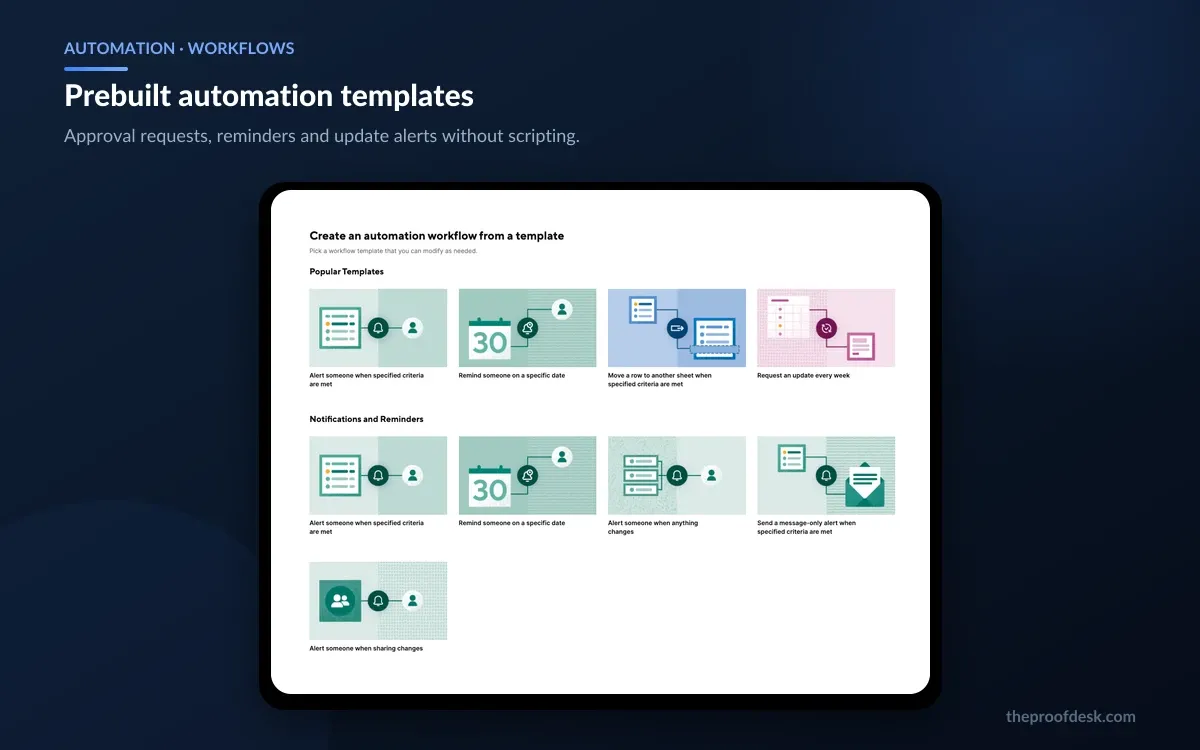
Automations are rule-based workflows built from a visual editor: a trigger, optional conditions, then actions such as alerting someone, requesting an approval, requesting an update, or moving and copying rows between sheets. There is a template gallery for the common patterns, so the first useful workflow takes minutes rather than an afternoon.

The number to plan around is Pro's cap of 250 automations per month. That sounds ample until you attach a daily reminder to a sheet with a few dozen active rows, at which point one workflow can consume the allowance on its own. Business and Enterprise are described as unlimited, and Smartsheet does not publish a numeric ceiling for them — worth confirming in writing if your workload is genuinely high-volume, since 'unlimited' is governed by the acceptable use policy rather than a stated figure.
In practice the 250-run cap is the single most common reason a team outgrows Pro before it outgrows the 10-Member limit.
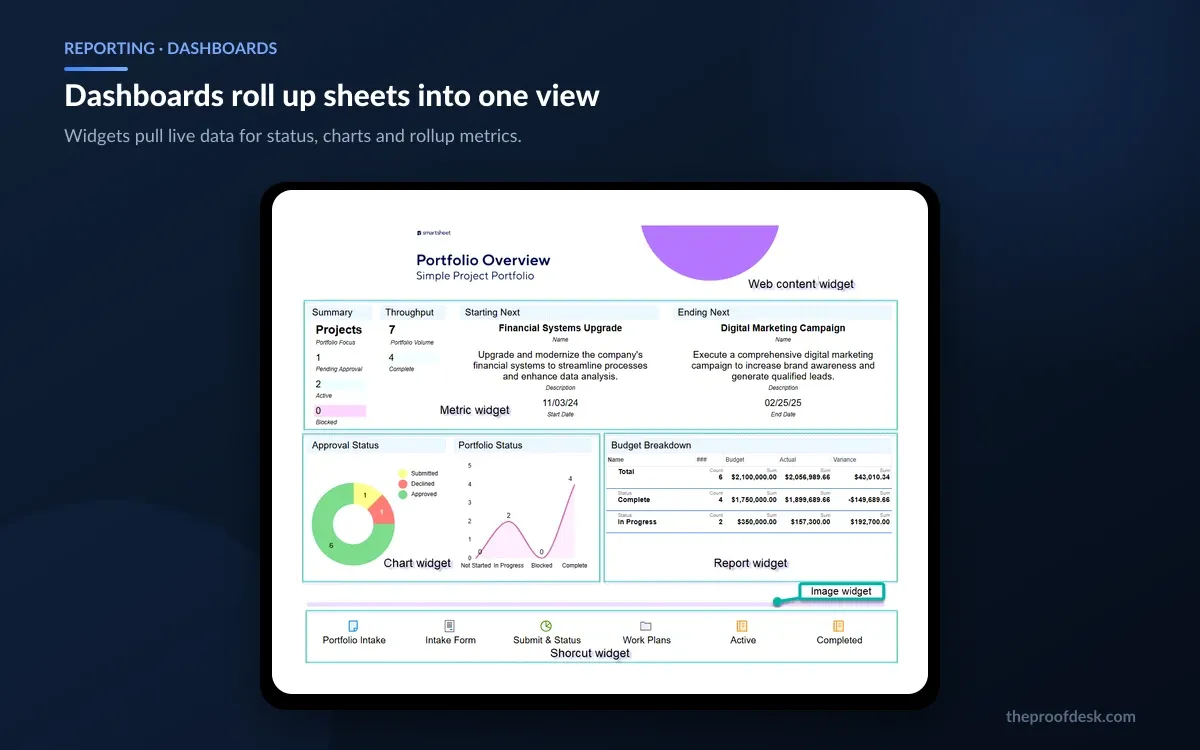
Reports pull rows from multiple sheets into a single filtered view, and dashboards assemble widgets — metrics, charts, report snapshots, shortcuts and rich text — into a page you can share with people who will never open a sheet. This is the layer executives actually look at, and it is included from Pro upward rather than being an Enterprise upsell.

Smartsheet publishes no numeric limit on how many reports or dashboards you can create; the pricing page describes sheets, forms and reports as unlimited from Pro. The practical constraint is the underlying sheet limits rather than the reporting layer.
Smartsheet's 2026 AI set is broader than the usual bolt-on. Smart Assist is a conversational assistant that answers questions about your data and takes actions on it. Smart Columns are AI column types that process every row automatically for sentiment analysis, translation or summarisation. An AI dashboard builder generates dashboards from a natural-language description, and there are narrower helpers for generating formulas, generating text and summaries, intelligent form fill by voice or paste, and analysing data into charts and metrics.
The commercially important part: AI is listed in the Pro plan's included features, not held back for Enterprise and not sold as a separate add-on. Some third-party write-ups claim full AI requires Enterprise; that is not what Smartsheet's own pricing page says as of this review.
"We don't currently have specific volume limits on AI feature usage, but reserve the right to enforce such limits in the future. Also, we don't currently offer a way to track your AI tool usage, but we'll inform you if and when such insights become available." Read that as generous today and unpredictable later — there is no meter to watch and no contractual guarantee it stays uncapped.
On data handling, Smartsheet's trust page is unambiguous that customer data is not used to train AI models, that data is not mixed between customers and that no third party is permitted to train foundation models on it. The company is also pursuing ISO 42001 certification for AI management systems.
These are platform limits rather than plan limits, and they apply regardless of what you pay. Check them against your largest existing spreadsheet before you migrate anything.
Smartsheet also advises using Chrome or Microsoft Edge for sheets above 5,000 rows, which is a fair signal about where browser performance starts to matter.
One gap to be aware of: Smartsheet does not publish an attachment storage figure for Pro on any first-party page, nor a maximum individual file size. Third-party sites cite 20 GB and various per-file caps, but none of that is confirmed by the vendor. If storage matters to you on Pro, ask before you buy.
A significant amount of what people describe as 'Smartsheet' is technically a Premium App sold separately. The current list includes Control Center, Resource Management, Brandfolder, Dynamic View, WorkApps, DataTable, Data Shuttle, Bridge, DataMesh, Calendar App, Pivot App and the Jira and Salesforce connectors.
Smartsheet publishes no unit price for any of them. Every add-on is a quote, and the Advanced Work Management tier exists to bundle the most-requested ones — Control Center, Dynamic View, Data Shuttle, Connectors, DataMesh, Calendar App and Pivot App — into a single custom-priced package with two-hour first-response support.
Third-party sites circulate figures like $20,000 a year for the Salesforce connector or $15,000 for Jira. None of these appear on any Smartsheet-owned page and the ranges quoted disagree wildly with each other. Treat them as noise and get the number from a quote.
This is where Smartsheet budgets go wrong. The seat maths is easy to model; the add-on layer is not, and a deployment that needs Control Center and a connector can cost several multiples of its seat spend. If your use case depends on a Premium App, price that first and treat the seats as the smaller line item.
The everyday integrations are broad and not tier-gated in the way you might expect. The Microsoft Teams integration, for example, is documented as available on Smartsheet, Pro, Business and Enterprise plans — all paid tiers, not Business and up. Smartsheet also ships native connectivity for Microsoft 365, Google Workspace, Adobe Creative Cloud and the common messaging apps.
The deeper system-of-record connectors — Jira and Salesforce — are Premium Apps rather than plan features. Smartsheet does not state a minimum plan for them on any page I could verify, and third-party sources contradict each other on whether Business qualifies. If a two-way Jira or Salesforce sync is the reason you are buying, confirm both the tier requirement and the price during the sales conversation rather than assuming Business covers it.
Smartsheet's compliance position is strong and clearly stated: SOC 2, ISO 27001, ISO 27701 and FedRAMP, with ISO 42001 for AI management in progress. Data is encrypted in transit with TLS 1.2 and 1.3, and at rest with AES-256.
Several controls are gated by tier, and this is often what forces the Enterprise conversation rather than seat count. SAML-based single sign-on is an Enterprise plan feature. Requiring authenticator-app MFA at the plan or domain level for non-SSO users is an Enterprise admin capability. Customer Managed Encryption Keys are described as a premium capability rather than a standard inclusion.
Healthcare buyers should read this carefully: Smartsheet states that Enterprise plan customers in healthcare can use the product to receive, maintain or transmit certain types of Protected Health Information after executing a Business Associate Agreement. PHI handling is therefore Enterprise plus a signed BAA — not something you can arrange on Pro or Business.
For data residency, Smartsheet Regions lets you choose whether data is hosted in the US, the EU or Australia. That covers most regional compliance requirements, though it is worth confirming which of your add-ons honour the same regional boundary.
The trial is genuinely low-friction: 30 days free, no credit card required, with all the capabilities of a Member for the full period. When it expires the account becomes a Free plan type rather than being deleted outright.
Cancellation is where Smartsheet is least buyer-friendly, and the terms are worth reading before you choose annual billing. The user agreement, last updated 3 April 2026, states that all Orders are non-cancelable and Service fees are non-refundable except as specifically and explicitly set forth in the agreement, and that subscription units automatically renew for successive one-year terms.
Smartsheet's own cancellation help article states plainly that canceled accounts don't qualify for pro-rated or full refunds, and asks you to submit a cancellation request at least 30 days before your renewal date. Budget for the full annual term you sign, because you will not get any of it back.
The 30-day notice requirement combined with automatic annual renewal is the trap. Put the notice date in a calendar the day you sign, because missing it commits you to another full year with no refund route.
Smartsheet fits teams that already run their work in spreadsheets and have hit the wall — no audit trail, no automation, no way to show a stakeholder a summary without rebuilding it by hand. The adoption cost is unusually low because the first screen is familiar, and the Contributor seat type means the people who only need to read cost nothing.
It also fits organisations with a large external population. Free Guests on Business and Enterprise make client, contractor and agency collaboration cheap in a way that per-user competitors are not.
It fits less well in three cases. If you need a relational data model rather than linked sheets, the structure fights you. If your requirements list is mostly Premium Apps, the published pricing tells you almost nothing about your actual cost. And if you want to start small on a permanently free plan, that option is no longer sold — the free tier is now what an expired trial becomes, not a product.
For a small team under ten paid editors with modest automation needs, Pro at $9 a month annually is straightforwardly good value. The decision gets harder at exactly the point where the 250-automation cap or the Guest requirement pushes you to Business, and harder again when a Premium App turns a transparent price into a quote.
Pro is $12 per Member per month billed monthly, or $9 billed annually. Business is $24 monthly or $19 annually and requires at least three Members. Enterprise and the Advanced Work Management bundle are quote-only. Prices are per Member, and Contributors and Guests are free.
Not as a plan you can buy or sign up for. The pricing page sells only Pro, Business, Enterprise and Advanced Work Management. A Free account type still exists as the state an expired 30-day trial drops into, but Smartsheet no longer markets it as a tier, so do not build a long-term plan around it.
Only Members are billed. Contributors, who view and can comment or handle attachments, are free on all paid plans. Guests, free external users who can view or edit, are available on Business and Enterprise but not Pro. Watch for Provisional Members: someone without a paid seat who takes an editing action gets full access free for at least 30 days, then converts to a billable Member unless an admin changes their seat type.
Pro is capped at 250 automations per month. Business and Enterprise are described as unlimited, with no published numeric ceiling, governed by the acceptable use policy. The Pro cap is easier to hit than it sounds — a single daily reminder on a sheet with dozens of active rows can consume it.
It is included, starting at Pro. Smart Assist, Smart Columns and the AI dashboard builder appear in the Pro plan's listed features rather than as a separate purchase. Smartsheet states it has no specific volume limits on AI usage today and offers no way to track it, while reserving the right to impose limits later.
No. Smartsheet's cancellation policy states that canceled accounts don't qualify for pro-rated or full refunds, and the user agreement makes Orders non-cancelable and fees non-refundable. Cancellation requests must be submitted at least 30 days before the renewal date, and subscriptions auto-renew for successive one-year terms.
Your items become read-only immediately on cancellation and are permanently deleted 30 days later. Export everything you need inside that window. For trial and free accounts you can instead switch to Free, which keeps the account active, though sheets you own become read-only and move to Deleted Items after 30 days.
More in Services & Software
Browse Services & SoftwareA standard sheet holds up to 20,000 rows, 400 columns and 500,000 cells, with 4,000 characters per cell and a 50 MB ceiling on imported files. Enterprise plans can use large-scale sheets in table view, which raise this to 50,000 rows and 1,000,000 cells. Smartsheet recommends Chrome or Edge above 5,000 rows.
Only on Enterprise, and only with a signed agreement. Smartsheet states that Enterprise plan customers in healthcare can receive, maintain or transmit certain types of Protected Health Information after executing a Business Associate Agreement. Pro and Business are not options for PHI. The platform separately holds SOC 2, ISO 27001, ISO 27701 and FedRAMP, and supports data residency in the US, EU or Australia.
Nothing has changed contractually, but the disclosure picture has. The $8.4 billion acquisition closed on 22 January 2025 at $56.50 a share and Smartsheet delisted from the NYSE, so there are no longer public filings to check before signing a multi-year term. Judge the product on its published terms and get commitments in the contract rather than inferring stability from financials you can no longer see.