Technology reviews & practical guides
Submagic review: what the $19, $39 and $69 plans buy, the 2/5/30 minute video caps, the Magic Clips add-on, API pricing, refunds and data terms.
Submagic started life as the tool that made those bold, word-by-word animated captions on TikTok and Reels easy. In 2026 it is a credit-based short-form video suite: captions, auto zooms, B-roll, silence removal, AI avatars, social publishing and a public API, sold at $19, $39 and $69 a month.
This review looks at what each plan actually buys, checked against Submagic's pricing page, help center, API docs and terms of use on 25 September 2026. The short version: the captions are the product, the per-video length cap decides which plan you need, Magic Clips (long video to short clips) costs extra on every plan, and refunds are close to non-existent, so use the free trial properly before paying.

Submagic is a good buy if you already have short vertical clips and want them captioned, zoomed, trimmed and styled fast. It is a weaker buy if your real job is cutting long podcasts or webinars into shorts, because that feature (Magic Clips) is a separate subscription and the plan you need for long source files is the $69 Business tier.
Submagic is a browser-based editor for short-form video. You upload a clip, it transcribes the audio, and it lays animated captions over the video in a chosen template. On top of that sit AI tools for auto zooms, B-roll insertion, removing silences and bad takes, cleaning audio, writing hook titles and descriptions, and correcting eye contact.
The company behind it is TURBO STUDIO S.A.S., registered in Paris (R.C.S. Paris 953 440 716) with a share capital of 1,000 euros. The site is hosted on Amazon Web Services, and support is staffed Monday to Friday, 9:00 to 18:00 CET. Submagic's own marketing claims more than 4 million users; that figure is the vendor's and was not independently verified.
Submagic's help center says there is no native iOS or Android app; you use it in a phone browser. An App Store listing called "Submagic ai" is published by a different seller and is not Submagic's product.
Prices are per member, exclusive of tax. Non-EU customers pay in US dollars; EU customers see the same numbers in euros. Monthly plans can be cancelled at any time; annual plans are billed up front and the pricing page advertises savings of up to 41%.
Every plan also lists AI video and AI image generation. A Custom plan with SSO, a dedicated customer success manager and negotiated limits is available through sales.
The pricing page says credits are consumed by premium features such as captions, B-roll and Magic Clips, and that extra packs can be bought at any time. Each plan's ratio works out to 3 credits per video. Submagic does not publish a price for extra (non-API) credit packs, so check in the app before you rely on them.
The single most important limit is not the number of videos but how long each one may be. Submagic's help center gives the caps as 2 minutes on Starter, 5 minutes on Pro and 30 minutes on Business, with a maximum file size of 3,000 MB per video.
That is why many buyers who start on Starter end up on Business: the jump is driven by source length, not volume.
Captions are what Submagic does best. Upload, pick a template, and you get word-by-word animated subtitles with emoji and highlighted keywords that you can edit line by line. Text-based trimming lets you cut the video by deleting words from the transcript, which is quick for talking-head content.

Language support is described inconsistently. The languages page title says captions in 123 languages, the same page's body says 50+ languages with high accuracy, and the API page says over 100. Expect the best results in major languages and test yours during the trial.
From Pro upward you get the tools that save most editing time: AI auto zooms that punch in on key moments, automatic removal of silences and bad takes, audio cleanup and Storyblocks B-roll. Business adds a custom words dictionary, useful for brand names and jargon that transcription tends to misspell.

Newer additions include AI Actors and AI avatars. Submagic says you can clone your face and voice and have an avatar ready in about 5 hours, and AI Actor Studio creates faceless videos with stock AI presenters.
Magic Clips takes a long video and cuts it into shorts automatically. It is the feature that competes with OpusClip and Klap, and it is not included in any Submagic plan. The help center (updated June 2026) prices the add-on at $19 a month for 10 video uploads; the current pricing page does not list the add-on price at all, so confirm it at checkout.
According to the help center, processing takes 10 to 25 minutes, after which you get a list of 20 or more generated clips, each with a virality score. The API docs allow Magic Clips uploads of up to 120 minutes and 10 GB, in MP4 or MOV.

Starter plus Magic Clips is $38 a month, Pro plus Magic Clips $58 and Business plus Magic Clips $88, at monthly prices. If long-to-short clipping is your main job, compare that against a clipping-first tool before committing.
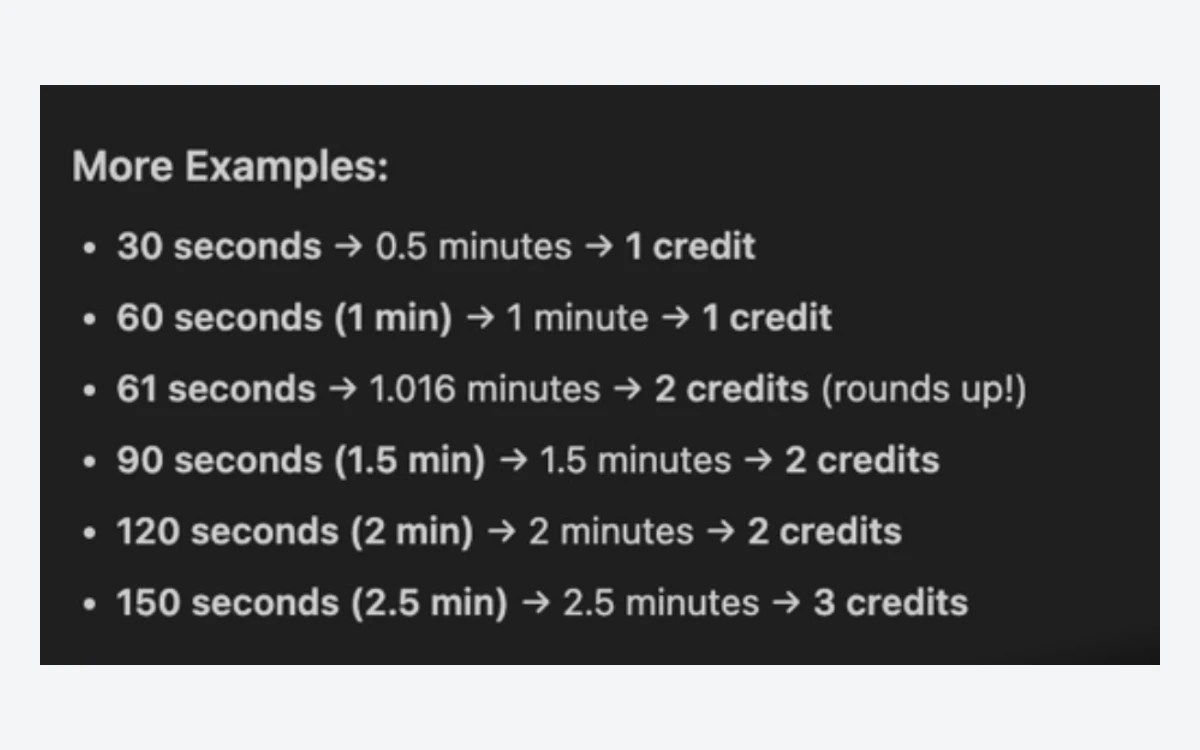
Submagic has a public REST API for uploading projects, applying templates, exporting and publishing. Starter includes 10 API minutes a month and Business 100. API credits are counted by the minute and always rounded up: a 30 second clip uses 1 credit, a 150 second clip uses 3.

Extra API minutes are sold as monthly packs on top of a plan:
Magic Clips created through the API draw on your Magic Clips allowance, not API credits, and fail without the add-on. API projects are limited to 2 GB and 2 hours per upload, with rate limits of 500 to 1,000 requests an hour depending on the endpoint. The API can publish or schedule to YouTube, TikTok, Instagram, X, Facebook and LinkedIn, though not every plan allows publishing through it.
For no-code automation there are Zapier, Make and n8n integrations plus Google Drive sync, and the docs list an MCP server for Claude Code, Claude Desktop and Cursor.
The free trial needs no credit card and lets you upload and edit 3 short videos. Downloads without a watermark require a paid plan.
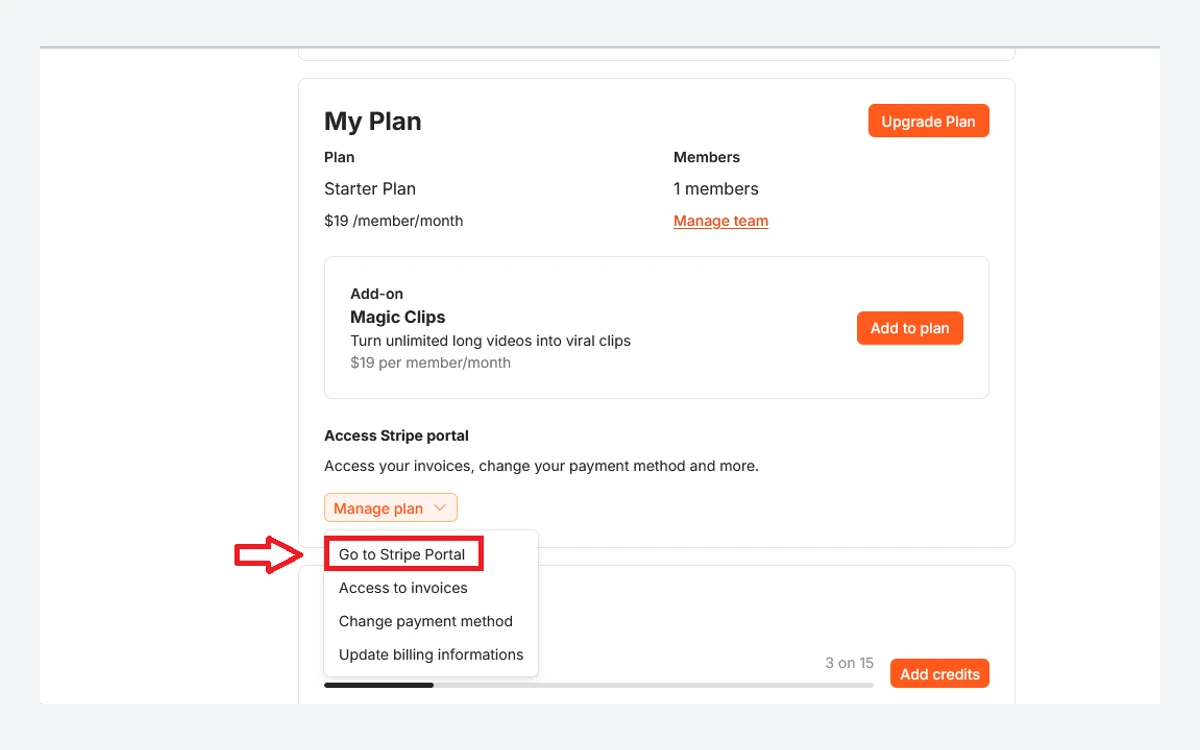
Cancelling is self-service: from billing you go to the Stripe portal and choose Cancel Subscription. Cancellation takes effect at the end of the current period. The help center also describes pausing a subscription for a few months, after which it renews as normal.

Submagic's terms say all monthly and annual fees are non-refundable. EU consumers have a 14 day right of withdrawal from the date of subscription, but the terms say it does not apply once the service has been fully performed with the consumer's consent. The help center goes further and simply says Submagic does not offer refunds. Annual plans renew for another 12 months unless cancelled before the anniversary date.
Practical advice: finish all three trial videos with your own footage, templates and language before paying, and start monthly rather than annually.
You keep the rights to what you upload, but the terms grant TURBO STUDIO a worldwide, non-exclusive licence to use, modify, reproduce and distribute it on and through the platform. You can opt out of promotional use by emailing [email protected]. The terms also warn that AI output may not be unique and other customers may get identical or similar results.
The privacy policy says the servers are in the United States. Named sub-processors include AWS, Vercel, Supabase, Stripe, PostHog, Google, TikTok, Customer.io and Crisp. No AI model provider is named, and neither the terms nor the privacy policy says whether uploaded videos are used to train AI models.
Retention periods differ between documents: one clause in the terms says data is destroyed 60 days after termination unless requested, another keeps account data for up to 3 years after closure (billing data 10 years), and the privacy policy says customer data is kept no longer than 2 years. The help center says accounts can be deleted on request via chat, processed at the end of each month.
Account sharing is prohibited by the terms. Teams are handled by adding members, each billed at the per-member price, who share projects, templates and the subscription.
Several details differ depending on which Submagic page you read. None is a deal-breaker, but check the ones that matter to you in the app:
On Trustpilot, read on 25 September 2026, Submagic scores 4.5 out of 5 from 842 reviews, with 86% five-star and 7% one-star ratings; the company has replied to 64% of negative reviews. Positive reviews focus on caption quality and speed. Recent negative reviews mention glitches, frame errors in exported videos, price and occasional downtime.
$19, $39 or $69 per member per month for Starter, Pro and Business, or $12, $23 and $41 a month billed yearly. Prices exclude tax, and EU customers pay the same figures in euros.
No. Magic Clips is a separate add-on that the help center prices at $19 a month for 10 uploads. Without it, clipping is unavailable in the app and through the API.
2 minutes on Starter, 5 minutes on Pro and 30 minutes on Business, with a 3,000 MB file size limit. Longer videos need Business or a Custom plan.
Yes. You can upload and edit 3 short videos with no credit card. Watermark-free downloads need a paid plan.
Generally no. The terms say fees are non-refundable, apart from a 14 day withdrawal right for EU consumers that can be lost once the service has been used, and the help center says refunds are not offered.
Open billing, go to the Stripe portal and choose Cancel Subscription. Access continues until the end of the paid period, and you can pause instead of cancelling.
It does not say. The terms and privacy policy are silent on AI training, though the terms do grant Submagic a licence to use your content on its platform, and you can opt out of promotional use by email.
No official one. Submagic works in a mobile browser, and the App Store app named "Submagic ai" is from a different developer.
More in Services & Software
Browse Services & Software