Trello in 2026: Pricing, Free Plan Limits, and Automation
How Trello works in 2026: boards and cards, the Inbox and Planner relaunch, Butler automation quotas, the four plans, MCP for AI assistants, and where the Free plan stops.
Trello is the tool most teams meet first when they decide they need a board. You drag a card from one list to the next and the state of the work is visible without anyone writing a status update. That simplicity is why it spreads through an organisation faster than heavier project tools, and it is also why teams tend to find its limits only after they have committed real work to it.
This guide covers what Trello is built from, what the 2025 relaunch added with Inbox and Planner, how the official MCP server connects boards to AI assistants, and exactly where each plan stops. Prices are in US dollars and reflect the published plans as of August 2026.
What Trello Is Built From
Trello has four nested objects and almost nothing else. A Workspace holds boards, a board holds lists, a list holds cards, and a card holds the detail. Learning the product takes minutes because there is no schema to design first and no project type to pick before you can add your first task.
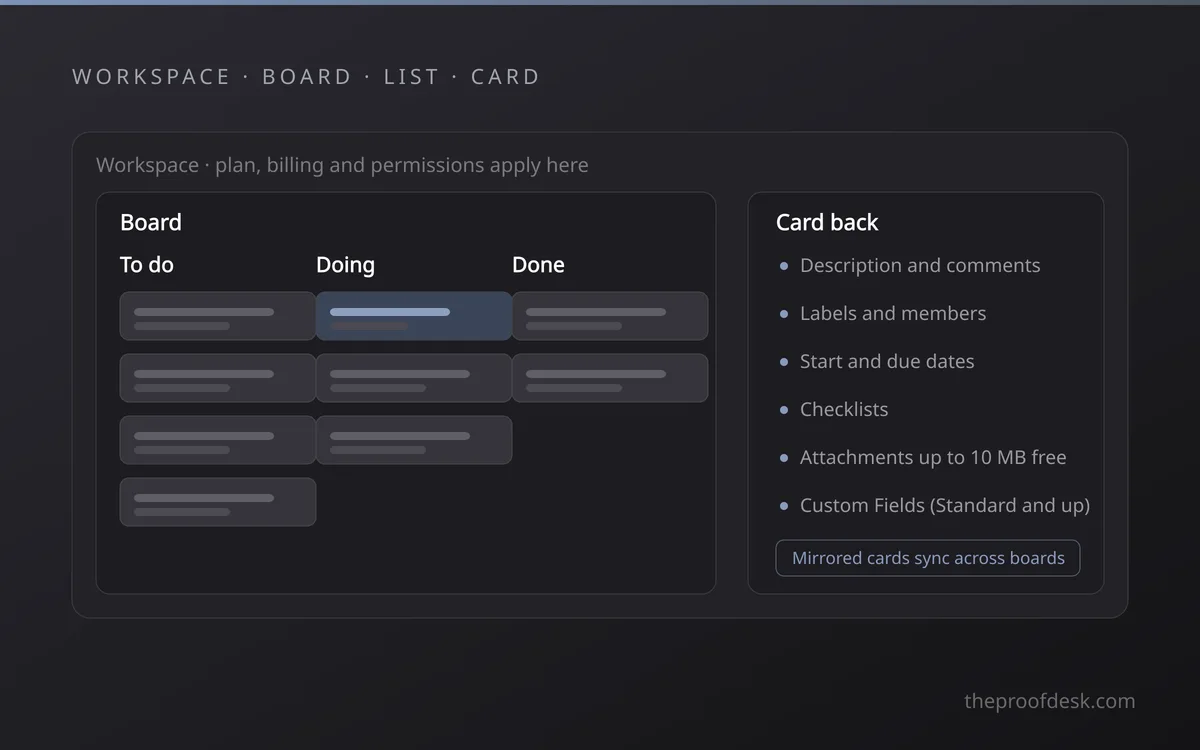
- Workspace: the billing and permission boundary, since plans apply here rather than per board.
- Board: one project, team or process, with its own members and visibility setting.
- List: a column, usually a stage of work rather than a category.
- Card: one unit of work, holding the description, checklists, dates and files.
- Power-Up: an integration enabled per board, with no cap on how many you add on any plan.
The card back is where the depth sits. A card carries a description, comments, labels, members, start and due dates, checklists and attachments. Standard adds Custom Fields and advanced checklists, so a checklist item can have its own owner and deadline instead of being a bare line of text.
Cards can also be mirrored. A mirrored card appears on more than one board and an edit in one place shows up everywhere it lives, which fixes the old habit of copying the same task onto a personal board and a team board and letting the two drift apart. Mirrored cards now show up in the Table, Calendar, Timeline and Map views and can be included in board filters.
Inbox, Planner, and the AI Layer
Atlassian rebuilt Trello's front door in 2025. The rollout began on 22 May 2025 for the Free, Standard and Premium plans, with Enterprise following later, and it added two surfaces that sit beside your boards rather than inside them.
The Inbox is a capture list. Anything you send to it becomes a card you can triage later, which keeps half-formed tasks out of your boards until they have earned a place there.
- Forward an email to [email protected] and the message becomes a card.
- Save a Slack or Microsoft Teams message straight into the Inbox.
- Dictate a task by voice on iOS, or add one from the Android home-screen widget.
- Atlassian Intelligence reads the raw text and pulls out due dates, priorities and action items.
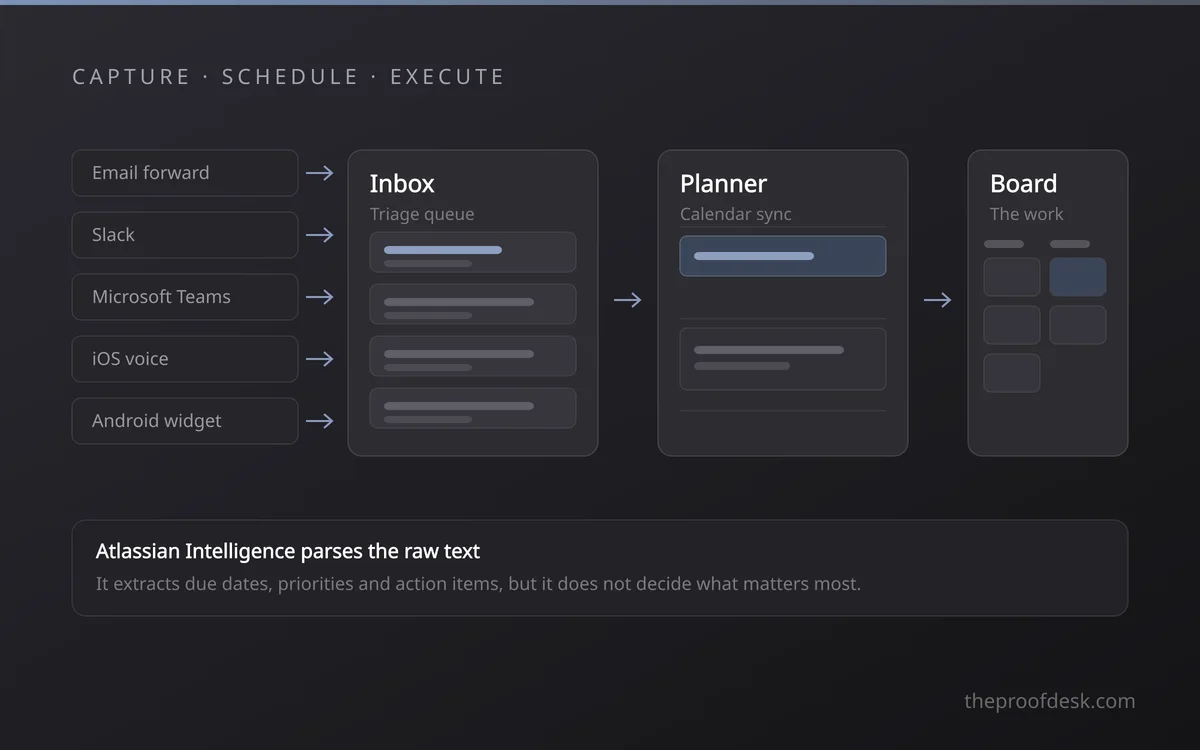
The Planner is a calendar you can drag work onto. Connect a Google or Microsoft calendar and your existing meetings appear next to your cards, so blocking focus time means dragging a card from the Inbox onto an empty hour instead of duplicating the task into a second app.
AI reads text, it does not set priorities
Atlassian Intelligence is good at extracting a date from a forwarded email and turning a paragraph into a card title. It does not know which of two deadlines matters more to your team, and it will happily build a confident-looking card out of a message that was never a commitment. Treat the Inbox as a draft queue and triage it yourself.
Trello also publishes an official MCP server at mcp.trello.com, which lets AI assistants read and change boards on your behalf. It works with ChatGPT, Claude, Cursor, Visual Studio Code and the Gemini CLI, authenticates over OAuth 2.0, and is available on every plan. Access is scoped to one workspace per connection and is deliberately non-destructive: an assistant can archive a card but cannot permanently delete a board, list, card, label, comment or attachment. Creating focus-time events through it needs Premium or Enterprise.
What Each Plan Costs and Where It Caps
Trello has four plans and bills per Workspace member. Annual billing is cheaper than monthly on every paid tier.
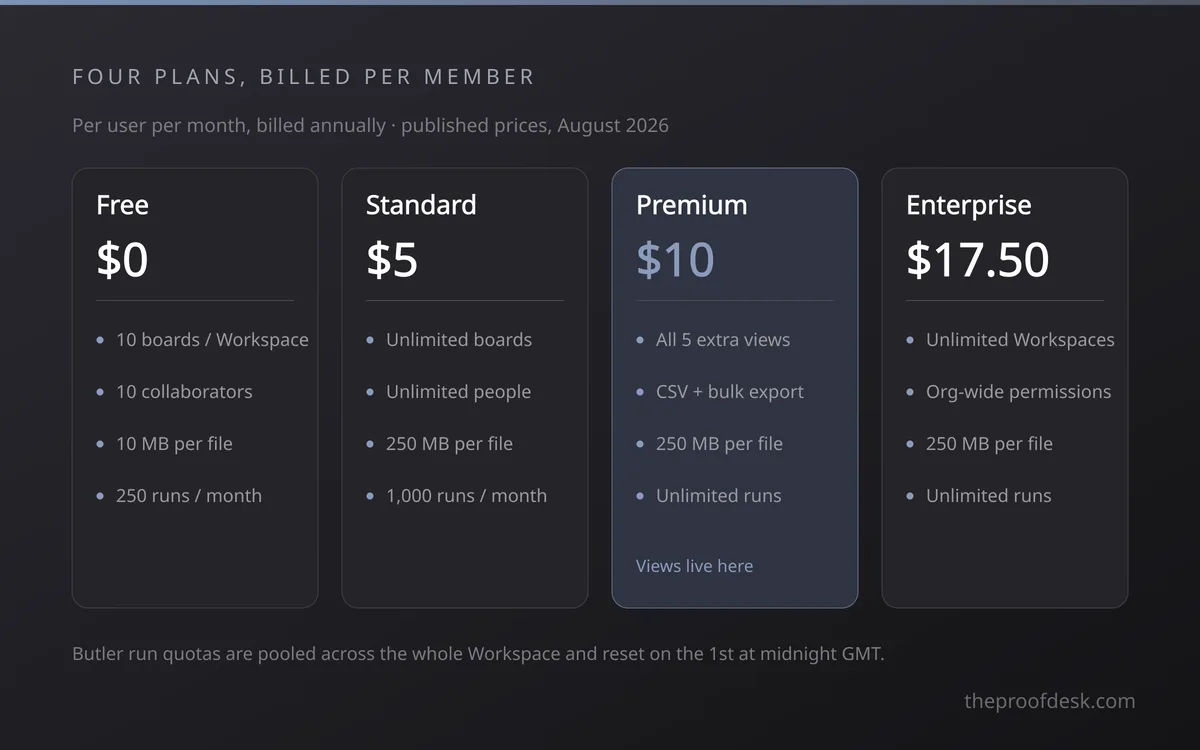
- Free: no cost, 10 boards open per Workspace, 10 collaborators, 10 MB per file, 250 automation runs a month.
- Standard: $5 per user per month billed annually or $6 monthly, for unlimited boards and collaborators, 250 MB files, 1,000 automation runs, Custom Fields, advanced checklists and saved searches.
- Premium: $10 per user per month billed annually or $12.50 monthly, adding the Table, Calendar, Timeline, Dashboard and Map views, unlimited automation runs, observers, CSV export and Workspace-wide export.
- Enterprise: from $17.50 per user per month on an annual commitment, with the per-seat price falling as the seat count rises, plus organisation-wide permissions and Atlassian admin controls.
The Free plan is more generous than its reputation in one direction and stricter in another. Cards are unlimited, and so are Power-Ups on every plan including Free. What is capped is structure and people: ten boards open at a time per Workspace, and ten collaborators, a count that includes Workspace members, guests invited to a single board, and any invitation still pending.
The collaborator cap is a hard stop, not a nudge
Go past ten collaborators on a free Workspace and every board in it becomes view-only. You can still read everything, but nobody can edit a card and automations stop running until you remove people or upgrade. Deactivated members and people who only belong to closed boards do not count toward the ten.
Automation deserves its own reading of the numbers. Butler counts one run each time a rule fires or a button is pressed, quotas are pooled across every board in the Workspace instead of being allocated per board, and they reset on the first of each month at midnight GMT. A single run can carry up to twenty actions on any plan. In practice two busy rules on one board can spend a free Workspace's 250 runs well before the month is out.
Where Trello Fits and Where It Stops
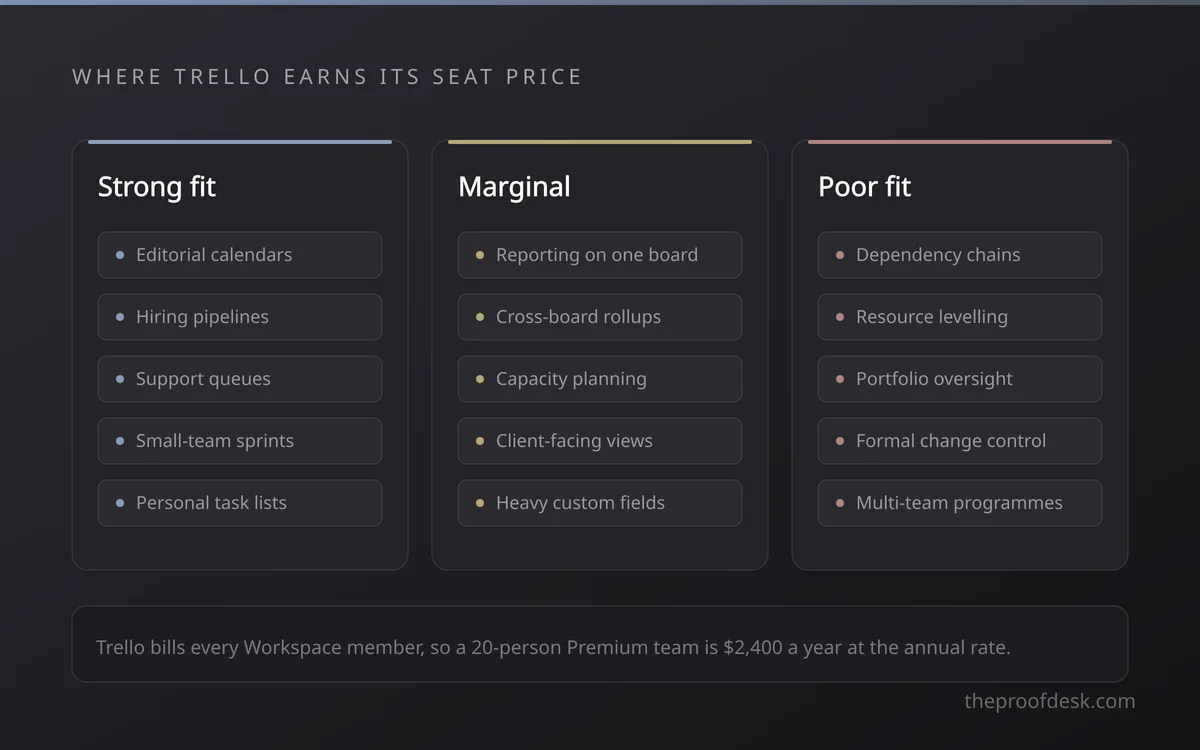
Trello is at its best when the process is a sequence of states and the team is small enough that everyone can see the whole board at once. It is a weak fit when the planning itself is the hard part.
- Strong fit: editorial calendars, hiring pipelines, support queues, small-team sprint boards, personal task management.
- Poor fit: work with real dependency chains, resource levelling across teams, or a portfolio view sitting above the boards.
- Marginal: reporting, because the Dashboard view arrives only at Premium and reports on one board at a time.
The per-seat model is worth modelling before you commit, because Trello bills every member of the Workspace rather than only the people who edit. A twenty-person team on Premium is $2,400 a year at the annual rate, and Premium is usually the tier teams actually want, since the extra views are what keeps a large board readable.
Plan the exit while you are still choosing. JSON export works on every plan including Free, but it carries only the 1,000 most recent actions on a board. CSV export of a single board needs Premium, covers only cards that are not archived, and leaves comments out. Exporting every board in a Workspace at once is Premium as well, and only a Workspace admin can run it.
An export is a copy, not a backup
Neither format can be imported to recreate a Trello board, and no export includes your Butler rules, Power-Ups or integrations such as Slack and Gmail. The cards travel with you; the machinery you built around them does not. If a board runs on automation, document those rules somewhere outside Trello.
Frequently Asked Questions
Is Trello free forever?
Yes. The Free plan has no time limit and no card limit. It caps you at ten boards open per Workspace, ten collaborators and 250 automation runs a month, and individual files are limited to 10 MB.
How much does Trello cost per user?
Standard is $5 per user per month billed annually or $6 billed monthly. Premium is $10 annually or $12.50 monthly. Enterprise starts at $17.50 per user per month on an annual commitment and drops as seat count rises. These are the published prices in August 2026, so confirm the figure at checkout.
Which plan do I need for Timeline and Calendar views?
Premium. It adds the Table, Calendar, Timeline, Dashboard and Map views on top of the board view. Standard adds Planner alongside the board but not the full view set.
Can AI assistants work with my Trello boards?
Yes, through the official Trello MCP server. It is available on all plans, connects ChatGPT, Claude, Cursor, Visual Studio Code and the Gemini CLI over OAuth 2.0, scopes access to one workspace per connection, and cannot permanently delete anything.
Can I get my data out of Trello?
JSON export is available on every plan and covers the 1,000 most recent board actions. CSV export and Workspace-wide export require Premium. Neither format can be re-imported to rebuild a board, and neither carries Butler rules or Power-Ups.
Key takeaways
- Trello's free tier is capped by structure and people, not by cards: ten open boards and ten collaborators per Workspace.
- Passing ten collaborators on a free Workspace turns every board in it view-only and stops automations until you upgrade or remove someone.
- Standard at $5 per user per month mostly buys unlimited boards and 1,000 automation runs; Premium at $10 buys the Table, Timeline, Calendar, Dashboard and Map views.
- Butler quotas are pooled across the whole Workspace and reset on the first of the month at midnight GMT, so one busy board can spend everyone's budget.
- Exports carry cards but never Butler rules, Power-Ups or integrations, and no export can be imported back into Trello.
More in Services & Software
Browse Services & Software