Technology reviews & practical guides
Wrike rebuilt its pricing in January 2026: five tiers, a new Apex plan, and AI that stopped being free on April 1. Here are the seat caps, storage limits, automation quotas and refund terms before you sign an annual contract.

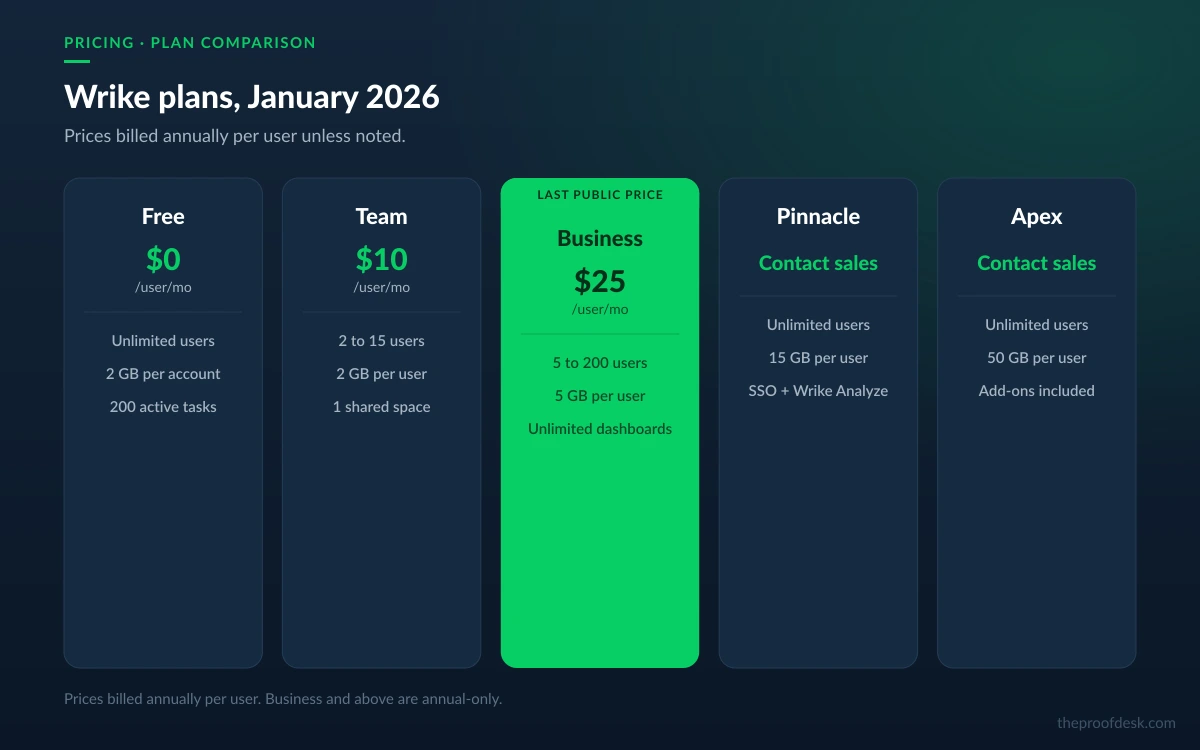
Wrike sells at $10 per user a month on Team and $25 on Business, billed annually. Those two numbers are the only prices the company publishes; everything above Business is a sales call. That alone tells you what kind of product this is in 2026 — a work management platform that expects a procurement conversation, not a credit card.
The list price also is not the number that decides your bill. Wrike restructured its entire lineup on 20 January 2026, added a tier called Apex above Pinnacle, retired Enterprise into legacy status, and — on 1 April 2026 — started metering the AI features that had been free until then. Four of the platform's most-marketed capabilities are add-ons with unpublished pricing.
This review works through what each tier actually contains, where the seat caps bite, how much automation and AI you get before you hit a wall, and what Wrike's own terms of service say about cancelling. Every figure below comes from Wrike's pricing page, its help centre or its terms, checked on 31 August 2026.
If you last looked at Wrike a year ago, the plan names no longer match. The lineup was Free, Team, Business, Enterprise and Pinnacle. It is now Free, Team, Business, Pinnacle and Apex. Wrike's help centre states the new plans are available from 20 January 2026, and the pricing page notes its rates are valid only for purchases made on or after 21 January 2026.
Enterprise did not get renamed into Pinnacle. It was moved into a separate 'Legacy Enterprise' article and dropped from the sales lineup. Apex is genuinely new: it sits above Pinnacle, and its main commercial argument is that it bundles the add-ons — Wrike Whiteboard, Wrike Integrate, Wrike Sync — that every lower tier has to buy separately.
One inconsistency is worth knowing about before you talk to sales. Wrike's AI pricing documentation still lists an 'Enterprise' row with its own monthly AI allowance, even though the pricing page no longer sells a tier by that name. Existing Enterprise customers appear to be supported; new buyers should not assume they can purchase it.
Two prices are public. Team is $10 per user a month and Business is $25 per user a month, both billed annually. Pinnacle and Apex are 'contact us'. Wrike's own footnote is explicit that the figure shown is per month but billed on an annual per-user basis, and its FAQ confirms that Business plans and above are only available as annual subscriptions — there is no monthly-billing escape hatch above Team.

Ten dollars to twenty-five is the single largest proportional step in Wrike's lineup, and it is the step most growing teams are forced into — not by wanting the features, but by hitting the 15-seat ceiling on Team. Budget for it as an eventual certainty rather than an upgrade you choose.
Wrike does not sell seats one at a time. Its pricing FAQ sets out the purchasing blocks: accounts up to 30 seats are sold in groups of five, accounts from 30 to 100 seats in groups of ten, and accounts above 100 seats in groups of 25. A team of 31 people buys 40 seats. That rounding is invisible on the pricing page and shows up on the quote.

The seat ranges themselves are documented inconsistently. Wrike's pricing page says Business runs from 5 to 200 users; the help centre's plan comparison table says only 'up to 200' with no floor. Team is 2 to 15 on both. If you are sizing a Business purchase at four or five people, get the minimum confirmed in writing — the two official sources disagree.
Licence types matter as much as seat counts. Wrike distinguishes Full Users from External Users, Collaborators, Contributors and Viewers, and only one of those is genuinely free at scale.
If your model is a small internal team plus a large pool of clients or freelancers, the discontinued Collaborator licence was the piece that made Wrike affordable. New accounts do not have it, so external people land on Viewer (read-only) or a paid seat. Model both before committing.
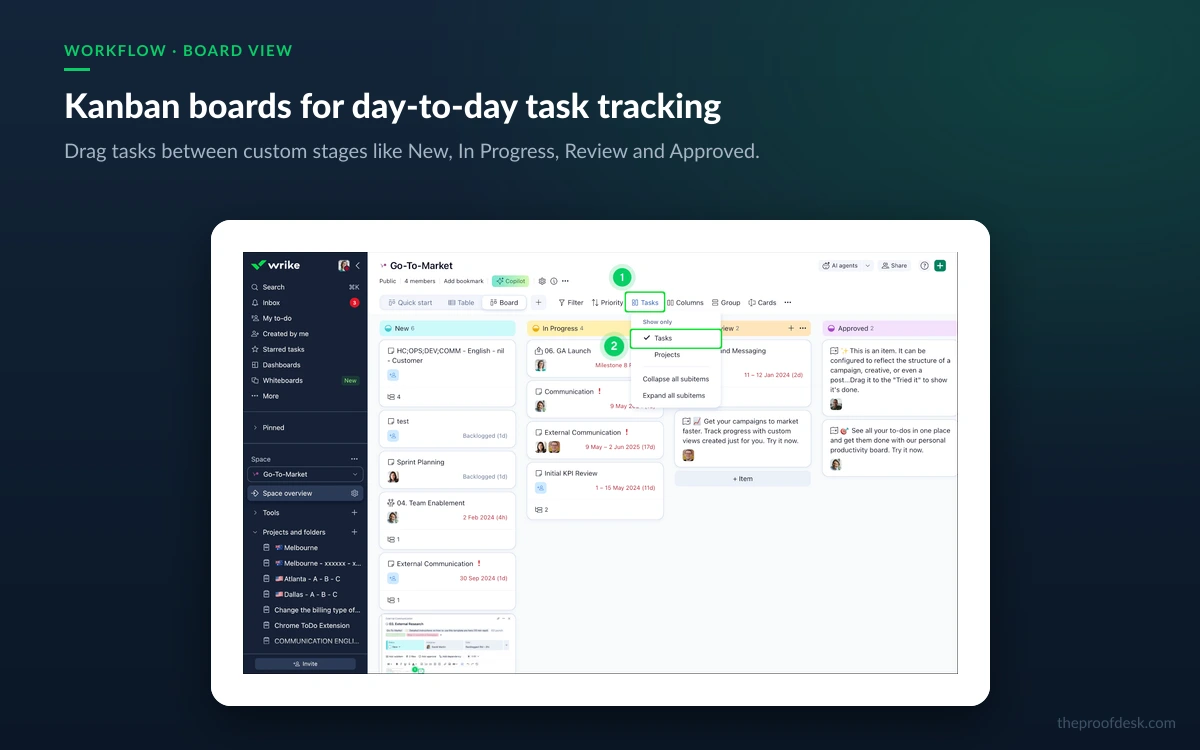
Wrike gates by capability more aggressively than most of its competitors. The Free plan is a genuinely limited trial-in-disguise: no Gantt chart, no dashboards, no custom fields, no automation, no request forms, no time tracking, no approvals, no custom workflows. It gives you folders, projects, tasks, comments, file sharing and Table, Board and Chart views, with a hard ceiling of 200 active tasks and a single shared space.

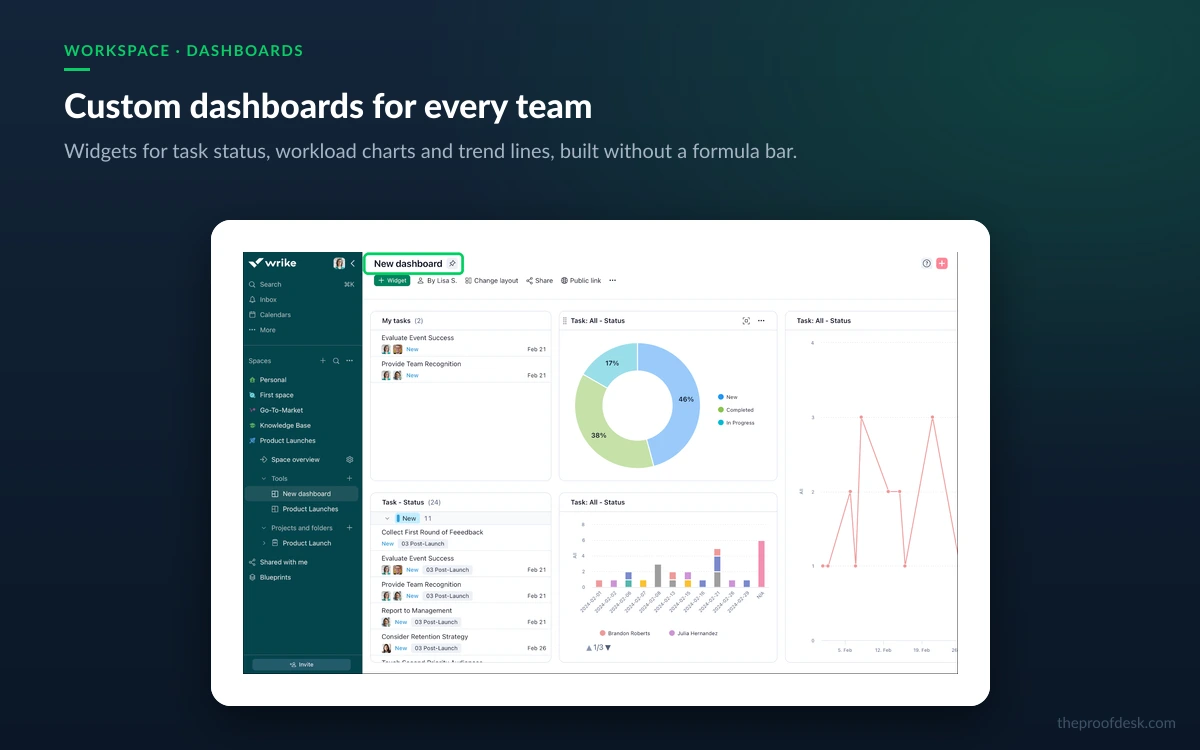
Team unlocks the automation engine, custom fields, custom item types and unlimited tasks, but limits you to one shared space plus personal spaces and a single shared dashboard. Business removes the space and dashboard limits and is where most organisations land. Pinnacle is the security and analytics tier — SAML single sign-on, two-factor enforcement, audit reports, Wrike Analyze, budgeting, job roles, bookings and locked spaces all start there, not on Business.
SAML single sign-on, enforced two-factor authentication and audit reporting are not available on Business at $25 per user. If your security review requires SSO, your real entry point is Pinnacle — which has no published price. Factor that into the evaluation early, not after the pilot.
Apex adds capacity rather than new categories: 50 GB per user of storage, 30 million Wrike Datahub actions against Pinnacle's 10,000, and the add-on bundle. Custom fields, usefully, have no numeric cap on any paid tier — Wrike's documentation states plainly that there is no limit to how many you can create.
Wrike's structure is folders, projects, tasks and subtasks, arranged inside spaces. That hierarchy is the product's real strength and its most-cited weakness in the same breath: it models complex, cross-functional work better than a flat board tool, and it takes longer to learn than one. The recurring line in Capterra and G2 reviews is a steep learning curve compared with simpler tools like Asana or Trello, and it is a fair criticism rather than a lazy one.

Wrike currently rates 4.4 out of 5 across 3,038 reviews on Capterra, checked on 31 August 2026. Third-party figures on G2, TrustRadius and Trustpilot were not directly verifiable during this review — the platforms block automated access — so treat any number quoted from them, including Wrike's own marketing claim of 4.5 across 13,000-plus reviews, as an aggregate rather than a single measured rating.
The other thing to know is that Wrike is mid-migration. Help centre pages carry banners for 'Wrike Lightspeed' and a 'New Wrike Experience' with its own separate documentation. Wrike has not published a clear scope or completion date for that rollout, which means some screenshots and instructions you find will not match what you see in your own workspace.
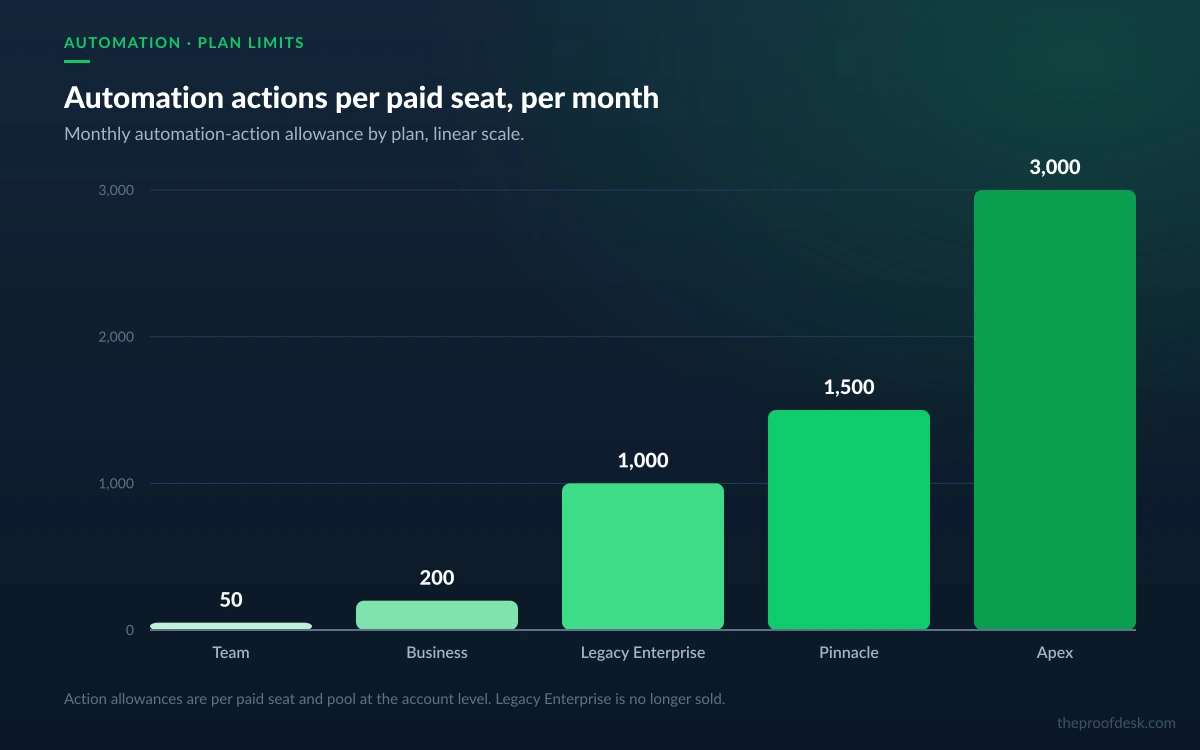
Wrike's automation engine is metered on two axes: how many rules you can define, and how many actions those rules may fire each month. The action budget is per paid seat and pools at account level, which means a 20-person Business account has 4,000 actions a month to spend across every rule it runs.

Each rule takes one trigger and up to ten actions, with no limit on conditions. There are also throttles that will disable a rule outright: more than 250 actions in a minute kills it immediately, and more than 100 actions a minute sustained for five minutes does the same. Anyone planning a bulk migration or a mass status update should expect to work around those.
On Team, a single rule that fires on every task creation will exhaust a small team's monthly budget inside a fortnight. If automation is the reason you are buying Wrike, Team is not the plan — the fourfold jump to Business is doing more work than the feature list suggests.
Wrike splits AI into two tiers. AI Essentials — content creation and editing, comment summaries, natural-language form and rule generation, AI highlights, board AI and mobile inbox prioritisation — is included free and unlimited on all paid plans, subject to a fair-usage clause Wrike may enforce with reasonable notice.
AI Elite is the metered half, and it is the half the marketing is about: Wrike Copilot, AI agents, widget generation and the whiteboard assistant. It is billed in AI Actions, defined as any single independent operation performed by Wrike AI, and the monthly allowance pools at account level.
Read those numbers carefully. Wrike presents them as illustrative for a typical 100-user account, not as a fixed per-seat entitlement, so your actual allowance is a quote item. And they are small. Wrike's own worked example has a single custom agent producing weekly status reports across ten projects consuming 160 actions a month — one agent, and a Business account's entire pooled allowance is half gone.
AI was unlimited and free through 31 March 2026. Quotas took effect the next day, along with an AI Elite Actions Pack of 12,000 supplemental actions at unpublished pricing. Wrike does say it will not invoice you automatically for overage: you get notified at 90 and 100 percent of your balance, and AI Elite features are simply restricted until the monthly reset or until you buy a pack.
Five capabilities Wrike markets heavily are not in the seat price. Only one of them has a published number, and that one is expensive relative to the platform itself.
Apex includes these add-ons with two named exceptions: Wrike Lock and the AI Elite actions pack still cost extra even at the top tier. Wrike Lock in particular is a paid add-on on both Pinnacle and Apex, so a regulated buyer who needs customer-managed keys is looking at the highest tier plus a separate line item.
This is the pattern behind the most common pricing complaint about Wrike in user reviews: the advertised seat price is real, but the platform as demonstrated in a sales call is frequently the seat price plus two or three add-ons, none of which you can price yourself before the call.
Wrike's free tier allows unlimited users, which sounds generous until you meet the ceiling: 200 active tasks and subtasks per account, one shared space, and 2 GB of storage for the whole account rather than per user. It includes folders, projects, tasks, subtasks, comments, file sharing, live editing, filtering, mass actions, the activity stream, Inbox, mobile apps, Table, Board and Chart views, plus email and cloud storage integrations.
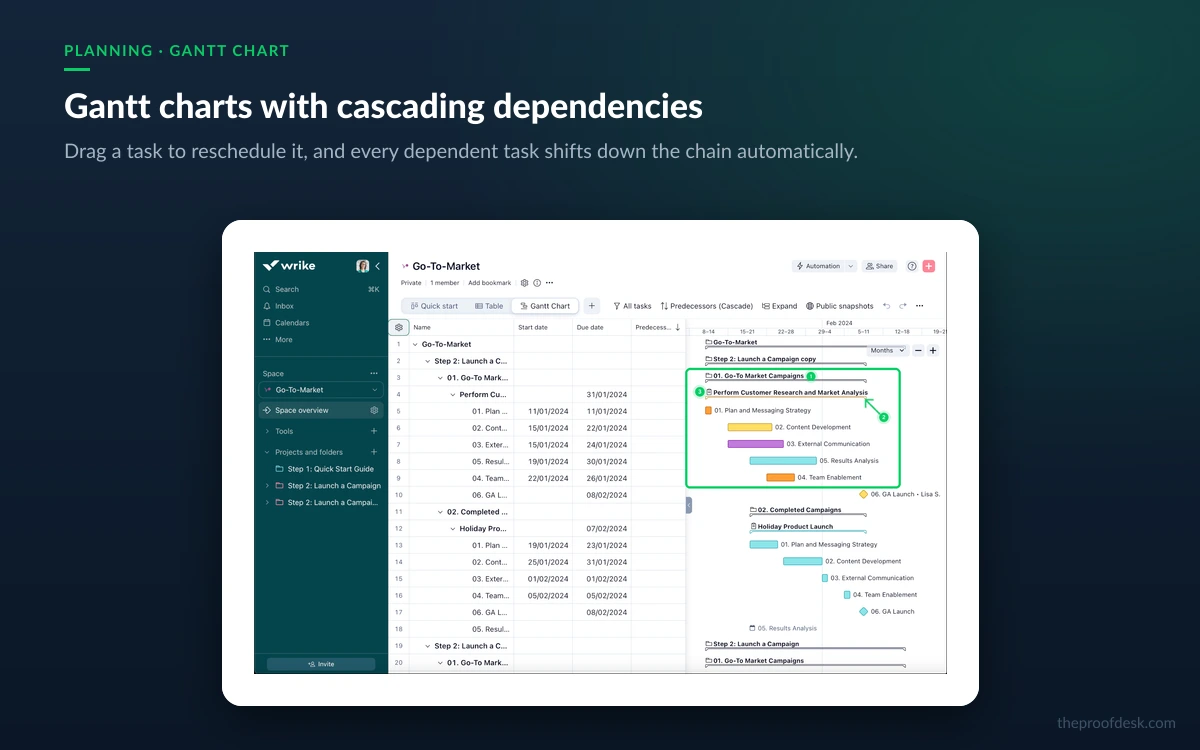
What it excludes is most of the reason to choose Wrike: Gantt charts, dashboards, custom fields, custom workflows and statuses, request forms, blueprints, time tracking, calendars, approvals, workload charts, timesheets and every automation feature. It is a viable free tool for a two-person side project and nothing beyond that.
The trial is two weeks, no credit card required, and it can be a trial of any subscription type — so you can evaluate Pinnacle features before anyone quotes you a Pinnacle price. When it expires the account is blocked but the data is preserved, so you are not racing a deletion clock.
Because you can trial any subscription type, run the fourteen days on Pinnacle if SSO, Wrike Analyze or budgeting are on your requirement list. Trialling Business and discovering the gate afterwards is the expensive version of this evaluation.
This is the section to read before the pricing one. Wrike's terms of service, last revised 8 April 2025, state that subscriptions renew automatically for successive terms at Wrike's then-current rates unless the customer gives written notice of intent not to renew before the current term expires. There is no fixed notice window written into the terms — the obligation is simply to cancel before renewal.
The refund clause is unusually firm. Except where local law requires otherwise, the terms state that all purchases are final and that Wrike does not provide refunds or credits for partial or unused subscription periods, for downgrades, for removed paid add-ons, or for features paid for but not used. There is no 30-day money-back guarantee.
Because cancellation is effective immediately and refunds are excluded, cancelling mid-term ends your access without returning your money. If you decide part-way through a year that Wrike is wrong for you, the rational move is to keep using it until the term ends and cancel before renewal — not to cancel the day you decide.
Review aggregators frequently describe a '30-day auto-renewal trap' at Wrike. That specific figure does not appear anywhere in Wrike's published terms, which set no numeric notice period at all. Treat it as user anecdote rather than a contractual term — but do get your own renewal notice requirement confirmed in your order form, because the contract you sign can add one.
Wrike's certification list is what an enterprise buyer expects: SOC 2 Type II, ISO 27001:2013, ISO 27018:2019 and CSA STAR, plus GDPR and CCPA compliance. Data residency is determined automatically by the region you register from — accounts created in Europe are hosted in Wrike's Paris data centre, everything else in Santa Clara, California. Moving between them requires contacting support or your account representative, so register from the right region the first time.
Workspace data and attachments carry foundational encryption by default. Wrike Lock adds a layer on top by encrypting your data keys with a master key you own and hold outside Wrike, in AWS KMS or Azure Key Vault. It is a paid add-on restricted to Pinnacle and Apex, and it carries one documented gap: bring-your-own-keys does not encrypt all Whiteboard data.
Wrike completed its separation from Citrix in 2022 and is backed by Vista Equity Partners and Evergreen Coast Capital. That ownership structure is worth noting only because private-equity-backed SaaS tends toward exactly the kind of repackaging Wrike executed in January 2026 — new top tier, metered AI, more capability moved into add-ons. Expect the pricing to keep moving.
Wrike is a strong fit for a 30-to-200-person organisation running structured, cross-functional delivery work — agencies, marketing operations, professional services, PMOs — where request forms, approvals, blueprints, workload views and proper Gantt dependencies are requirements rather than nice-to-haves. Few competitors at $25 a seat handle that shape of work as thoroughly.
It is a poor fit for three groups. Small teams under ten people will find the 200-action automation budget on Team restrictive and the hierarchy heavier than the work justifies. Teams that need SSO on a mid-tier budget cannot get it — that is a Pinnacle capability with no public price. And anyone whose model depends on many free external collaborators has lost the licence type that made it work.
Team is $10 per user a month and Business is $25 per user a month, both billed annually. Pinnacle and Apex have no published price and require a sales conversation. Business and every tier above it are annual-only — Wrike does not offer monthly billing above Team.
No. Wrike's terms of service state that all purchases are final and that it does not provide refunds or credits for partial or unused subscription periods, downgrades, removed add-ons, or paid features you did not use, except where local law requires otherwise. There is no money-back window.
Partly. AI Essentials — content generation, comment summaries, AI highlights, natural-language form and rule creation — is free and unlimited on every paid plan. AI Elite, which covers Wrike Copilot, AI agents, widget generation and the whiteboard assistant, is metered in AI Actions from a pooled monthly allowance and is unavailable on Free and Team.
AI Elite features are restricted until your monthly allowance resets or you buy an AI Elite Actions Pack of 12,000 actions. Wrike states it does not invoice overage automatically; you get warnings at 90 and 100 percent of your balance and the pack purchase is a deliberate decision.
Team runs from 2 to 15 users and Business from 5 to 200 on the pricing page, though the help centre lists Business as simply 'up to 200' without a minimum. Free, Pinnacle and Apex are unlimited. Seats are sold in blocks: groups of five below 30 seats, groups of ten from 30 to 100, and groups of 25 above 100.
Only for very small, simple projects. It allows unlimited users but caps you at 200 active tasks, one shared space and 2 GB of storage for the entire account, and it excludes Gantt charts, dashboards, custom fields, automation, request forms, time tracking and approvals.
Yes — two weeks, no credit card required. You can trial any subscription type, including tiers with no published price, so it is worth trialling the tier you actually intend to buy. When the trial expires your account is blocked but your data is preserved.
More in Services & Software
Browse Services & SoftwareRegion is set automatically by where you register: European sign-ups are hosted in Paris, everyone else in Santa Clara, California. Changing data centre afterwards requires contacting Wrike support or your account representative. Wrike holds SOC 2 Type II, ISO 27001, ISO 27018 and CSA STAR certifications and is GDPR and CCPA compliant.
Increasingly, no. Viewers are free and unlimited but read-only, and Wrike reserves the right to cap them. The free Collaborator licence, which allowed limited interaction, was discontinued for accounts created after 20 January 2025. External Users and Contributors both require payment.