Zapier Review 2026: Pricing, Task Limits, AI Costs and the Fine Print
Zapier review for 2026: real prices at every task tier, how tasks are counted, AI step multipliers, the 3x overage cap, no-refund policy and US-only data.
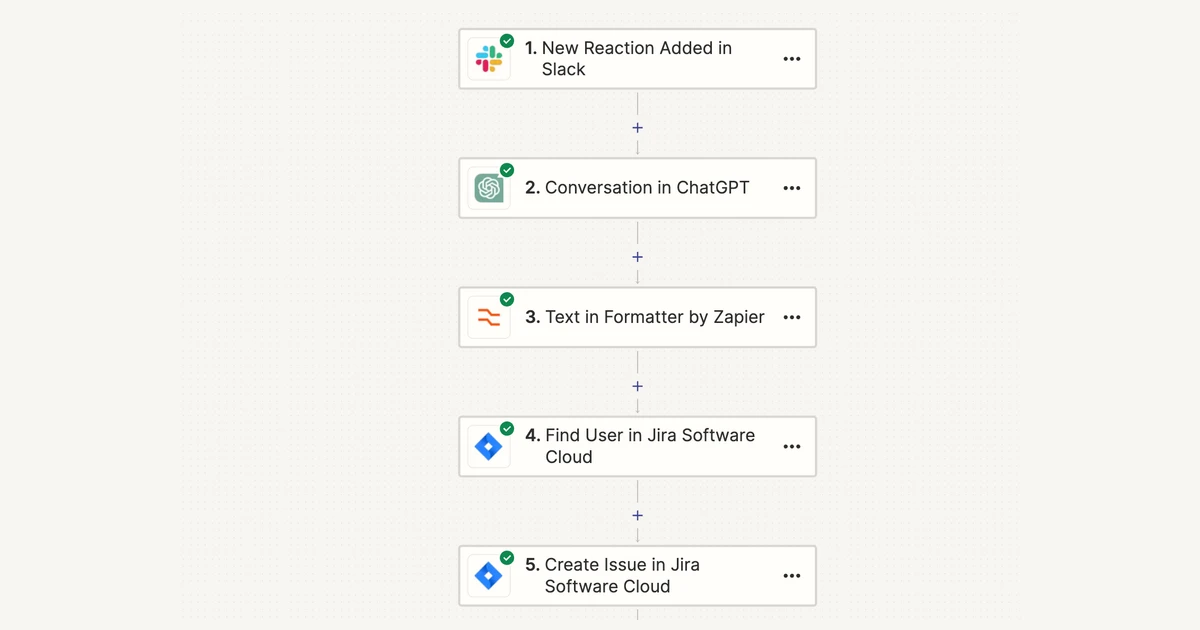
Zapier is still the easiest way to connect apps without writing code, and in late 2026 it connects more of them than anyone else: 9,000+ apps, plus Tables, Forms, an MCP server for AI assistants and model-tiered AI steps, all inside the same plans.
The product is not the hard part. The bill is. Everything Zapier sells is metered in tasks, AI steps can burn 1 to 5 tasks per run, overage is switched on by default for newer accounts, and the refund policy reads 'All sales are final.' This review covers what you actually pay at each task tier, what counts as a task, where the AI features change the maths, and the fine print worth reading before you put a card in.
Verdict: the best app coverage, priced by the action
Zapier is the right tool if you need to connect mainstream SaaS apps quickly, you want non-technical teammates to build and maintain workflows, and your volume sits in the low thousands of tasks per month. Nothing else matches its app catalogue, and the editor is the gentlest learning curve in the category.
It is the wrong tool if your workflows run tens of thousands of actions a month on a tight budget, if you need data stored in the EU, or if you want a vendor that refunds an accidental annual renewal. At volume the per-task model gets expensive, and Zapier's billing terms give you very little room once a charge goes through.
- Best for: solo operators, marketing and ops teams, and small companies automating lead routing, notifications, CRM updates and reporting across many apps.
- Watch out for: AI steps multiplying task use, pay-per-task overage running up to 3x your plan, no refunds, and US-only data hosting.
- Pricing: Free at 100 tasks/month; Professional from $19.99/month billed annually ($29.99 monthly); Team from $69/month billed annually ($103.50 monthly); Enterprise by quote.
What Zapier is in 2026
A Zap is a workflow: one trigger (a new form entry, a new email, a Slack reaction) followed by one or more actions in other apps. Zapier now lists 9,000+ supported apps and says it is 'trusted by 3 million+ businesses'. It calls itself 'the most connected AI orchestration platform', which tells you where the company is pushing the product.
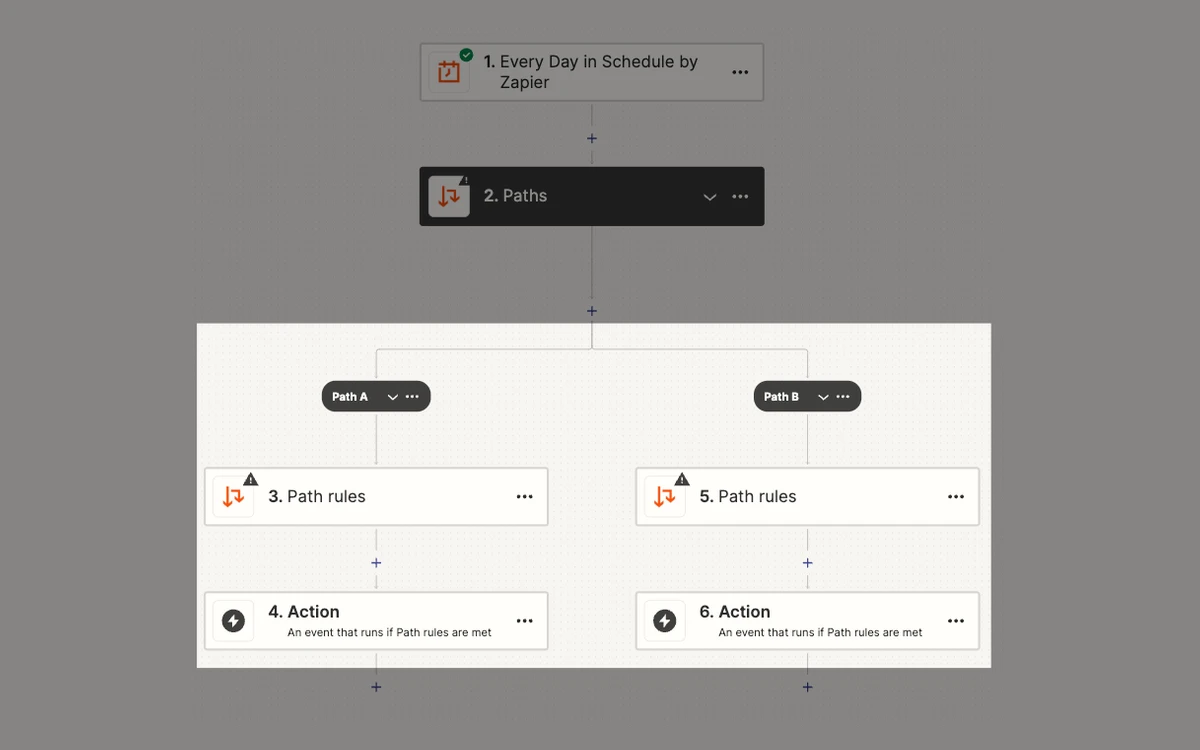
Around Zaps, Zapier has bundled a set of tools that used to be separate add-ons. Per Zapier's help centre, 'Tables, Interfaces, and Zapier MCP are now included in our Free, Pro, and Team plans - no separate add-ons required.' Interfaces now appears as Forms on the pricing page.
- Zaps: unlimited on every plan, up to 100 steps each (counting steps inside paths), with up to 1,000 fields per action step.
- Tables: a lightweight database. Text fields hold 255 characters and Long Text 10,000. The pricing page lists 2,500 records on Free, 100,000 on Pro and 500,000 on Team.
- Forms (formerly Interfaces): simple forms and pages that feed Zaps.
- Zapier MCP: lets AI assistants such as Claude or ChatGPT call Zapier actions, with access to '9,000+ apps and 40,000+ actions'.
- AI by Zapier, Copilot, Chatbots and Agents: the AI layer, covered below.
Pricing: what each task tier costs
Zapier has four plans: Free, Professional, Team and Enterprise. Free is $0 with 100 tasks per month. Professional and Team are priced on a ladder of task tiers, and the price you see depends heavily on billing cycle. Paying annually gives 'a 33% discount in comparison to the monthly plan'. The figures below come from the plan data on Zapier's live pricing page, checked on 31 October 2026.
Professional (one user)
- 750 tasks: $19.99/month billed annually ($239.88/year), or $29.99 billed monthly
- 1,500 tasks: $39/month annually ($468/year), or $58.50 monthly
- 2,000 tasks: $49/month annually ($588/year), or $73.50 monthly
- 5,000 tasks: $89/month annually ($1,068/year), or $133.50 monthly
- 10,000 tasks: $129/month annually ($1,548/year), or $193.50 monthly
- 20,000 tasks: $189/month annually ($2,268/year), or $283.50 monthly
- 50,000 tasks: $289/month annually ($3,468/year), or $433.50 monthly
- 100,000 tasks: $489/month annually ($5,868/year), or $733.50 monthly
- 2,000,000 tasks: $3,389/month annually ($40,668/year), or $5,099 monthly
Team (up to 25 users)
- 2,000 tasks: $69/month billed annually ($828/year), or $103.50 billed monthly
- 5,000 tasks: $119/month annually ($1,428/year), or $178.50 monthly
- 10,000 tasks: $169/month annually ($2,028/year), or $253.50 monthly
- 20,000 tasks: $249/month annually ($2,988/year), or $373.50 monthly
- 50,000 tasks: $399/month annually ($4,788/year), or $598.50 monthly
- 100,000 tasks: $599/month annually ($7,188/year), or $898.50 monthly
- 2,000,000 tasks: $3,999/month annually ($47,988/year); above that, a custom limit through Sales
Enterprise is 'Contact for pricing'. Non-profits get 'a 15% discount on any paid plan (excluding any pay-per-task charges)'. We found no startup discount.
Per-task maths
On annual billing, Professional works out to about 2.7 cents per task at 750 tasks, 1.3 cents at 10,000 and under half a cent at 100,000. Team at 2,000 tasks is about 3.5 cents per task. The entry tiers are where Zapier is most expensive per action, and that is exactly where most small accounts sit.
How tasks are counted
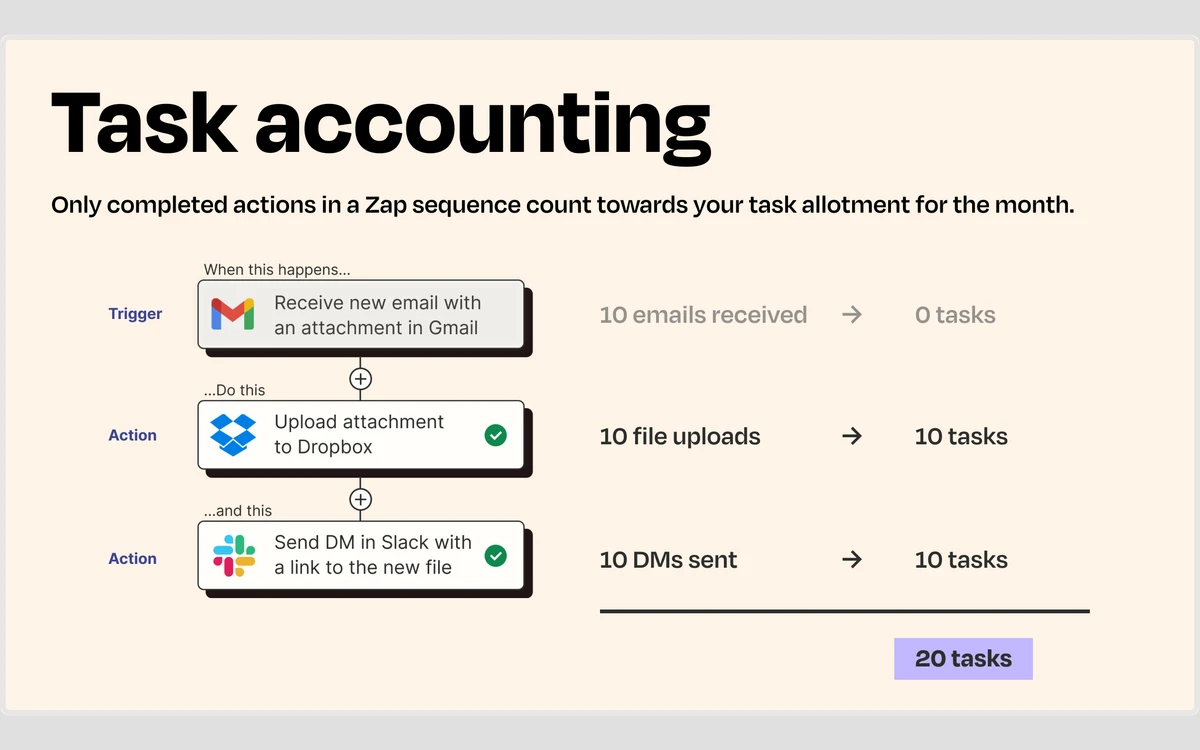
Zapier's definition is short: 'A task is any successful action that runs in Zapier. Only successful actions count toward your task usage.' Triggers are free, and so is a long list of built-in utility steps.
What does not use tasks
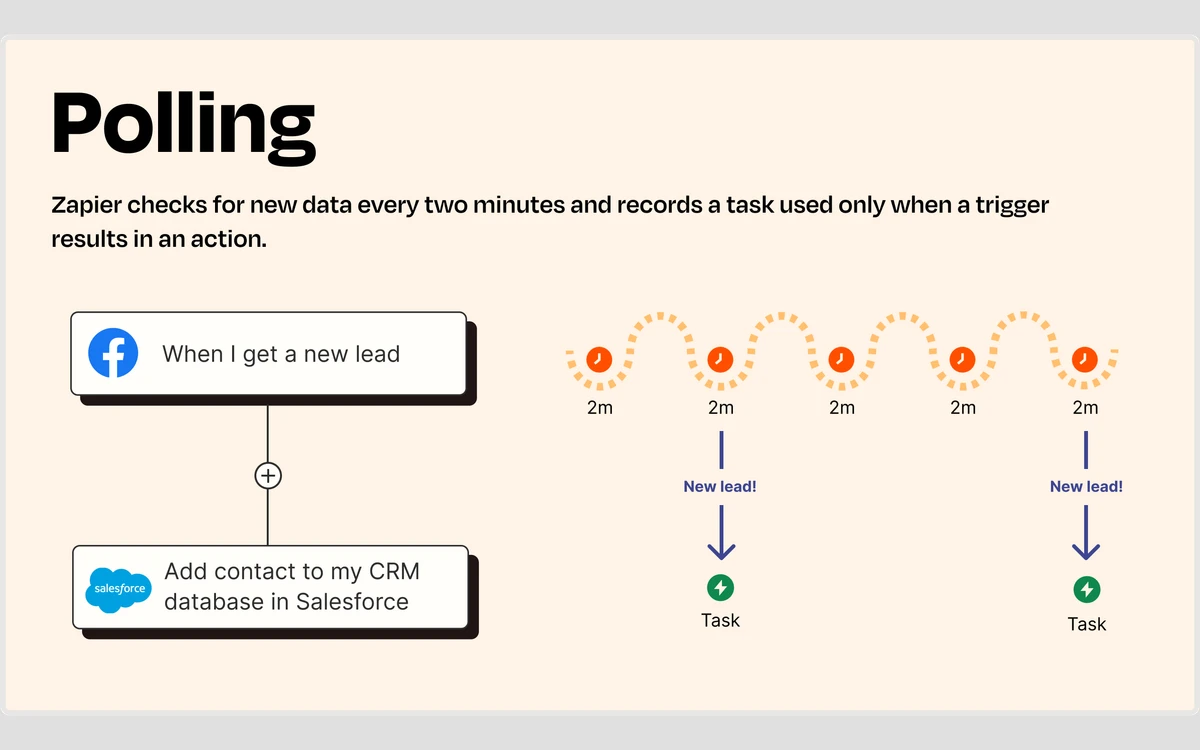
- All trigger steps, including polling triggers, which 'never use tasks'
- Filter and Paths steps
- Testing steps in the editor
- Actions that error or are halted
- Zapier Tables and Zapier Forms steps
- Formatter, Delay, Looping, Sub-Zap, Digest, Storage and Zapier Manager steps
What costs more than you might expect
- Code by Zapier: 1 task per run
- Lead Router: 5 tasks per successful lead routed
- Zapier MCP: 2 tasks per successful tool call
- AI by Zapier: 1, 3 or 5 tasks per run depending on model tier, plus the same again for every tool call
- Autoreplayed steps: each successful replay uses a task
Work the example forward. If that Gmail-to-Dropbox-to-Slack Zap handles 100 emails a day, it uses about 6,000 tasks a month. That is more than the 5,000-task tier, so you land on Professional 10,000 at $129 per month on annual billing, for one fairly simple workflow.
Overage, the 3x cap and other limits
What happens at your task limit depends on one setting. With pay-per-task billing on, Zapier says 'we'll switch you to pay-per-task billing once you reach your plan's task limit so your Zap workflows continue running', and those extra tasks are 'charged at a higher per-task rate than your base subscription tasks'. With it off, 'your Zap workflows will pause once you reach your plan's task limit until the start of your next usage period.'
Pay-per-task is 'enabled by default if you joined Zapier after January 2024.' Zapier does not publish one overage rate: it 'depends on your plan and billing cycle type', and the exact figure is in your Billing settings. Check it before you rely on overage.
The 3x cap is a total, not an extra
Overage stops at three times your plan's task limit in total. Zapier's example: 'Professional 750 plan... 750 + 1500 = 2250 tasks.' A Team 2,000 plan caps at 6,000. Past the cap, runs are held until the cycle resets: 'Your Zap runs will be held, not lost.' Up to that point, though, a runaway Zap can bill you for twice your plan's tasks at the higher rate.
Autoreplay
On paid plans, a failed step is retried automatically: 'Zapier will attempt to replay the step up to 5 times', at 5 minutes, 30 minutes, 1 hour, 3 hours and 6 hours. 'The final replay will occur about 10 hours, 35 minutes after the first error', and 'Zapier will not send any error notification emails until the final autoreplay attempt fails.' Useful for flaky APIs, but it means you can go most of a working day without hearing that something broke.
Rate limits
- Free and trial plans: polling Zaps 'will be held if they exceed 200 requests every 10 minutes per Zap.'
- Private apps on Free and Professional: 100 requests every 60 seconds.
- Private apps on Team and Enterprise: 5,000 requests every 60 seconds.
AI by Zapier, MCP and Agents: where the task maths changes
Zapier's AI features run on the same task meter, and since 15 June 2026 they can use it up quickly. Zapier's help centre says: 'Starting June 15, 2026, AI by Zapier steps are priced by model tier.' You pick the tier per step.
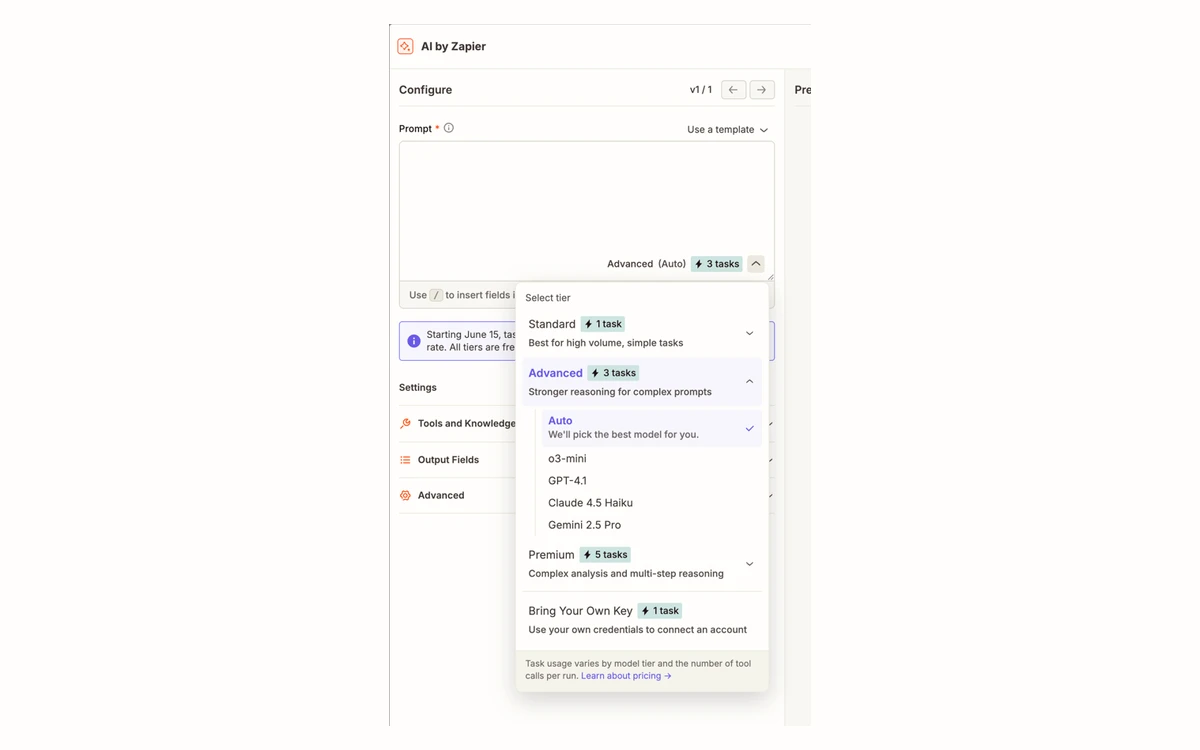
- Standard: 1 task per unit
- Advanced: 3 tasks per unit
- Premium: 5 tasks per unit
- Bring Your Own Key: 1 task per unit (you pay the model provider separately)
The formula is 'Tasks used per run = (1 × model rate) + (number of tool calls × model rate).' An Advanced step that makes two tool calls costs 9 tasks per run; a Premium step with two tool calls costs 15. Run the Advanced step 1,000 times a month and that is 9,000 tasks, enough to fill a Professional 10,000 plan by itself. A per-run cap protects you from a runaway step: 'The default is 75 tasks, and you can raise it up to 500.'
On Free, 'you cannot add tools or publish a Zap with an AI by Zapier step.'
Zapier MCP
MCP lets an AI assistant call Zapier actions directly. It 'runs on your existing Zapier plan, with no separate billing. Each successful tool call uses two tasks', and failed calls are free. An assistant that makes 500 Zapier calls a month uses 1,000 tasks. Sharing an MCP server needs Team or Enterprise.
Agents, Copilot and Chatbots
- Agents: 'Zapier is moving Agents to AI by Zapier.' After migration, 'You no longer manage a separate Agents subscription or add-on fees.' Zapier 'has not set a date to turn off Agents yet.' Until then, Agents use a separate activity quota (400 activities a month on Free, 1,500 on Pro) rather than tasks.
- Copilot, the assistant that builds Zaps from a prompt, is in open beta. Building and testing with it uses no tasks. Free accounts get a daily limit that resets at 12:00 AM UTC; Zapier does not publish the number.
Next Gen Zaps
At ZapConnect on 23 September 2026, Zapier announced Next Gen Zaps. They add a Workflow Manager with a visual canvas next to a TypeScript code editor, and 'Agentically managed' workflows in beta, where AI helps maintain the Zap.
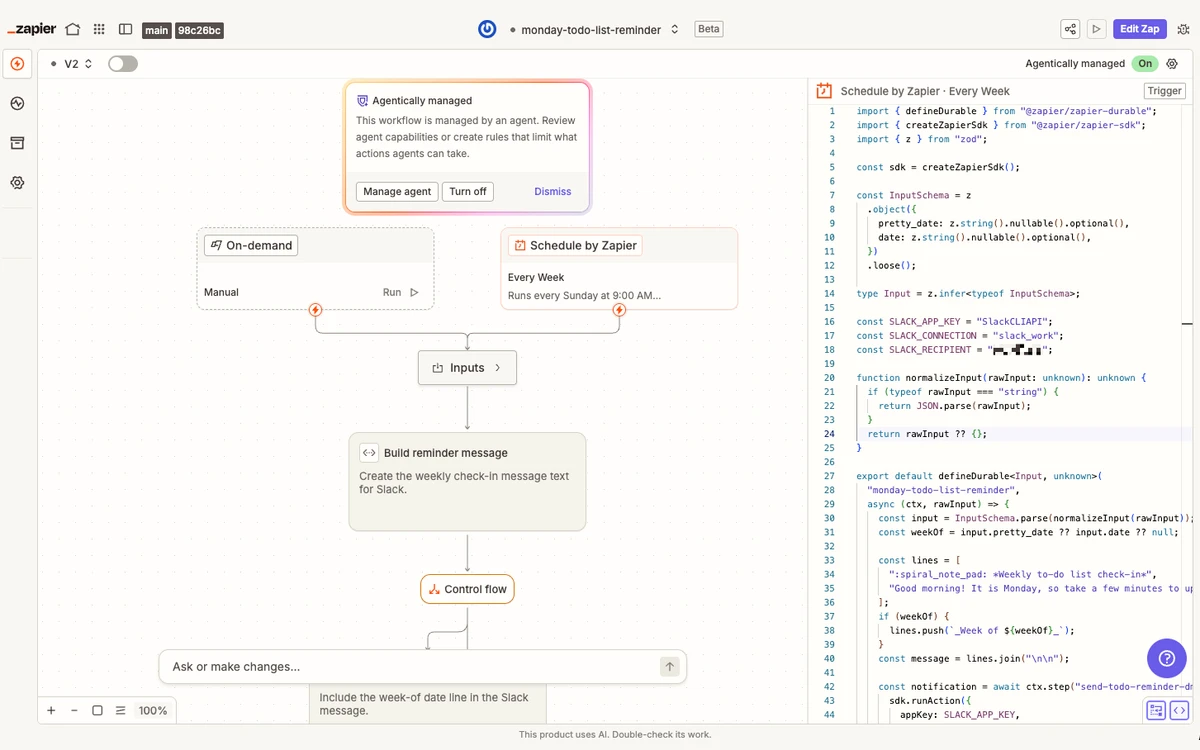
Billing does not change: 'Early access to Next Gen Zaps is available on paid Zapier plans... they'll use the same task-based pricing.' For developers this narrows the gap with code-first tools. For everyone else it is an early-access feature to try, not a reason to upgrade.
Security, data location and AI training
- Audits: Zapier holds 'SOC 2 Type II, and SOC 3' reports, and the 'SOC 2 Type II audit is conducted annually.' Reports are in its Trust Center; some need a self-service NDA.
- Data location: 'Zapier hosts data in AWS servers located in the United States.' Asked whether data can stay in the EU, Zapier says it 'does not support this option.' It is certified under the EU-US Data Privacy Framework, the UK Extension and the Swiss-US DPF.
- Retention: Zapier keeps Zap history for 29 to 69 days. Enterprise can set 7 to 30 days.
- Admin controls: SAML SSO on Team; SCIM, app allow-lists and custom retention on Enterprise.
AI training opt-out is automatic only on Enterprise
Zapier's policy says 'Enterprise customers are automatically opted out of Zapier using their content for model training and improvement purposes.' Subprocessors may not train on customer content, and Zapier uses OpenAI's Zero Day Retention. On Free, Professional and Team you are opted in by default and have to opt out yourself.
Two incidents are worth knowing about. In February 2025, press reports said an unauthorised party reached some of Zapier's internal code repositories through a 2FA misconfiguration. Those repositories held some customer data copied in for debugging, and Zapier notified affected customers. In November 2025, during that month's wave of npm supply-chain attacks, Zapier published a notice about unauthorised access to its npm packages.
Free trial, refunds and cancelling
New accounts are 'automatically enrolled in a 14-day free trial. No payment method is required, and your account will not auto-upgrade.' The trial is capped at 1,000 tasks, 'only the first 30 steps of a Zap will run', and there is no autoreplay or pay-per-task. A later 7-day re-trial is different: it 'Requires a payment method', and if you do not cancel you will be charged.
No refunds
Zapier's billing policy is blunt: 'All sales are final... Once a charge is processed, it is considered final and will not be refunded.' 'Charges following the end of a trial are non-refundable.' If you pick annual billing, put the renewal date in your calendar.
Cancelling is a downgrade: 'There is no separate "Cancel" button.' You move to Free, and the change takes effect at the end of the current monthly or annual cycle. Pay-per-task usage can still be billed after you cancel, and 'Premium apps... will stop working on the Free plan', so check which Zaps will break first.
This is where Zapier's reputation suffers. On Trustpilot it scored 1.3 from 327 reviews when we checked on 31 October 2026, with 75% one-star ratings. The complaints are mostly about billing rather than the product: refused refunds ('they will not give you your money back'), annual renewals people did not expect, and support ('Their customer support is the worst.'). Reviews on G2, written mainly by people who use the product day to day, are far kinder, at roughly 4.5 out of 5.
Who should and should not buy Zapier
Good fit
- You need a niche or mainstream SaaS app that other automation tools do not support.
- The people building workflows are not developers, and you value a gentle editor over the lowest price per action.
- Your volume is predictable and fits a tier with room to spare, or you are happy to pay for speed of setup.
- You want AI assistants to act in your apps through MCP without running your own integration layer.
Poor fit
- High-volume workflows where every action counts: the per-task model and AI multipliers add up quickly.
- EU organisations that need data residency, since Zapier hosts only in the US.
- Teams of more than 25 that do not want to negotiate Enterprise.
- Buyers who need refund flexibility or a simple cancel button.
Practical advice: start on the 14-day trial, which needs no card, and count tasks on your real workflows before choosing a tier. Turn pay-per-task off, or at least read your overage rate in Billing settings, if a surprise bill would hurt. Buy monthly first and switch to annual only when your volume is stable. If you are also weighing up Make, our older comparison of Zapier vs Make covers the basic trade-offs.
Frequently asked questions
How much does Zapier cost per month?
Zapier Professional starts at $19.99 per month billed annually or $29.99 billed monthly, for 750 tasks. Team starts at $69 per month billed annually or $103.50 monthly, for 2,000 tasks. Free gives 100 tasks a month, and Enterprise is priced by quote.
What counts as a task in Zapier?
A task is one successful action. Triggers, filters, paths, tests, failed actions and built-in steps such as Formatter, Delay and Tables do not count. Code steps count as 1 task, MCP tool calls as 2, Lead Router as 5 per lead, and AI by Zapier steps as 1, 3 or 5 per run plus the same for each tool call.
What happens if I go over my task limit?
With pay-per-task billing on, your Zaps keep running and the extra tasks are billed at a higher rate, up to 3x your plan's limit in total. With it off, your Zaps pause until the next usage period. Pay-per-task is on by default for accounts created after January 2024.
Is there a Zapier free trial?
Yes. New accounts get a 14-day trial with no payment method and no auto-upgrade, capped at 1,000 tasks and 30 steps per Zap. A later 7-day re-trial needs a card and will charge you if you do not cancel.
Can I get a refund from Zapier?
Generally no. Zapier's policy says all sales are final and charges after a trial are non-refundable. Cancelling means downgrading to Free, which takes effect at the end of your current billing cycle.
Does Zapier store data in the EU?
No. Zapier hosts data on AWS servers in the United States and does not offer EU-only storage. It relies on the EU-US Data Privacy Framework, the UK Extension and the Swiss-US DPF for transfers.
Does Zapier use my data to train AI?
Only Enterprise customers are opted out automatically. On Free, Professional and Team you are opted in by default and need to opt out. Zapier says its subprocessors may not train on customer content.
How many users can a Zapier plan have?
Free and Professional allow one user. Team allows up to 25 users and includes SAML SSO. Enterprise has unlimited users and adds SCIM provisioning.
Key takeaways
- Zapier has the widest app coverage in no-code automation (9,000+ apps) and bundles Tables, Forms and MCP into every plan.
- Professional starts at $19.99/month annually ($29.99 monthly) for 750 tasks; Team starts at $69/month annually ($103.50 monthly) for 2,000 tasks and up to 25 users.
- Only successful actions cost tasks, but AI by Zapier steps cost 1, 3 or 5 tasks per run plus each tool call, and MCP calls cost 2.
- Pay-per-task overage is on by default for newer accounts and can reach 3x your plan's limit at a higher rate.
- All sales are final, there is no cancel button, data is hosted only in the US, and only Enterprise is automatically opted out of AI training.
- Start on the card-free 14-day trial and measure real task use before choosing a tier.
More in Services & Software
Browse Services & Software