Technology reviews & practical guides
Our AWS review for 2026: the new Free plan and up to $200 in credits, project spend limits from $20, Lightsail vs EC2 prices, IPv4 and egress charges, support and SLA fine print.
Amazon Web Services is still the biggest cloud on the market. AWS segment sales reached $42.2 billion in Q2 2026, up 37% year on year, and it now runs 124 Availability Zones across 39 Regions. Size is not the question for a solo developer or a small team, though. The question is what a few small workloads cost, and how easily a bill can run away from you.
That answer changed in 2026. On September 16, 2026 AWS announced a new sign-up experience with project-based billing and a native monthly spend limit that pauses a project instead of letting charges pile up. Most new customers no longer need a credit card. Underneath, the old cost traps are still there: data transfer, the public IPv4 charge, and a support lineup that was rebuilt at the end of 2025.
This review covers costs, plans, guardrails, support, reliability and the contract. It does not teach the core services; our beginner guide to AWS does that, and our AWS vs Azure vs Google Cloud comparison covers the three-way choice. All prices are US East (N. Virginia), checked on October 9, 2026.
AWS is the most complete cloud you can buy, and in 2026 it finally became safer for beginners. The project spend limit is a real cap, not just an alert, and the Free plan no longer asks most people for a card. That fixes the most common horror story: a forgotten resource quietly billing a personal card.
It is still not the cheapest or simplest place to run one small server. A plain EC2 instance plus its public IPv4 address costs more per month than a comparable Lightsail bundle, and egress beyond the free 100 GB is billed at $0.09 per GB. Paid support now starts at $29 a month per account. If you need managed databases, queues, serverless and global reach under one bill, AWS earns its place. If you need one VPS, Lightsail or a simpler host is the better buy.
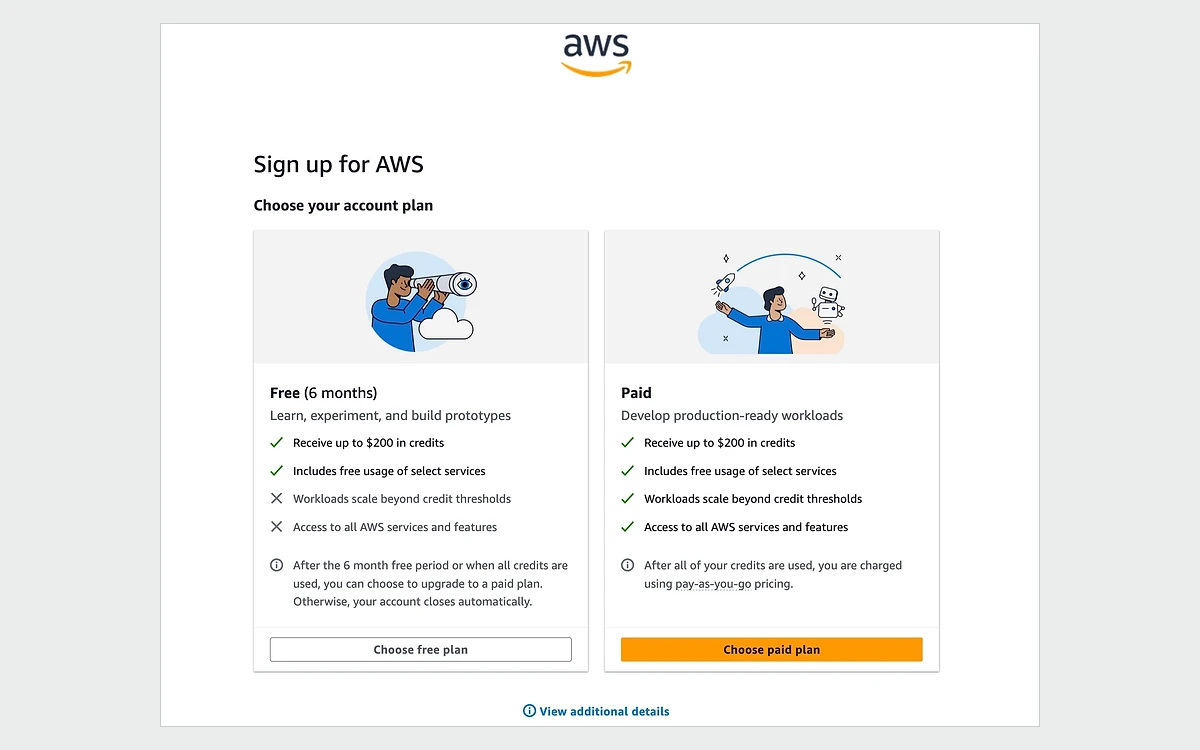
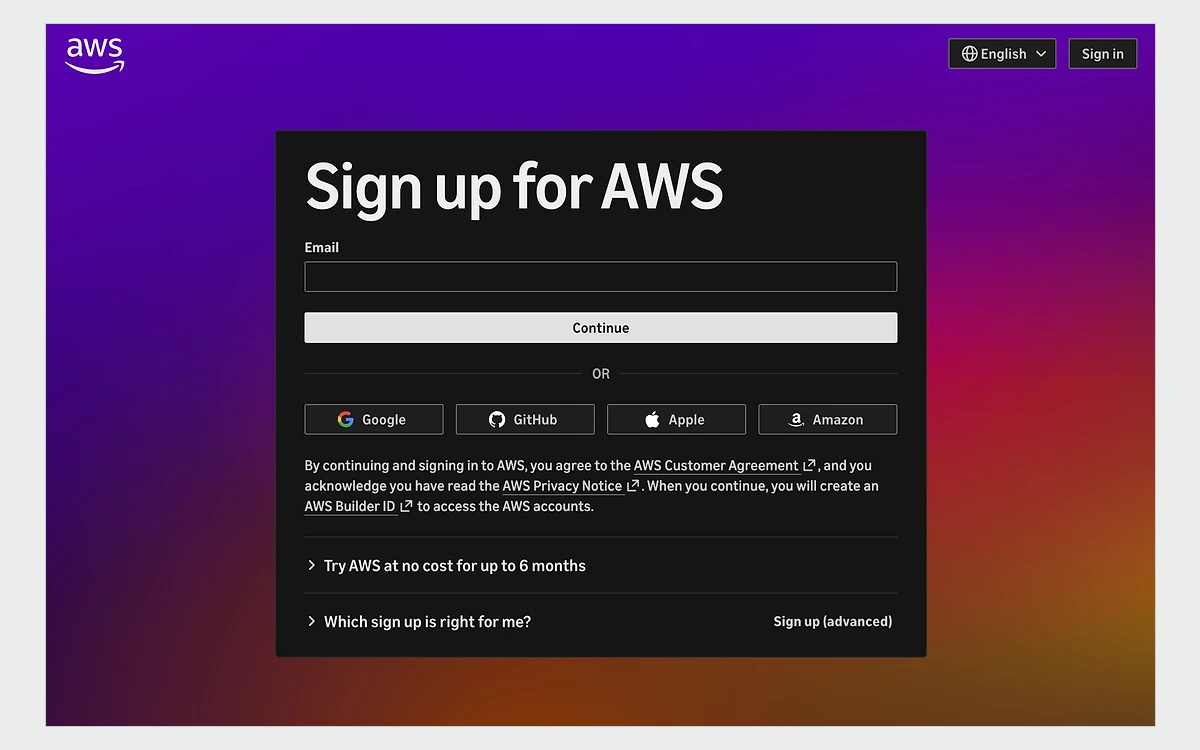
AWS announced the new AWS Builder Experience on September 16, 2026. You can sign up with Google, GitHub, Apple or Amazon credentials as well as email. According to the announcement, most new customers need no credit card and get up to $200 in Free Tier credits.

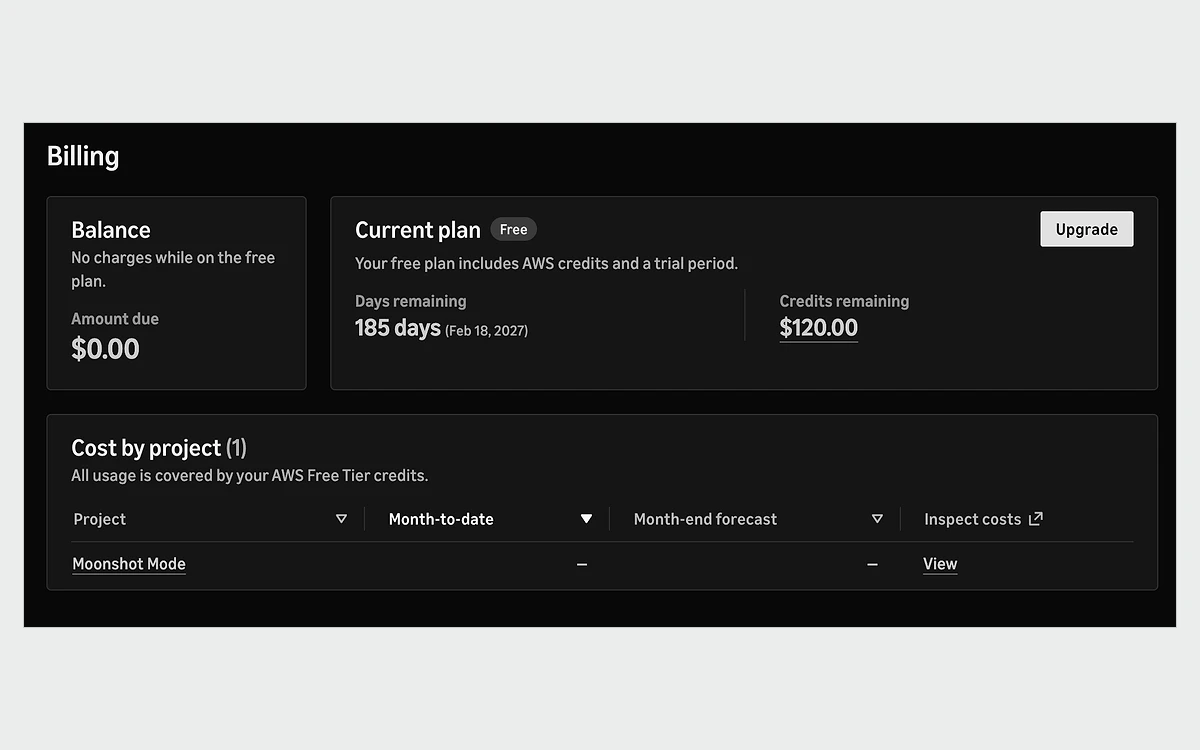
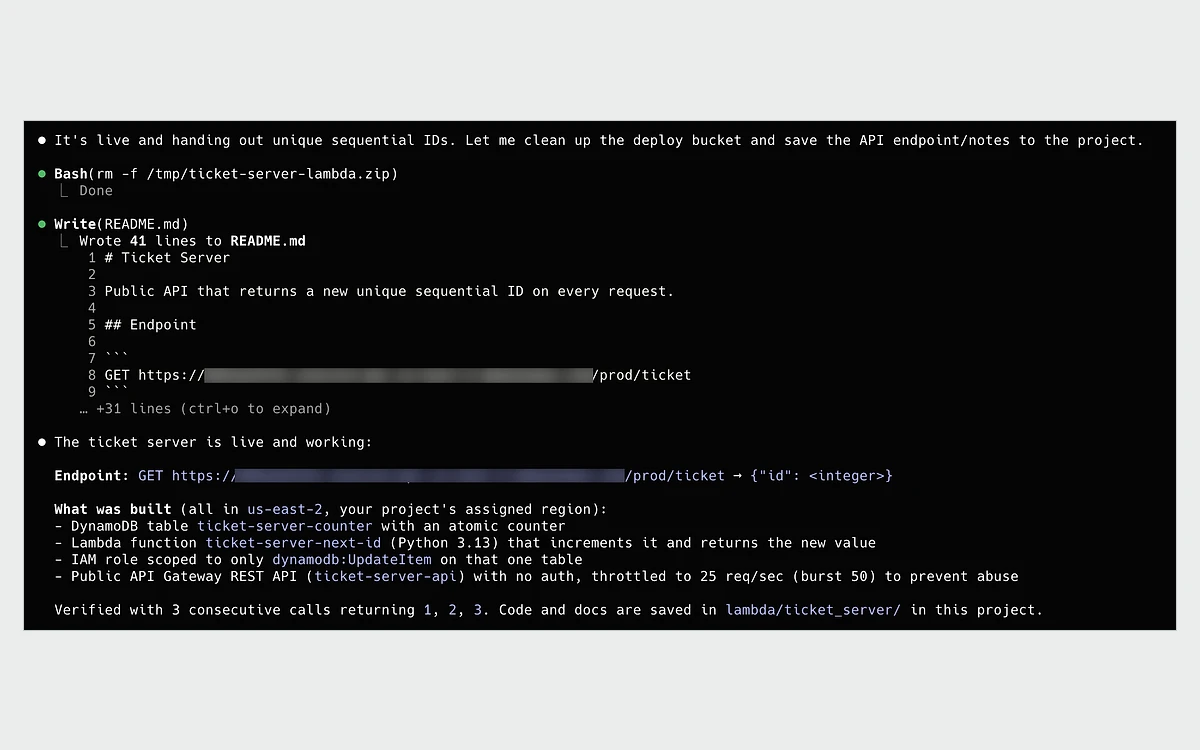
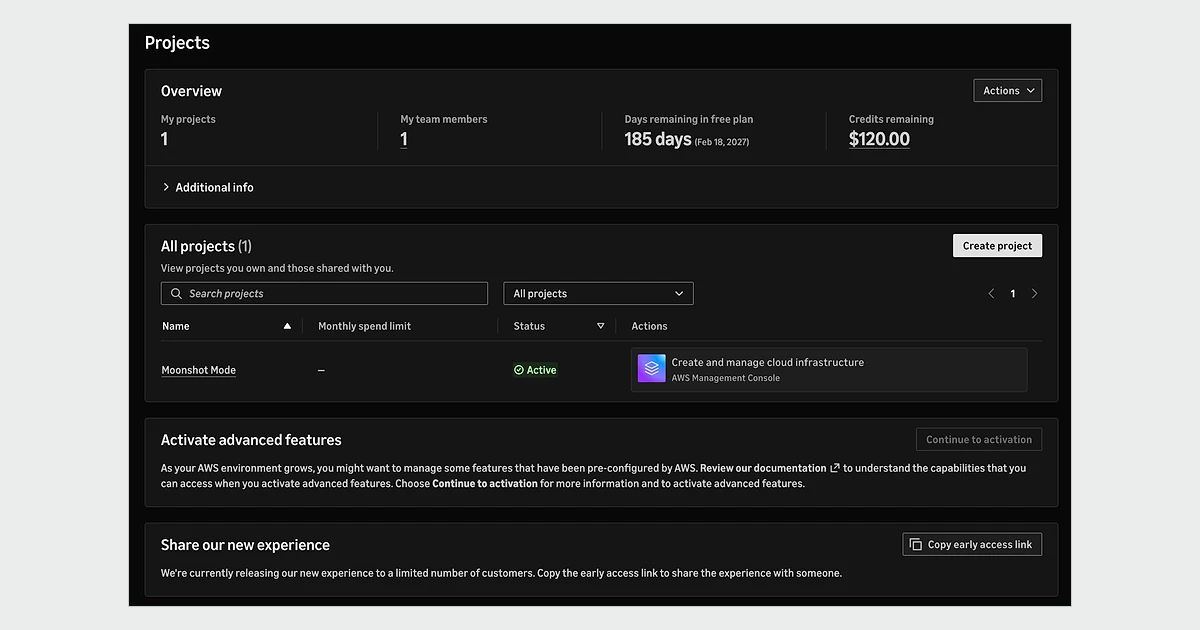
Billing is now organized by project. Each project has its own spend limit and its own team members, and you can create more projects with one click. AWS also added a one-prompt setup that connects a coding agent by installing the AWS CLI and the Agent Toolkit for AWS.
Accounts that need more can turn on what AWS calls advanced features, such as multiple Regions and custom governance controls, without migration or downtime and at no additional cost. That switch is one-way: once advanced features are on, you cannot go back to the Free plan and cannot earn more activity credits.
The announcement and launch blog are dated September 16, 2026, while the Free Tier FAQ refers to "the new sign-up experience in October 2026". Accounts created before the new experience still see their credits on the Credits page of the Billing and Cost Management console.
Since July 2025, new AWS customers choose between a Free plan and a Paid plan. You get $100 in credits on sign-up and can earn up to $100 more by completing activities. In the 2025 version there were five activities worth $20 each: launch an EC2 instance, try the Amazon Bedrock playground, set up a cost budget, build a Lambda web app and create an RDS database. Usage during those activities is itself charged against your credits, so the $200 is a ceiling, not a guaranteed balance.

The Free plan expires 6 months after sign-up or when the credits are used up, whichever comes first. AWS's documentation says the account then closes automatically and you lose access to your resources and data. The FAQ describes it as a suspension. Both agree on what happens next: AWS keeps your content for 90 days and then permanently deletes the account. To keep it, you must upgrade to a Paid plan within those 90 days. You cannot extend the Free plan past 6 months, and you cannot move from Paid back to Free.
AWS's own FAQ is inconsistent. Several answers say credits expire 6 months from account creation, while others, and the July 2025 launch blog, say 12 months. For accounts created through the new 2026 sign-up, plan on 6 months. If you signed up earlier, check the Credits page in the Billing console for your actual expiry date.
Some offers stay free beyond the credits. Lambda includes 1 million requests and 400,000 GB-seconds a month. DynamoDB includes 25 write capacity units, 25 read capacity units and 25 GB of storage per Region per payer account. CloudFront includes 1 TB of transfer out and 10 million requests a month, and SQS and SNS each include 1 million requests or publishes. CloudWatch includes 10 custom metrics and 10 alarms.
For one always-on server you have two realistic options on AWS: a Lightsail bundle with a fixed monthly price, or an EC2 instance billed per second. Here is how they compare at the low end.
IPv6-only bundles are cheaper: $3.50 a month for 512 MB RAM, 2 vCPUs, 20 GB and 1 TB, $5 for 1 GB RAM and 40 GB, and $10 for 2 GB RAM. Note that the $5 IPv4 bundle has 0.5 GB of memory while the $5 IPv6-only bundle has 1 GB. You cannot attach a static IP to an IPv6-only instance.
The monthly figures are our own arithmetic at 730 hours, from AWS's published hourly rates as of October 8, 2026. EC2 bills per second with a 60-second minimum; SUSE Linux instances are billed by the full hour.

The EC2 hourly price is not the whole bill. A t3.micro with a public IPv4 address costs about $7.59 plus about $3.65 for the address, roughly $11.24 a month before storage and before any egress beyond the free allowance. A $7 Lightsail bundle with the same memory includes the address, 40 GB of SSD and 2 TB of transfer. For a single small server, Lightsail is the better value.
Compute Savings Plans save up to 66% and EC2 Instance Savings Plans up to 72% against On-Demand. Reserved Instances also reach up to 72%, and Spot Instances up to 90%. Savings Plans and Reserved Instances are not available on the Free plan, and both are commitments: if you close the account, you stay liable for what you committed to.
For years the standard advice was that AWS has no hard spending cap. That is now out of date for new accounts. On a Paid plan in the new experience, you can set a monthly spend limit per project starting at $20. AWS notifies you at 50%, 75% and 90%, and if the project reaches its limit, AWS pauses the project and stops its resources until the next month unless you raise the limit.
Pausing protects your wallet, not your uptime. A project that hits its limit goes offline, so set the limit with headroom for a production workload. We found no native cap in AWS's documentation for accounts created before the new experience or for accounts with advanced features turned on.

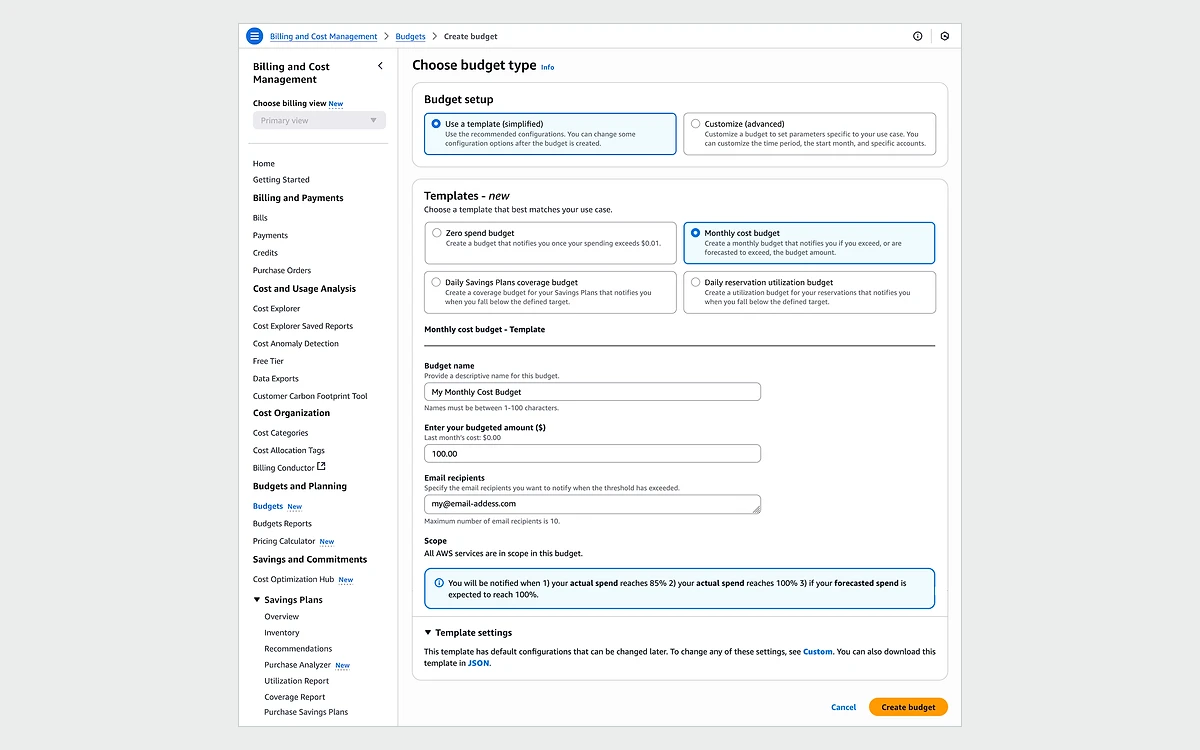
AWS Budgets monitoring and notifications are free. The first two action-enabled budgets are free, then each costs $0.10 a day, and each report delivered costs $0.01. Budget data updates up to three times a day, typically 8 to 12 hours apart, so a runaway resource can bill for most of a day before an alert fires.
Budget actions can apply IAM policies or service control policies, or stop specific EC2 and RDS instances. If an instance belongs to an Auto Scaling group, Auto Scaling starts it again. Cost Anomaly Detection adds machine-learning alerts for unusual spending on top of that.
AWS publishes no one-time bill forgiveness policy. Its official guidance is to contact AWS Support to ask about or appeal charges. Open the case quickly and shut down whatever caused the spike first.
Every account includes Basic Support for free. On December 2, 2025 AWS stopped selling Developer Support and Business Support, and both are discontinued on January 1, 2027. Developer customers must opt in to Business Support+ or accept a downgrade to Basic. Enterprise On-Ramp also ends on January 1, 2027, and its customers move to Enterprise Support during 2026. The older plans remain available in GovCloud (US).
Two details matter for small teams. Support fees are calculated on gross charges before discounts or credits, so a bill fully covered by credits can still produce a support fee. And the minimum commitment is 30 days, or 90 days for Unified Operations. On a $500 monthly bill, Business Support+ costs $45 a month by our arithmetic, since 9% beats the $29 floor.
The EC2 Region-level SLA promises 99.99% monthly uptime for instances deployed at the same time across two or more Availability Zones. Service credits are 10% of the affected charges below 99.99%, 30% below 99.0% and 100% below 95.0%. A single instance has a separate 99.5% instance-level SLA with credits of 10%, 30% and 100% on similar bands, and AWS automatically does not charge for a single instance that is unavailable for more than 6 minutes of a clock hour.
The most serious recent incident with an AWS post-event summary ran from 11:48 PM PDT on October 19 to 2:20 PM PDT on October 20, 2025, about 14.5 hours in US East (N. Virginia). DynamoDB was impaired until 2:40 AM, EC2 instance launches failed from 2:25 AM to 10:36 AM, and Network Load Balancer was affected from 5:30 AM to 2:09 PM. AWS traced the root cause to a latent race condition in DynamoDB's DNS automation that left an empty DNS record for the regional endpoint.
The lesson for small teams is not that AWS is unreliable, but that a single Region is a single point of failure. If your users would notice a day offline, plan for a second Availability Zone at minimum, and treat us-east-1 as the Region most likely to be in the news when something breaks.
The AWS Customer Agreement was last updated on August 14, 2026. A few clauses are worth knowing before you put anything important on it.
Closing an account is a separate process. A closed account can be reopened during a 90-day post-closure period, you receive a final bill the following month, and you remain liable for any outstanding Reserved Instances and Savings Plans. Do not confuse that 90-day window with the 30-day content window under the agreement, or with the 90-day retention after a Free plan expires.
AWS makes sense when you will use what only a large cloud offers: managed databases, queues, serverless functions, AI services such as Bedrock, many Regions, and the compliance programs larger customers ask about. The 2026 project model also suits small agencies and teams, since each client or app can get its own project, members and spend limit.

Pick something simpler if all you need is one virtual server and a database on the same box. Lightsail inside AWS covers that with predictable prices. Outside AWS, flat-priced VPS hosts include more transfer and do not charge for IPv4 by the hour.
Partly. New customers get $100 in credits plus up to $100 more from activities, but the Free plan ends after 6 months or when the credits run out. Some offers, such as 1 million Lambda requests a month, stay free on a Paid plan.
The account closes and you lose access to your resources. AWS keeps your content for 90 days, and you can upgrade to a Paid plan within that window to keep the account. After 90 days it is permanently deleted.
Yes, on accounts created with the 2026 experience. A Paid plan project can have a monthly spend limit from $20, and AWS pauses the project when it is reached. AWS Budgets on its own only alerts, with data that can lag 8 to 12 hours.
Not for most new customers since the September 2026 launch. AWS says most sign-ups need no payment method, but you will need one to upgrade to a Paid plan.
Usually, yes. A $7 Lightsail bundle includes 1 GB of RAM, 40 GB of SSD, 2 TB of transfer and a public IPv4 address, while a t3.micro costs about $7.59 a month before storage, plus about $3.65 for its public IPv4 address.
Basic Support is free. Paid support starts with Business Support+ at the greater of $29 a month per account or a percentage of your bill, starting at 9%. Developer Support is no longer sold and ends on January 1, 2027.
Not as cash. Eligible SLA breaches earn service credits against future bills, only above $1, and you must file a claim through Support by the end of the second billing cycle after the incident.
Yes, you can close the account whenever you like, but you will get a final bill the following month and remain liable for any Reserved Instances or Savings Plans you committed to. A closed account can be reopened within 90 days.
More in Cloud Computing
Browse Cloud Computing