Technology reviews & practical guides
IBM Cloud review for 2026: the $200 30-day credit, Lite free tier rules, us-south list prices, no spending cap, $200/month support and the 2025 outages.
IBM Cloud is the big-name public cloud that most buyers never get around to pricing. It has a $200 sign-up credit, more than 40 always-free Lite plans and 13 regions, and it sits behind a brand that enterprise procurement teams already trust.
We read the fine print instead of the landing page. As of 15 October 2026 new accounts are Pay-As-You-Go with a card on file, spending alerts never stop charges, idle Lite instances are deleted after 30 days, Basic support can no longer open technical cases, and the platform went through four major outages in 2025. Below are the real list prices (us-south, effective 1 October 2026), what the free tier actually covers, and who IBM Cloud is a sensible choice for.
IBM Cloud is a credible enterprise platform with strong regulated-industry features, but it is a poor default for small teams. List prices for general-purpose virtual servers start around $28 a month for a 1 vCPU / 1 GB instance, which is above budget VPS providers, and there is no hard spending cap to protect a hobby account.
All prices are IBM US list prices for the Dallas (us-south) region taken from IBM's Global Catalog, effective 1 October 2026. Monthly figures are hourly price x 730 hours, calculated by us rather than quoted by IBM, so treat them as approximate. Other regions and negotiated contracts differ.
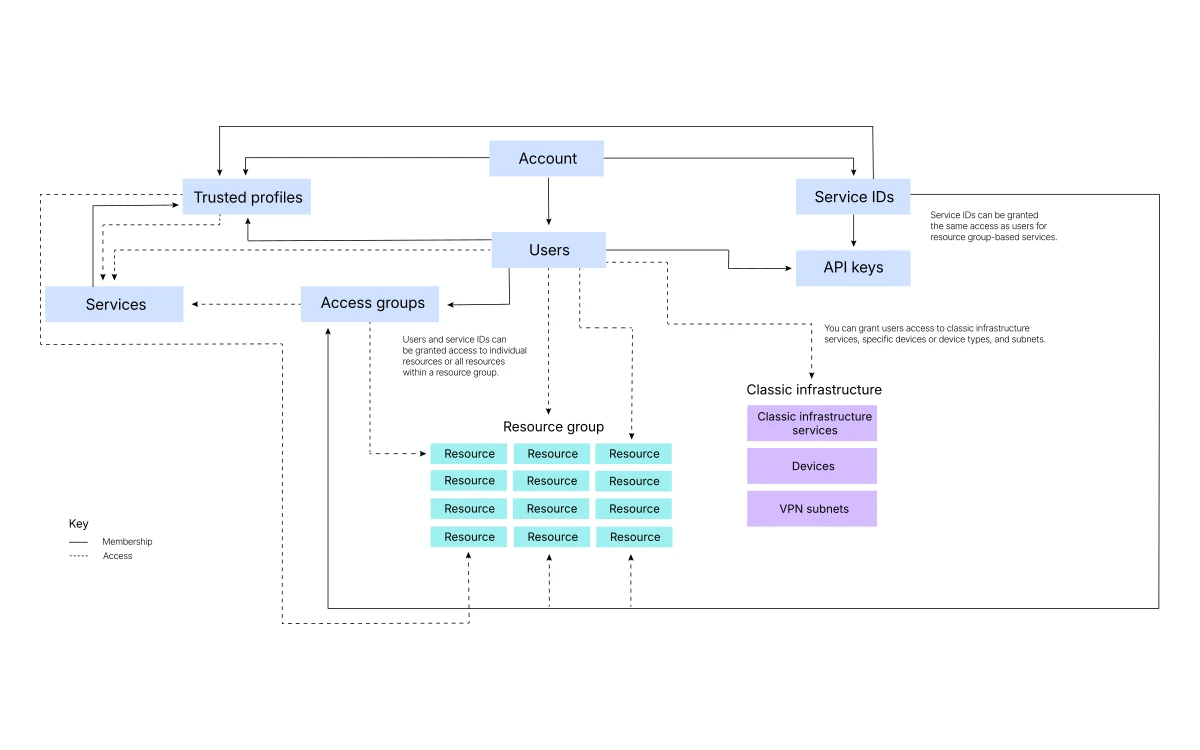
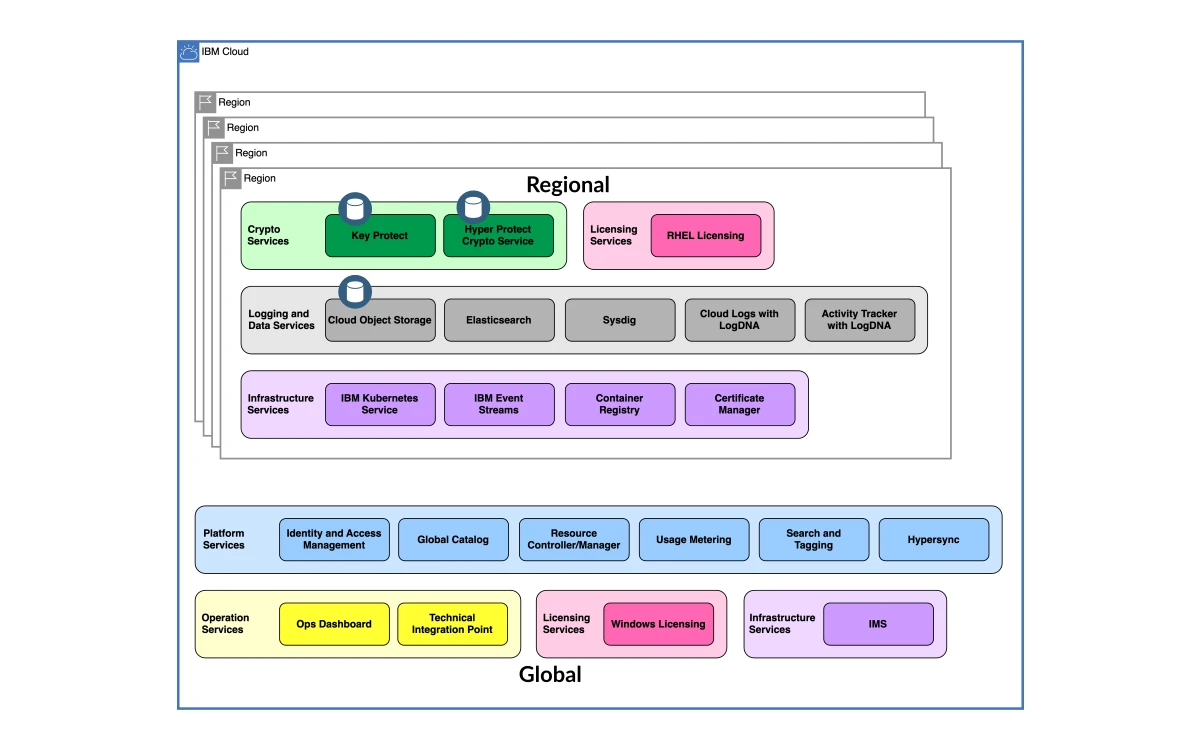
IBM Cloud is IBM's public cloud: VPC virtual servers and bare metal, Kubernetes and Red Hat OpenShift, the Code Engine serverless platform, Cloud Object Storage, managed databases such as Cloudant and Db2, and the watsonx AI portfolio, all managed from one account with resource groups, IAM and consolidated billing.
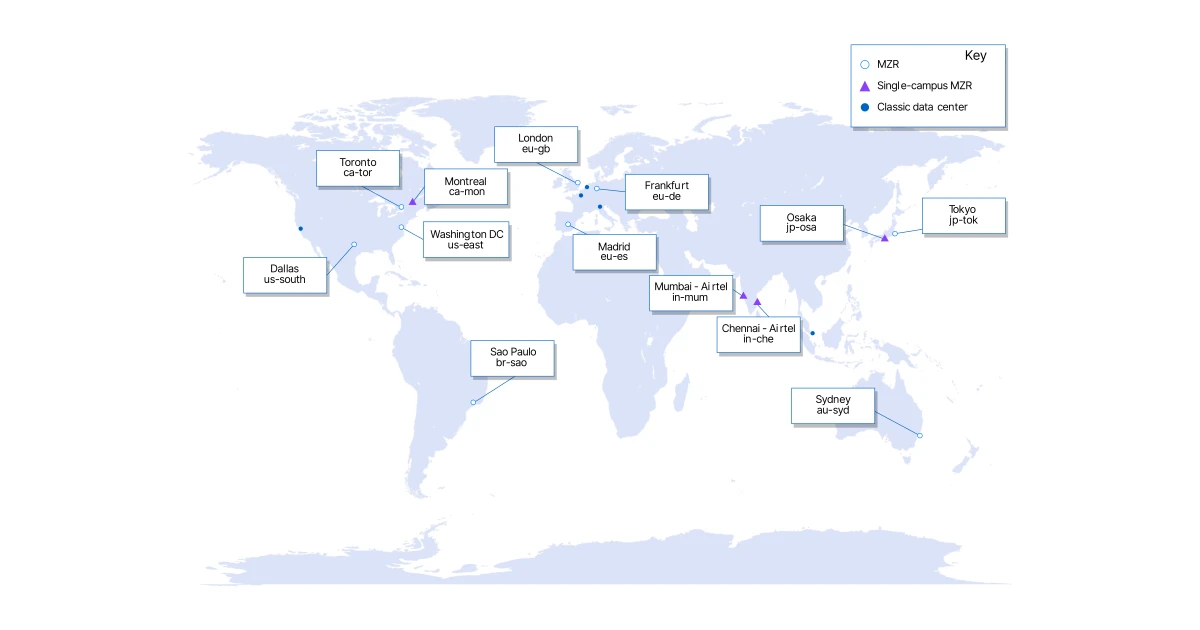
IBM lists 9 multizone regions (MZRs): Dallas, Sao Paulo, Toronto, Washington DC, Frankfurt, London, Madrid, Sydney and Tokyo. It adds 4 single-campus MZRs: Chennai and Mumbai (both run with Bharti Airtel), Montreal and Osaka, for 13 regions in total. That is a much smaller footprint than AWS, Azure or Google Cloud, so check that a region near your users exists before you go further.

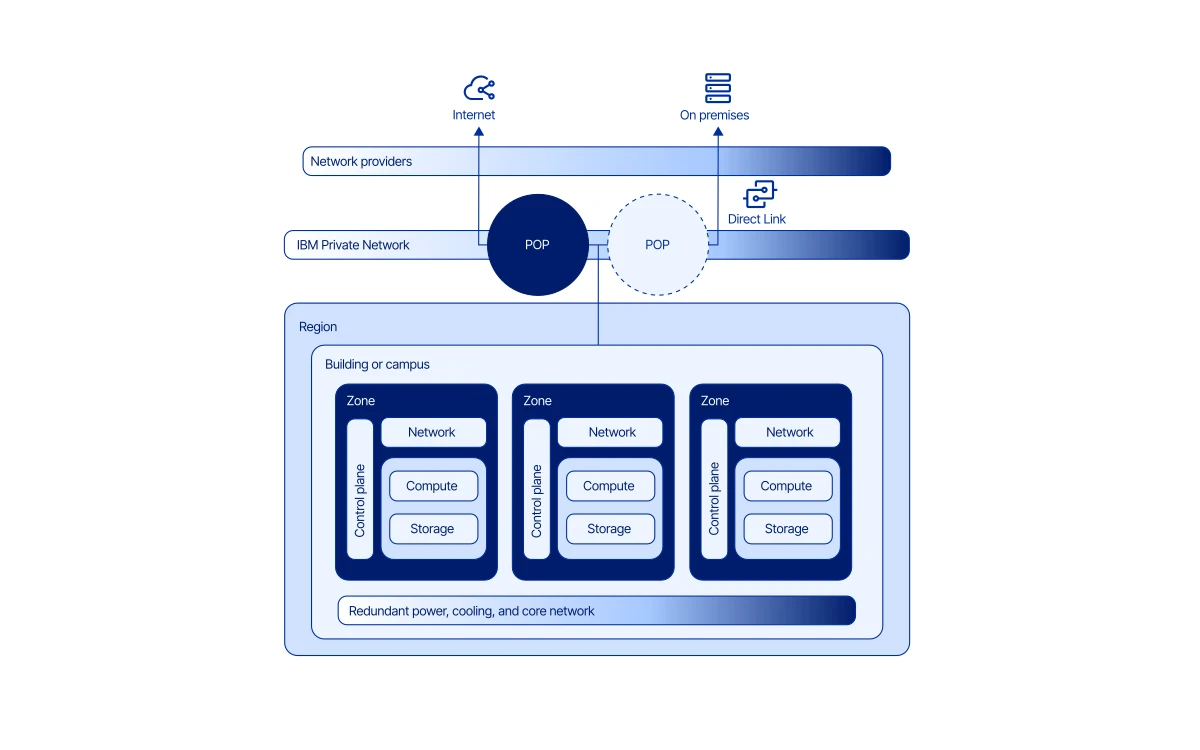
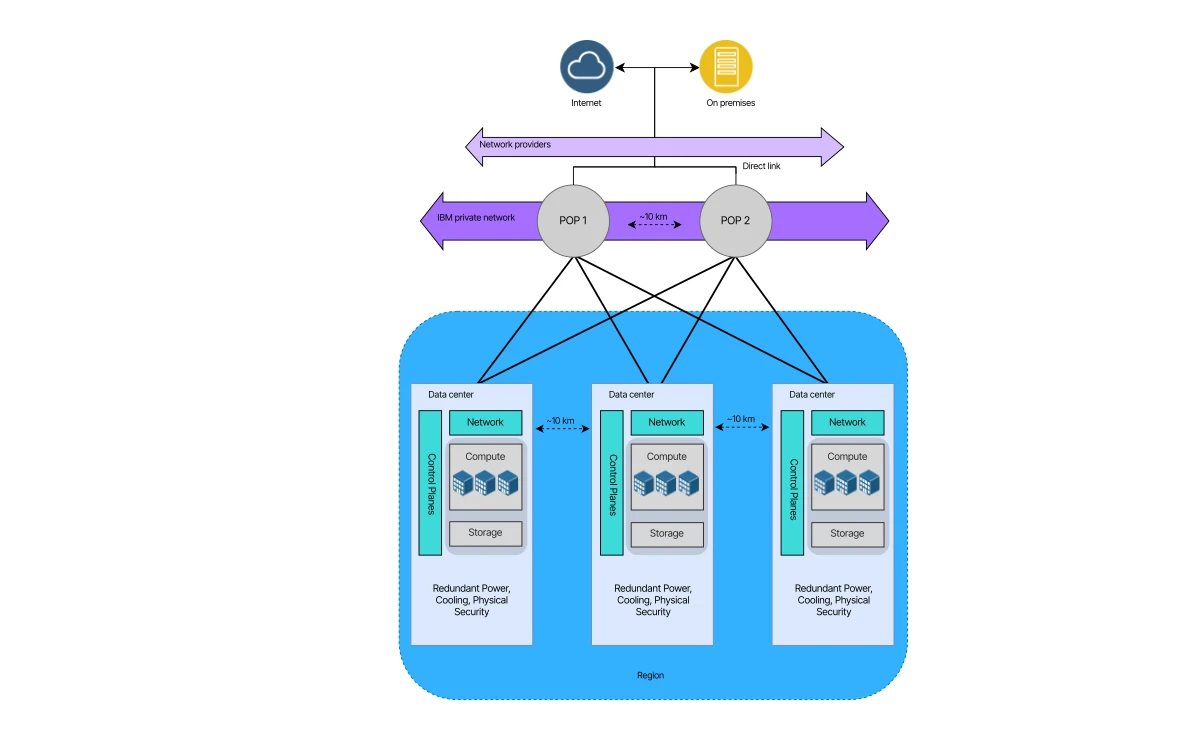
IBM describes an MZR as "three or more data centers in multiple zones with independent power, cooling, and network connectivity" and says regional services spread across those zones "generally provide 99.99% (tier 3) availability". That figure applies to regional services spread across zones. A single virtual server in one zone does not get it, and you should design for multiple zones if uptime matters.
Since 25 October 2021 every new IBM Cloud account is created as Pay-As-You-Go. You have to enter a credit card for identity verification, and IBM places a nominal hold on it, "typically around USD 1.00". In return you get two things.
IBM advertises "over 40 always-free products with no time limit". Lite plans never expire and IBM says you "can't be charged for them - ever". The rules matter more than the headline:

Lite accounts created before 25 October 2021 still work, but they are limited to one org and one resource group. You cannot create a new one today. Every new sign-up is a card-backed Pay-As-You-Go account.
IBM's current VPC profiles are the gen4 families (bx4, cx4) and the newer flex families (bxf, cxf, nxf). Ubuntu and Rocky Linux add nothing to the base price. Windows adds $0.05151 per vCPU-hour.

Bare metal starts at about $2.16 an hour among the profiles we priced: mx3-metal-16x128 at $2.158/hour (about $1,575/month), cx3-metal-48x128 at $2.332/hour and cx3d-metal-48x128 at $3.847/hour. That is the territory the BUYBRS credit is aimed at.
IBM's catalog also lists 1-year and 3-year reserved rates and reserved virtual servers. IBM does not publish a single discount percentage for them, so get a quote before committing.

IBM says inbound bandwidth "is unlimited and not charged" and that public outbound bandwidth "is charged on a tiered basis, with a set allocation for each month", but its bandwidth page does not give the allocation. Third-party trackers list 250 GB a month of free outbound for VPC virtual servers, then roughly $0.09, $0.07 and $0.05 per GB tiers. IBM itself does not state that 250 GB figure, so confirm it in your own bill.
Code Engine's Standard plan costs $0.1235 per vCPU-hour, $0.0128 per GB-hour of memory and $0.538 per million HTTP requests. IBM's docs say Code Engine "includes a free tier" but give no amounts. Third-party trackers list 100,000 vCPU-seconds, 200,000 GB-seconds and 100,000 HTTP requests a month. For scale, a 1 vCPU / 2 GB container running all month works out to about $109 by our maths, so Code Engine is cheap for spiky workloads and expensive for always-on ones.
Here is a single small web server in Dallas, at list price, before support and data transfer:
The $200 credit covers roughly two and a half months of that setup, but it expires after 30 days, so in practice it pays for about $75 of usage and the rest goes unused. Add a second zone for redundancy and the bill roughly doubles. Add Advanced support and it rises by at least $200.
IBM sends notifications when monthly spending reaches 80%, 90% and 100% of thresholds you set, but its own billing FAQ says: "Spending notifications don't stop charges from incurring." We found no documented hard cap. A leaked API key or a forgotten bare metal server keeps billing until you notice it.
Practical mitigations: set spending notifications on day one, put experiments in their own resource group, delete rather than stop resources you no longer need, and restrict who can create bare metal or GPU instances with IAM policies.
In September 2026 IBM added billing exports in the FinOps FOCUS format, which helps if you already track spend across several clouds.
If you close an account, IBM deletes all data and removes all services 30 days after closure, so export everything first.
The January 2026 change is the important one. On a Basic plan you now rely on documentation and community forums for technical problems. For any production workload, budget the $200 minimum for Advanced. On a $75 setup like the one above, support costs more than the infrastructure.
IBM Cloud had a bad 2025. Network World counted four major outages between late May and August. In the latest, which began at 12:59 UTC on Monday 11 August 2025, problems lasted two hours and 23 minutes and affected 27 services across 10 regions. IBM rated it Severity One. By Network World's count, an incident in early June lasted more than 14 hours.
The Register reported in June 2025 that IBM Cloud login had broken "for the second time in a fortnight", with one incident affecting 41 products. At the time IBM had not published a cause. The incidents centred on login and authentication, so spreading workloads across zones would not have helped. When the control plane is down, you cannot manage resources in any zone.

We have no comparable public tally for 2026, and regional service design is still sound on paper. Still, if your operations depend on reaching the console or API during an incident, the 2025 record should weigh on your decision.
Against AWS, Azure and Google Cloud, IBM Cloud has fewer regions and fewer managed services, and a comparable small instance is not cheaper at list price. Its advantages are elsewhere: Power Virtual Server, Hyper Protect and other confidential-computing services, tight Red Hat OpenShift integration, and the commercial relationship many large enterprises already have with IBM.
Against developer-focused providers such as DigitalOcean or Hetzner, IBM Cloud is several times more expensive for a basic Linux server and much more complex to operate. Our AWS, Azure, Google Cloud, Oracle Cloud, DigitalOcean and Hetzner reviews use the same method if you want to compare line by line.
Partly. More than 40 Lite plans are free with no time limit, and new accounts get a $200 credit for 30 days. You still need a credit card, Lite instances are deleted after 30 days without development activity, and anything outside Lite plans or the credit is billed.
Yes. Since 25 October 2021 new accounts are Pay-As-You-Go and IBM asks for a card for identity verification, placing a hold of about USD 1.00.
No hard limit is documented. You can set spending notifications at 80%, 90% and 100% of a threshold, but IBM states that the notifications do not stop charges.
The nxf-1x1 burstable profile is $0.00655 an hour in Dallas, about $4.78 a month. A full 1 vCPU / 1 GB nxf-1x1 is $0.03838 an hour, about $28 a month. Prices exclude storage, IPs and bandwidth.
Usage is billed to your card at list price. The credit also expires after 30 days whether or not it is used, cannot be spent on third-party products, and is limited to first-time Pay-As-You-Go accounts.
Basic support is free but, since 5 January 2026, cannot open technical support cases. Advanced support starts at USD 200 a month or 10% of consumption, whichever is higher.
IBM deletes all data and removes all services 30 days after the account is closed. Export anything you need before you close it.
Its multizone design targets 99.99% availability for regional services, but 2025 brought four major outages, including one in early June that lasted over 14 hours. Plan for control-plane outages as well as zone failures.
More in Cloud Computing
Browse Cloud Computing