Oracle Cloud Review 2026: The Halved Always Free Tier, $300 Trial, Real Prices and the Fine Print
Oracle Cloud (OCI) review for 2026: the Always Free Arm tier cut to 2 OCPUs and 12 GB, the $300 trial, real pay-as-you-go prices, 10 TB free egress and no hard spend cap.
Oracle Cloud Infrastructure (OCI) built its reputation with hobbyists and startups on one thing: the most generous Always Free tier in public cloud. For years that meant 4 Arm OCPUs and 24 GB of RAM, free forever, plus 10 TB of outbound data a month. In mid-2026 Oracle halved the Arm allowance to 2 OCPUs and 12 GB.
At the same time OCI has never been busier. Oracle reported cloud infrastructure revenue up 121% to $7.4 billion in its fiscal Q1 2027 results on September 10, 2026, driven by AI customers. This review looks at what the free tier and the $300 trial actually give you today, what OCI costs once you pay, and the fine print that catches new users out.
Verdict: still the best free tier, with sharper edges
Even after the cut, OCI's Always Free tier is more useful than anything AWS, Azure or Google Cloud give away permanently. Two Arm cores with 12 GB of RAM, 200 GB of block storage, two Autonomous AI Databases and 10 TB of free egress a month is enough to run a small website, a VPN, a game server or a side project at no cost.
Paid OCI is also cheap where it matters: x86 compute is priced per OCPU (two vCPUs), egress is free for the first 10 TB and a fraction of the big three after that, and technical support is included in the base price. The weak spots are operational. Free capacity is often unavailable, idle free instances can be reclaimed, your home region is permanent, and budgets only send emails - there is no hard spending cap.
- Best for: developers who want a real always-on server for free, and teams with heavy outbound traffic.
- Watch out for: "out of host capacity" errors, idle reclamation, A1 instances deleted at trial end if you exceed the new free limit.
- Not ideal for: anyone who needs a guaranteed spending cap, or who wants Oracle Support without paying anything.
The Always Free tier after the 2026 cut
Oracle's documentation (updated June 2026) now reads: "All tenancies get the first 1,500 OCPU hours and 9,000 GB hours per month for free for VM instances using the VM.Standard.A1.Flex shape... For Always Free tenancies, this is equivalent to 2 OCPUs and 12 GB of memory." The previous allowance was 3,000 OCPU-hours and 18,000 GB-hours, the familiar 4 OCPUs and 24 GB. An Oracle community post dated July 21, 2026 confirms the new totals and notes you can still split them, for example one 2-OCPU instance or two 1-OCPU instances.
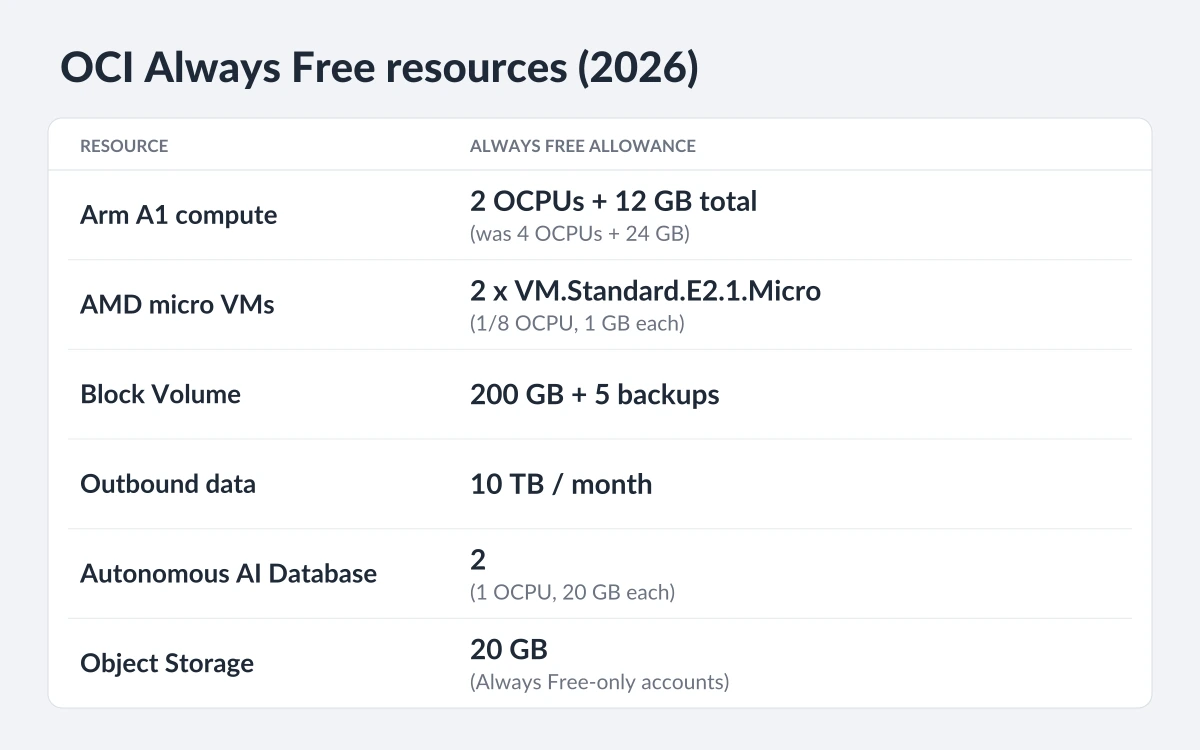
The rest of the Always Free list is largely intact:
- Compute: the Arm A1 allowance above, plus up to two VM.Standard.E2.1.Micro AMD instances, each with 1/8 OCPU and 1 GB of memory.
- Block storage: 200 GB of Block Volume in total and five volume backups.
- Object Storage: 20 GB across Standard, Infrequent Access and Archive tiers for Always Free-only accounts, plus 50,000 API requests a month.
- Databases: two Always Free Oracle Autonomous AI Databases (1 OCPU and 20 GB each, not scalable, up to 20 sessions), NoSQL with 133 million reads and writes a month across 3 tables of 25 GB, and HeatWave with 50 GB of storage.
- Networking: 10 TB of outbound data a month, one Flexible Load Balancer at 10 Mbps, a Network Load Balancer and up to two VCNs.
- Extras: 3,000 emails a month through Email Delivery.
Not every region qualifies
Always Free A1 instances are not offered in South Korea North (Chuncheon), and the Free Tier is not available in US Government Cloud regions. Oracle also states that "Availability to Free Tier is subject to capacity limits" and that the list of services "is subject to change" - as the 2026 cut showed.
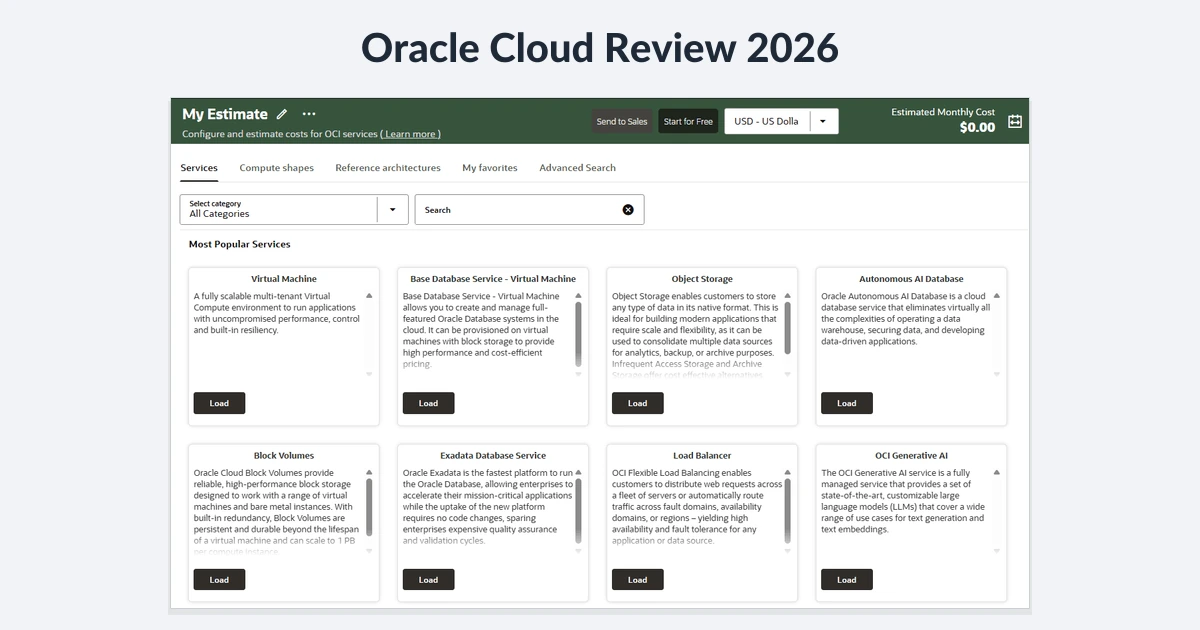
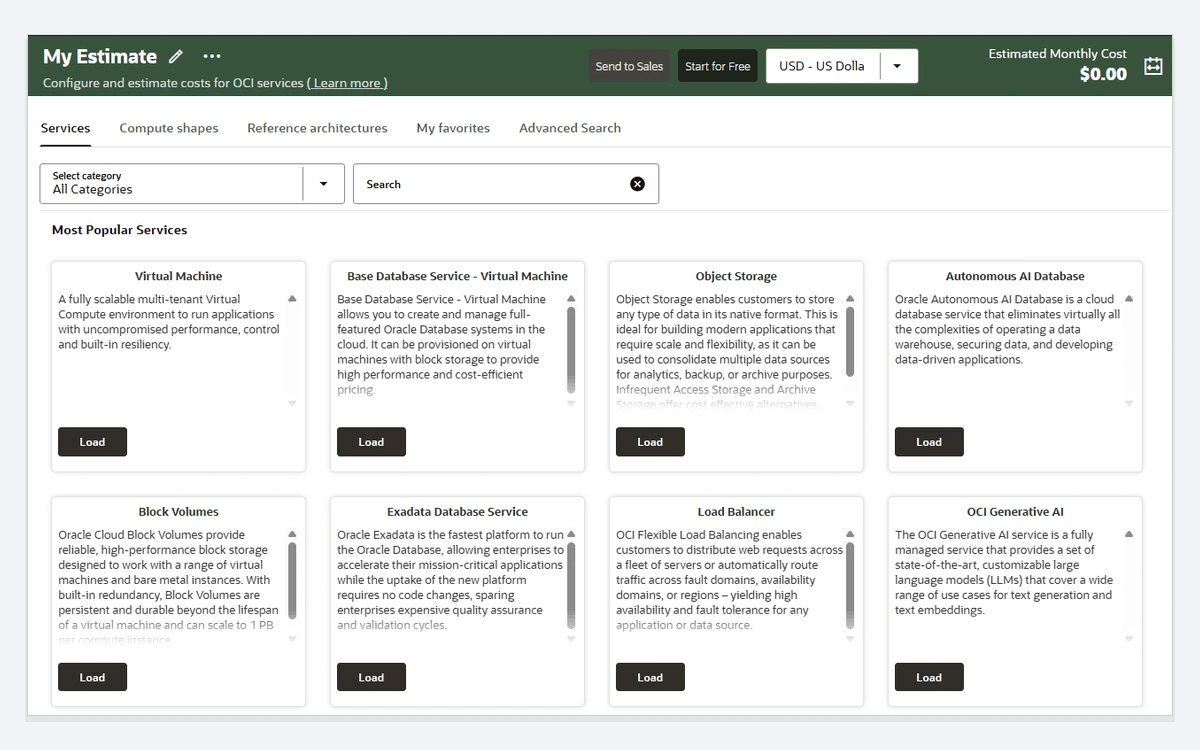
One small inconsistency: Oracle's cost estimator price feed still showed the old 3,000 OCPU-hour free band in October 2026. Treat the documentation, not the estimator, as authoritative and size your free instances to 2 OCPUs and 12 GB in total.
The $300 free trial and what happens when it ends
New accounts also get a Free Trial: "$300 of cloud credits that are valid for up to 30 days", usable on all eligible OCI services. You need a credit card or a debit card that works like one; Oracle uses it for identity verification and says the card will not be charged unless you upgrade. Expect temporary authorization holds, which Oracle says banks usually drop within three to five days.
When the 30 days are up or the credits run out, whichever comes first, you get a 30-day grace period to upgrade. If you do not, "your Free Trial service instances and data will be deleted", and Oracle stresses that reclaimed resources "can't be recovered". Resources marked Always Free are kept and the account stays active.
The A1 trap at trial end
If you built more Arm A1 capacity during the trial than the Always Free limit allows, Oracle's docs say "all existing OCI Ampere A1 Compute instances are disabled and then deleted after 30 days, unless you upgrade". Not just the excess - all of them. Before the trial ends, shrink to no more than 2 OCPUs and 12 GB of A1 in total.
Upgrading to Pay As You Go has no commitment, and you are only charged for usage above the Always Free amounts. Oracle places a $100 authorization hold on your card at the moment of upgrade. Monthly and annual Flex contracts with discounted pricing are available through Oracle sales.
Real pay-as-you-go prices
OCI prices compute per OCPU-hour and per GB of memory per hour, so you choose cores and RAM independently on Flex shapes. On x86 shapes one OCPU equals two vCPUs (hyperthreads); on Ampere A1 one OCPU is one physical core. Keep that in mind when comparing with AWS or Google Cloud vCPU prices. List prices from Oracle's price list, updated October 8, 2026:
- AMD E5 and E6 Standard: $0.03 per OCPU-hour plus $0.002 per GB-hour.
- Ampere A1: $0.01 per OCPU-hour plus $0.0015 per GB-hour beyond the free allowance.
- Ampere A2: $0.014 per OCPU-hour plus $0.002 per GB-hour.
- Ampere A4: $0.0138 per OCPU-hour plus $0.0027 per GB-hour.
- Block Volume: $0.0255 per GB-month plus $0.0017 per performance unit per GB-month (balanced performance uses 10 units).
- Object Storage: first 10 GB free per tier, then $0.0255 (Standard), $0.01 (Infrequent Access) and $0.0026 (Archive) per GB-month.
- Load Balancer: first 744 hours free, then $0.0113 per hour base plus $0.0001 per Mbps-hour after 7,440 free Mbps-hours.
What a typical server costs
Our estimates from those list rates, assuming 730 hours a month and before storage:
- AMD E5 Flex with 2 OCPUs (4 vCPUs) and 16 GB: 2 x $0.03 x 730 + 16 x $0.002 x 730 = about $67.16 a month.
- Ampere A1 with 4 OCPUs and 24 GB: you pay only for the 2 OCPUs and 12 GB above the free tier, about $14.60 + $13.14 = $27.74 a month.
- A 100 GB balanced block volume beyond the free 200 GB: $2.55 + $1.70 = about $4.25 a month.
- A second load balancer beyond the free one: about $8.25 a month in base hours.
Egress and included support: where OCI is genuinely cheaper
Outbound data transfer is OCI's strongest price argument. Every tenancy gets the first 10 TB (10,240 GB) a month free. After that Oracle charges $0.0085 per GB in North America, Europe and the UK, $0.025 per GB in Asia-Pacific, Japan and South America, and $0.05 per GB in the Middle East and Africa.
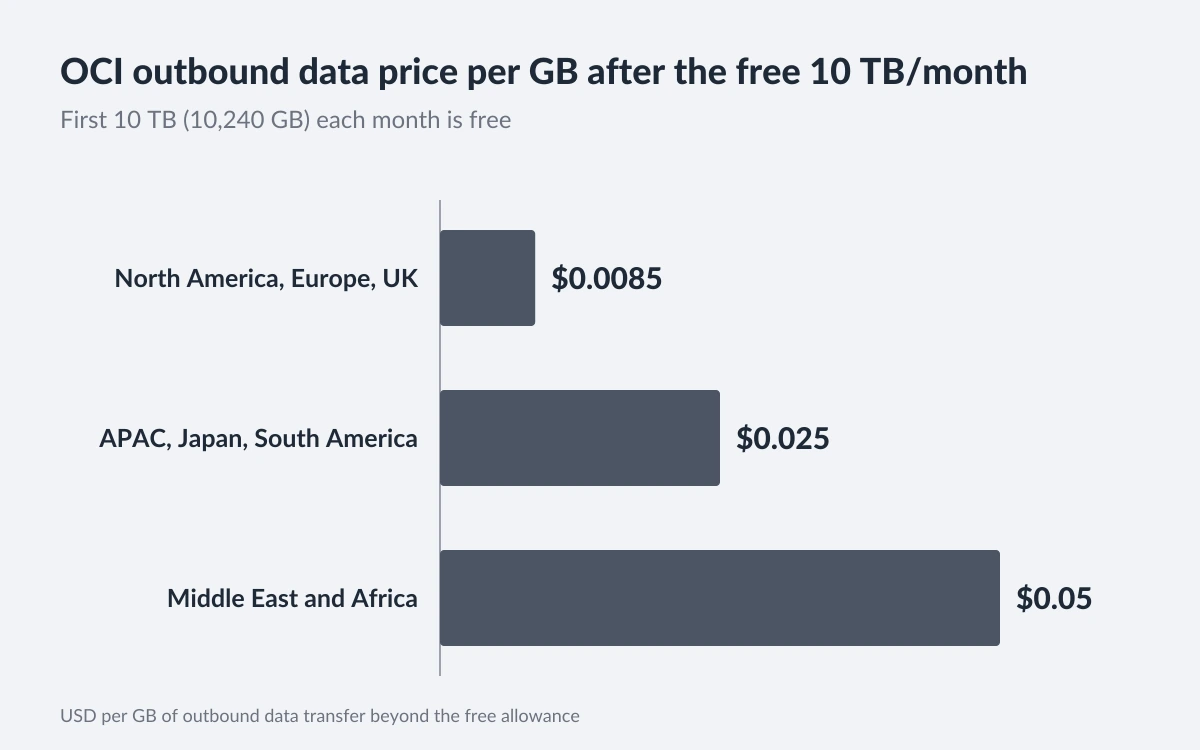
In practice, a service pushing 12 TB a month from a US region pays for 2,048 GB, which is about $17.41. That is why OCI is popular for video, downloads and game servers. Note that egress is the exception to Oracle's "same price in every region" message: service prices are uniform, data transfer is not.
Support is the other surprise. Oracle says "the base fees for OCI services include enterprise-ready support" and contrasts this with providers that charge 3% to 10% of the monthly bill. The catch: "Customers using only Always Free resources are not eligible for Oracle Support". Free users rely on documentation and community forums.
Spend controls: alerts, not a hard cap
OCI has no setting that stops spending at a fixed amount. Budgets let you set alerts on actual or forecast spend, as a percentage or a fixed sum, and when one triggers the configured recipients "receive an email". Alerts are evaluated every 24 hours, so a runaway workload can run for most of a day before you hear about it.
The closest thing to a guard rail is Compartment Quotas, which administrators set with policies to limit how many resources a compartment can create. Oracle describes budgets and quotas together as "a powerful toolset to manage your spending", but quotas cap resource counts, not dollars. Unlike Google Cloud's newer spend caps covered in our Google Cloud review, nothing shuts OCI resources down automatically when a budget is hit.
- Create a budget on the root compartment with alerts at 50%, 90% and 100% of forecast spend.
- Put experiments in a separate compartment and set quotas on GPU, compute and storage resources there.
- Stay on an Always Free-only account until you need paid services - nothing above the free limits can be billed until you upgrade.
Console and setup
The OCI console follows the same patterns as other clouds: compartments for organizing resources, Virtual Cloud Networks (VCNs) for networking and guided wizards for common tasks. The "Create a VCN with Internet Connectivity" wizard builds subnets, gateways and route tables in one pass, which removes most of the networking setup for a first server.
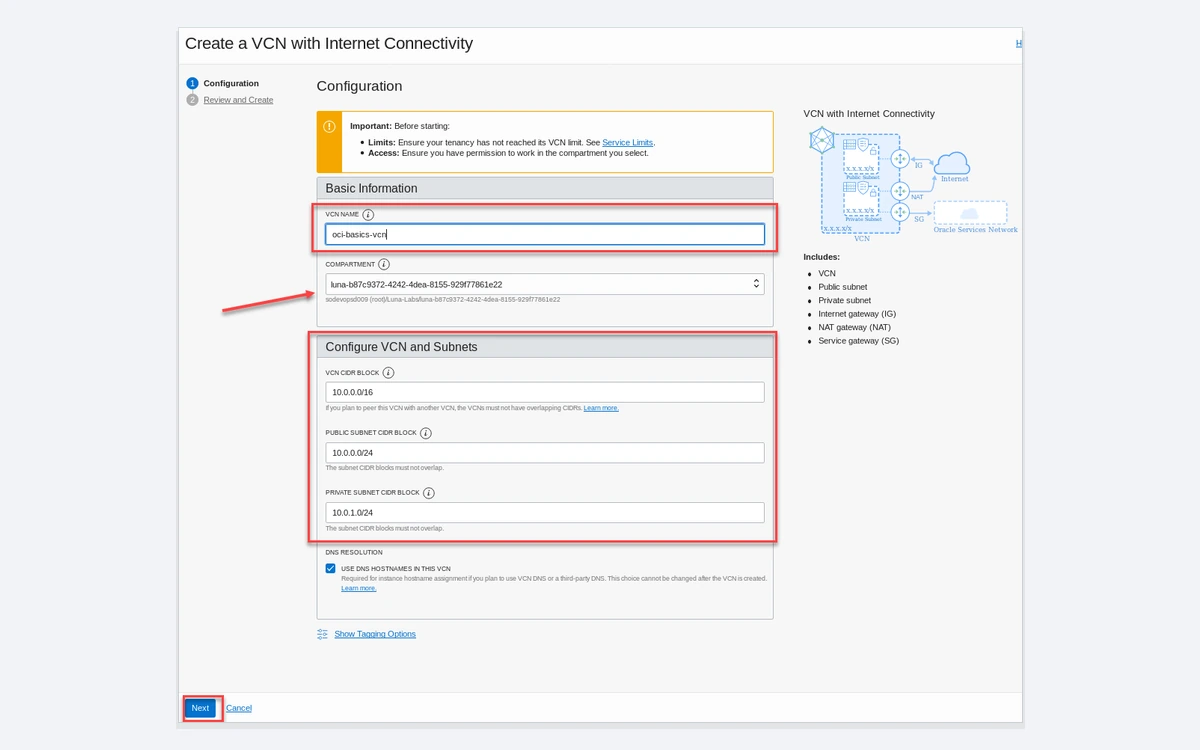
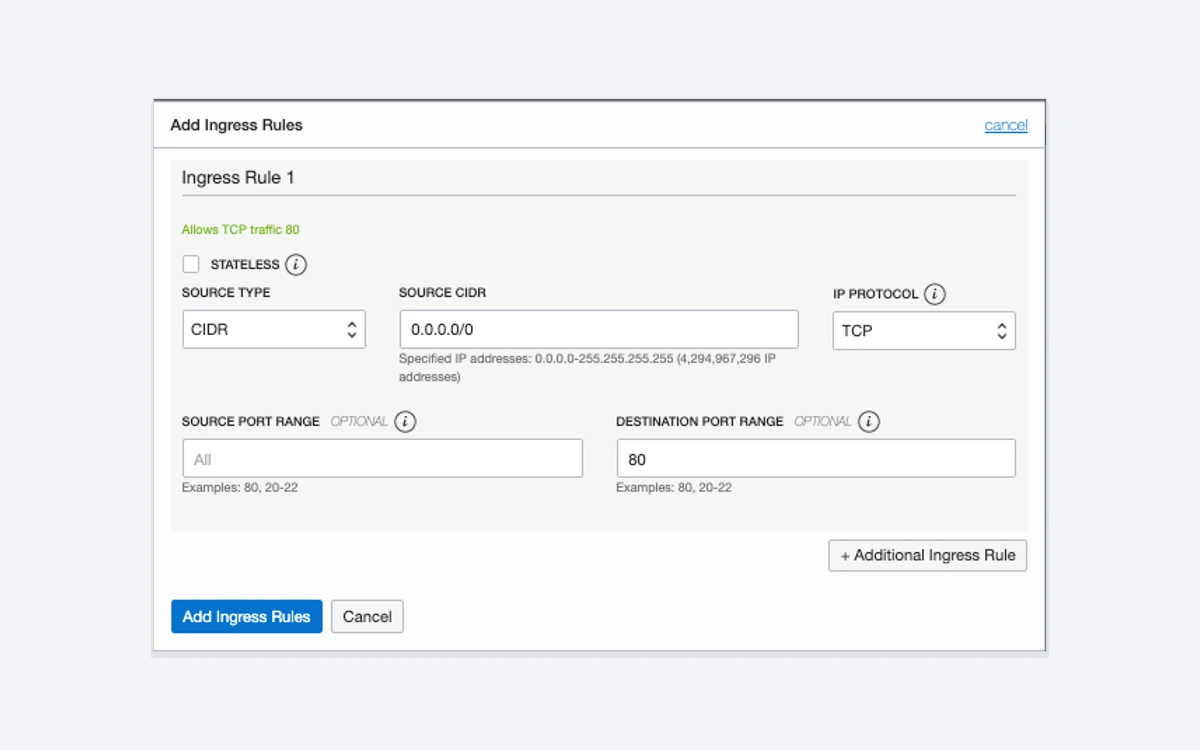
The most common beginner snag is the firewall. A new VCN only opens SSH, so a web server will not be reachable until you add ingress rules to the security list (and, on Oracle Linux and Ubuntu images, open the ports in the instance's own firewall too).
Pick your home region carefully at signup. Oracle's signup guide says you "can't change this after signing up", and Always Free compute instances and Autonomous AI Databases can only be created in the home region. Choose one close to your users that has more than one availability domain if possible.
The fine print that bites
- Out of host capacity: popular regions often have no free A1 capacity. Oracle says it "might take several days" for capacity to return and suggests trying another availability domain.
- Idle reclamation: Oracle may reclaim Always Free instances if, over 7 days, 95th-percentile CPU, network and (for A1) memory use all stay below 20%. A lightly used personal server can qualify.
- Idle accounts: accounts left idle for 30 days or more "may be deemed abandoned" and can be suspended or terminated.
- Home region lock: free compute and databases only run in the region you picked at signup, and block volumes created outside it are billed.
- Trial deletion: anything not Always Free is permanently deleted 30 days after the trial ends unless you upgrade.
- No hard cap: budgets only email you, and only once a day.
Is reclamation a reason to upgrade?
Upgrading to Pay As You Go keeps the same free allowances and you are only billed for usage above them. That makes upgrading a reasonable option if you depend on a free instance; set a budget alert at a few dollars as a safety net.
Why OCI is growing so fast
Oracle's fiscal Q1 2027 results, published September 10, 2026, reported total revenue up 30% to $19.3 billion, cloud infrastructure revenue up 121% to $7.4 billion and remaining performance obligations of $664 billion. Oracle said it delivered 850 MW of additional data center capacity and more than 300,000 GPUs to AI customers. OpenAI's compute agreement, reported in September 2025 at about $300 billion over roughly five years, is a large part of that backlog.
For ordinary users this cuts both ways. Oracle is investing heavily in regions and hardware, but capacity is being steered toward large AI contracts, and the halved free Arm allowance arrived in the same year. Expect the free tier to stay generous by industry standards, but not to grow.
Who should use Oracle Cloud
- Choose OCI if you want an always-on free server with real resources, run bandwidth-heavy workloads, use Oracle Database or want support included without a percentage surcharge.
- Look elsewhere if you need a hard spending cap, the broadest catalog of managed services, or predictable free capacity in a busy region. Our AWS, Azure and Google Cloud reviews cover the big three, and our Hetzner review covers a simpler fixed-price alternative.
Frequently asked questions
Is Oracle Cloud Always Free really free forever?
Yes, Always Free resources have no time limit, but Oracle can change the list and did so in 2026. Free instances can also be reclaimed if they sit idle for 7 days, and accounts idle for 30 days or more can be suspended.
How much Arm compute does the Always Free tier include now?
2 OCPUs and 12 GB of memory in total, from 1,500 OCPU-hours and 9,000 GB-hours a month. It was 4 OCPUs and 24 GB before Oracle halved it in mid-2026.
Will Oracle charge my card during the free trial?
No, Oracle says your card is not charged unless you upgrade. You may see temporary authorization holds, and upgrading triggers a $100 authorization hold.
What happens to my servers when the $300 trial ends?
Always Free resources keep running; everything else is deleted after a 30-day grace period unless you upgrade. If your A1 instances exceed 2 OCPUs and 12 GB in total, all of them are disabled and then deleted after 30 days.
Can I set a hard spending limit on Oracle Cloud?
No. Budgets send email alerts, checked every 24 hours, and Compartment Quotas limit resource counts, but nothing stops resources automatically at a dollar amount.
Why do I get an "out of host capacity" error?
Your home region has temporarily run out of free shapes. Try another availability domain if your region has more than one, or retry later; Oracle says it can take several days.
Can I change my home region later?
No, the home region is fixed at signup. Always Free compute and Autonomous AI Databases can only be created there.
Does Oracle Cloud include technical support?
Paid accounts get support included in the base service price. Accounts that use only Always Free resources are not eligible for Oracle Support.
Key takeaways
- OCI's Always Free Arm tier is now 2 OCPUs and 12 GB, half the old 4 OCPUs and 24 GB, but still the most useful permanent free tier among major clouds.
- The Free Trial gives $300 for up to 30 days; non-free resources are deleted 30 days after it ends unless you upgrade.
- Shrink A1 usage to 2 OCPUs and 12 GB before the trial ends, or every A1 instance is disabled and later deleted.
- Paid compute is cheap: $0.03 per OCPU-hour on AMD E5 (2 vCPUs) and $0.01 on Ampere A1, with support included.
- The first 10 TB of egress each month is free, then $0.0085 per GB in North America and Europe.
- There is no hard spend cap - budgets only send daily-evaluated email alerts.
More in Cloud Computing
Browse Cloud Computing