Technology reviews & practical guides
Beautiful.ai rebuilt its AI in 2026 and raised Pro to $14.50/mo billed annually. We cover Create with AI, Slide AI, exports, Team pricing, the card-required trial and the 24-hour refund window.
Beautiful.ai has always sold one idea: you supply the words and its Smart Slides handle the layout, so a deck stays tidy no matter how much you change it. In 2026 the company rebuilt almost everything around that idea. On March 17-18 it shipped a context-aware Create with AI workflow, an early-access API, a ChatGPT app and localization into 15 languages, and announced a $45 million investment from General Catalyst. In September it added Brand Kits that feed straight into AI-generated decks.
The price moved too. Wayback Machine snapshots show Pro at $12/mo billed annually from January 2025 until at least August 3, 2026; by September 12, 2026 it was $14.50/mo, and that is what the live pricing page shows today. Many third-party reviews still quote the old figure.
This review checks whether the new AI justifies the higher price, and spells out the fine print buyers most often trip on: a trial that needs a card and converts automatically, a refund window measured in hours, a free plan capped at 100 slides, and exports that are paid-only and drop animations. Every figure below comes from Beautiful.ai's own pricing page, help centre and legal pages as read on October 28, 2026.
Beautiful.ai is the strongest option we know of for people who want every slide to look consistent without touching alignment, spacing or fonts. The 2026 Create with AI flow is a genuine step up: you can attach documents, PDFs or links, edit the outline in a chat panel before anything is generated, and then rework single slides with Slide AI instead of regenerating the whole deck.
Worth paying for if you build decks every week and will keep presenting from Beautiful.ai itself. If your slides must end up as fully editable PowerPoint files, or you only need one deck, test hard on the free Basic plan first, because the refund rules leave very little room for second thoughts.
Beautiful.ai's March 18, 2026 press release announced a new context-aware AI workflow, localization of the product into 15 languages, a new API, a ChatGPT app, a more mobile-friendly experience, and a $45 million investment from General Catalyst. The company says it has more than 100,000 business customers; its security page separately claims over 3 million users. Axios reported the money as non-dilutive financing from General Catalyst's Customer Value Fund, so it is not a conventional Series round.
The public product updates log shows how fast the rest of the year moved:
Naming has shifted along the way. Create with AI now means generating a whole deck, Slide AI means reworking one slide, and DesignerBot, once the name of the whole generator, now refers only to the in-editor text assistant.
The pricing page states: "Every seat includes unlimited AI content generation, over 300 Smart Slide layouts, and PowerPoint import and export." We found no AI credit quota anywhere in Beautiful.ai's documentation, which sets it apart from credit-metered rivals such as Gamma.
A free Basic plan exists but is not shown on the pricing page; it is documented in the help centre. It is capped at 100 slides in total across the account. Once you hit that cap you can no longer add, duplicate or copy slides or presentations, or recover deleted slides. Shared pages carry Beautiful.ai branding, and editable PowerPoint and Google Slides export are not included.
Pro is for one user. The card lists unlimited AI content generation, custom brand styling, extra context from files or links, AI image generation, the AI writing assistant, AI translation, 300+ Smart Slide layouts, auto-formatting, image and icon libraries, transitions, dynamic data visualizations, embedded video and audio, and a custom theme builder. Viewer analytics start at Pro.
The $45 option is labelled "Everything in Pro plan (billed monthly)" and "For ad hoc projects", with the line "Our monthly option makes one-time projects a breeze. Cancel anytime." Despite the one-off framing, it is a monthly Pro subscription that renews until you cancel, not a single purchase.
The page text says teams of 2 to 20 pay $40 per user per month billed annually, or $50 billed monthly. The Team card itself, however, reads "$50 | $40 /MO (INCLUDES 3 USERS)" and "Fixed pricing for up to three users". The page contradicts itself, so confirm the actual total for your seat count at checkout before committing. Team adds real-time collaborative editing, a central slide and template library, version control and locked slides, custom branded themes, a shared asset library, live data linking to charts and tables, slide-level analytics and engagement alerts, view and edit permissions, and on-demand slide translation.
Enterprise is quoted by sales and adds dedicated onboarding and training, SSO, SCIM provisioning, audit and change logs, configurable brand guardrails, advanced permissions and priority support. The pricing page also links to an SMB plan described as flat rates for smaller teams, but shows no price for it, so we cannot quote one.
Students with a verified .edu email get their first year of Pro free. Beautiful.ai does not currently offer bulk or institutional education licenses.
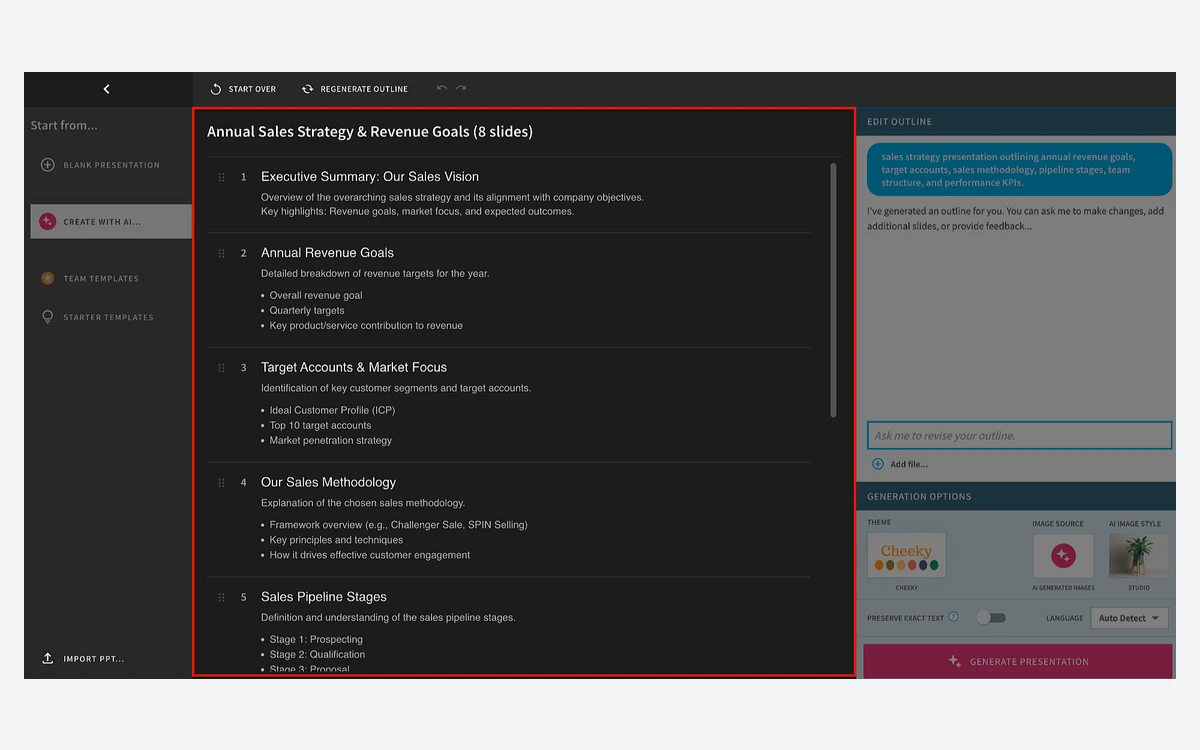
You start with a prompt, typed or spoken, and can attach documents, PDFs or links as context. Instead of jumping straight to slides, Beautiful.ai produces an editable outline alongside an AI chat panel, so you can reorder, add or drop slides in plain language before anything is designed. That outline step is the biggest practical improvement of 2026: fixing structure in a list is far quicker than fixing it across eight finished slides.

Next you set visual preferences: the theme, where images come from (AI-generated, stock, web or none), an AI image style, and the language. Style presets include Minimalist, Warm, Claymation, Isometric, Oil Painting, Watercolor, Charcoal and Monoline/Doodle, and a custom style can be saved to a theme. Then you click Generate Presentation.
Because the output is built from Smart Slides rather than free-floating boxes, the generated deck stays editable in the normal way: add a bullet and the layout reflows, add a data point and the chart rebuilds. Since September 29 you can also start from a template and have AI fill it, which helps teams that already have an approved deck structure.
On models, Beautiful.ai says it uses Gemini by Google, Claude by Anthropic and other models for text, and Imagen by Google and DALL-E by OpenAI for images, and that anything you enter is never used to train the AI models.
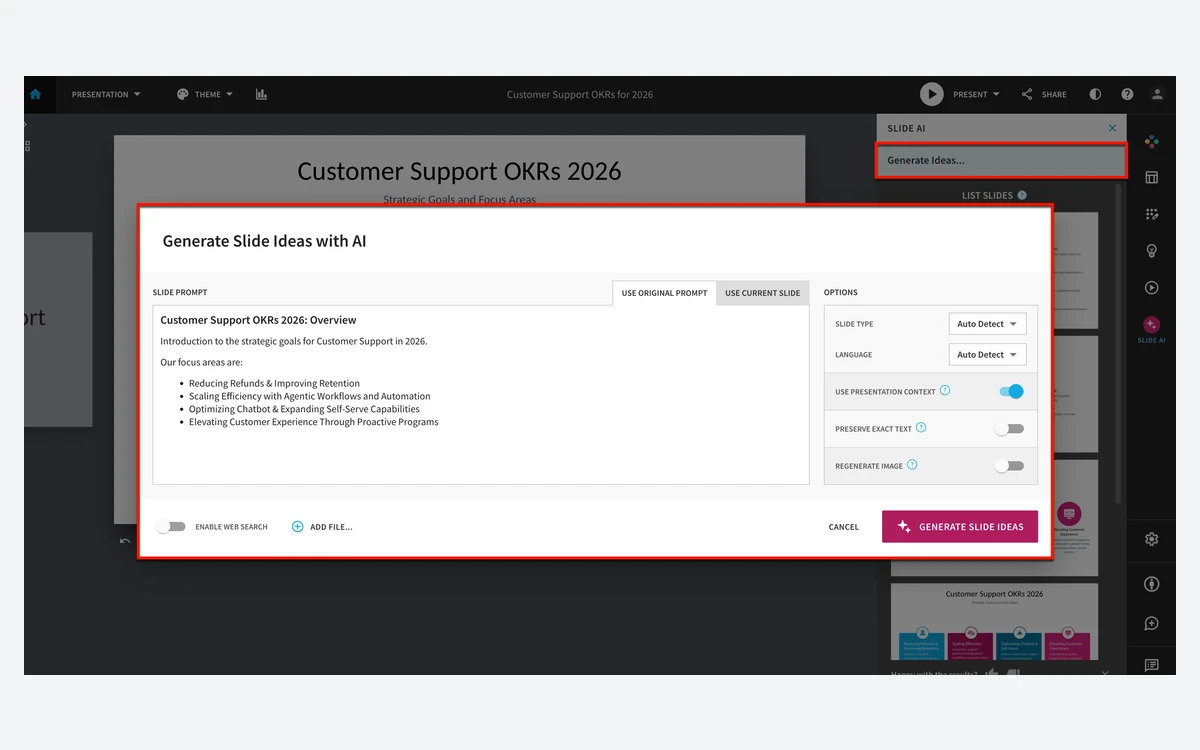
Slide AI works on one slide at a time. Beautiful.ai describes it as a slide-level AI editing experience to regenerate, restructure and restyle individual slides. Options include Preserve Exact Text (keep your wording, change only the design), Regenerate Image, Use Presentation Context, Enable web search and Add file. In practice this is what makes the generator usable on real work: you keep the slides that landed and redo only the weak ones.

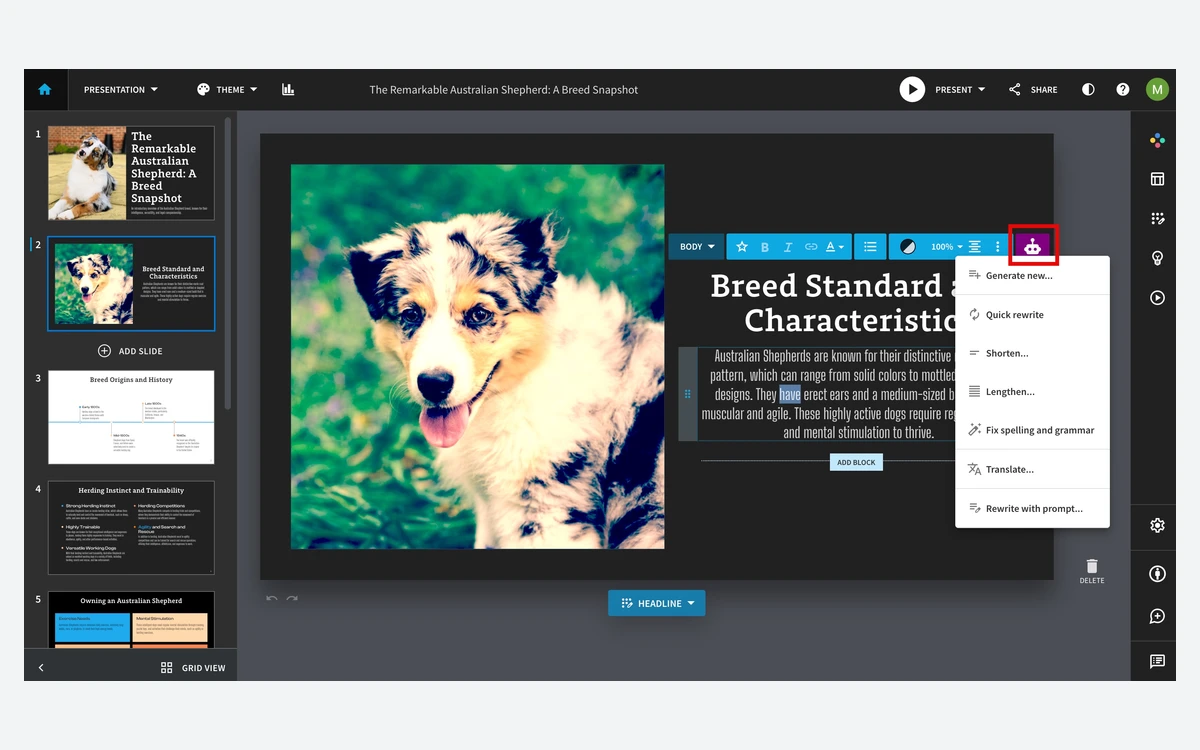
DesignerBot is now the text assistant inside the editor. Select text and it offers Generate new, Quick rewrite, Shorten, Lengthen, Fix spelling and grammar, Translate, and Rewrite with prompt. None of these touch layout, which is the point: Smart Slides handle design, DesignerBot handles copy.

Two newer channels are worth knowing about but not buying for yet. The API is in early access only. The ChatGPT/MCP connector can create decks and export PDF or PPTX, but Beautiful.ai says it does not provide full arbitrary slide-by-slide editing of an existing presentation.
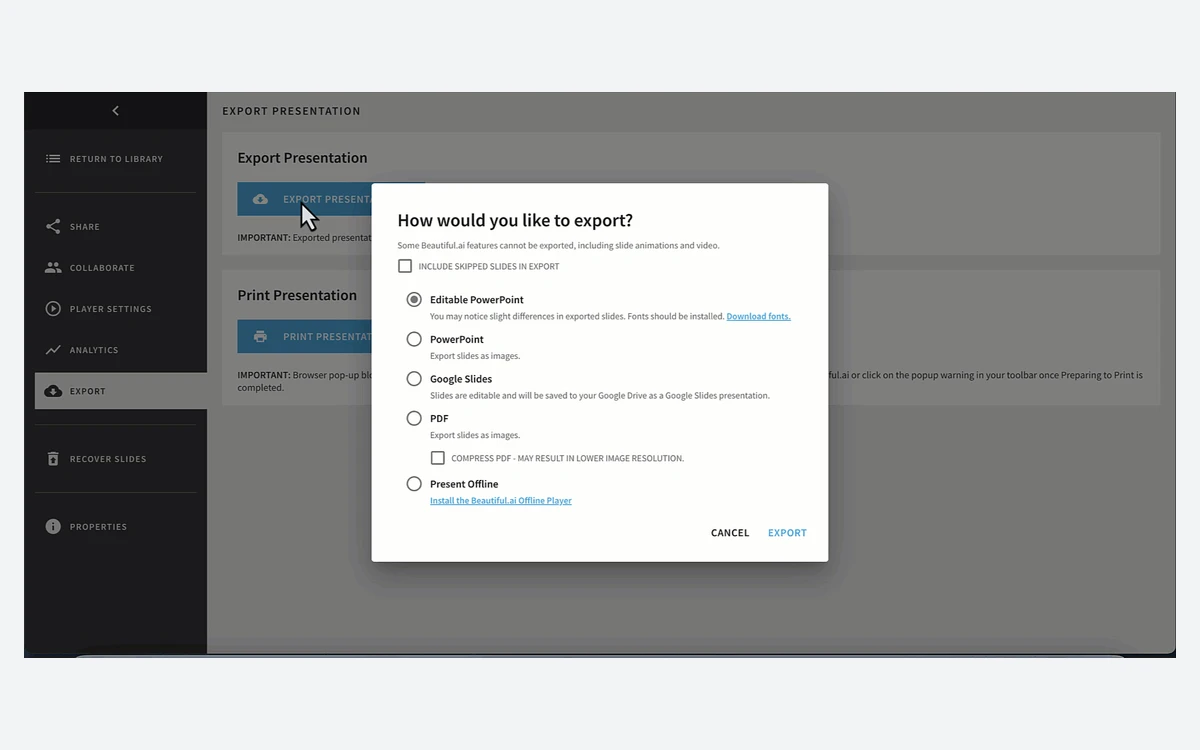
This is where buyers most often get surprised. Beautiful.ai is built to present from its own player and share links; leaving the platform always costs something.

Importing works the other way through Add Slide, then Import From PPT. If you need animations on a machine without a reliable connection, the Offline Player for Mac and Windows plays exported .zip presentations with their animations intact. It is a player, not a desktop editor, and there is no confirmed native mobile app; the March release only promised a more mobile-friendly web experience.
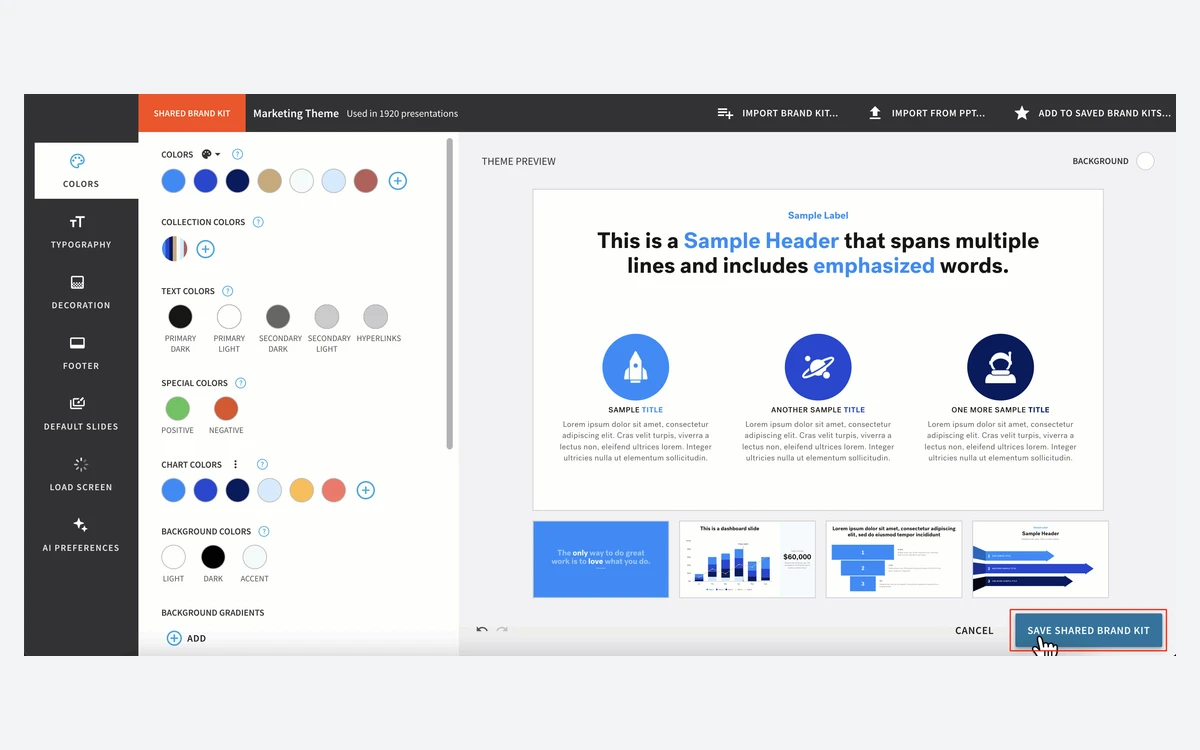
Brand Kits, added in September 2026, are the main reason a company would pick Team over several Pro seats. According to the help centre, every template, shared slide and AI-generated deck pulls from the kit, and only Owners and Librarians can create or edit one. Updating a shared kit updates every existing presentation that uses it, in real time, which is powerful and also something to do carefully.

Team roles are Owner, Librarian, Member and Guest. Guests do not take a paid seat, but how many you may add depends on the plan, and Audit Logs are visible to Owners only. Analytics start at Pro and show views, completion rates, last viewed and views per day for up to 90 days; Team adds slide-level analytics and engagement alerts. SSO uses SAML with IdP- and SP-initiated flows, Strict SSO, JIT and SCIM provisioning, and is an Enterprise feature.
Beautiful.ai's security page claims SOC 2 Type II, GDPR, CCPA and PCI compliance. These are the vendor's own statements; ask for the SOC 2 report if your procurement process requires it. Data is encrypted with AES-256 at rest and sent over TLS.
For EU teams with data-residency requirements, the US-only storage statement is the line to raise with sales before signing.
The 14-day Pro trial requires a credit or debit card. In Beautiful.ai's words, after your trial expires "your billing cycle will automatically begin and your account will be charged for the Pro subscription." The pricing FAQ adds that the card "will be charged in full if you don't cancel your trial before the trial period ends." If you choose annual billing, that is the full year up front.
There is no money-back guarantee. Annual subscribers may be able to get a partial refund if they ask within 24 hours of the initial purchase or a renewal. Monthly subscriptions are not refundable, Team seats are non-refundable and cannot be transferred between teams, and all refunds carry a processing fee. The Terms of Service (revised August 22, 2025) go further: all fees are non-refundable and non-cancellable.
Cancelling means downgrading to Basic, which can only be done from a desktop or laptop, not a phone. You keep paid access until the end of the billing cycle, and subscriptions renew automatically until you do. After the downgrade you lose Analytics, Revision History and the Desktop Player, folders are removed, Secured Sharing switches to Public Sharing, custom fonts revert to the default, and Beautiful.ai branding appears on shared pages and on an ending slide.
Ratings split sharply between the product and the billing. On Trustpilot, read on October 28, 2026, Beautiful.ai has a TrustScore of 2.9 from 249 reviews, and the recurring complaints are about charges after cancelling and slow support: "They took payment despite cancellation" (Aug 30, 2026), "Cancelled my subscription and they still charged me." (Jun 13, 2026), "Wrote them 3 times--never got an answer." (Jun 13, 2026), and "1 star because to cancel you have to fill out a form that is not optional." (Jul 21, 2026).
Business software directories are kinder. G2 shows a rating of around 4.6 from roughly 195 reviews and Capterra around 4.2 from about 85, with customer service the weakest Capterra sub-score at around 3.4. We could not load either page directly, so treat those figures as approximate. The pattern is consistent: people like making slides in it, and the friction comes from trials, renewals and cancellations.
Alternatives worth comparing: Gamma is more free-form and card-based but meters AI with credits; Canva Magic Studio suits teams already designing everything else in Canva; and Tome, once a common comparison, has dropped its slides product. Our Gamma, Canva Magic Studio and Tome reviews cover each of them in depth.
Pro costs $14.50 per month billed annually, or $45 billed monthly. Team is $40 per user per month billed annually or $50 monthly, though the Team card also mentions a three-user package, so check your total at checkout. Enterprise is custom-priced. Pro was $12/mo annually until at least August 2026.
Yes, the Basic plan is free but capped at 100 slides in total. At the cap you cannot add, duplicate or copy slides or presentations, shared pages show Beautiful.ai branding, and editable PowerPoint and Google Slides export are not included.
Yes. The 14-day Pro trial requires a credit or debit card, and the subscription is charged in full automatically when the trial ends unless you cancel first.
Only in a narrow case. Annual subscribers may get a partial refund if they ask within 24 hours of purchase or renewal, minus a processing fee. Monthly plans and Team seats are non-refundable, and the Terms of Service say all fees are non-refundable.
Yes, on paid plans only. Editable PowerPoint and Google Slides exports need Pro, Team or Enterprise. All exports lose animations and transitions, Google Slides also drops video and audio, and missing fonts can change the look of a PowerPoint file.
No published limit. Every paid seat includes unlimited AI content generation, and Beautiful.ai does not document any credit system.
No, according to Beautiful.ai. It says your input is never used to train the AI models and its AI sub-processors are barred from training on customer data. Generative AI can also be turned off for a company account on request.
Downgrade to Basic from a desktop or laptop; it cannot be done on mobile. You keep paid features until the end of the billing cycle, then lose analytics, revision history, folders and custom fonts, and branding returns to shared decks.
More in Artificial Intelligence
Browse Artificial Intelligence