Cutout.Pro Review 2026: Cheapest Cutouts, Messiest Fine Print
Cutout.Pro review for 2026: new credit prices from about 5 cents per HD cutout, the 0.25 MP free tier, API costs, contradictory refund terms and the 2024 breach.
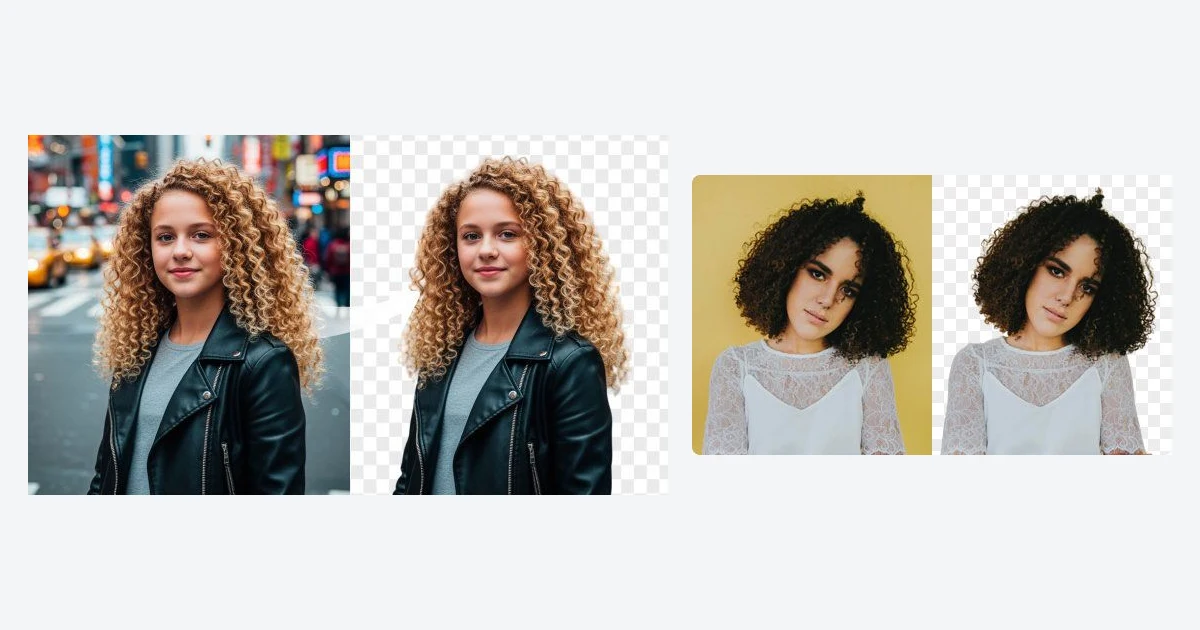
Cutout.Pro is one of the longest-running AI background removers on the web, and in 2026 it became one of the cheapest. Early this year it roughly doubled the credits in every subscription tier without touching the prices, so the entry plan now buys 80 HD cutouts a month for $5 instead of 40.
Price is only half the story. The pricing page, the help centre and the Terms of Use disagree on credit rollover and refunds, the service leaked 20 million records in February 2024, and its Trustpilot score sits at 1.6 out of 5. This review walks through what a cutout really costs as of September 30, 2026, what the free tier gives you, and what the fine print means before you pay.
What Cutout.Pro does
Cutout.Pro started as a background remover and has grown into a toolbox of single-purpose AI editors that all draw from one credit balance. The image side covers Background Remover, Face Cutout, Retouch (object removal), Photo Enhancer and Enhancer Pro, Photo Colorizer, Cartoon Selfie and a Passport Photo Maker. The video side adds a Video Background Remover, an AI Video Enhancer, Photo Animer and image-to-video generation, with third-party models such as Seedance, Veo, Sora and Nano Banana listed in the menu.
Beyond the web app there are iOS and Android apps, a Shopify plugin, a REST API and a desktop app for Windows and Mac. The service is run by WINROAD HOLDINGS LIMITED in Hong Kong under the brand Team LibAI, which also operates the sister product PromeAI, and its Terms are governed by Hong Kong law.
Who it is for
Online sellers, marketplace listers and small studios that need a steady stream of clean cutouts at the lowest per-image price, and developers who want a cheap background removal API. It is a poor fit if you need a full design editor or strong consumer protection.
Pricing in 2026: what a cutout really costs
Everything on the image side is paid in credits. Background removal and Retouch cost 1 credit per image. Cartoon Selfie, Photo Enhancer and Photo Colorizer cost 2 credits. The Passport Photo Maker is listed at 2 credits on the pricing page, while the API price list charges 1 credit, or 2 with an outfit change, so budget 1-2 credits for it.
Monthly subscriptions
- 80 credits a month - $5.00 (about $0.063 per credit)
- 170 credits a month - $9.90 (about $0.058)
- 300 credits a month - $16.90 (about $0.056)
- 550 credits a month - $29.00 (about $0.053)
- 1,000 credits a month - $49.00 (about $0.049)
- 1,450 credits a month - $69.00 (about $0.048)
- Custom volumes - contact sales
Plans are monthly and the pricing page says you can cancel anytime. No yearly prices appear anywhere on the vendor site, so treat any annual discount quoted elsewhere with suspicion.
The 2026 credit increase
Archived copies of the pricing page show the change clearly. Through January 2, 2026 the same six price points bought 40, 100, 200, 400, 800 and 1,200 credits. By March 7, 2026 they bought 80, 170, 300, 550, 1,000 and 1,450. On the $5 plan that cuts the cost of an HD cutout from 12.5 cents to about 6.3 cents. Some help centre pages still say the monthly plan starts at 40 images, which is out of date.
Pay-as-you-go packs
- 30 credits - $4.99 (about $0.166 per credit)
- 300 credits - $39.00 (about $0.130)
- 900 credits - $79.00 (about $0.088)
- 3,000 credits - $199.00 (about $0.066)
- 30,000 credits - $1,399.00 (about $0.047)
- 5,000,000 credits - $37,500.00 (about $0.007)
The packs were reworked too. In September 2025 the same dollar prices bought 3, 10, 100, 300, 1,000 and 10,000 credits, so today's packs carry roughly three times as many. The 5-million-credit tier is new and did not appear in an August 2026 snapshot. Pay-as-you-go credits do not expire, which makes them the safer choice for irregular work even though they cost more per image at small sizes.
What the free tier gives you
The pricing page promises free previews forever plus 5 free credits on sign-up, and you can earn 5 more credits for each friend you invite. The catch is resolution: free background removal results are capped at 0.25 megapixels, about 500 x 500 pixels. That is fine for checking whether the AI handled hair or a tricky edge, but too small for most product listings or print.
To download the HD version you spend a credit. HD output tops out at 16 megapixels (for example 4096 x 4096); larger images are resized down to that limit. Uploads are capped at 15 MB according to the API docs, though one help answer says 16 MB. The help centre lists JPG, PNG, JPEG and WEBP as accepted formats, while the pricing FAQ lists BMP instead of WEBP.
Enhancer, passport photos and the other image tools
The Photo Enhancer upscales and sharpens low-resolution images and has dedicated modes for portraits and old, noisy photos. At 2 credits per image, the $5 plan covers 40 enhanced photos a month, roughly 12.5 cents each.
The Passport Photo Maker crops to official sizes, swaps in a plain background and can change the outfit to a suit or formal wear. It is handy for home use, but always check the result against the rules of the authority you submit to, since AI edits to the face or outline can get a photo rejected.
Desktop app, batch work and the API
Cutout.Pro calls its desktop app for Windows and Mac the best way to batch process photos, but it only supports background removal and face cutout. Everything else stays in the browser or the mobile apps.
The API shares credits with the web account. A successful background removal call costs 1 credit, and a 0.25-megapixel preview costs a quarter of a credit through the API or desktop app. Retouch costs 1 credit, Enhancer, Colorizer and Cartoon Selfie 2, and AI art or background generation 3, 6 or 12 credits depending on output size (up to 512 x 512, 1024 x 1024 or 1920 x 1080). The default rate limit is 5 requests per second, though the pricing FAQ says 3 images per second.
At 4.7 cents a call on the 30,000-credit pack, and well under a cent on the 5-million pack, it is among the cheapest background removal APIs you can buy without negotiating a contract. The Terms add one operational risk: an account with more than 15% unsuccessful requests can be blocked.
Video tools and video credits
Video runs on a separate balance of video credits, billed by the second and used for video background removal, the AI Video Enhancer, Photo Animer and AI video generation. The smallest pack is one minute for $9 (the page also shows $19, which looks like a struck-through list price), or $0.15 per second. Larger packs bring the rate down: 15 minutes for $108, 120 minutes for $599, and 5,800 minutes for $19,999, about $0.057 per second.
Files can be up to 2 GB, 4K and 30 fps, and you get a 5-second preview at 360p for free. That is enough to judge edge quality before buying, and at these prices you should.
The fine print: rollover and refunds contradict each other
This is the part to read before you subscribe, because Cutout.Pro's own documents do not agree.
Do unused credits roll over?
The pricing page says subscribers can roll over up to 5x their monthly credit budget and keep it as long as the subscription is active. Section 3.5 of the Terms of Use says monthly credits expire at the end of each billing cycle. The help centre adds that any subscription credits left when you cancel are removed. Only pay-as-you-go credits are described consistently: they never expire.
Can you get a refund?
The pricing page and help centre advertise a 14-day money-back guarantee on all subscriptions, restricted to 50 downloads. Section 3.6 of the Terms grants a 14-day withdrawal right only if you have not used the service, even in part. The Terms also count a photo as processed once the result is offered for download, whether or not you download it.
Cancellation and liability
You can cancel in the My Account area, although the Terms also describe cancellation by registered letter with a one-month notice period. Other clauses let the operator block your account if a payment is late by even one day, promise availability only 98% of the time, and cap its liability at what you paid in the last three months.
Protect yourself
Screenshot the pricing page on the day you buy, cancel from My Account well before renewal and keep the confirmation, and start with a pay-as-you-go pack if your volume is irregular.
Privacy, the 2024 breach and user reviews
Cutout.Pro gives three different retention answers. The help centre says result images are deleted after 60 minutes. The privacy policy says uploads are deleted automatically without giving a period, and that face data processed on AWS stays in the cloud for 24-48 hours after your last edit. The API page says uploads and results are deleted when the request ends. The privacy policy states that portrait photos are used only to provide the editing feature, but there is no broader statement ruling out AI model training. API users can opt into an Improvement Program that shares failed images.
In February 2024 Cutout.Pro suffered a data breach that exposed 20 million records, according to Have I Been Pwned, which added it on February 28, 2024. The leaked data included email addresses, names, IP addresses and passwords stored as salted MD5 hashes, a weak hashing scheme. If you had an account before 2024 and reused that password elsewhere, change it.
Trustpilot shows a TrustScore of 1.6 out of 5 from 37 reviews as of September 30, 2026, with 89% one-star ratings and no visible company replies. The recurring complaints are charges continuing after cancellation, credits used up by failed jobs, refunds that never arrived and worries about the data leak. The sample is small, but the themes line up with the contradictions in the Terms.
Cutout.Pro vs Photoroom and Clipdrop
Photoroom is the more polished choice for sellers who want templates, batch editing and a design workflow around the cutout, at a higher monthly price. Clipdrop suits people who want a clean set of AI image tools and an API from a better-known vendor. Cutout.Pro wins on raw cost per cutout and on the breadth of cheap single-purpose tools, and loses on trust and clarity of terms. Our Photoroom review and Clipdrop review cover both in detail.
Verdict
After the 2026 credit increase, Cutout.Pro is hard to beat on price: about 5-6 cents per HD cutout on a subscription and under 5 cents at volume. The free 0.25-megapixel previews let you judge quality before spending anything.
The trade-off is trust. Contradictory rollover and refund terms, a 20-million-record breach with MD5-hashed passwords and a 1.6 Trustpilot score all argue for caution. Use a unique password, start with a small pay-as-you-go pack, and move to a subscription only once you know your monthly volume and have tested cancellation.
- Pros: very low cost per image after the 2026 changes, free previews, pay-as-you-go credits that never expire, a cheap API, and a desktop app for batch cutouts
- Cons: contradictory credit and refund terms, a 2024 data breach, poor user reviews, a desktop app limited to cutouts, and inconsistent retention statements
Frequently asked questions
How much does Cutout.Pro cost?
Subscriptions start at $5 a month for 80 credits and run to $69 a month for 1,450 credits. A background removal costs 1 credit, so an HD cutout costs about 4.8-6.3 cents on a plan. Pay-as-you-go packs start at 30 credits for $4.99.
Is Cutout.Pro free?
Partly. Previews are free forever but limited to 0.25 megapixels, about 500 x 500 pixels. New accounts get 5 free credits for HD downloads, and each invited friend earns 5 more.
Do Cutout.Pro credits expire?
Pay-as-you-go credits never expire. Subscription credits are unclear: the pricing page promises rollover up to 5x your monthly budget while subscribed, but the Terms say monthly credits expire each billing cycle, and credits left at cancellation are removed.
Can I get a refund from Cutout.Pro?
Possibly, within 14 days. The pricing page offers a 14-day money-back guarantee limited to 50 downloads, but the Terms void the withdrawal right once you have used the service even in part. Request it in writing and keep records.
Is Cutout.Pro safe to use?
Use it with care. A February 2024 breach exposed 20 million records including salted MD5 password hashes, and retention statements vary from 60 minutes to 48 hours. Use a unique password and avoid uploading sensitive photos.
Does Cutout.Pro have an API?
Yes. It uses the same credits as the web app: 1 credit per background removal, a quarter credit per preview, and 2 credits for enhancement or colorization. The default rate limit is 5 requests per second.
Does the Cutout.Pro desktop app do everything the website does?
No. The Windows and Mac app only handles background removal and face cutout, mainly for batch processing. The enhancer, passport, video and other tools are web and mobile only.
Key takeaways
- Cutout.Pro doubled subscription credits in early 2026 at unchanged prices; $5 now buys 80 HD cutouts a month.
- Background removal costs 1 credit; enhancer, colorizer and cartoon tools cost 2; passport photos 1-2.
- Free previews are capped at 0.25 megapixels; new accounts get 5 free HD credits.
- Pay-as-you-go credits never expire, but subscription rollover and refund terms contradict each other.
- A 2024 breach exposed 20 million records and Trustpilot rates it 1.6/5, so use a unique password and start small.
More in Artificial Intelligence
Browse Artificial Intelligence