Google Cloud Review 2026: The $300 Trial, Always Free Tier, Egress Costs and New Spend Caps
Google Cloud review 2026: the $300 trial that never auto-charges, the Always Free tier, VM and egress pricing, support costs and the new spend caps.
Google Cloud is the platform behind BigQuery, Cloud Run and Google's Gemini models, and for a developer or small team it is one of the most generous places to start: a $300 trial that never auto-charges and an Always Free tier that includes a small VM, 2 million serverless requests and 1 TiB of BigQuery queries every month.
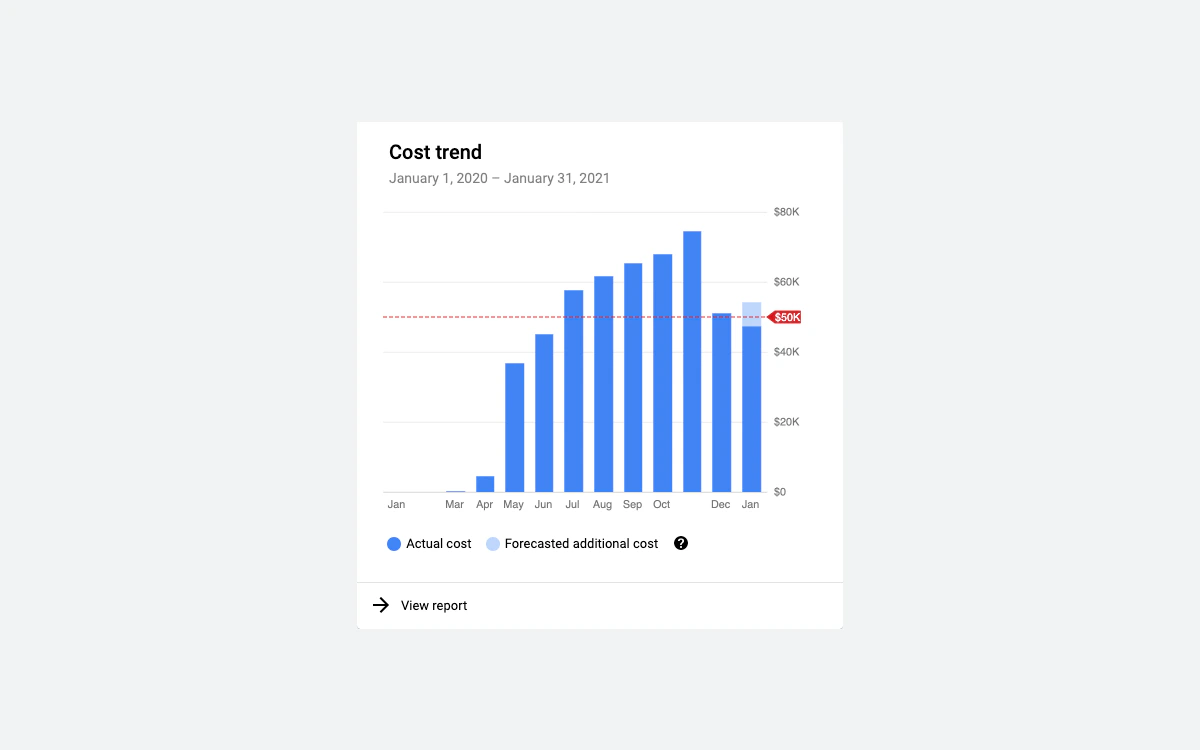
It is also a hyperscaler, with hyperscaler billing. Internet egress on the default network tier costs $0.12 per GiB after the first GiB, the popular E2 and N4 machine families get no automatic sustained use discounts, and budgets only send emails - they do not stop spending. Google added real spend caps in 2026, but only for a handful of services and not for virtual machines.
We read the fine print on Google's own trial, pricing, network, support and billing pages so you know what Google Cloud costs a small team in October 2026, and where the bill can surprise you.
Verdict: who Google Cloud suits in 2026
Google Cloud is a strong choice if you want managed services rather than just servers: Cloud Run for containers that scale to zero, BigQuery for analytics, GKE for Kubernetes and the Gemini Enterprise Agent Platform (formerly Vertex AI) for AI work. The free allowances for these services are real and permanent, and a hobby project can run for years without a bill.
It is a weaker choice if you just need a few always-on virtual machines with predictable traffic. A 2 vCPU, 8 GB e2-standard-2 VM costs roughly $49 a month on demand in us-central1 before disk, IP and bandwidth, while VPS hosts such as Hetzner, Vultr or Linode bundle terabytes of transfer into flat monthly plans.
- Best for: serverless apps on Cloud Run, data and analytics teams using BigQuery, Kubernetes users, and teams building on Gemini models.
- Watch out for: Premium Tier egress at $0.12/GiB, no spending cap on Compute Engine, paid support from $29 a month, and a pricing model with many separate line items.
- Skip it if: you want a flat monthly bill for a couple of VMs and plenty of bandwidth.
Pros and cons at a glance
Pros: $300 trial with no automatic charges, permanent Always Free tier, per-second VM billing, Cloud Run and BigQuery free allowances, 43 regions, new spend caps for Cloud Run and Gemini. Cons: expensive internet egress, no sustained use discounts on E2/N4, budgets do not stop spend on VMs, many billable line items, human support is a paid add-on.
The $300 free trial, in fine print
New customers get a $300 Welcome credit to spend over 90 days. You need a credit card or another valid payment method to sign up; Google runs a pending verification transaction of $0.00 to $1.00, which is not an actual charge.
The most important detail is that the trial does not roll into paid billing on its own. Google states there are no automatic charges: the trial ends only if you manually upgrade to a paid billing account, or when the trial account closes. It closes automatically when you have spent the $300 or 90 days have passed, whichever comes first.
What happens when the trial ends
- All resources on the trial billing account are stopped.
- A 30-day grace period starts, during which you can upgrade and get your resources back.
- If you do not upgrade, the resources and their data are permanently deleted.
Trial limits worth knowing
- Eligibility: you must never have been a paying customer of Google Cloud, Google Maps Platform or Firebase, and must not have used the Free Trial before.
- Upgrading early keeps your remaining credit, but it still has to be used within the original 90 days. The trial cannot be paused or extended.
- The credit cannot pay for Gemini API usage in AI Studio or for generative AI partner models offered as a managed API.
- During the trial you cannot add GPUs to VMs, use Google Cloud Marketplace, request quota increases, run Windows Server VM images or use Google Cloud VMware Engine. Crypto mining is prohibited.
Before the 90 days are up
If you built something you want to keep, upgrade before the trial ends or at least within the 30-day grace period. After that, Google deletes the stopped resources and there is no undo.
The Always Free tier: what you actually get
Separate from the trial, Google Cloud has an Always Free tier with no end date. Google can change it with 30 days' notice. Limits are counted per billing account (Firestore is per project), and unused allowance does not carry over to the next month.
Compute Engine
- One non-preemptible e2-micro VM per month, only in us-west1 (Oregon), us-central1 (Iowa) or us-east1 (South Carolina).
- 30 GB-months of standard persistent disk - not balanced or SSD disk.
- 1 GB of outbound data transfer per month from North America to all region destinations, excluding China and Australia.
- GPUs and TPUs are not included.
Start the VM in any other region, or attach a balanced disk instead of a standard one, and you pay normal rates. An external IPv4 address in use on a standard VM is billed at $0.005 an hour (about $3.65 a month) and is not among the Always Free allowances Google lists, so check your first invoice.
Serverless and data
- Cloud Run (request-based billing): 2 million requests, 360,000 GB-seconds of memory, 180,000 vCPU-seconds and 1 GB of North America egress per month.
- Cloud Run functions (1st gen): 2 million invocations, 400,000 GB-seconds, 200,000 GHz-seconds and 5 GB of egress per month.
- BigQuery: 1 TiB of queries and 10 GiB of storage per month.
- Firestore: 1 GiB of storage, 50,000 reads, 20,000 writes and 20,000 deletes per day per project, plus 10 GiB of egress per month.
- Cloud Storage: 5 GB-months of regional storage in us-east1, us-west1 or us-central1, 5,000 Class A and 50,000 Class B operations, and 100 GB of egress from North America per month.
Smaller allowances
- GKE: no cluster management fee for one Autopilot or zonal Standard cluster per month (you still pay for the nodes or pods).
- App Engine: 28 hours per day of F1 instances.
- Cloud Build: 2,500 build-minutes per month. Artifact Registry: 0.5 GB of storage.
- Pub/Sub: 10 GiB of messages. Cloud Logging: the first 50 GiB per project per month.
- Cloud Shell: 5 GB of persistent disk. Secret Manager: 6 active secret versions.
Compute Engine and Cloud Run pricing
Compute Engine bills vCPUs, memory and GPUs for a minimum of one minute, then per second. Google's pricing page renders prices in the browser, so the figures below are approximate on-demand rates for us-central1 from Google pricing calculator estimates, using 730 hours per month. Disk, IP addresses and egress are extra. Confirm current prices for your region in Google's pricing calculator before you commit.
- e2-micro (shared core, 1 GB): about $6 a month, or about $3.65 as a Spot VM.
- e2-small (shared core, 2 GB): about $12 a month.
- e2-medium (shared core, 4 GB): about $24 a month.
- e2-standard-2 (2 vCPU, 8 GB): about $49 a month.
- n2-standard-2 (2 vCPU, 8 GB): about $57 a month with the full sustained use discount applied.
- n4-standard-2 (2 vCPU, 8 GB): about $66 a month.
Discounts: three kinds, and they do not stack
Google offers three ways to pay less, and states plainly that discount types cannot be combined.
- Sustained use discounts are automatic, up to 20% for N2, N2D and C2 and up to 30% for older N1, M1, M2, f1-micro and g1-small machines. E2, N4, C3 and C4 are not eligible, and only self-serve billing accounts qualify.
- Committed use discounts need a 1- or 3-year commitment: up to 55% for most machine types and up to 70% for memory-optimized ones. Spend-based flexible commitments give 28% for one year or 46% for three years across families including E2, N2, N4 and C4. With a 3-year commitment an e2-standard-2 falls to about $22 a month.
- Spot VMs are up to 91% cheaper than on-demand but can be stopped at any time. Spot prices can change up to once every 30 days.
Cloud Run
Cloud Run with request-based billing in us-central1 charges $0.000024 per vCPU-second and $0.0000025 per GiB-second while a request is being handled, plus $0.40 per million requests beyond the free allowance. Idle minimum instances are billed at $0.0000025 per vCPU-second. For bursty or low-traffic apps this is often far cheaper than an always-on VM: an app serving 3 million requests a month within the free compute allowance pays about $0.40 for the extra million requests.
Storage and BigQuery
- Persistent disk: roughly $0.04 per GB-month for standard, $0.10 for balanced and $0.17 for SSD.
Egress: the line item that surprises people
Inbound data is free. Outbound data to the internet is where Google Cloud costs most compared with VPS hosts, and it depends on which network tier you pick.
Premium Tier (the default)
Traffic rides Google's private backbone as far as possible. From us-central1 and other North American and European regions to users in North America or Europe, the first 1 GiB per month is free, then $0.12 per GiB up to 1 TiB, $0.11 per GiB up to 10 TiB and $0.08 per GiB above that. Traffic to China (excluding Hong Kong) costs $0.23 to $0.20 per GiB, and to Australia, Indonesia, Korea, South America or Saudi Arabia $0.19 to $0.15 per GiB.
Standard Tier
Traffic leaves Google's network closer to the source and travels over the public internet. The first 200 GiB per month are free per billing account across all regions, then $0.085 per GiB up to 10 TiB, $0.065 up to 150 TiB and $0.045 above that. Google's pricing page also notes that Always Free limits do not apply to Standard Tier, so treat the 200 GiB as Standard Tier's own allowance.
Worked example: 500 GiB a month
Serving 500 GiB to North American users from us-central1 costs about $59.88 on Premium Tier (499 GiB at $0.12) or about $25.50 on Standard Tier (300 GiB at $0.085 after the free 200 GiB). Many VPS hosts include several TB of transfer in a $5 to $10 plan.
Inside Google's network
- Traffic between zones in the same region costs $0.01 per GiB; same-zone traffic over internal IPs is free.
- Load balancers, Cloud NAT and protocol forwarding can add data processing charges.
- EU and UK customers can opt in to Data Transfer Essentials, which meters qualifying multicloud traffic separately at no charge. Google also waives exit fees for customers moving data out of Google Cloud entirely.
Budgets, alerts and the new spend caps
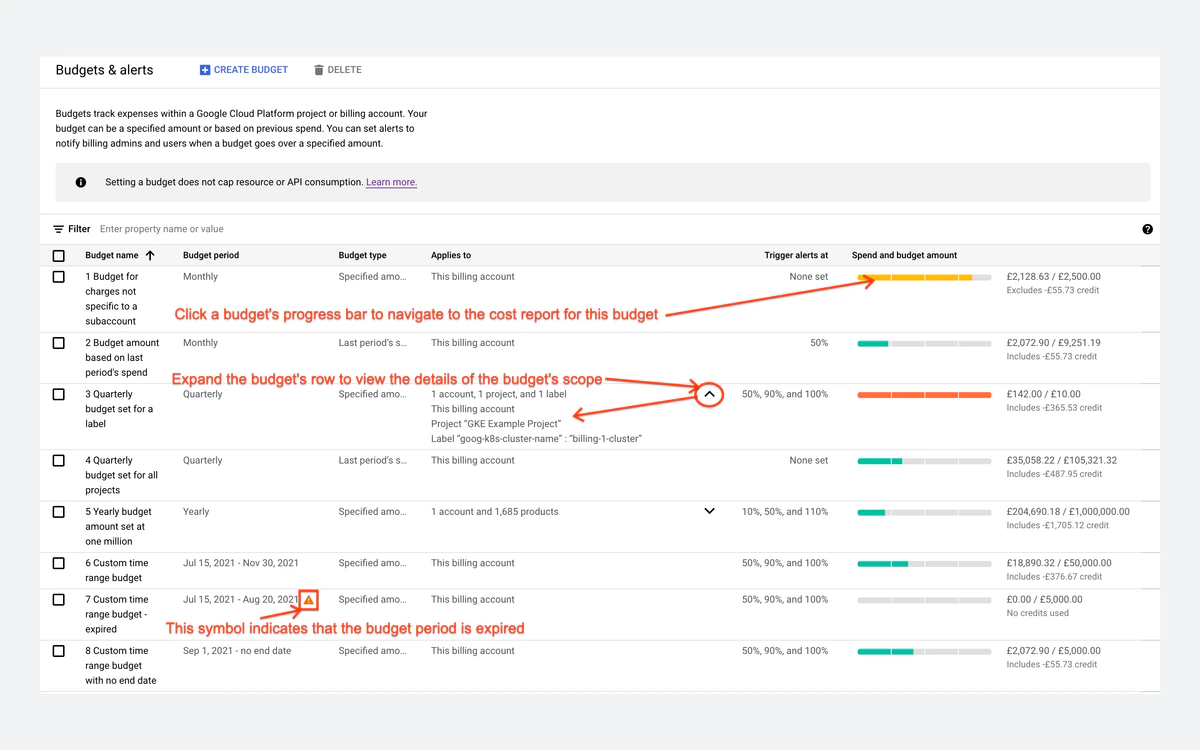
This is the part of Google Cloud that most deserves a careful read. A normal budget is an alert, not a limit. Google's own documentation says that setting an alerts-only budget does not automatically cap Google Cloud usage or spending, and recommends setting budgets below the funds you actually have because cost reporting runs behind real usage.
Spend cap budgets (Preview)
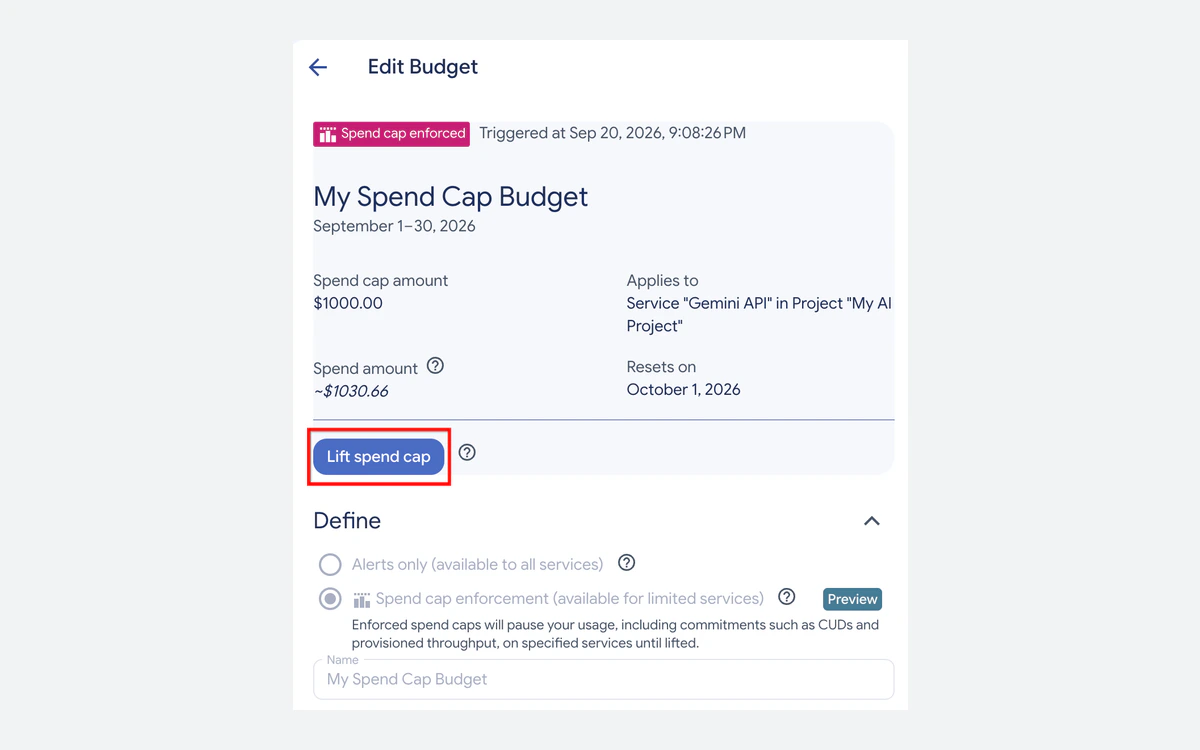
In 2026 Google added spend cap budgets, in Preview in the console. When a cap is enforced, usage of the chosen service is automatically paused for the rest of the budget period unless you lift the cap by hand. The limits are strict:
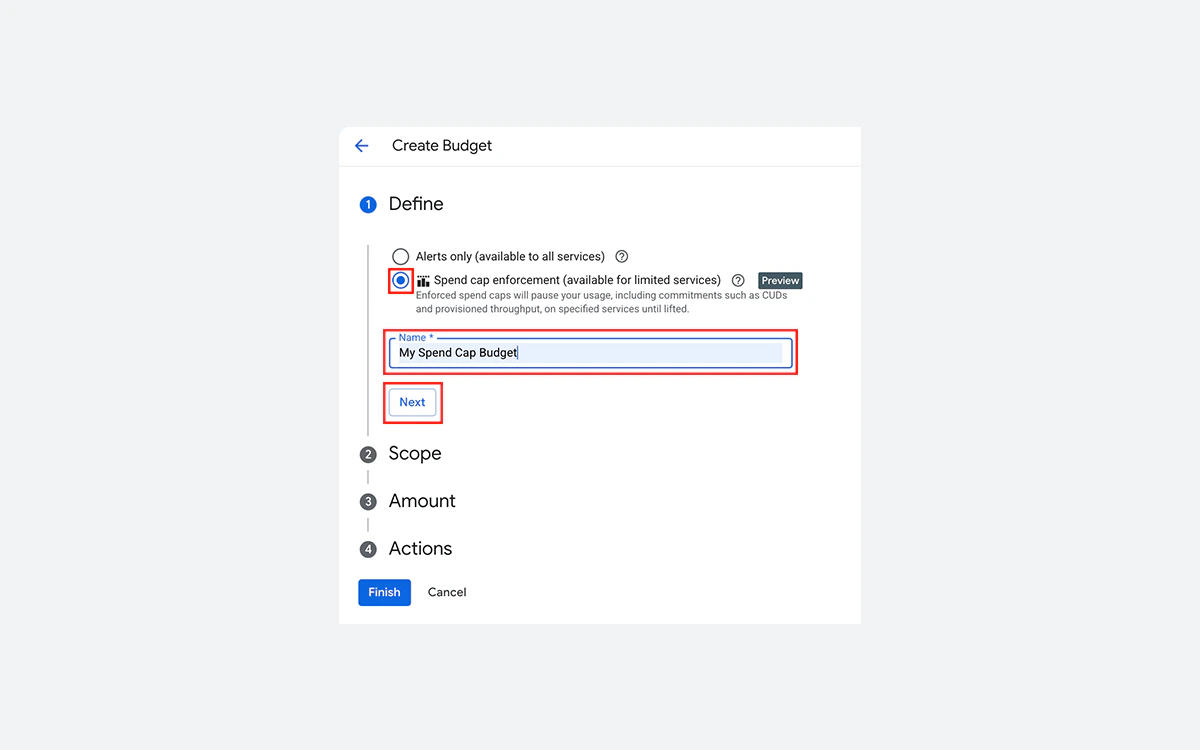
- Only four services are supported: Gemini API, Gemini Enterprise Agent Platform (formerly Vertex AI), Cloud Run and Cloud Run functions.
- Each cap covers one project and one eligible service, and periods are monthly only.
- It is available to first-party customers only, not accounts billed through a reseller.
- It does not pause persistent resources such as Compute Engine VMs or storage.
Support plans and what they cost
Basic Support is free for every customer, including trial users, and covers billing questions, documentation and community forums. Technical help from Google engineers is paid:
- Standard Support: the greater of $29 a month or 3% of monthly Cloud charges. Initial response within 4 hours for P2 and 8 hours for P3/P4, business hours (8/5).
- Enhanced Support: the greater of $100 a month or a tiered 10%, 7%, 5% and 3% of spend. 1-hour response for P1, 4 hours for P2, 8 hours for P3/P4, 24/7.
- Premium Support: the greater of $15,000 a month or the same tiered percentages. 15-minute response for P1, 2 hours for P2, 4 hours for P3 and 8 hours for P4.
Support fees are calculated on list prices before discounts and credits. For a small team, Standard Support is usually enough; there is no 1-hour P1 response until Enhanced.
What changed in 2026
At Google Cloud Next 2026, which wrapped up in April, Google focused heavily on AI agents and its own silicon:

- Vertex AI was renamed Gemini Enterprise Agent Platform, positioned as the place to build and govern AI agents.
- Google announced eighth-generation TPUs, TPU 8t and TPU 8i.
- Google Axion N4A Arm VMs became generally available, with Google claiming up to 2x better price-performance than comparable current-generation x86 VMs.
- Spend cap budgets arrived in Preview for Gemini and Cloud Run, the first real hard limit Google Cloud has offered.
Google Cloud now runs 43 regions and 130 zones, and each region has three or more zones spread across three or more physical data centers.
Google Cloud vs AWS, Azure and simpler VPS hosts
Against AWS and Azure, Google Cloud stands out for BigQuery, Cloud Run and GKE, and its trial is unusually safe because it never auto-charges. We compare the three platforms in detail in our AWS vs Azure vs Google Cloud guide, and cover Amazon on its own in our AWS review.
Against VPS providers the trade-off is managed services versus a predictable bill. Hetzner, Vultr and Linode give you a VM with generous bundled bandwidth for a fixed monthly price, which suits websites and small backends. Google Cloud makes more sense once you need autoscaling, managed databases, analytics or AI services. If you do choose it, our cloud cost optimization guide covers rightsizing, commitments and egress reduction.
Frequently asked questions
Will Google charge my card when the $300 free trial ends?
No. The trial never upgrades on its own. When the $300 is spent or 90 days pass, your resources stop, and you have 30 days to upgrade to a paid account before they are deleted.
Is the e2-micro VM really free forever?
Yes, within limits. One e2-micro per billing account runs free each month in us-west1, us-central1 or us-east1, with 30 GB of standard persistent disk and 1 GB of North American egress. Other regions, other disk types and extra traffic are billed, and Google can change the tier with 30 days' notice.
How much does data transfer out cost on Google Cloud?
On the default Premium Tier, $0.12 per GiB after the first free GiB for traffic to North America and Europe, falling to $0.11 and $0.08 at higher volumes. Standard Tier gives 200 GiB free per month, then $0.085 per GiB.
Can I set a hard spending limit on Google Cloud?
Only for some services. Spend cap budgets, in Preview, can pause Gemini API, Gemini Enterprise Agent Platform, Cloud Run and Cloud Run functions. Compute Engine VMs and storage cannot be capped, and normal budgets only send alerts.
How much does Google Cloud support cost?
Basic Support is free. Paid technical support starts with Standard at $29 a month or 3% of your spend, whichever is higher; Enhanced starts at $100 a month and Premium at $15,000 a month.
What happens to my data if I don't upgrade after the trial?
It is deleted. Resources stop when the trial ends, and if you do not upgrade within the 30-day grace period they are permanently removed. Export anything you want to keep before then.
Does Google Cloud offer refunds?
There is no general refund policy. Unauthorized charges are disputed through your bank, and charges caused by a compromised account are reviewed case by case by Cloud Billing Customer Care.
Key takeaways
- The $300, 90-day trial never auto-charges; resources stop at the end and are deleted after a 30-day grace period unless you upgrade.
- Always Free includes an e2-micro VM in three US regions, 2 million Cloud Run requests and 1 TiB of BigQuery queries per month.
- Premium Tier egress costs $0.12/GiB after 1 GiB; Standard Tier gives 200 GiB free, then $0.085/GiB.
- E2 and N4 VMs get no sustained use discounts; commitments save up to 55% and Spot VMs up to 91%.
- New spend caps can pause Gemini and Cloud Run, but nothing caps Compute Engine VMs - budgets only alert.
- Paid support starts at $29 a month or 3% of spend.
More in Cloud Computing
Browse Cloud Computing