Technology reviews & practical guides
A close look at Notta in 2026: what the monthly minute pool really buys, the free plan's three-minute wall, how Notta Bot joins meetings as a visible participant, and the billing rules worth reading before you commit to a year.

Notta does one job and does it competently: it listens to a meeting, turns the audio into searchable text, and then turns that text into a summary you can paste into a ticket or a CRM record. The part that is genuinely hard to work out from the marketing pages is where each plan stops, and Notta's ceilings are unusually specific — a monthly pool of minutes, a separate cap on how long any single recording can be, and a third cap on how many AI summaries you are allowed to generate.
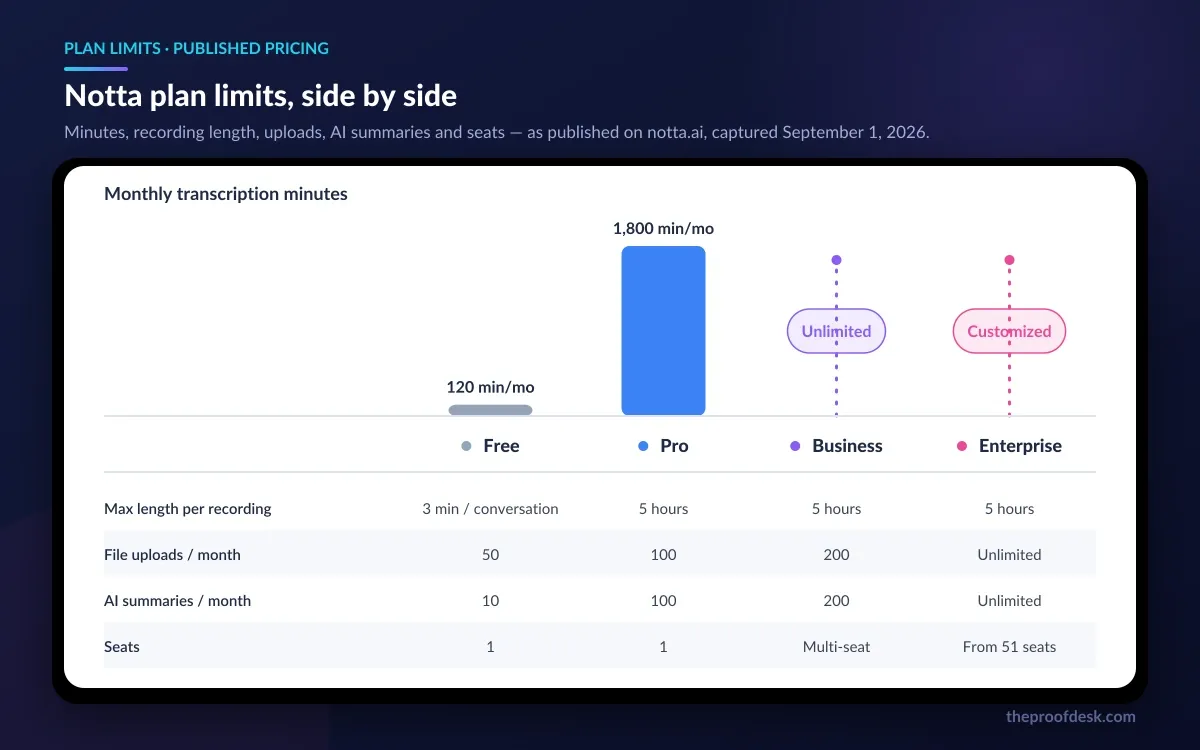
Those three numbers, not the feature checklist, are what decide whether a plan works for you. A free account that gives you 120 minutes a month sounds usable until you notice that no single conversation may exceed three minutes, which rules out the entire use case most people download a transcription tool for.
This review works through the 2026 tiers and what each one actually buys, how the minute quota behaves when you run out, what Notta Bot looks like to the other people in your meeting, the gap between the accuracy Notta advertises and the accuracy its own help centre describes, and the billing rules — no refunds on web purchases, chief among them — that are easy to miss before you commit to a year.
Notta is a transcription and meeting-notes service built around a workspace of recordings. You get audio into it three ways: record directly in the browser, desktop app or phone; upload an existing audio or video file; or send a bot into a scheduled online meeting to capture it live. Whichever route the audio takes, it lands in the same workspace as a timestamped, speaker-labelled transcript you can search, edit and export.
On top of that transcript sits the AI layer. Notta calls its summaries AI Notes, and they run off templates — a generic meeting recap, or structured sales frameworks, or a template you write yourself. There is also Notta Brain, a credit-metered assistant sold partly as its own product, and a hardware recorder called Notta Memo for capturing conversations that never touch a computer.
It competes most directly with the dedicated meeting notetakers. Where it differs is breadth of language support and the fact that it treats file upload as a first-class path rather than an afterthought, which matters if a lot of your audio arrives as recordings rather than as calendar invitations.
The transcription is solid and the language coverage is genuinely wide. The friction is all in the metering: minutes, per-recording length, upload count and AI summaries are four separate quotas, and you can hit any one of them while the other three still have room.
Notta publishes four tiers. Prices below are from the pricing page as it stood in September 2026, which defaults to annual billing and shows a 40% discount badge against the paid plans.
Monthly billing is the number to be careful with, because Notta's pricing page renders those figures client-side and they are easier to find in the help centre than on the pricing page itself. A help article on the three-day trial gives the Pro monthly fee as $13.49, and an article about the education discount lists the Business monthly plan at $27.99 per seat. Both are Notta's own documentation, but they are help-centre figures rather than pricing-page figures, so treat them as indicative and check the toggle before you buy.
The gap between the two billing modes is the real story. At $13.49 a month, Pro costs about $161.88 across a year against $97.99 paid up front — the annual commitment is roughly a 40% saving, which matches the badge, and it is a large enough spread that monthly billing only makes sense if you genuinely expect to stop.
Students and educators get a further cut. Notta's education discount takes annual Pro from $97.99 to $48.99, annual Business from $199.99 to $99.99 per seat, and monthly Business from $27.99 to $13.99 per seat.
Then there are the add-ons, which is where a plan quietly gets more expensive. Monolingual translation is $6 per month billed annually ($72 for the year) or $10 month to month, and is capped at 100 uses per account per month on Pro and Business. Bilingual transcription and translation is $9 per month annually ($108 for the year) or $15 monthly, capped at 200 uses per month. Notta Brain Pro is sold separately at $93.59 a year for 8,000 AI credits a month, with a 10% discount if you bundle it with a Notta plan.
Translation is not included in the base subscription beyond a small monthly allowance. If translation is central to your workflow, add $72 to $108 a year to whichever tier you were pricing.
Every Notta plan meters four things independently, and they are the numbers worth memorising before you pick a tier.

The catch that surprises people is what happens when the pool runs dry. Notta does not sell top-up minutes. Its help centre is explicit that buying the Pro plan again on the same account only extends the expiry date — the monthly quota does not increase. If 1,800 minutes a month is not enough, the answer is not more Pro, it is Business.
Concurrency is tied to seats rather than sold separately. A single Notta Bot handles one online meeting at a time, and every additional seat adds one more bot. That is a straightforward rule, but it means a one-seat Pro account cannot cover two meetings running in parallel — which for a lot of solo consultants is precisely the moment they needed it.
Business has a minimum of one seat and is bought in single-seat units, so a two-person team can move up without buying a block. Above 50 users Notta routes you to sales, which is the same threshold at which Enterprise formally begins.
You can exhaust your 10 monthly AI summaries on Free while 90 of your 120 minutes are still unused. The quotas do not borrow from each other.
Notta's free tier is unusually honest in one respect and unusually restrictive in another. The honest part: it has no time limit, runs free indefinitely, and Notta states plainly that you will not be auto-upgraded or charged unless you choose to upgrade yourself. No card is required to start.
The restrictive part is the three-minute cap on any single conversation. The 120 monthly minutes are real, but you can only spend them three minutes at a time, which excludes essentially every meeting, interview or lecture. In practice the free tier is a quality demo — enough to hear how Notta handles your accent, your jargon and your audio setup — rather than a workable free plan in the way that word is normally used.
The same three-minute figure returns in a place that matters more: if you let a paid subscription lapse, your data is retained permanently, but you can only view the first three minutes of each transcript until you subscribe again. Your transcripts are not deleted, they are truncated at the point of viewing. Only the workspace owner retains access, and features drop back to the free tier. That is a reasonable policy compared with vendors who simply delete, but it means an archive built on Notta stays effectively locked behind an active subscription.
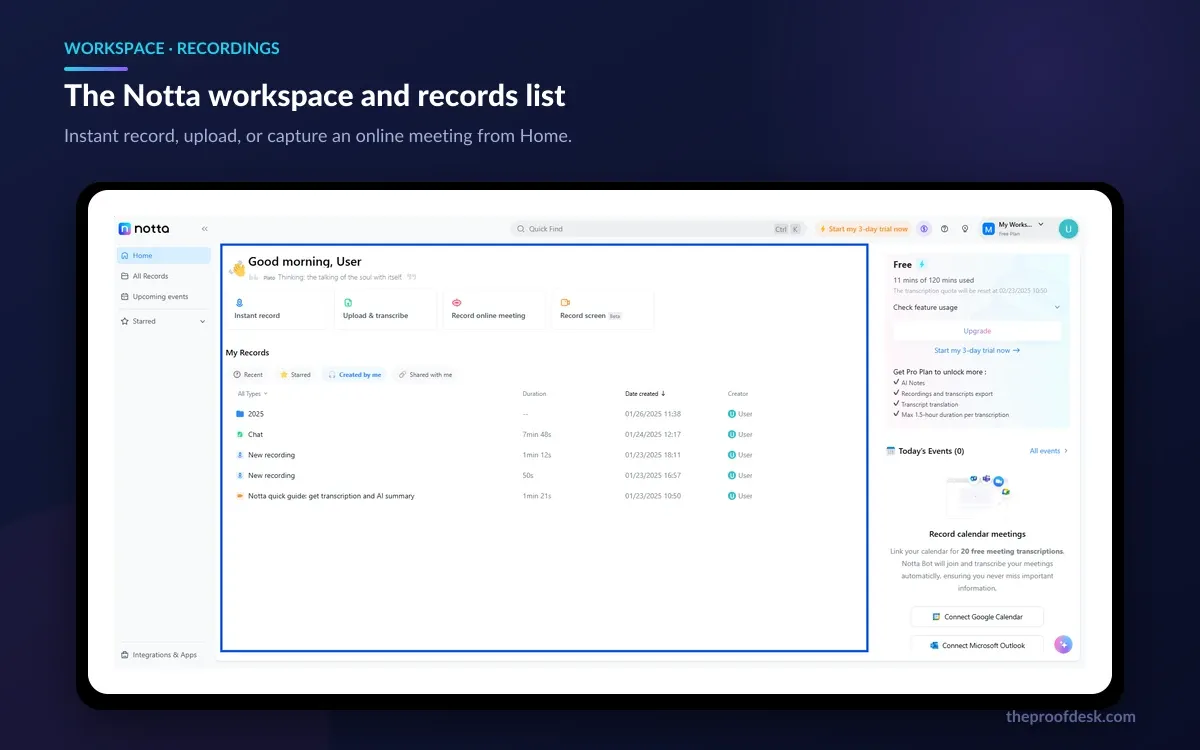
The workspace is a straightforward three-panel layout: a sidebar for folders and shared spaces, a central list of recordings with type, title, length and creator, and a detail view where the transcript sits beside the AI notes. Nothing about it is surprising, which is the right outcome for a tool whose job is to stay out of the way.

Editing the transcript is where most of the real work happens, and it is competent: you can correct text, relabel speakers and jump the audio to any point by clicking the corresponding line. Speaker identification is worth understanding in detail, because its behaviour changes with the capture method. Screen recording identifies up to 10 speakers. Real-time recording through a microphone only performs speaker identification when the spoken language is Japanese, and again caps at 10. Online meetings captured by Notta Bot are the best case — speaker identification works across all transcription languages with no stated limit on the number of speakers.
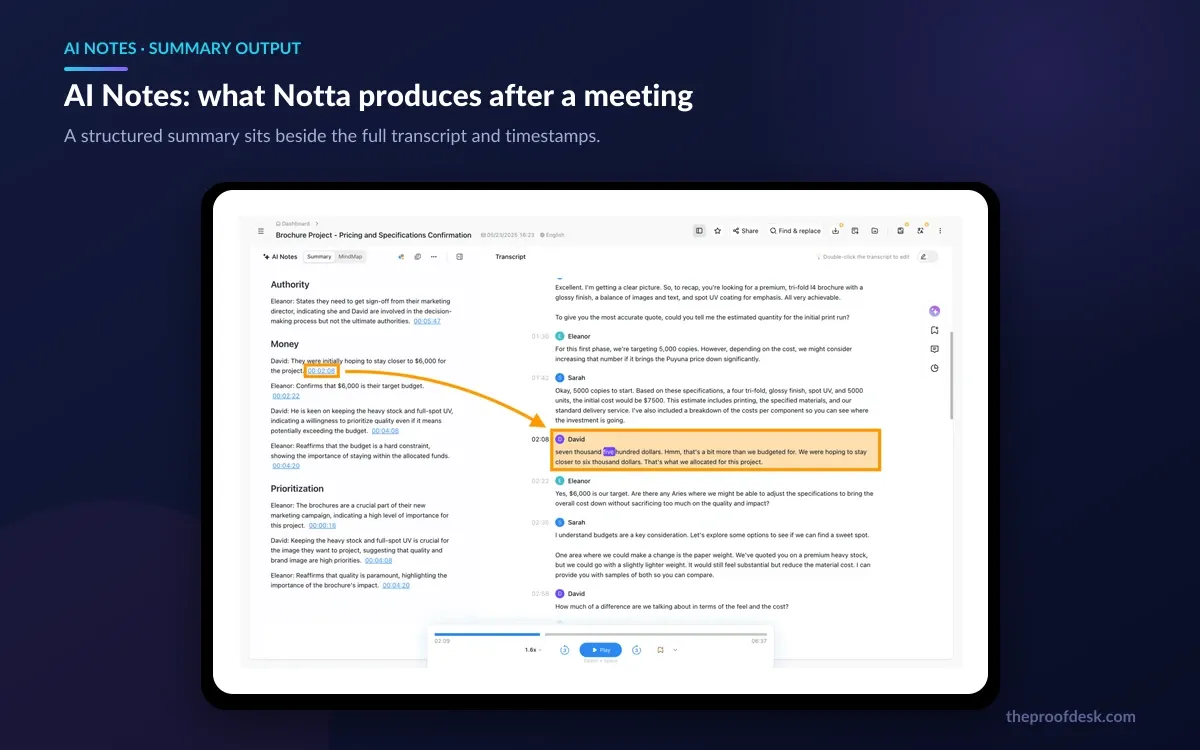
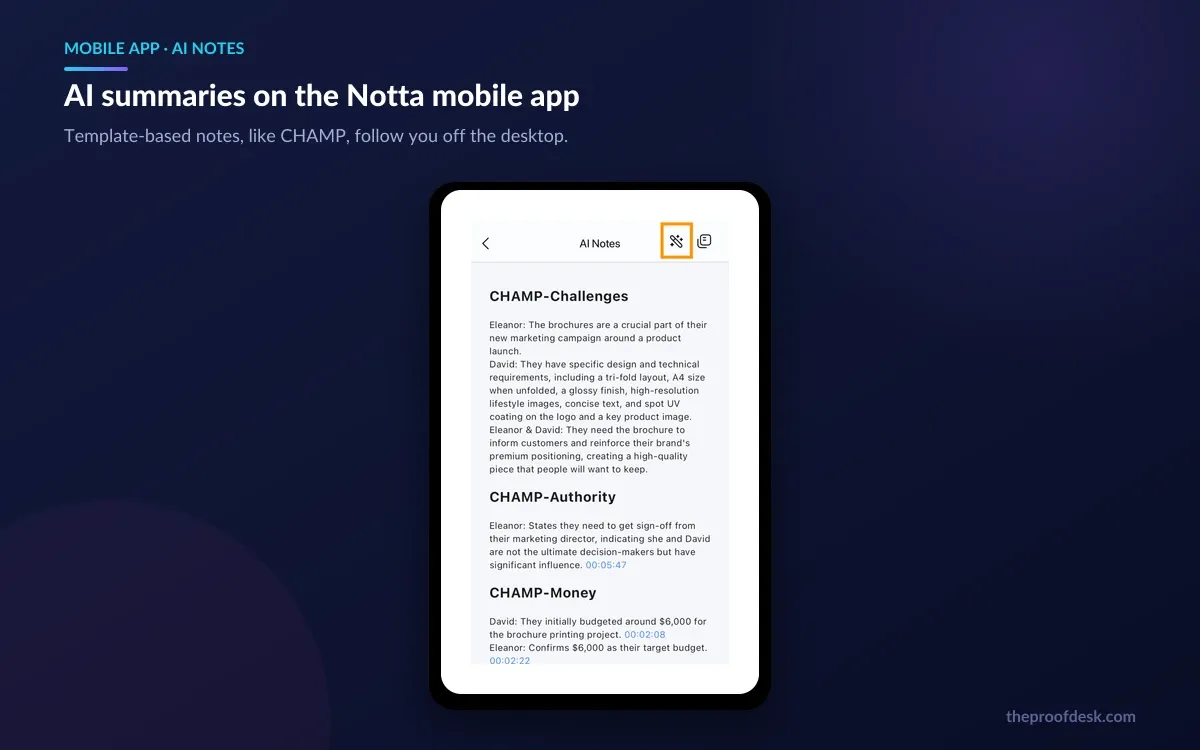
AI Notes is Notta's summary layer, and its distinguishing feature is that summaries are template-driven rather than a single generic recap. There is a library of prebuilt templates, including structured sales frameworks, and Pro and above can write their own — Free is limited to five templates.

The detail that makes this trustworthy is the timestamp linking: clicking a point in the AI notes jumps you to the place in the transcript it came from. For anything you intend to act on — a commitment, a number, a decision — being able to verify the summary against the source in one click is the difference between a summary you can send to a client and one you have to re-read the whole meeting to check.
Remember the quota, though. AI summaries are capped at 10 a month on Free, 100 on Pro and 200 on Business. If you are running several templates over the same meeting to compare outputs, each run counts.
For online meetings, Notta's default capture method sends a bot into the call. It records and transcribes Zoom, Microsoft Teams, Google Meet and Webex — and notably, that capability is listed at every tier including Free, which is more generous than several competitors.

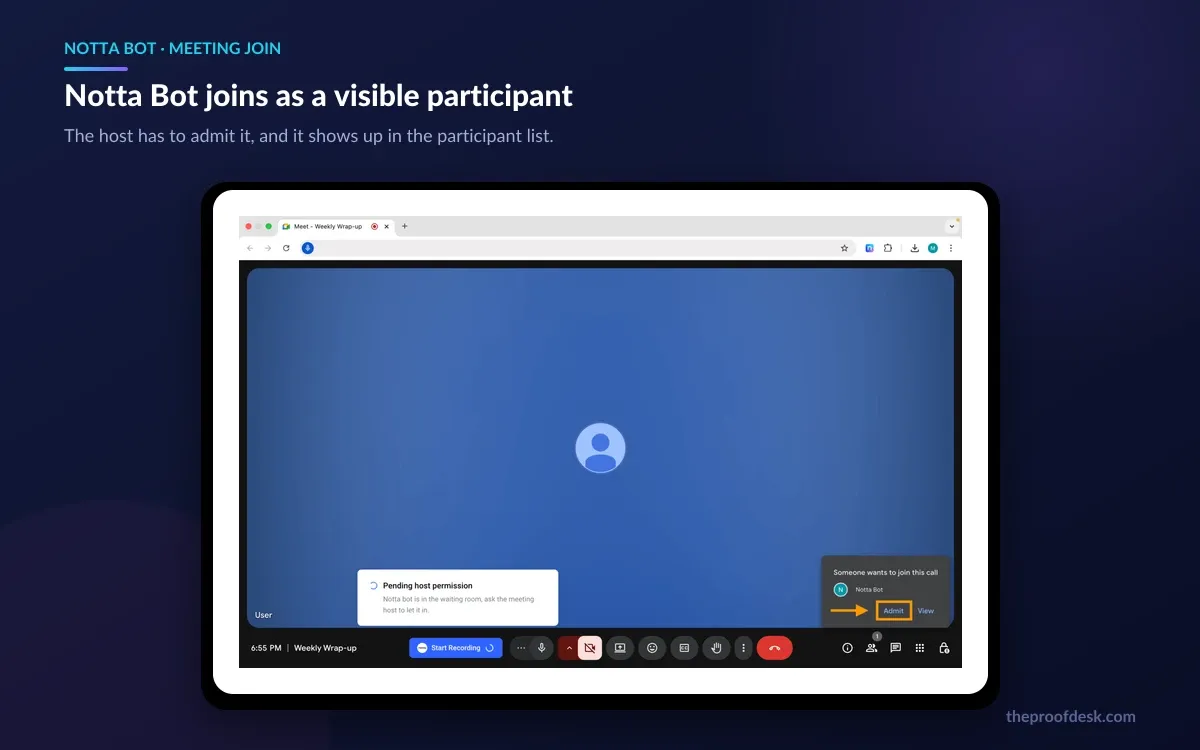
Be clear about what this looks like socially. Notta's own documentation states that the bot joins your meeting as a participant and appears in the participant list, taking 10 to 30 seconds to join. It is not a silent observer, and in most jurisdictions and most workplaces that visibility is the correct behaviour — but it does mean your counterpart knows they are being recorded, which is a conversation you should be prepared to have rather than one you discover mid-call.
Notta has since added a bot-free path. Notta Desktop captures the meeting from your own machine, which its documentation describes as completely invisible to other participants and instant to start, because nothing has to join anything. That removes the awkwardness and the join delay, and it moves the disclosure obligation entirely onto you. Which of those two you should use is a legal and ethical question about your jurisdiction and your relationship with the other party, not a technical one — recording consent rules vary sharply by country and by state, and Notta does not decide that for you.
Language coverage is one of Notta's strongest cards, and its help centre breaks the numbers down more carefully than the marketing does.
Accuracy is where the messaging pulls in two directions, and it is worth knowing both figures. Notta's homepage advertises 98%+ accuracy guaranteed. Its own help centre, in an article on transcription accuracy, is markedly more careful: it says that because recognition accuracy varies with the content of the meeting, the speaker and the recording environment, it is difficult to make general statements, then estimates roughly 90% or higher for formal meetings and around 50% to 80% for casual meetings or discussions, adding that accuracy drops significantly if the audio is not captured clearly near the speaker's mouth.
Both statements come from Notta. The help-centre version is the one that matches how transcription actually behaves, and it is the number to plan around. A clean, one-speaker-at-a-time meeting with decent microphones will transcribe very well; four people talking over each other in a reverberant room will not, on any service.
Notta's marketing says 98%+. Notta's support documentation says 50% to 80% for casual discussion. Budget your editing time against the second number and you will not be disappointed.
Export formats are broad, covering both the text and the media: plain text (.txt), Word (.docx), PDF, Excel (.xlsx), subtitles (.srt), audio as .mp3 or .wav, and video as .mp4. The important qualifier is the plan gate — downloading transcription data requires Pro or above. On the free plan your transcripts live inside Notta and stay there.
Integrations tier up in a way that tracks how teams actually grow. Free already includes Zoom, Google Calendar, Outlook Calendar, Notion, Slack, Microsoft Teams and Webex. Pro adds the file stores: Box, Google Drive, Dropbox and Microsoft OneDrive. Business adds Zapier and the CRM connections — Salesforce, HubSpot, Pipedrive, Zoho CRM, Zendesk Sell, Salesflare and Freshsales.
Business is also where the administrative apparatus arrives, and if you are buying for a team this is the real reason to go past Pro rather than the unlimited minutes. You get member invitations and management, user roles, internal sharing, restrictions on external sharing, usage reports, security certification reports, IP address restrictions covering 20 addresses, and the option to hide member information.
Enterprise adds the controls a security review will ask for: SAML single sign-on, centralized management, automatic file deletion settings, password expiration policies, the ability to disable AI features or third-party integrations outright, priority support, and a setting labelled no data training — which, as the next section explains, is more significant than it looks in a feature list.
Notta runs about everywhere. There is the web app, a desktop application for Windows 10 or later and macOS 11 Big Sur or later, mobile apps requiring iOS 10.0 or later and Android 7.0 or later, and a Chrome extension used to pull the bot into meetings from the browser.

Notta Memo is the outlier: a physical recorder intended for conversations that never involve a computer at all — an in-person meeting, a site visit, a phone call taken on the move. It is bought through Notta's separate shop, and its refund terms follow that shop's own policy rather than the software subscription terms, which is a distinction worth noting before you buy one.
Notta's security posture is documented in reasonable detail, and the claims are specific rather than vague.
Retention is generous and clearly stated: Notta commits to storing transcription data indefinitely, and says it will not be automatically deleted unless you delete it, delete the workspace or delete the account. There is no published storage cap in gigabytes on any tier, and no per-file size limit that I could find documented — a pleasant contrast to services that quietly expire old recordings.
The training question deserves more care than most reviews give it. Notta's privacy policy does not contain a blanket statement that customer audio and transcripts are excluded from AI training. The only explicit non-training clause is narrow and specific to one integration — that Google Workspace APIs are not used to develop, improve or train generalized or non-personalized AI or ML models. Elsewhere the policy reserves the right to use gathered information to perform statistical analysis of user behaviour and to evaluate and improve the service.
Notta lists no data training as a feature of the Enterprise tier specifically. That framing implies the opt-out is not something Free, Pro or Business customers can switch on. If your recordings contain client-confidential or regulated material, this is the question to put to Notta's sales team in writing before you buy — not something to infer from a feature table, including this one.
There are several trials and they are not equivalent, so check which one you are actually starting.
The three-day web trial is the one to watch, because Notta's documentation says the annual fee of $97.99 will be charged as soon as the trial ends. That is not a monthly charge you can absorb and cancel out of — it is a full year billed on day three. Notta asks you to cancel at least 24 hours before the trial ends to avoid it.
Cancellation of an active subscription behaves conventionally: plans renew automatically, you keep access until the end of the current billing cycle, and you should cancel at least 24 hours before the next billing date. Notta states plainly that the remaining days of your subscription are non-refundable.
And the rule that catches the most people: Notta's help centre says that in accordance with its terms of service, refunds are generally not provided for paid plans purchased through the web platform. Purchases made through the App Store or Google Play have to be refunded by Apple or Google under their policies, not by Notta. Combine that with a three-day trial that bills a full year, and the correct order of operations is obvious — exercise the trial hard, set a calendar reminder a day before it expires, and only then commit.
The four-quota system is the most common source of confusion. Minutes, per-recording length, file uploads and AI summaries all meter separately, and hitting any one stops the workflow regardless of how much headroom the other three have. It is defensible pricing design and it is genuinely hard to hold in your head.
The free plan is a demo rather than a free tier. Three minutes per conversation means it cannot record a meeting, which is the thing people install it for. That is a legitimate commercial choice, but anyone evaluating Notta should budget for the 7-day Business trial rather than expecting to assess it properly on the free plan.
Export being gated behind Pro is a real constraint on the free tier and worth knowing up front — without it, transcripts are viewable but not portable.
Speaker identification on live microphone recording is Japanese-only. That is an unusual limitation, it is not prominent in the marketing, and it will affect anyone planning to record in-person conversations in another language through their phone or laptop mic. Use the bot or screen recording and the limitation disappears.
The accuracy messaging is the thing I would most like to see fixed. Advertising 98%+ accuracy guaranteed on the homepage while the support centre estimates 50% to 80% for casual discussion sets an expectation the product cannot always meet, and it makes an otherwise well-documented service look less trustworthy than it is.
Finally, the no-refunds-on-web-purchases rule paired with a three-day trial that charges an annual fee is an unforgiving combination. Nothing about it is hidden — it is all in the help centre — but it rewards people who read the documentation and penalises people who do not.
The decision point between Pro and Business is not really minutes. It is whether more than one person needs access, and whether anyone needs to record two things at once. If either is true, Pro will frustrate you long before you exhaust its 30 hours.
Pro is $8.17 per month billed annually, a total of $97.99 for the year, and Business is $16.67 per seat per month annually, $199.99 per seat for the year. Notta's help centre gives the month-to-month prices as $13.49 for Pro and $27.99 per seat for Business, so annual billing saves roughly 40%. Free is $0 with no card required, and Enterprise is quoted by sales starting from 51 seats.
120 transcription minutes a month, and no single conversation may exceed three minutes. You also get 50 file uploads and 10 AI summaries a month, one seat, and five AI templates. Downloading transcripts requires Pro or above, so free transcripts stay inside Notta. The free plan itself has no expiry and Notta will not auto-upgrade or charge you.
No. Notta's help centre states that buying the Pro plan again on the same account only extends the expiry date and does not increase the monthly quota. If 1,800 minutes a month is not enough, the upgrade path is the Business plan, which has unlimited transcription minutes.
Yes. Notta's documentation says the bot joins the meeting as a participant and appears in the participant list, taking 10 to 30 seconds to join. If you need a recorder that other attendees do not see, Notta Desktop captures from your own machine instead and is described as completely invisible to other participants — which shifts the responsibility for disclosing the recording entirely onto you, and recording consent laws differ by jurisdiction.
58 languages for monolingual transcription, 42 language options for translating a transcript, 36 source and 61 target languages for real-time monolingual translation, and 23 languages for bilingual transcription and translation. On accuracy, Notta's homepage advertises 98%+ while its own help centre estimates roughly 90% or higher for formal meetings and around 50% to 80% for casual discussion, noting that accuracy varies with the speaker and the recording environment. Plan around the help-centre figures.
Notta's privacy policy contains no blanket statement excluding customer audio and transcripts from AI training. The only explicit non-training clause is narrow, covering Google Workspace APIs specifically, and the policy elsewhere reserves the right to use gathered information to evaluate and improve the service. Notta lists no data training as an Enterprise-tier feature, which implies the opt-out is not available on Free, Pro or Business. If you handle confidential material, ask Notta's sales team to confirm this in writing.
More in Artificial Intelligence
Browse Artificial IntelligenceIndefinitely. Notta states it stores transcription data permanently and will not delete it automatically unless you delete the data, the workspace or the account. There is no published storage cap on any tier. If a paid subscription lapses, the data is retained but you can only view the first three minutes of each transcript until you subscribe again.
Generally no. Notta's help centre states that in accordance with its terms of service, refunds are not usually provided for paid plans bought through the web platform, and that remaining days on a cancelled subscription are non-refundable. Purchases made through the App Store or Google Play must be refunded by Apple or Google under their own policies. This matters most with the three-day web trial, which Notta says charges the $97.99 annual fee as soon as the trial ends — cancel at least 24 hours before if you do not want it.
Text (.txt), Word (.docx), PDF, Excel (.xlsx), subtitles (.srt), audio (.mp3 or .wav) and video (.mp4). Export requires the Pro plan or above; it is not available on Free.