Pebblely Review 2026: Paid-Only After the Rebuild, With Smaller Quotas
Pebblely's Lite, Basic and Pro plans, image credits, output sizes, refunds and privacy, checked against its own pages after the March 2026 rebuild dropped the free plan.
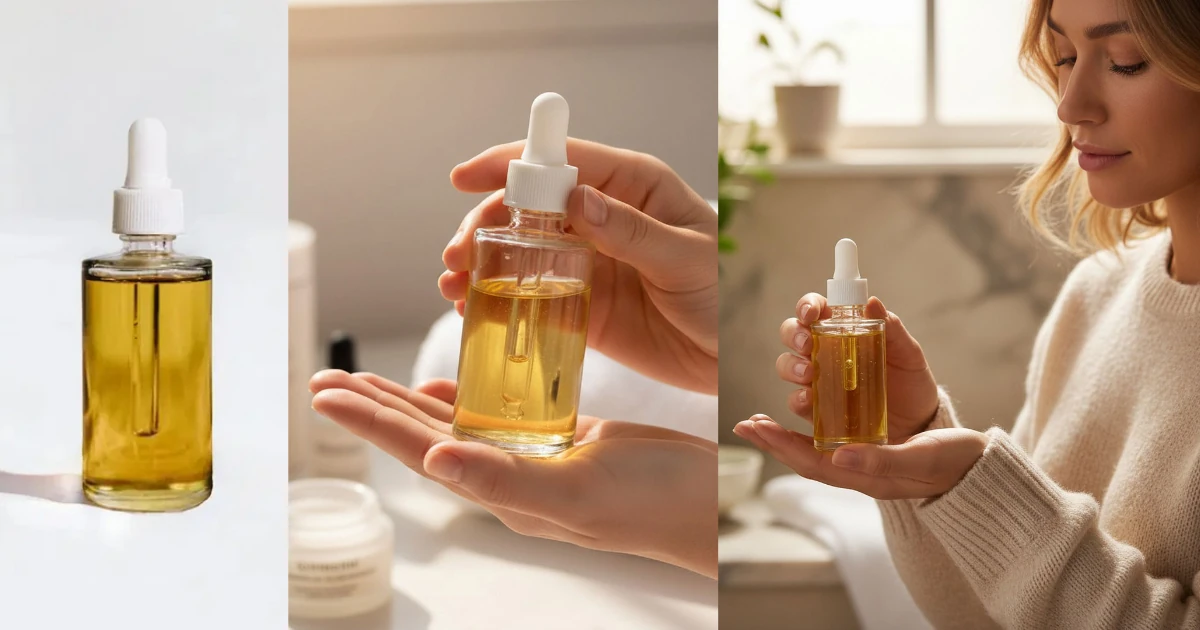
Pebblely is an AI product-photo generator from Singapore: you upload a photo of your product, pick a theme or type a prompt, and it returns styled shots for a shop, an ad or a social post. Most reviews you will find online describe a free tool that removes the background and drops your product onto a themed canvas. That tool no longer exists.
On 8 March 2026 Pebblely was rebuilt from the ground up on a new model, and background removal was dropped. By October 2026 the Free plan and the free trial were gone, image quotas had been cut, and a $9 Lite tier had been added. We checked the current pricing page, its FAQ, the Terms, the Privacy Policy and the relaunch post on 18 October 2026, and compared them with the February 2026 pricing page on the Wayback Machine. This review covers what $9, $19 and $39 a month actually buy today, and where Pebblely's own pages contradict each other.
The short verdict
Pebblely is now a paid-only, prompt-driven product-photo generator. The new flow is simpler than the old canvas editor, it keeps packaging text legible, and it generates natively at common social and ad sizes. The catch is the money side: there is no free plan, no free trial and, in practice, no refund once you have generated a single image, while the quota on the two older plans was cut sharply at the same annual price.
- Good for: small shops that want lifestyle shots of a product in seconds, without a studio or a design tool.
- Not for: anyone who needs background removal, an API, a Shopify app or print-size output.
- Price today: Lite US$9, Basic US$19, Pro US$39 per month, or $90, $179 and $379 billed yearly.
- Biggest risk: you pay before you can try it, and the refund window closes the moment you generate.
Ignore stale figures
Third-party reviews still quote a free plan with 40 images a month, Pro as unlimited, or other quotas. None of that is current. The only figures in this review that describe today's plans come from pebblely.com/pricing as of 18 October 2026.
What changed in the March 2026 rebuild
Pebblely's relaunch post, dated 8 March 2026, says it plainly: "We've rebuilt Pebblely from the ground up. No more background removal. Just upload your product, describe what you want, and get beautiful photos in seconds."
The old flow was, in Pebblely's words, "upload a photo, remove the background, position your product on a canvas, pick a theme". That ran on a diffusion-based pipeline. The new version is "powered by a more capable model", which Pebblely does not name. Existing accounts, subscriptions and credits carried over.
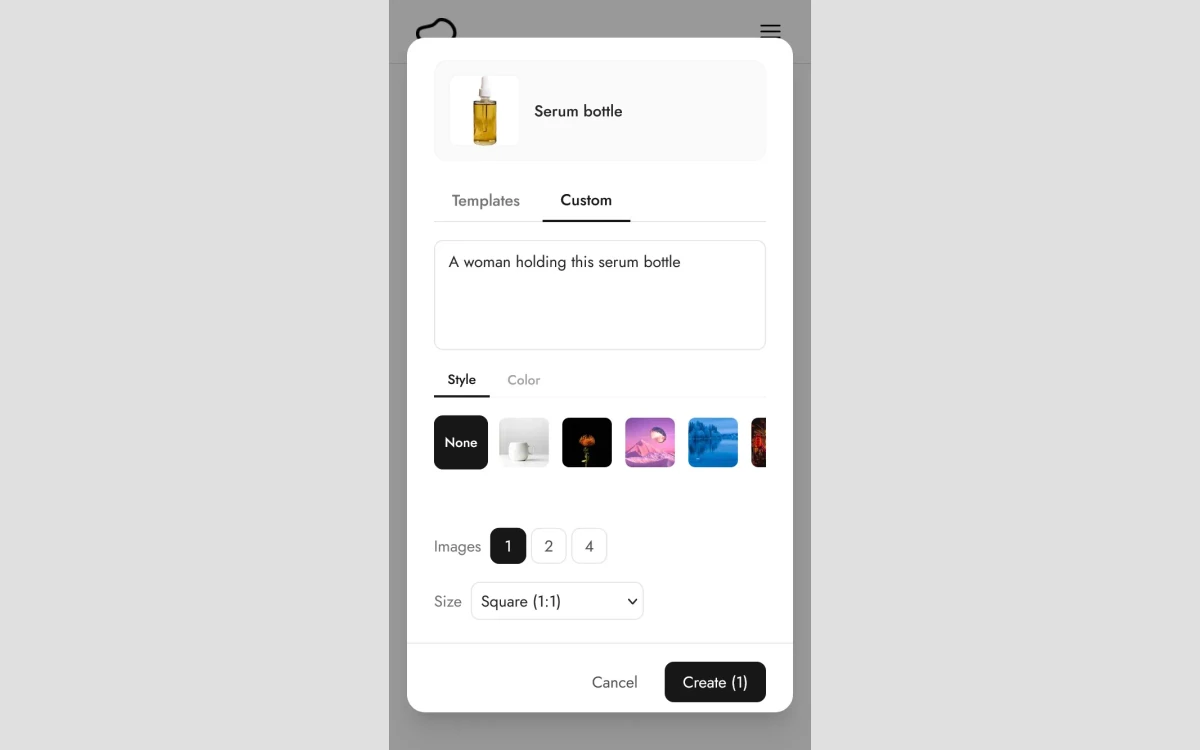
In practice this means Pebblely no longer places a cut-out of your product on a background. The model redraws the whole scene with your product in it, which is why it can now show the product held in a hand or used in context rather than only sitting on a surface.
How generating a photo works now
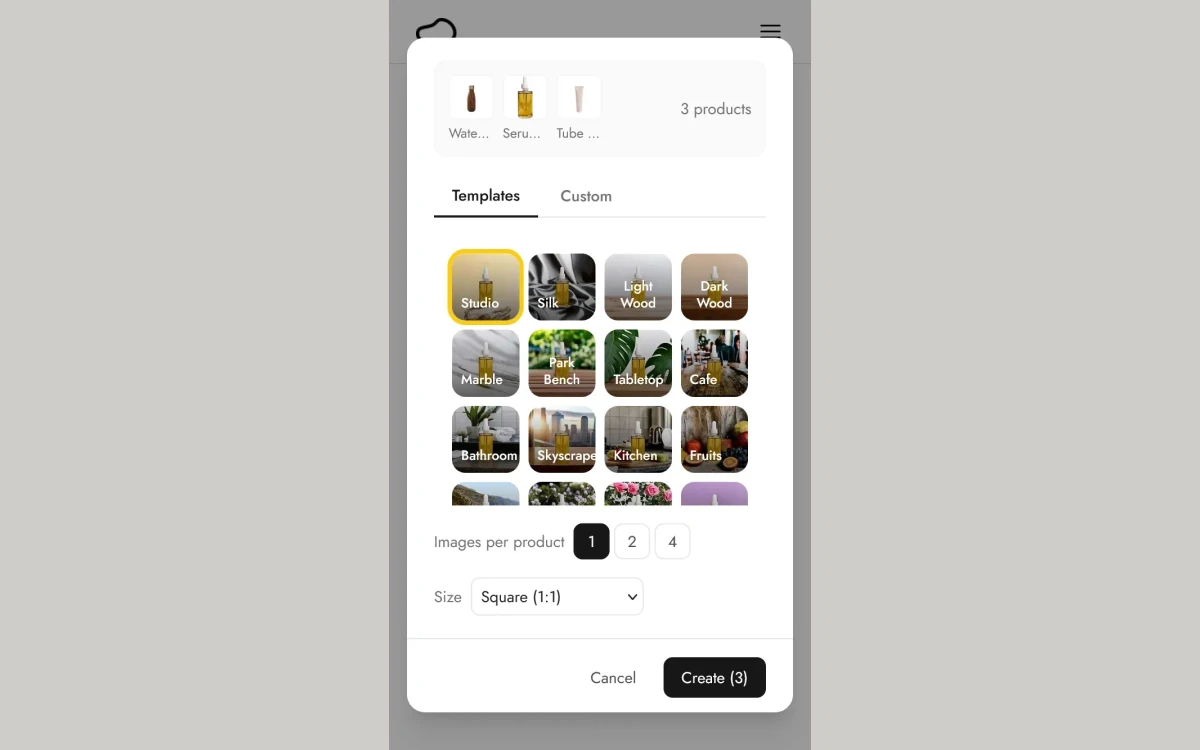
You add a product photo, crop it and give it a name. Then you choose between Templates and Custom. Templates are pre-made themes such as Cafe, Studio, Kitchen, Marble or Park Bench. Custom lets you write your own prompt, and you can steer either one with a style reference image or a colour: white, cream, sage, blue, tan, black, or a custom colour picker.
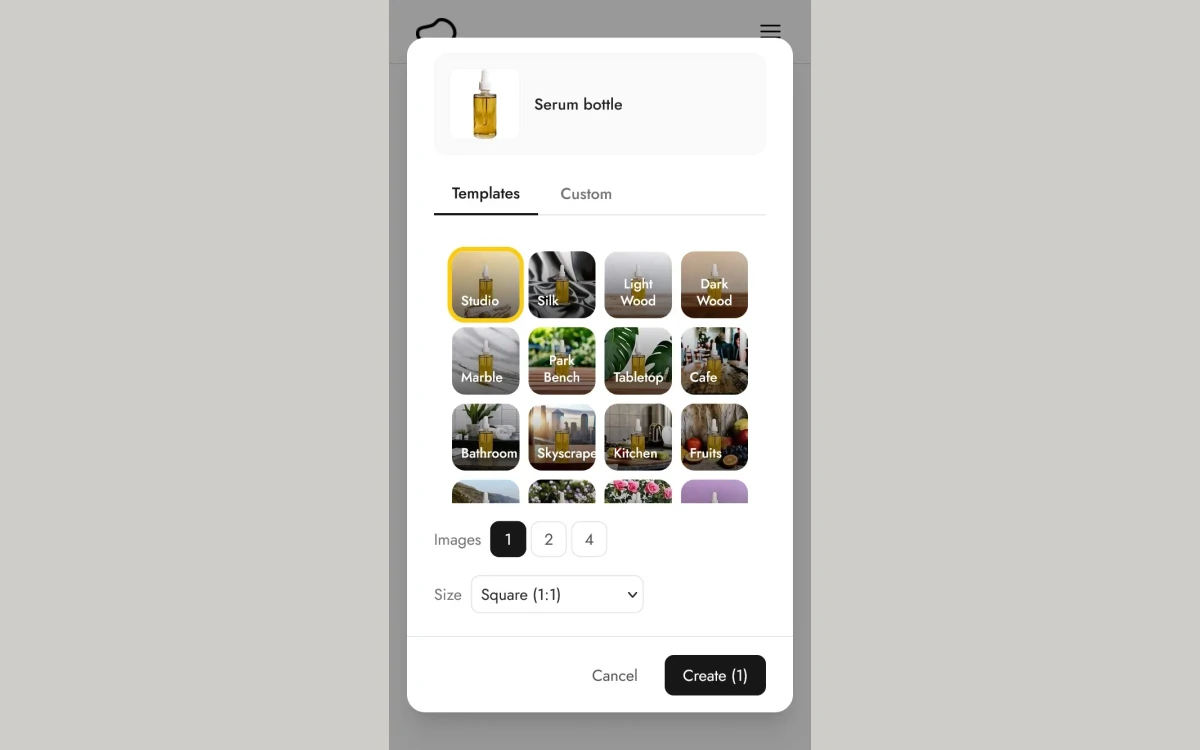
Each run produces 1, 2 or 4 images. Pebblely's guide says each image takes about 10 seconds. A High-resolution option costs 2 credits per image instead of 1 and takes about 30 seconds. You can also select up to 5 products for a single group shot.
Output sizes
Instead of cropping or extending a square, the model generates at the target size. The presets listed in the relaunch post are:
- Square (1:1) - 1080 x 1080
- Portrait (4:5) - 1080 x 1350
- Story (9:16) - 1080 x 1920
- Landscape (16:9) - 1920 x 1080
- Facebook Ad - 1200 x 628
That covers marketplaces and social feeds well, but the largest output is 1920 pixels on the long edge. Before the rebuild, paid plans offered custom sizes up to 2048 x 2048. If you need print or very large hero banners, plan on upscaling elsewhere.
Template count
Editing results and keeping label text legible
To change a result, you click its edit button and describe the change in words. Pebblely's own example swaps the person in the background of a bathroom scene while leaving the product untouched. There are no manual tools such as brushes or layers; every change goes through a prompt.
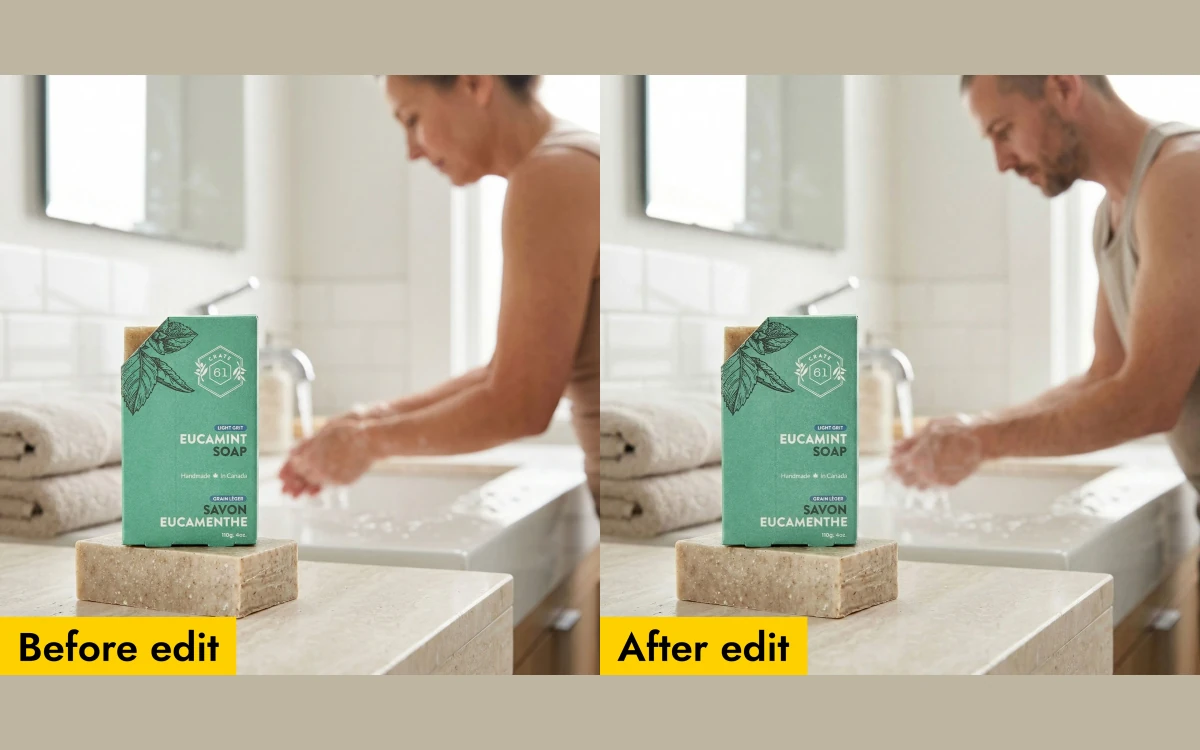
The feature that matters most for packaged goods is text handling. AI image models tend to garble small print on labels. Pebblely says it "automatically extracts all visible text from your product image, including brand names, ingredients, dosage info, etc." and uses it to keep that text readable in the generated photo.
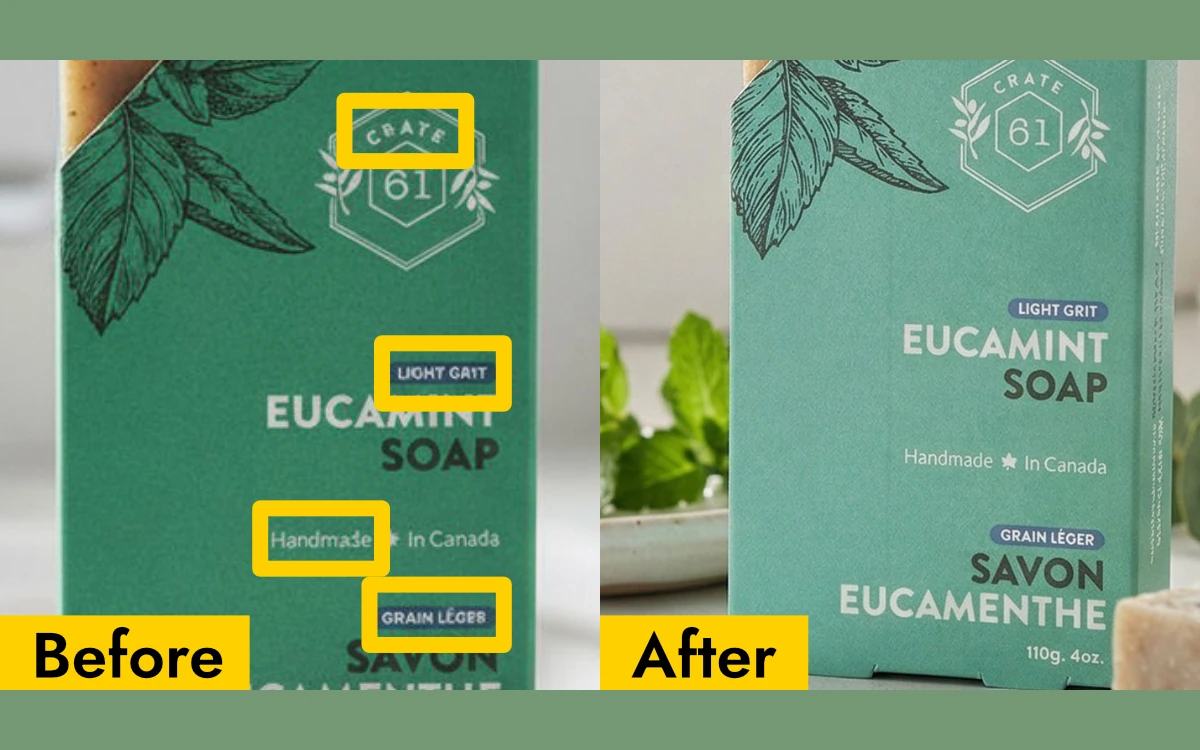
That is a real improvement over generic image generators, but it is still AI output. For supplements, cosmetics or anything with regulated label text, zoom in on each image before using it in a listing.
Pricing and plans: Lite, Basic and Pro
There are three plans, all in US dollars. No Free, Business, Team or API plan is listed.
- Lite - US$9 per month: 30 images every month, 40+ background themes, custom prompts. No bulk generate.
- Basic - US$19 per month: 200 images every month, 40+ background themes, custom prompts, bulk generate.
- Pro - US$39 per month: 500 images every month, 40+ background themes, custom prompts, bulk generate. Marked "Best value".
The Yearly toggle, labelled "2+ months free", shows Lite at $7.50 a month billed $90 annually, Basic at $15 a month billed $179 annually, and Pro at $32 a month billed $379 annually. The billed totals are what you pay. The per-month figures are rounded: $15 x 12 is $180 and $32 x 12 is $384, not $179 and $379.
Cost per image
- Lite: $0.30 per image monthly, $0.25 yearly.
- Basic: about $0.095 per image monthly, about $0.075 yearly.
- Pro: about $0.078 per image monthly, about $0.063 yearly.
These assume standard images at 1 credit each. High-resolution images cost 2 credits, so they halve every quota: Lite becomes 15 high-res images a month, Basic 100 and Pro 250. Unused credits do not roll over to the next month.
Lite is the odd one out
When the rebuild launched, Pebblely said both plans included all features, including bulk generation. Lite was added later and is the only plan without bulk generate. At $0.30 an image it is also about three times more expensive per image than Basic.
What the same money bought in February 2026
The Wayback Machine snapshot of the pricing page from 15 February 2026 shows how much the plans changed at the same annual prices:
- Free: US$0, 40 images every month at 1024 x 1024, 90-day storage for inactive users. Now removed.
- Basic: billed $179 annually, 1,000 images every month, custom sizes up to 2048 x 2048, logo or badge overlay, unlimited storage. Now 200 images a month for the same $179.
- Pro: billed $379 annually, unlimited images, priority support. Now 500 images a month for the same $379.
So a yearly Basic subscriber went from 12,000 images a year to 2,400, an 80% cut, and Pro went from unlimited to 6,000 a year. The new model may produce better images per credit than the old pipeline did, but that is the trade on offer. The exact dates when the Free plan disappeared and Lite arrived are not public; both happened after the March 2026 relaunch.
Refunds, renewals and cancelling
This is where Pebblely is strictest. The pricing page FAQ says: "Because of high cost required to generate AI images, we cannot offer refunds. When you make a purchase, you acknowledge the suitability of the service and waive your right to withdraw your purchase and request for refunds." It also says plainly: "We do not offer free trials."
The Terms, last modified 14 February 2024, add the one exception: "If you have not generated any images yet, email us at [email protected] to apply for a refund." They also state that you get an email reminder 7 days before your subscription renews, and that "The subscription renewal charge is non-refundable."
- Refund: only if you have generated nothing, by email to [email protected].
- Renewal: automatic; reminder 7 days before; renewal charges are non-refundable.
- Cancel: anytime, from profile > Manage billing in the app.
Pebblely contradicts itself here
The pricing FAQ, the separate /faq/ page and the Terms each word the refund rule differently, and the Terms still say Pebblely "offers a generous free version of the Services for you to try the Services before purchase" even though there is no free plan or trial today. If you buy, assume the strictest reading: one generated image ends any chance of a refund.
Trustpilot shows a TrustScore of 2.9 from just 2 reviews, the newest from April 2026, and both complain about refused refunds. Two reviews is too small a sample to judge the service, but it matches what the policy says will happen.
Ownership, AI training and privacy
The Terms say: "You own the images you generate and can use them however you want." There is no separate commercial licence and no seat count stated on any plan. The same Terms add that "There is no assurance or guarantee that the images do not violate the intellectual property rights of others", so responsibility for what you publish stays with you. Users must be 16 or older.
On AI training the pages disagree. The pricing FAQ says: "No, uploaded images and generated images are not used for any AI training." The Privacy Policy, last modified 15 February 2023, says Pebblely will "collect and store information such as your product images, custom descriptions, negative prompts, and reference images in order to provide and improve our Services." The FAQ is the more recent statement, but the Privacy Policy is the legal document.
- Retention: no fixed period; data is deleted when "no longer necessary". You can request deletion at [email protected].
- Payments: processed by Stripe.
- Marketing: the Terms say creating an account means you agree to newsletters and marketing emails.
- Company: Pebblely Pte Ltd, a Singapore private company. The Terms contain no governing-law clause.
If you work with unreleased products, keep that gap in mind and avoid uploading anything under embargo.
What Pebblely does not do
- No background removal. It was dropped in the March 2026 rebuild.
- No upscaler. High-resolution mode at 2 credits per image is the closest option, and outputs top out at 1920 pixels.
- No API. The old API link is gone, and /api/ and /docs/ now just load the homepage.
- No Shopify app. The Shopify App Store listing says the app is not currently available.
- No mobile app on the App Store or Google Play, and no Canva app that we could find.
- The underlying AI model is not named.
If background removal or an API is the main thing you need, look at tools built around it. Photoroom, Clipdrop and erase.bg cover cut-outs and batch processing; we review each of them separately on this site.
Who should buy Pebblely
Pebblely makes sense for a small online seller who wants quick lifestyle shots of a product for listings, ads and social posts, and who will use most of a monthly quota. Basic at $179 a year is the sensible starting point, because Lite costs three times as much per image and lacks bulk generate. Pro only pays off if you regularly need more than 200 images a month.
It is a harder sell if you want to test before paying, need print-size output, rely on Shopify integration, or were an existing Basic or Pro subscriber who now gets a fraction of the images for the same price. Because the refund window closes at your first generation, look closely at Pebblely's own examples before subscribing, and start monthly rather than yearly.
Frequently asked questions
How much does Pebblely cost?
US$9, US$19 or US$39 a month for Lite, Basic and Pro, as of October 2026. Billed yearly, they cost $90, $179 and $379. Lite includes 30 images a month, Basic 200 and Pro 500.
Does Pebblely have a free plan or free trial?
No. The pricing FAQ says "We do not offer free trials", and the old Free plan with 40 images a month was removed after the March 2026 relaunch. The Terms still mention a free version, but no free plan is on offer.
Can I get a refund from Pebblely?
Only if you have not generated any images yet. In that case the Terms say to email [email protected] to apply. Once you generate an image, and on every renewal charge, Pebblely says it does not refund.
Do unused Pebblely credits roll over?
No. Unused image credits expire at the end of each subscription month. High-resolution images use 2 credits each, so they burn through a quota twice as fast.
Can I use Pebblely images commercially?
Yes. The Terms say you own the images you generate and can use them however you want. Pebblely does not guarantee that outputs are free of others' intellectual property, so check results before publishing.
Does Pebblely use my product photos for AI training?
Its pricing FAQ says no, uploaded and generated images are not used for AI training. Its older Privacy Policy says product images and prompts are stored to "provide and improve our Services", so the two pages do not fully agree.
What image sizes does Pebblely produce?
Five presets: 1080 x 1080, 1080 x 1350, 1080 x 1920, 1920 x 1080 and 1200 x 628. Custom sizes up to 2048 x 2048 were part of the pre-2026 plans and are no longer listed.
Does Pebblely still remove backgrounds?
No. The March 2026 rebuild removed background removal. Pebblely now generates a whole new scene around your product from a template or prompt.
How do I cancel Pebblely?
Go to your profile, then Manage billing, in the app. Subscriptions renew automatically, and Pebblely emails a reminder 7 days before each renewal.
Key takeaways
- Pebblely was rebuilt on 8 March 2026: no background removal, scenes are generated around your product from a template or prompt.
- Plans are Lite $9 (30 images), Basic $19 (200) and Pro $39 (500) a month, or $90, $179 and $379 a year. High-res images cost 2 credits.
- There is no free plan and no free trial, and refunds are only possible before you generate your first image.
- At the same yearly price, Basic dropped from 1,000 to 200 images a month and Pro from unlimited to 500.
- You own the outputs, but the pricing FAQ and the Privacy Policy disagree on whether uploads help improve the service.
- No API, no Shopify app and no mobile app; output tops out at 1920 pixels.
More in Artificial Intelligence
Browse Artificial Intelligence