SeaArt AI Review 2026: Generous Free Tier, Strict Billing
SeaArt review: 130 free Stamina a day, LoRA training, video and an AI Agent - plus the no-refund, auto-renew and public-by-default catches to know before paying.
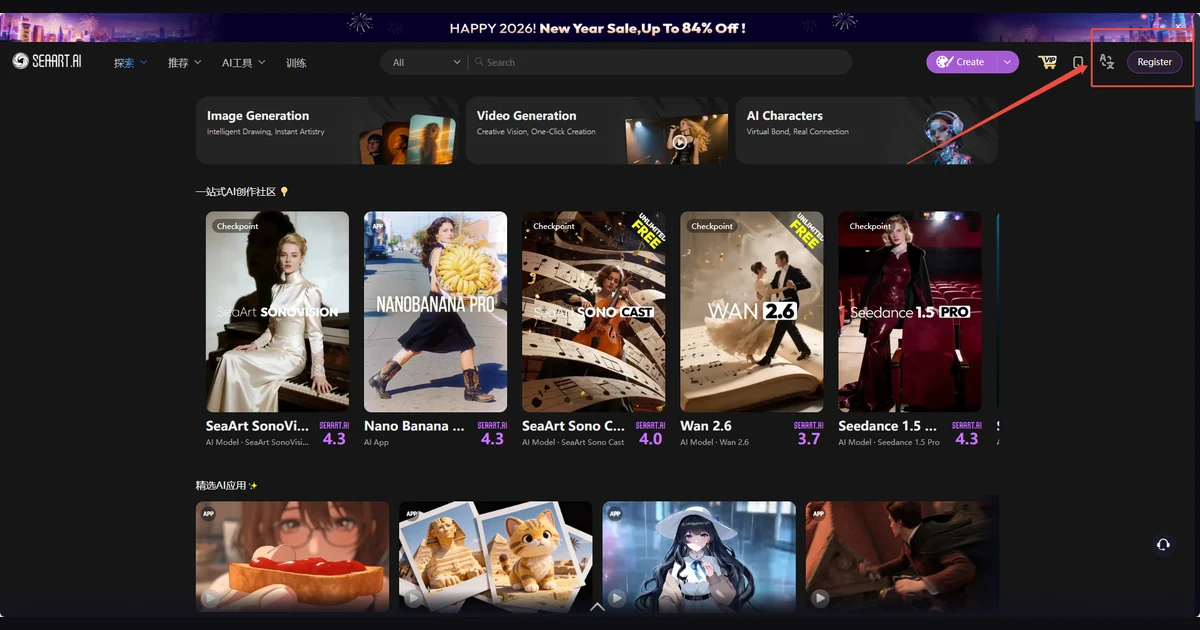
SeaArt started life as a Stable Diffusion model hub with a free daily allowance. In 2026 it is something bigger and messier: an agent-driven platform that puts in-house models next to third-party ones such as Nano Banana Pro and Sora 2, runs cloud ComfyUI-style workflows, trains LoRAs, and makes video. The company says it has more than 30 million monthly active users and annual recurring revenue approaching $50 million.
The free tier is one of the most generous in AI image generation, and the per-image cost on paid plans is tiny. The catches sit in the billing terms: subscriptions are non-refundable, renew automatically, and the 3-day trial can charge a few hours early. Creations are public unless you pay for privacy, and purchased Credits now expire. This review covers what SeaArt does well, what it costs, and how to avoid the traps before you hand over a card number.
What SeaArt is in 2026
SeaArt (seaart.ai) is a browser and mobile platform for generating images and video with AI. The current version, SeaArt AI 2.0, was introduced in a blog post published on December 26, 2025 and updated on June 18, 2026. It replaced the old model-gallery-first layout with a creation-first interface built around three entry points: Image Generation, Video Generation and AI Apps.
The pitch is breadth. SeaArt says its unified image, video, audio and 3D workflows draw on "more than one million" specialized models, most of them community uploads such as checkpoints and LoRAs. Alongside them sit commercial models the platform resells access to. Third-party reviews in 2026 also list Veo 3.1, Kling 3.0, Flux and SDXL among the options.
In January 2026 the company launched SeaVerse, announced from Tokyo, and used the occasion to cite 30M+ monthly active users, 50M+ registered users and ARR approaching $50 million. The iOS app, SeaArt AI: Photo & Video Maker, shipped version 5.0.0 on October 5, 2026; the Android app has more than 5 million downloads.
Who runs it
The site footer reads "© 2026 SeaArt, Inc." and names SUNRISEAI PTE. LTD., a Singapore company that also publishes the iOS and Android apps. A Japanese entity, SeaArt Japan Co., Ltd., sells in Japan, and press releases describe SeaArt as headquartered in Tokyo. Disputes go to the Singapore International Arbitration Centre under Singapore law, with a class-action waiver.
The free tier and how Stamina works
SeaArt meters usage with two currencies. Stamina is a daily allowance that resets at 0:00 UTC and does not roll over. Credits are bought (or won in events) and are spent only once the day's Stamina is gone.
Free accounts get 130 Stamina per day, which SeaArt says is enough for about 21 images. An older docs page still says 150; the pricing page's 130 is the current figure. Free users can run 2 tasks at once and get Standard Quality output.
The cost of free is time. SeaArt's own plan comparison says free generation will "Often Need to Queue for Over 30 Minutes". For casual experiments that is tolerable; for any real project it pushes you toward a paid plan, which is the point.
Daily Stamina and concurrency by plan
- Free: 130 Stamina per day (about 21 images), 2 simultaneous tasks
- Beginner: 300 Stamina per day (about 50 images), 5 simultaneous tasks
- Standard: 700 Stamina per day (about 117 images), 10 simultaneous tasks
- Professional: 2,100 Stamina per day (about 350 images), 15 simultaneous tasks
- Master: 3,500 to 100,000 Stamina per day depending on the tier bought, 20 simultaneous tasks
Paid Stamina replaces the free 130 rather than adding to it. The image estimates assume a cheap model: SeaArt bases them on Z Image Turbo at 20 Stamina per image. Heavier models burn through the allowance far faster, and video is in a different league - a 5-second 480p clip on Seedance 2.5 costs 1,015 Stamina, more than seven days of the free allowance.
Plans and pricing
There are five plans: Free, Beginner, Standard, Professional and Master. The paid tiers are branded SVIP. Pricing is less transparent than it should be, because the web pricing page renders its numbers in the browser and quotes them as "estimated prices" that exclude tax and move with exchange rates.
The firmest public figures are the US App Store in-app prices:
- Beginner: $4.99 per month or $37.99 per year
- Standard: $11.99 per month or $119.99 per year (a Standard yearly trial is listed at $83.99)
- Credit packs: $1.99, $3.99, $9.99, $19.99 and $39.99
Professional and Master are not sold in the iOS app; you buy them on the web, where the price depends on your region. Third-party reviews in 2026 report Master at around $149.99 per month, well above the $49.99 SeaArt's own docs showed in an August 2024 screenshot. Treat any figure you read elsewhere, including here, as a guide and check the price at checkout on seaart.ai/mall.
Web and App Store prices differ
The same plan can cost a different amount on the web and in the iOS app. If you plan to cancel through Apple, subscribe through Apple; if you buy on the web, you cancel on the web.
What paying actually buys
- An SVIP fast generation channel that SeaArt says is up to 10x faster than the free queue
- "Free Image Creation" - unlimited image generation with no Credit or Stamina cost on supported settings
- Private Creation, so your work is visible only to you
- Quality Mode, hi-res video, first and last frame video control and priority queueing
- Up to 3 logged-in devices per account
The pricing page lists these privileges but does not spell out which tier unlocks which, so confirm the feature you need is on the plan you pick before paying.
On cost per output, SeaArt is cheap. The pricing page puts a standard image at 6 Credits, about $0.006, and a standard video at 30 Credits, about $0.03, again based on its cheaper models.
Image and video generation
Image generation follows the familiar pattern: pick a model or style, set aspect ratio and quantity, write a prompt, generate. Where SeaArt stands out is model choice. The community catalog is enormous and skews heavily toward anime, illustration and stylized character art, and it is easy to switch between a community checkpoint, a LoRA and a commercial model in the same session.
The independent benchmark VibeDex scored SeaArt 5/5 for model selection, 4/5 for speed, 4/5 for output quality and 4/5 for onboarding in April 2026. The same review gave it 1/5 for platform trust and content safety, which the billing and moderation sections below explain.
Video generation runs through a mix of in-house and partner models, including Wan, Seedance and SeaArt's Stardream. Prices vary sharply: Wan 3.0 is used for the cheap 300-Stamina estimate, Seedance 2.0 at 480p for 5 seconds costs 675 Stamina, and Seedance 2.5 or Stardream 2.5 at the same settings cost 1,015. Hi-res video and first and last frame control sit behind SVIP.
Expect the interface to be busy. Reviewers note frequent pop-ups and "Lucky Box" promotions, and that the site and app are heavy on memory.
LoRA training, workflows and the AI Agent
SeaArt is one of the few consumer platforms where LoRA training is open to every user, not only paying ones. Training is charged in Credits "based on the complexity and duration of the training", and SeaArt publishes no fixed figure, so run a small test first. Creators who sell paid models on the platform keep 70% of the price they set, and SeaArt says its creator program also pays by downloads, generation counts and user ratings.
For node-based work, SeaArt runs cloud ComfyUI-style workflows, plus two canvas tools: SeaArt Flow at flow.seaart.ai and SeaArt Movies at tv.seaart.ai. Workflows can be published for other users to run, which makes the platform a shortcut for people who want ComfyUI results without a local GPU.
The headline 2.0 feature is the SeaArt AI Agent. You "simply describe what you want" and it "automatically handles prompt optimization, model selection, and parameter configuration", with an Agent Canvas for multi-step projects. It is a sensible answer to the platform's own complexity: with a million models, most people need help choosing.
What SeaArt does not offer is a public developer API. We found no official API documentation or API pricing, and VibeDex scored it 2/5 on API access. If you need to generate images from your own code, look elsewhere.
Privacy, ownership and content rules
SeaArt says the intellectual property in what you generate belongs to you and that it does not prohibit commercial use of your own work. Using someone else's work commercially needs that owner's permission; other users' public content may be used only for personal, non-commercial purposes.
The privacy catch is that SeaArt is built as a community. Private Creation is sold as an SVIP feature, which means free users' creations are public. Under section 6.4 of the terms, public content grants SeaArt, its affiliates "and each user a worldwide, perpetual, non-exclusive, royalty-free, sublicensable license", and SeaArt may use it for promotion.
Data handling deserves a look too. The privacy policy allows transfers "to affiliated entities, or to other third parties across borders", and the iOS privacy label says identifiers and usage data are used to track you, with advertising data linked to your identity.
Content rules
- No uploading images of people without their consent
- No images of public figures
- NSFW content is filtered, with moderation that combines AI and human review
- The terms set a minimum age of 12, while the App Store rates the app 17+ or 18+
Users have reported NSFW filters silently blocking generations with no explanation, so expect some prompts to fail without a clear reason.
Billing, trials and refunds: read this before paying
This is the section that matters most. SeaArt's terms are strict, and many of the complaints about the service are billing complaints.
- No refunds: the terms say the VIP membership "is non-refundable once locked". If a refund is issued in exceptional circumstances, the matching benefits are revoked.
- Automatic renewal with no limit: renewal continues "unless the member or company voluntarily and explicitly cancels", and SeaArt may take payment up to 24 hours before the renewal date. Renewals bill at any new price.
- Trials can charge early: SeaArt warns that the charge after the 3-day trial "may be processed a few hours earlier" because of regional differences and network latency, and that it will not refund a trial that converts.
- Credits now expire: Credits bought before April 1, 2026 never expire; those bought on or after that date are valid for 2 years. Event Credits from that date last 90 days to 2 years.
- Cancelling keeps your SVIP benefits until the end of the paid period.
User reports collected by Somake and VibeDex describe people being charged for an annual plan when they believed they had chosen monthly, including charges of $251.88, with refunds refused. We have not verified those cases, but the terms leave little room for recourse when it happens.
How to avoid the traps
Check the monthly or yearly toggle twice before paying. Cancel a trial at least a day before it ends, not on the last evening. Turn off auto-renewal right after subscribing if you only want one period. Buy Credits only in amounts you will use within two years.
The Civitai model-mirroring dispute
SeaArt's huge model catalog has a controversy attached. Since 2025, creators on Civitai, the largest community model site, have complained publicly that their LoRAs appear on SeaArt without them having uploaded anything there.
SeaArt's position is that it runs "Civitai Archive" bot accounts that mirror creators' models, and that creators can claim those accounts. In a case documented on Civitai on September 8, 2026, a LoRA published only on Civitai appeared on the creator's SeaArt account the next day labelled "civitai". SeaArt replied that the model "was not directly imported by SeaArt's Civitai Archive", attributed it to a scraping source tied to a fake account, said it had blacklisted that source and removed the auto-import link, and offered originality authentication.
For users, the practical effect is that some models on SeaArt may not be published with their creators' consent, which matters if you plan to use a community model commercially. For creators, it is worth searching SeaArt for your own work and using the claim process if you find it.
Who SeaArt is for
Good fit
- Anime, illustration and stylized character art, where the community catalog is strongest
- LoRA tinkerers who want to train and share without a local GPU
- People who want ComfyUI-style workflows in the cloud
- Budget users who can live with queues, or want cheap per-image and per-video costs on a paid plan
Poor fit
- Anyone who needs private work without paying
- Developers who need an API
- Buyers who want refund protection or clear, stable prices
- Commercial users who need certainty about the provenance of community models
Our verdict: start on the free tier and stay there as long as the queue allows. If you upgrade, buy the shortest period, preferably through the App Store if you are on iOS, and set a reminder to cancel. SeaArt offers a lot of capability for very little money; it just expects you to read the fine print.
Frequently asked questions
Is SeaArt free?
Yes. Free accounts get 130 Stamina per day, about 21 images on cheap models, resetting at 0:00 UTC. The trade-off is Standard Quality output and queues that SeaArt says often exceed 30 minutes.
How much does SeaArt cost?
In the US App Store, Beginner is $4.99 per month and Standard is $11.99 per month, with yearly options at $37.99 and $119.99. Professional and Master are sold only on the web, where prices vary by region and exclude tax; check seaart.ai/mall before buying.
Can I get a refund from SeaArt?
Generally no. The terms say VIP membership is non-refundable once locked, and a trial that converts is not refunded either, even though the charge may arrive a few hours before the trial ends.
Do SeaArt Credits expire?
Credits bought on or after April 1, 2026 expire after 2 years; older purchases never expire. Event Credits from that date last between 90 days and 2 years, and Stamina never carries over to the next day.
Are my SeaArt images private?
Not on the free plan. Private Creation is a paid SVIP feature, and public content is licensed to SeaArt and other users under a perpetual, royalty-free license.
Can I use SeaArt images commercially?
Yes, for your own generations. SeaArt says the IP belongs to you and does not prohibit commercial use, but using another user's work commercially needs their permission.
Does SeaArt have an API?
No public one. We found no official API documentation or API pricing, so SeaArt is a web and app tool rather than a developer platform.
How do I cancel a SeaArt subscription?
Cancel where you subscribed: in your SeaArt account on the web, or in Apple or Google subscription settings for app purchases. Benefits last until the end of the paid period, and renewal can be charged up to 24 hours early, so cancel well ahead of the date.
Key takeaways
- SeaArt's free tier is generous at 130 Stamina a day, about 21 images, but free generations often queue for 30+ minutes.
- Per-output costs are tiny, about $0.006 per standard image, and the model catalog is the biggest draw, especially for anime and stylized art.
- LoRA training is open to all users, and cloud ComfyUI-style workflows and the AI Agent make the platform approachable.
- Subscriptions are non-refundable, renew automatically, and trials can charge a few hours early.
- Creations are public unless you pay, Credits bought since April 1, 2026 expire after 2 years, and there is no public API.
- Some community models are mirrored from Civitai, a practice creators dispute.
More in Artificial Intelligence
Browse Artificial Intelligence