Technology reviews & practical guides
Supabase review for 2026: what the $25 Pro plan really costs once compute is added, Free tier pauses and limits, spend cap gaps, no refunds, reliability and support SLAs.
Supabase gives you a full Postgres database plus Auth, file Storage, Realtime, Edge Functions, vector search, queues and cron jobs behind one dashboard and one set of client libraries. It has become the default backend for a huge share of new apps: the company says nearly 10 million developers build on it, and that more than 60% of new databases are now launched by some kind of AI tool.
The product is good. The pricing page is where people get surprised. The Pro plan says "From $25", and that "from" does real work: every project adds its own compute bill, the $10 compute credit covers exactly one small instance, the spend cap does not cap compute or add-ons, and there are no refunds. This review walks through what you actually pay, using Supabase's own published rates and worked examples as of October 2026.
Review the current offer, features, and terms for Supabase before deciding whether it fits your needs.
Supabase is one of the best-value ways to get a managed Postgres database with authentication, storage and an API already wired in. For a single production app on the default Micro instance, Pro costs about $25 a month before usage overages, which is hard to beat for what you get.
The catch is that the bill scales per project, not per account. Every extra project adds compute, the most useful safety features (point-in-time recovery, custom domains, log drains) are paid add-ons outside the spend cap, and an uptime SLA only exists on Enterprise. The Free plan is excellent for prototypes but pauses after a week of inactivity and has no backups, so it is not a home for anything real users depend on.
Choose Supabase if you want Postgres plus auth and storage without running servers, and you are comfortable budgeting compute per project. Budget roughly $25 for one app, $45 for three, and well over $100 once you add PITR or move past the Small instance.
Supabase describes itself as a Postgres development platform. Each project is its own Postgres database running on AWS, with a set of services built around it:
Because the core is ordinary Postgres, lock-in is lower than with most backend-as-a-service products. You can dump the database with standard tools and move it elsewhere. Supabase is also open source and can be self-hosted, with one documented limit: "Self-hosted Supabase runs as a single project, which means that Studio doesn't support multiple organizations or projects."

There are four plans. The headline prices are per organization per month, and quotas are shared across the whole organization: "The quota is applied to your entire organization, independent of how many projects you launch within that organization."
Usage quotas on Pro and Team are generous for most apps: 2 million Edge Function invocations (then $2 per million), 500 Realtime peak connections (then $10 per 1,000), 5 million Realtime messages (then $2.50 per million), 20 GB of log ingestion (then $0.50 per GB) and file uploads up to 500 GB each, against 50 MB on Free.
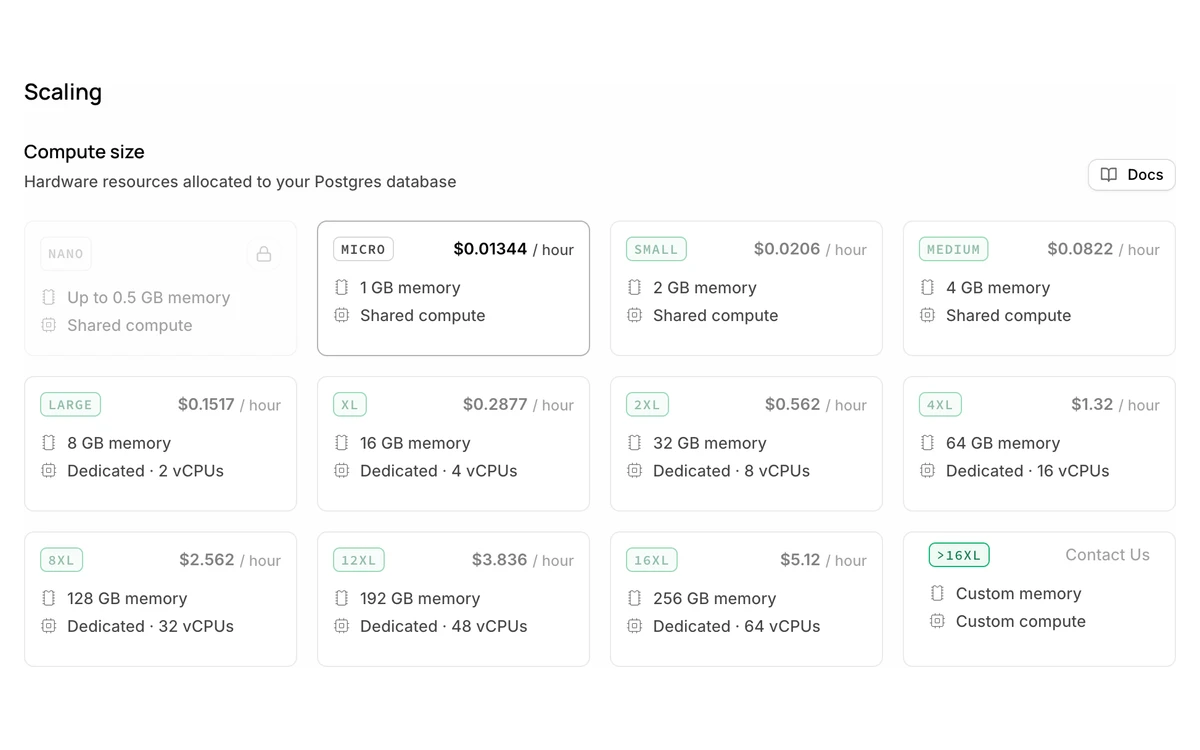
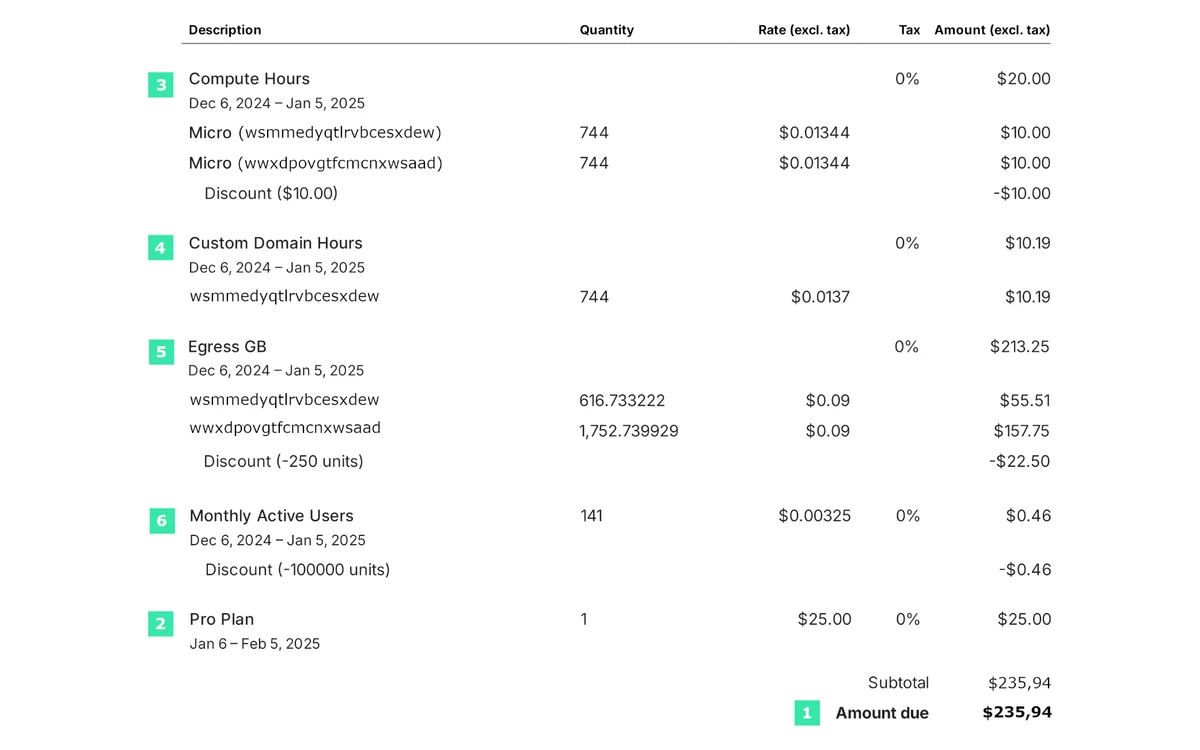
The $25 Pro fee includes $10 of compute credit, which covers exactly one project on Micro compute. A second project is another roughly $10 a month, a bigger instance costs more, and none of that is visible in the headline price.
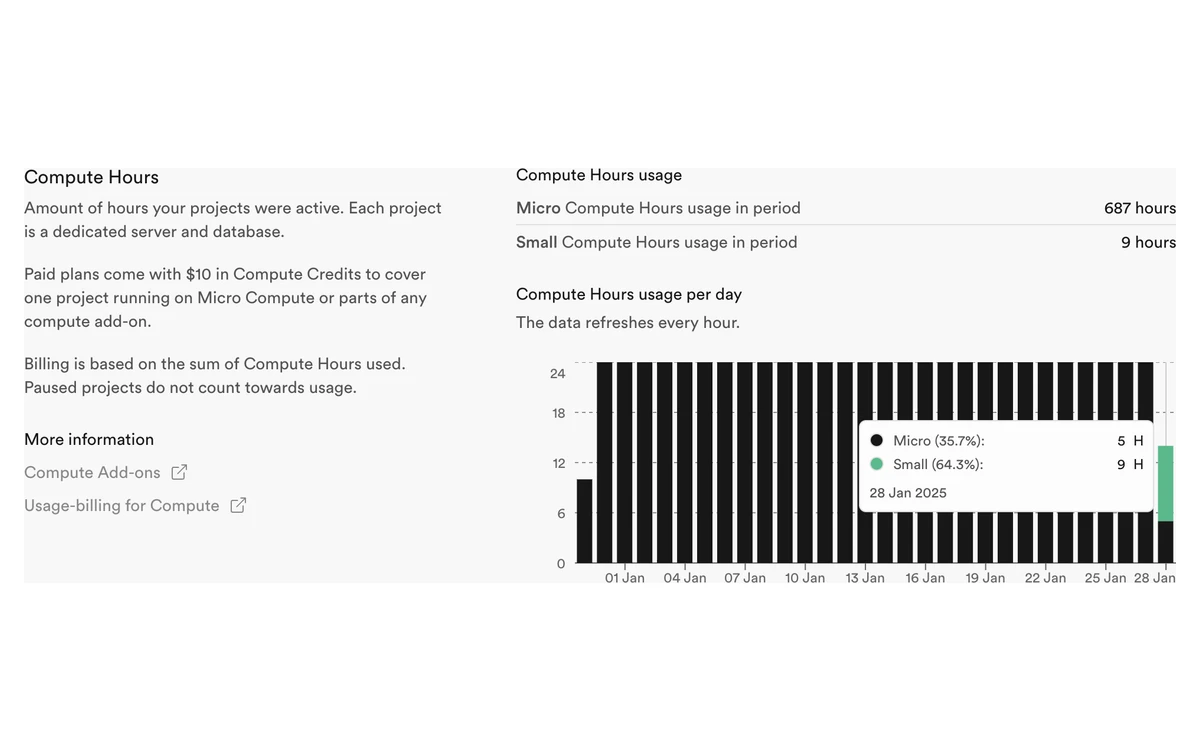
Compute is the line that grows as you add projects or need more power. It is billed by the hour per project, and partial hours round up: "If a project runs for part of an hour, you are still charged for the full hour." On paid plans, Nano instances are billed at the same price as Micro, so there is no cheaper tier below Micro once you upgrade.
The $10 compute credit on paid plans resets monthly and does not roll over. It only applies to project compute: "Compute Credits apply only to Compute and do not cover other line items, including Read Replica Compute and Branching Compute." A read replica is billed as another instance at the normal compute rate, and each preview branch starts at the Micro hourly rate.

Disk is a separate line. Each project gets 8 GB, then $0.125 per GB. Disk performance includes 3,000 IOPS and 125 MB/s of throughput; going past that costs $0.024 per extra IOPS and $0.95 per extra MB/s.
These examples use Supabase's published rates, before usage overages and tax. The three-project figure is Supabase's own worked example from its billing FAQ.
Timing matters too. "The subscription plan fee is charged upfront, whereas usage-charges, including compute, are charged in arrears." So your first invoice after adding projects or resizing an instance will be higher than the plan price suggests, because it carries last month's compute.

For learning and prototypes the Free plan is genuinely useful. It includes unlimited API requests, 50,000 monthly active users, 500,000 Edge Function invocations, 200 Realtime peak connections and 2 million Realtime messages. The limits that matter are elsewhere:
Going over the Free quotas does not create a bill, but it can break your app. Supabase lists the possible restrictions as pausing projects, switching databases to read-only mode, blocking new project launches or returning a 402 status code for all API requests. Plans cannot be mixed inside one organization, so if one project needs Pro, the whole organization moves to Pro.
Pro has a spend cap, switched on by default. With it on, "further usage of that item is disallowed until the next billing cycle" once you exceed a quota. With it off, overages are billed per unit. The cap covers disk size, egress, Edge Function invocations, logs, MAU, Realtime, image transformations and storage size.
It does not cover anything Supabase treats as predictable and opted into: compute, branching compute, read replica compute, custom domains, extra disk IOPS and throughput, IPv4, log drains, MFA phone and PITR. It also cannot set a budget or send alerts: "The Spend Cap doesn't allow for fine-grained cost control, such as setting budgets... or receiving notifications." Team and Enterprise have no spend cap at all.

Supabase only commits to uptime on Enterprise: "Each product is individually covered by a 99.9% uptime commitment for customers with an Enterprise tier subscription." Service credits run from 10% of fees below 99.9% to 30% below 96.0%, capped at 20% of the fees paid over the previous 12 months. Free, Pro and Team have no uptime SLA.
The most serious incident with an official write-up this year was on 12 February 2026 in us-east-2 (Ohio). "The outage lasted 3 hours and 42 minutes", caused by "a configuration error stemming from insufficient guardrails in our infrastructure deployment pipeline."
Autumn 2026 has been busy on the official status page:
Several of these hit the control plane (dashboard, project creation, management API) rather than running databases, but they still block deploys and restores. For anything revenue-critical, keep your own off-site dumps even on Pro, and treat PITR as a requirement rather than a luxury.
Free gets community support. Pro gets email support with no response-time commitment. Response SLAs start on Team: "Supabase provides Support Service Level Agreements for Team and Enterprise customers."
The jump from Pro at $25 to Team at $599 is steep, and a 24-hour urgent response on Team is slow for a production outage. Most small teams on Pro rely on the docs, GitHub discussions and the community Discord in practice.
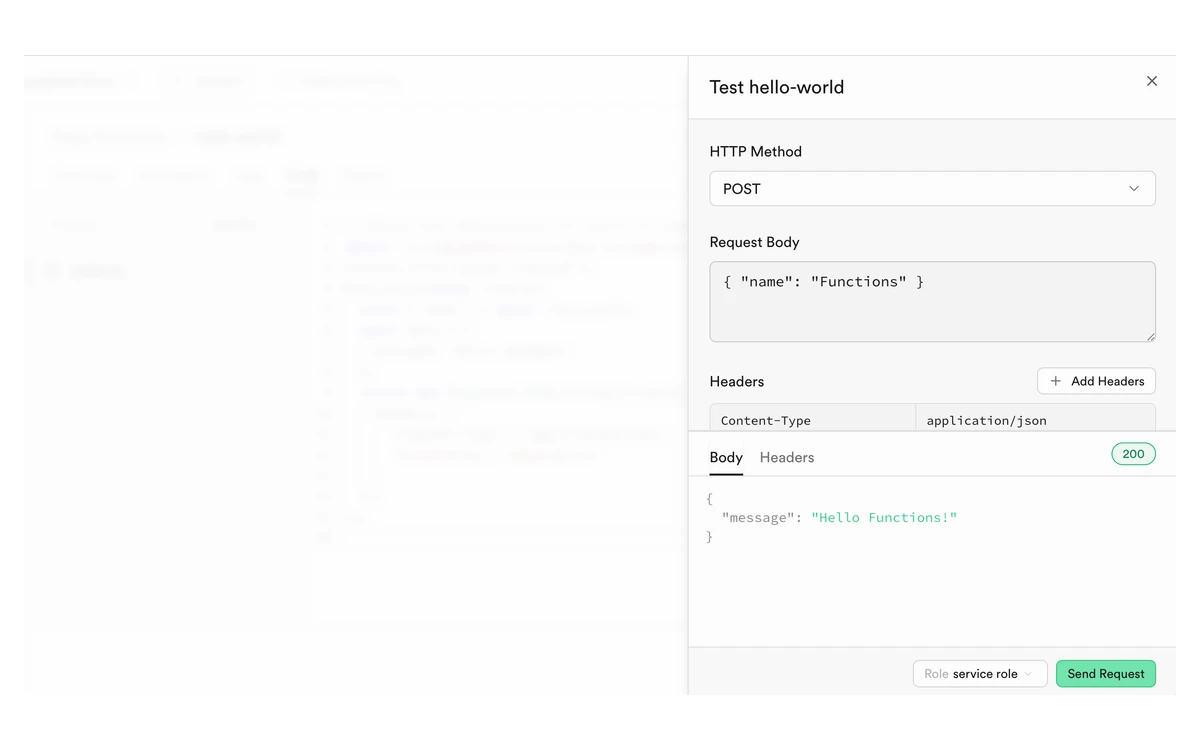
This is where Supabase earns its popularity. Creating a project gives you a database, auth and an API in a couple of minutes, and the dashboard covers most daily tasks: browsing tables, running SQL, writing row-level security policies, testing Edge Functions and reading logs.
The 2026 releases have mostly improved workflow rather than adding new products: branching without Git became the default in May, Unified Logs entered open beta in July, Postgres Changes gained AND filters and column selection in August, Declarative Schemas 2.0 shipped in October and the .NET SDK was unified the same month. Supabase is also available as an official ChatGPT app, and "Sign in with ChatGPT" entered beta in July.

The weak spots are cost visibility and log retention. Logs last 1 day on Free and 7 days on Pro, and there are no budget alerts, so you find out about a costly month from the invoice.
Supabase is SOC 2 Type 2 compliant and ISO 27001 certified, with data "encrypted at rest with AES-256 and in transit via TLS". The SOC 2 report is only available to Team and Enterprise customers, which matters if a client's security review asks for it.
HIPAA is possible but expensive to reach. It is a paid add-on on Team and Enterprise, requires a Business Associate Agreement, and Supabase does not publish its price. HIPAA projects must also run PITR, "which requires at least a small compute add-on", plus SSL enforcement and network restrictions.
All projects run in AWS regions. If you pick a broad region, Supabase deploys to "an available AWS region within that broader area", and "the 'Europe' general region includes London and Zurich, which are not EU member states." If EU data residency matters, pick a specific EU region rather than the general one.
Supabase is well funded. In June 2026 it raised a $500M Series F at a $10B pre-money valuation, led by GIC, with all existing investors joining. On 2 October 2026 it announced it is acquiring Turso, the team that rebuilt SQLite in Rust. The stated aim is cheap, on-demand databases for AI agents, and Supabase says that "For existing users, nothing changes. Supabase will continue building around Postgres."
The company says it already launches over one million databases a week. It is also working on Multigres, an open-source project for scaling Postgres horizontally, released as a v0.1 alpha and not yet production-ready. For buyers, the funding lowers the risk of the platform disappearing. The AI-agent focus is worth watching, because much of the recent roadmap is aimed at that audience rather than at traditional app teams.
About $25 for one project on Micro compute, then more for each additional project. The $25 fee includes $10 of compute credit that covers one Micro instance. Three Micro projects cost $45, and a single project on Large compute is about $125 before add-ons.
Yes, after 1 week of inactivity. Free projects can also be paused or made read-only if they keep exceeding quotas. Paid projects are not paused for inactivity.
No. It stops usage-based items like egress, storage and MAU, but not compute, read replicas, branching, PITR, custom domains, IPv4, log drains or MFA phone. It also does not send alerts or let you set a budget.
No. Supabase states that it does not provide refunds. If you downgrade, unused plan time becomes credit on your organization that does not expire.
No. Free projects have no backups, and Supabase recommends exporting data regularly with the CLI db dump command. Pro keeps daily backups for 7 days and Team for 14 days.
No. The 99.9% uptime SLA with service credits is only for Enterprise customers. Team gets support response-time SLAs, and Pro gets email support without one.
Yes, more easily than with most backend services. The database is standard Postgres, so you can dump and restore it elsewhere, and Supabase itself is open source and self-hostable as a single project.
Not officially. Supabase bills monthly by credit card only, though you can prepay with a credit top-up. Enterprise terms are negotiated separately.
More in Cloud Computing
Browse Cloud Computing