VEED.io review 2026: is this browser video editor worth the AI-credit pricing?
A hands-on look at VEED.io in 2026: its class-leading subtitles, AI avatars and text-to-video tools, the credit-based Creator/Pro/Studio pricing, and the reliability complaints worth knowing before you subscribe.
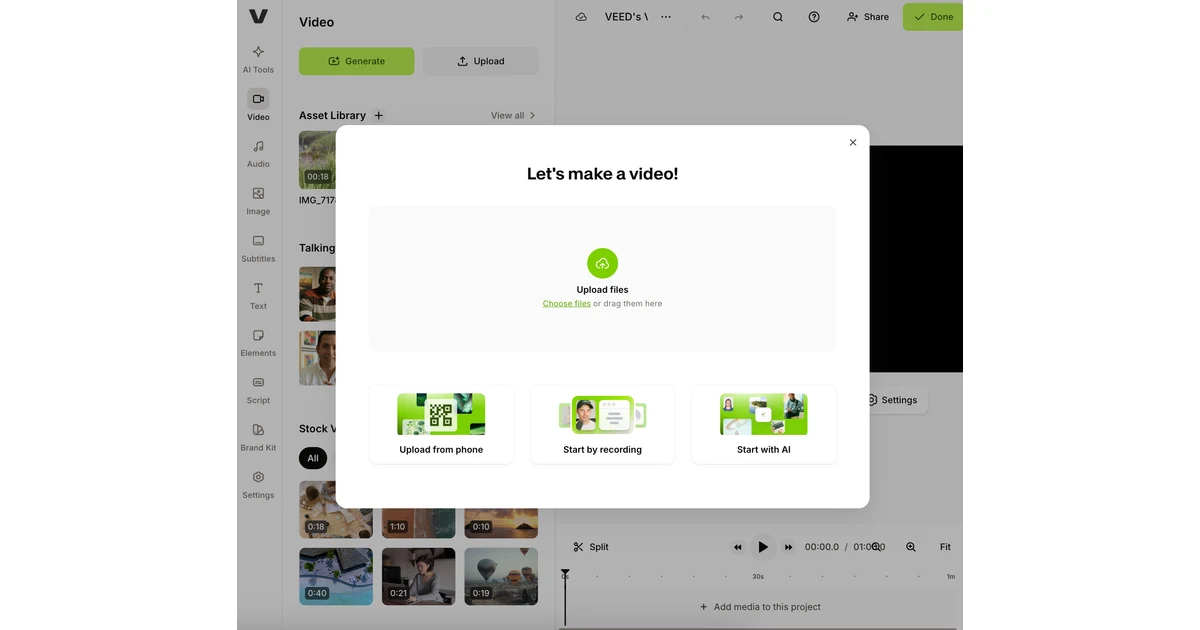
VEED.io has grown from a simple online subtitle tool into a full browser-based video studio, and in 2026 it sits squarely between traditional editors like Premiere and the new wave of AI video generators. You open a tab, drop in a clip, and the same workspace can cut the timeline, burn on captions in dozens of languages, clone your voice, or spin a script into a talking-avatar video.
That breadth is the appeal and also the catch. VEED now meters most of its AI features with a yearly credit allowance, and its plans changed enough that older reviews quote prices that no longer exist. This review works through what VEED actually does well, what the current Creator, Pro and Studio tiers cost, how the AI credits translate into real output, and the reliability complaints that show up often enough to take seriously.
What VEED.io is in 2026
VEED is a video editor that runs entirely in the browser, with no desktop install. Editing and AI creation live in the same workspace, so you can trim a timeline, add music from a stock library, and generate an AI voiceover without leaving the page or exporting between apps.
The company says the approach is working at scale. VEED reported reaching $45 million in annual recurring revenue in October 2025, up from $25 million at the end of 2024, and cites roughly 10 million monthly active users exporting about one video every second. Those figures come from VEED via a cybernews write-up rather than an audited filing, so treat them as the company's own numbers, but they line up with a product that is clearly past the hobbyist stage.
The core toolset is wide: automatic subtitles in 125+ languages, AI avatars, text-to-video and image-to-video generation, AI voice cloning and text-to-speech, filler-word removal, eye-contact correction, background-noise removal, video compression, brand kits, shared workspaces and approval workflows. It is aimed at social-media creators, marketing teams and anyone turning talking-head footage into polished clips fast.
Subtitles, translation and the AI tools that stand out
Subtitles are where VEED built its reputation and they remain the strongest part of the product. Auto-captioning is fast and accurate across a large language set, the styling controls are genuinely good, and the editor makes fixing a misheard word painless. If your main job is putting readable, well-designed captions on short-form video, VEED handles it better than most general editors.
Translation extends that strength. On paid tiers VEED can translate subtitles into 50+ languages, which turns one recording into captioned versions for several markets in a few clicks. Combined with the 125+ language transcription, it is a practical localization pipeline rather than a checkbox feature.
- AI avatars and text-to-video: paste a script and generate a presenter-led clip without filming anything.
- Image-to-video: animate a still into a short moving shot.
- Voice cloning and text-to-speech: create or replace narration, including in the presenter's own voice.
- Cleanup tools: filler-word removal, eye-contact correction and background-noise removal fix common talking-head problems automatically.
- Brand kits and shared workspaces: keep fonts, colors and logos consistent and route drafts through approval on team plans.
Who it fits
VEED suits creators and small marketing teams who want captions, quick edits and AI generation in one browser tab. Editors who need frame-accurate color grading, multicam or heavy motion graphics will still reach for a desktop NLE.
Pricing and how the AI credits work
VEED has a free plan and three paid tiers, and the price you see depends heavily on billing period. Paid plans are billed per user. On annual billing, Creator is $10 per user per month, Pro is $21, and Studio is $35. Pay month to month and the same tiers cost $20, $44 and $70 per user per month, so VEED advertises savings of up to 51% for committing annually.
The free plan lets you try the editor but exports carry a VEED watermark and both AI features and export options are limited. Creator is the first tier that removes the watermark and adds unlimited auto subtitles, the full audio and video stock library, and access to 15+ AI tools. Pro layers on multiple brand kits and subtitle translation for 50+ languages. Studio adds custom templates and more enterprise-friendly workflows, and a custom-priced Enterprise tier covers governance, privacy controls, user permissions and dedicated support.
The part that catches people out is AI credits. Most generative features draw from a yearly credit pool that scales sharply with the plan: Creator includes about 6,000 credits a year (roughly 1,200 AI videos), Pro about 30,000 (roughly 6,000 AI videos), and Studio about 180,000 (roughly 36,000 AI videos). AI voice generation is capped separately, at up to 144 hours a year on Pro and up to 960 hours on Studio.
Read the credits before you pick a tier
If you mainly edit and caption, Creator's allowance is plenty. If AI avatars or text-to-video are your core workflow, credit burn — not the headline price — is what decides whether Pro or Studio is the honest choice.
One caution on figures: older reviews and some search snippets still quote retired Lite-era prices such as $12, $25 or $29. The Creator/Pro/Studio numbers above reflect VEED's current tier structure; always confirm the live total on VEED's pricing page for your billing period and seat count before you subscribe.
Reliability and the complaints worth knowing
VEED's weak spot is stability, not features. Across community feedback, the recurring themes are bugs, crashes, frustration with the credit-based pricing, and — most seriously — reports from some users of lost work. For a browser tool where the project lives in the cloud, an occasional crash mid-edit is more than an annoyance.
None of this makes VEED unusable; plenty of people ship videos with it daily. But it does argue for caution on anything time-critical: export or back up important projects rather than trusting a single browser session, and test the AI features against your real footage during the free plan or a monthly Pro month before committing to an annual seat.
It also reframes the pricing question. VEED's value is strongest when captions, translation and quick AI generation in one place save you hours; it is weakest if you would be paying mainly for generation credits you might not fully use, on a platform whose reliability you have not yet stress-tested.
Frequently asked questions
How much does VEED.io cost in 2026?
On annual billing, Creator is $10 per user per month, Pro is $21 and Studio is $35. Month-to-month the same tiers are $20, $44 and $70 per user per month, and Enterprise is custom-priced. VEED advertises up to 51% savings for paying annually.
Is there a free version of VEED?
Yes. The free plan lets you use the editor, but exports carry a VEED watermark and both the AI features and export options are limited. Removing the watermark and unlocking unlimited auto subtitles starts at the Creator tier.
What are AI credits and how many do I get?
Most generative features — avatars, text-to-video, voice — draw from a yearly credit pool. Creator includes about 6,000 credits a year (roughly 1,200 AI videos), Pro about 30,000 (roughly 6,000), and Studio about 180,000 (roughly 36,000). AI voice generation is capped separately at up to 144 hours a year on Pro and 960 on Studio.
How many languages does VEED support for subtitles?
Automatic subtitles cover 125+ languages, and paid tiers can translate subtitles into 50+ languages. The subtitle and translation tooling is widely considered VEED's strongest feature.
Is VEED.io reliable enough for professional work?
It is capable, but reliability is its most common complaint: users report bugs, crashes and occasional lost work. For anything time-critical, back up or export projects regularly rather than relying on a single browser session, and test it during the free plan first.
Do I need to install anything to use VEED?
No. VEED runs entirely in the browser with no desktop install, and editing plus AI generation happen in the same workspace.
Key takeaways
- VEED.io is a browser video editor that combines timeline editing with AI generation, and its subtitle and translation tools are its standout strength.
- Paid tiers are Creator, Pro and Studio: $10/$21/$35 per user per month annually, or $20/$44/$70 billed monthly, with up to 51% saved by paying yearly.
- Most AI features run on a yearly credit pool (about 6,000 / 30,000 / 180,000 credits), so match the tier to how much you generate, not just the headline price.
- The free plan adds a watermark and limits AI and exports; Creator removes the watermark and unlocks unlimited auto subtitles.
- Reliability is the main caveat — bugs, crashes and lost-work reports mean you should back up important projects and trial VEED before an annual commitment.
More in Artificial Intelligence
Browse Artificial Intelligence