Technology reviews & practical guides
An n8n review for November 2026: euro pricing from 20€ a month, per-execution billing compared with Zapier and Make, Cloud plan limits, the free self-hosted Community Edition and its licence, AI agents and MCP, the n8n 3.0 beta, and the refund fine print.
n8n is a workflow and AI-agent automation platform that you can rent as n8n Cloud or run yourself for free as the Community Edition. It sits in the same market as Zapier and Make, but it bills differently. You pay per workflow execution, not per step, and that one choice changes the maths for long, branching workflows.
It is also a good moment to look at it closely. The n8n 3.0 early-access beta shipped on 27 October 2026, with stable due in early December, and it brings real breaking changes for self-hosters. In May 2026 SAP's strategic investment valued the company at $5.2bn. This review covers what n8n costs in November 2026, which limits matter on each plan, what the free self-hosted edition can and cannot do under its licence, and the fine print on refunds and trials.
n8n is the strongest choice here for technical teams that build long, multi-step or AI-heavy workflows, because a 30-step run costs the same as a 3-step run. Self-hosting is free for internal use and has no execution caps. The trade-offs are a steeper learning curve than Zapier, euro-only pricing, non-refundable fees, and a Business plan you cannot get on n8n Cloud.
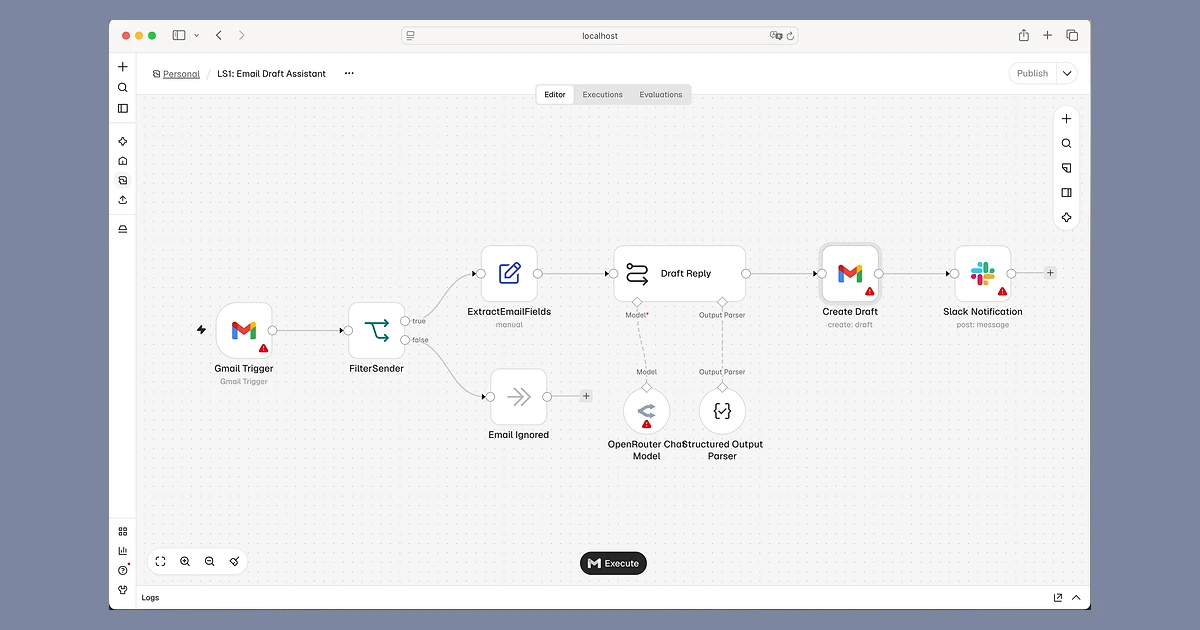
n8n is a visual workflow builder. You drag nodes onto a canvas, connect a trigger (a new email, a webhook, a schedule) to actions in other apps, and add logic, code and AI steps in between. Its integrations page advertises 2,000+ integrations, and a Code node covers anything that is not built in.

Two things set it apart from Zapier and Make. First, you can host it yourself, on your own server, with your data never leaving it. Second, it leans hard into developer features: JavaScript and Python code nodes, Git version control on higher plans, queue mode for scaling, and custom nodes on self-hosted installs.
The project is large and active. The GitHub repository had 209,381 stars and 61,359 forks on 3 November 2026. In October 2025 n8n raised a $180M Series C led by Accel at a $2.5bn valuation, and in May 2026 SAP bought shares in a secondary sale that valued n8n at $5.2bn. That deal also brings n8n into SAP's Joule Studio. At its first conference, In The Loop in Berlin on 13-14 October 2026, n8n launched standalone Agents and, according to an attendee's recap of the keynote, claimed 6.7 million active workflows a month. A light rebrand with a new logo landed the same week.
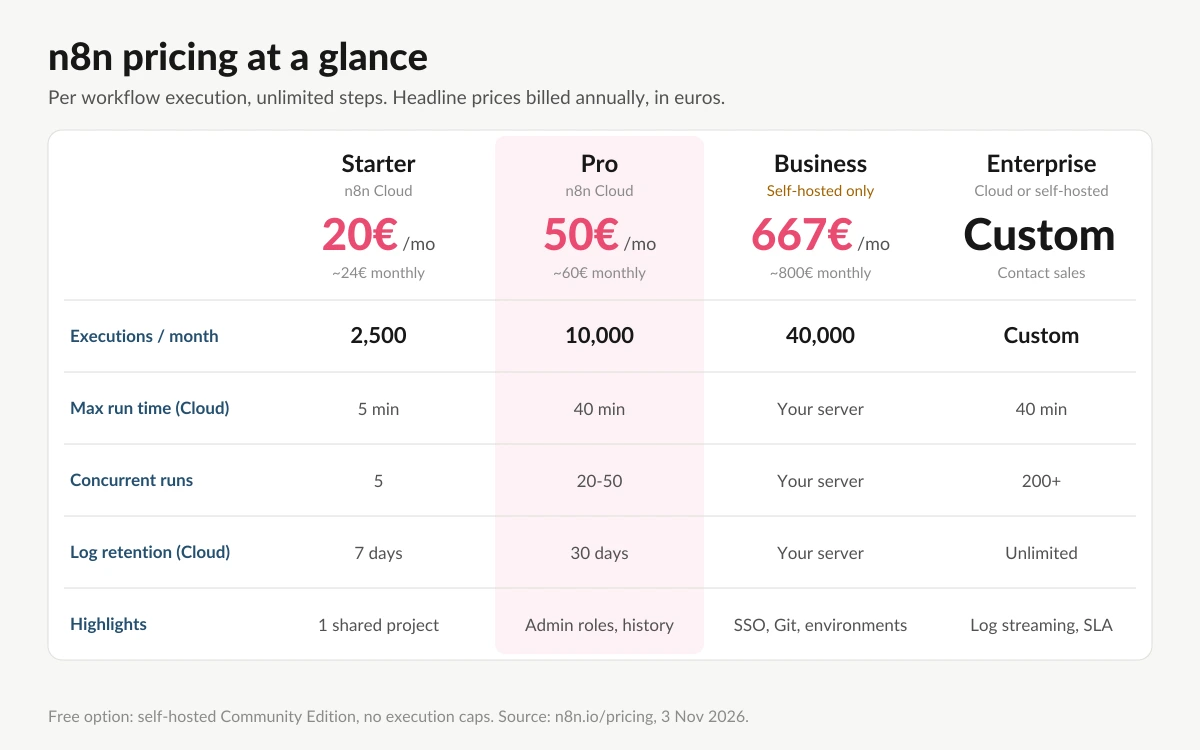
Every plan includes unlimited users, unlimited workflows and every integration. What changes between plans is the monthly execution quota, concurrency, log retention and admin features. n8n defines an execution as "a single run of your entire workflow. It doesn't matter how many steps are in the workflow or how much data it processes."
Official prices are in euros only. The headline figures are billed annually. Paying month to month costs roughly 20% more, which is the "Save 17%" the annual toggle advertises.

n8n's FAQ answers "Is the Business plan available on n8n Cloud?" with "Not yet." On n8n Cloud the ladder goes Starter, Pro, then Enterprise, so SSO, environments, Git and log streaming need an Enterprise contract if you want n8n to host it. The Business licence key must ping n8n's licence server daily to stay active.
Startups get 50% off Business: 333€ a month billed annually for 40,000 executions. You qualify with fewer than 20 employees and less than €5M in total funding. The discount lasts a year, or longer while you stay eligible.
This is the main reason people switch. Zapier counts a task for each action step that runs, and Make charges credits for each module run. On both, a long workflow multiplies your usage. On n8n, a workflow run is one execution whether it has 3 nodes or 40, and n8n says that "if it doesn't run, you don't pay."
Here is an example. Take a lead-routing workflow with 12 steps: enrich, score, branch, write to a CRM, post to Slack and so on. If it runs 2,000 times a month, that is 2,000 executions on n8n, which fits Pro's 10,000 quota with room to spare. On a per-step tool, the same volume is tens of thousands of billable steps.
The reverse also holds. If your automations are short, two-step jobs that run very often, the per-step model loses most of its penalty, and Zapier's larger app catalogue and easier editor may matter more. Some third-party guides say manual test runs and retries also count as executions. n8n's pricing page does not spell this out, so budget some headroom.
Execution quotas get the attention, but the comparison table on n8n's pricing page hides limits that matter more for some workloads. For Starter, Pro and Enterprise respectively:
"Capped" means you cannot buy extra usage on that plan. Once you hit the quota you have to move up a tier. On Business and Enterprise, workflows keep running past the quota, but overage charges may apply if you do not upgrade.

The Community Edition is free, self-hosted and has no execution caps, which is why many teams start there. You pay for your own server and your own maintenance, but not per run. A free Registered Community licence, which you get by entering your email, also unlocks folders, debug in editor and custom execution data.
What the Community Edition leaves out is mostly team and governance tooling: projects, sharing of workflows and credentials, SSO (SAML and LDAP), environments, Git version control, custom variables, external secrets, external binary data storage, log streaming and multi-main mode. Queue mode is included. For a solo builder this rarely matters. For a team of ten sharing credentials, it is the reason the Business plan exists.
n8n is published under its own Sustainable Use License, which is source-available, not OSI open source. You may use or modify it "only for your own internal business purposes or for non-commercial or personal use." Hosting n8n as a paid service for others, or reselling it, needs a separate commercial agreement. Files marked .ee. need an Enterprise licence.
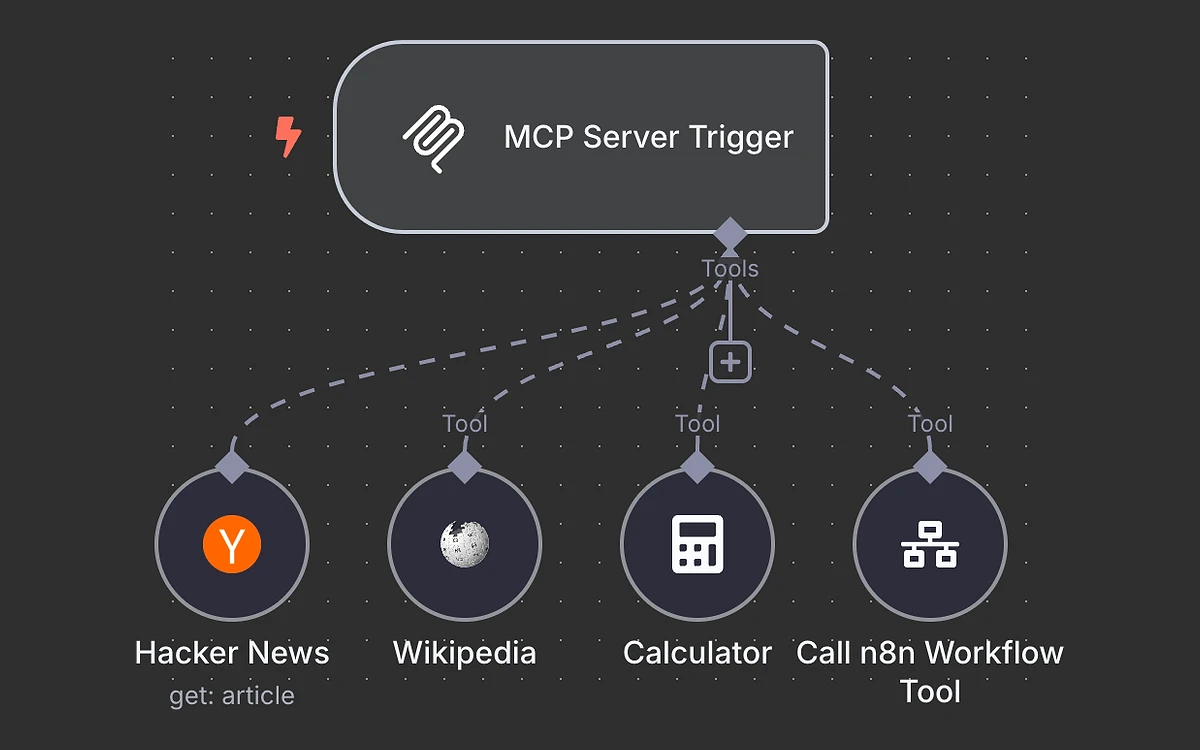
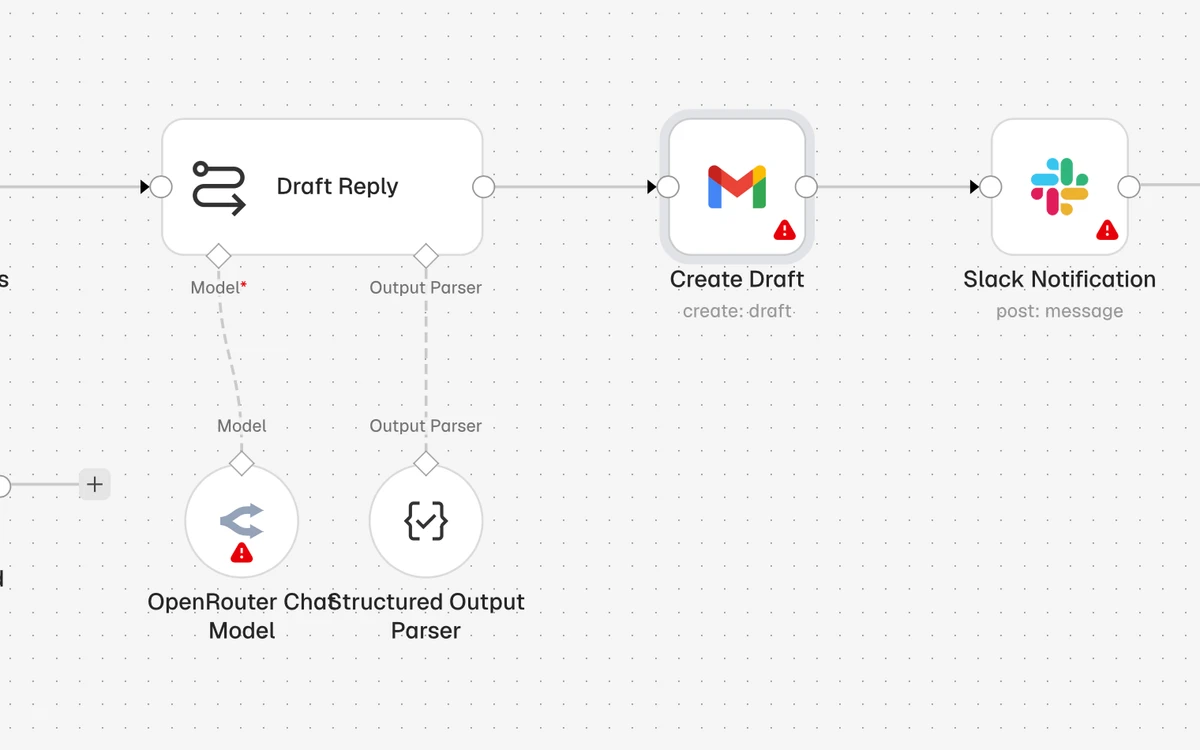
AI is where n8n has invested most. The AI Agent node is built on LangChain and can be wired to a chat model, memory and tools, including other workflows. Every plan includes the AI Agent node, the MCP Server Trigger, the MCP Client node and an instance-level MCP server.

In practice, MCP works both ways. The MCP Server Trigger lets an outside AI client call your n8n workflows as tools, and the MCP Client node lets an n8n agent use tools from other MCP servers. The instance-level MCP server lets AI coding tools such as Claude build workflows in your instance directly.
The AI Workflow Builder and n8n Assistant let you create, refine and debug workflows in plain language. On Cloud they run on monthly credits (1,600 on Starter, 4,000 or 9,600 on Pro, depending on tier) that do not roll over. Cloud plans can also use AI models without your own API keys. On self-hosted you bring your own key, so no credit limits apply.
n8n 3.0.0 entered early-access beta on 27 October 2026, and the stable release is due in early December. It covers self-hosted, Cloud and Enterprise installs. On Cloud you opt in by choosing "3.0.0 Beta (early access)". Credentials and execution history carry over, and no pricing or licence changes came with it.
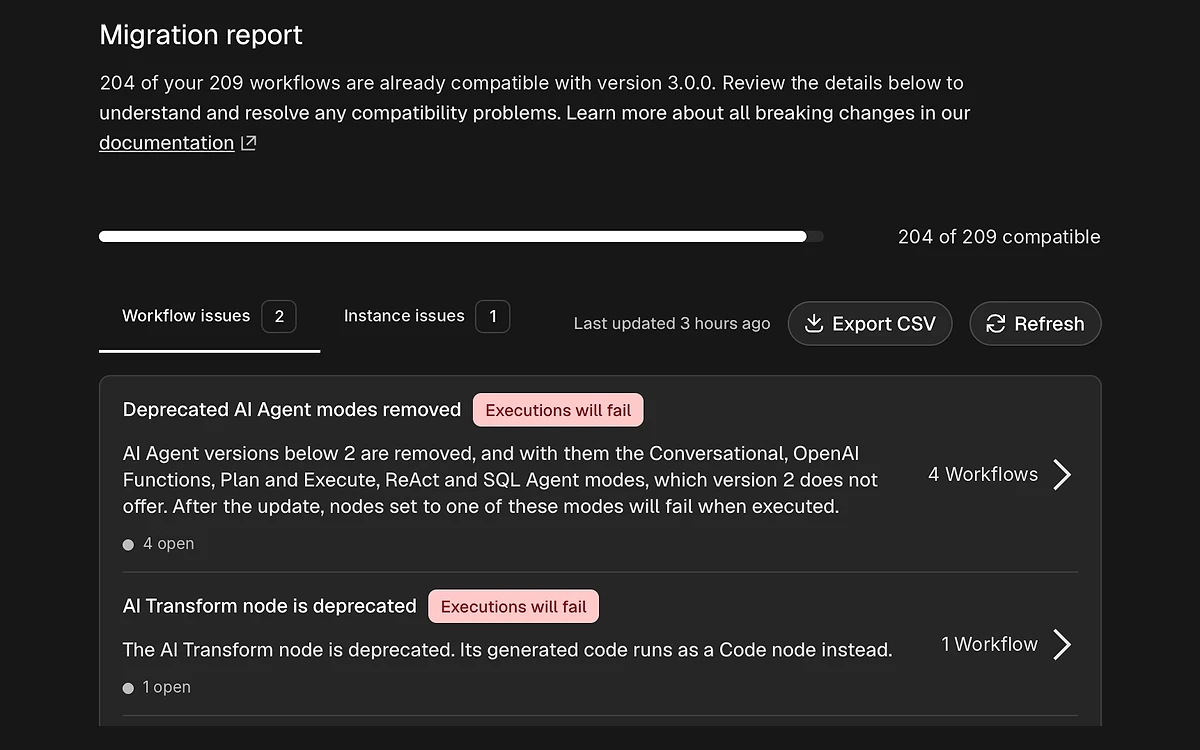
n8n states that moving to 3.x is one way, so there is no rollback to 2.x. There is also no direct path from 1.x to 3.x. Back up first and run the Migration Report before you switch.
The breaking changes that matter most:

Support timelines set the pace. 1.x support ends on 31 December 2026. 2.x gets security and critical fixes for 12 months after 3.0 goes stable, but new features ship on 3.x only. The Migration Report, under Settings, needs version 2.39 or later. If you run production on npm, plan the Docker move now rather than in December.
n8n's self-serve terms were last updated on 26 October 2026. Read them before you commit to an annual plan.
n8n Cloud offers a 14-day trial of Pro features with no credit card. It is tighter than Pro itself: 1,000 executions, 5 concurrent executions, a 180-second execution timeout, 1 team project, 800 Assistant credits and 100 AI credits. That is enough to build and test a few real workflows, but not to load-test them. The Business trial also lasts 14 days and does need a card.
n8n Cloud starts at 20€ a month billed annually (about 24€ month to month) for 2,500 executions. Pro is 50€ a month billed annually for 10,000 executions, and the self-hosted Business plan is 667€ a month billed annually for 40,000. The self-hosted Community Edition is free.
Yes, if you host it yourself. The Community Edition has no execution caps but lacks team features such as projects, sharing, SSO and Git. There is no permanent free plan on n8n Cloud, only a 14-day trial.
No. n8n charges per workflow execution, and one run of the whole workflow counts once however many steps it has. Zapier bills per task and Make per credit, so long workflows cost more there.
Not in the OSI sense. It is fair-code under the Sustainable Use License: free to use and modify for internal business, personal or non-commercial purposes, while resale or hosting it as a paid service needs a commercial agreement.
Not yet. Business is self-hosted only. On n8n Cloud, SSO, environments and Git version control come with Enterprise.
On Starter and Pro the quota is capped, so you have to upgrade to the next tier to keep going. On Business and Enterprise, workflows keep running and overage charges may apply if you do not upgrade.
No. Fees on both monthly and annual plans are non-refundable, with no pro-rata refunds. You can cancel a monthly plan at any time and keep access until the end of that month.
In the EU. Hosted plans store data on Microsoft Azure servers in Frankfurt, Germany.
Only on a test instance for now. 3.0 is an early-access beta with stable due in early December 2026, and the upgrade cannot be rolled back. Self-hosters on npm must move to Docker first.
More in Services & Software
Browse Services & Software